Most AI streaming tutorials stop at res.write(chunk) and call it a day. That works on localhost. In production — behind load balancers, with thousands of concurrent connections, and users on flaky mobile networks — you need backpressure handling, automatic reconnection, heartbeats, and graceful shutdown. This guide builds all of that with Node.js, Express, and EzAI API.
Why SSE Over WebSockets for AI Streaming
Server-Sent Events (SSE) is a one-way channel from server to client over plain HTTP. For AI chat responses, that's exactly what you need — the model generates tokens, you push them downstream. No bidirectional protocol negotiation, no upgrade handshakes, no ping-pong frames.
Concrete advantages over WebSockets for this use case:
- Automatic reconnection — browsers natively retry with
Last-Event-ID, zero client code needed - HTTP/2 multiplexing — multiple SSE streams share one TCP connection; WebSockets require separate connections
- Load balancer friendly — standard HTTP, no
Connection: Upgradethat confuses certain CDNs and proxies - Simpler error handling — standard HTTP status codes, content-type negotiation, and compression all work as expected
The tradeoff is you lose server-bound messages, but for AI streaming you send the prompt via a regular POST and stream the response via SSE. Clean separation.
Basic SSE Endpoint with EzAI API
Start with a minimal Express server that proxies streaming responses from EzAI. Install the dependencies:
npm init -y
npm install express node-fetch@3import express from 'express';
import fetch from 'node-fetch';
const app = express();
app.use(express.json());
const EZAI_KEY = process.env.EZAI_API_KEY;
const EZAI_URL = 'https://api.ezaiapi.com/v1/messages';
app.post('/api/chat', async (req, res) => {
// SSE headers
res.writeHead(200, {
'Content-Type': 'text/event-stream',
'Cache-Control': 'no-cache, no-transform',
'Connection': 'keep-alive',
'X-Accel-Buffering': 'no', // nginx
});
const upstream = await fetch(EZAI_URL, {
method: 'POST',
headers: {
'Content-Type': 'application/json',
'x-api-key': EZAI_KEY,
'anthropic-version': '2023-06-01',
},
body: JSON.stringify({
model: 'claude-sonnet-4-20250514',
max_tokens: 4096,
stream: true,
messages: req.body.messages,
}),
});
// Pipe upstream SSE directly to client
upstream.body.on('data', (chunk) => {
res.write(chunk);
});
upstream.body.on('end', () => res.end());
upstream.body.on('error', () => res.end());
});
app.listen(3000);This works, but it's a demo. The connection dies if the client disconnects mid-stream, there's no backpressure, and a slow client will buffer chunks in memory until your process crashes. Let's fix all of that.
Adding Backpressure and Connection Cleanup
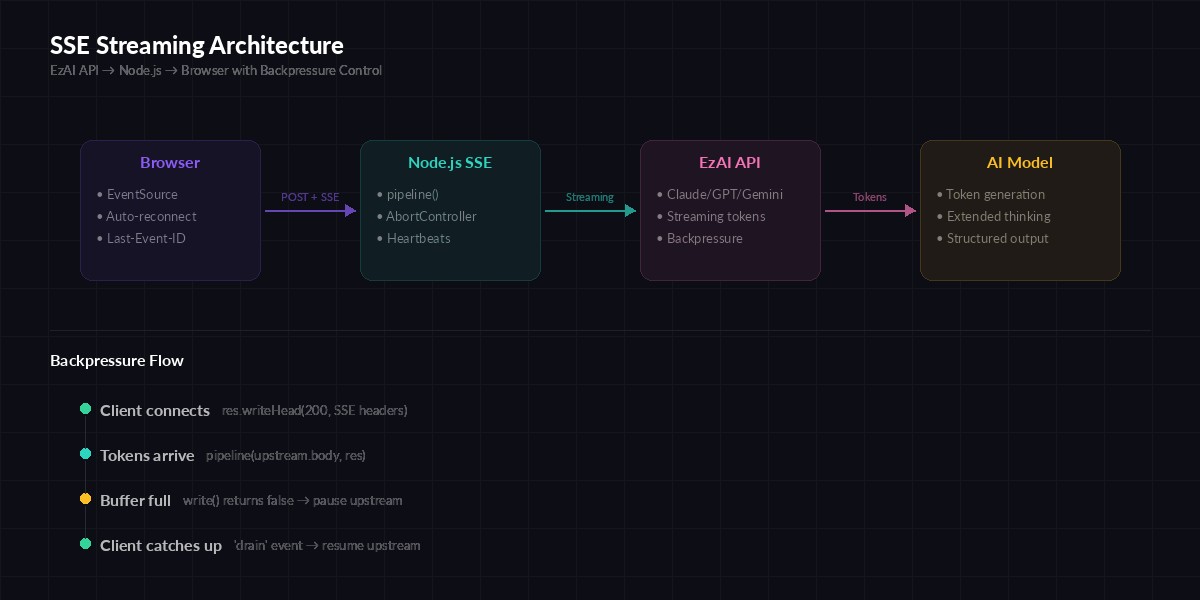
SSE streaming architecture with backpressure — slow clients don't crash your server
Node.js streams have built-in backpressure via the write() return value. When it returns false, the internal buffer is full — you need to wait for drain before writing more. Most tutorials ignore this. In production, a single slow client on a 3G connection will eat your server's memory.
import { pipeline } from 'node:stream/promises';
import { Transform } from 'node:stream';

app.post('/api/chat', async (req, res) => {
  res.writeHead(200, {
    'Content-Type': 'text/event-stream',
    'Cache-Control': 'no-cache, no-transform',
    'Connection': 'keep-alive',
    'X-Accel-Buffering': 'no',
  });

  const controller = new AbortController();

  // Abort upstream fetch if client disconnects
  req.on('close', () => controller.abort());

  const upstream = await fetch(EZAI_URL, {
    method: 'POST',
    headers: {
      'Content-Type': 'application/json',
      'x-api-key': EZAI_KEY,
      'anthropic-version': '2023-06-01',
    },
    signal: controller.signal,
    body: JSON.stringify({
      model: 'claude-sonnet-4-20250514',
      max_tokens: 4096,
      stream: true,
      messages: req.body.messages,
    }),
  });

  if (!upstream.ok) {
    const err = await upstream.text();
    res.write(`event: error\ndata: ${err}\n\n`);
    return res.end();
  }

  // pipeline() handles backpressure automatically
  try {
    await pipeline(upstream.body, res);
  } catch (err) {
    if (err.code !== 'ERR_STREAM_PREMATURE_CLOSE') {
      console.error('Stream error:', err.message);
    }
  }
});
Three critical changes here. First, pipeline() from Node's stream module replaces manual .on('data') — it respects backpressure and cleans up both sides when either stream ends. Second, AbortController cancels the EzAI API request the moment your client hangs up, so you stop paying for tokens nobody will read. Third, the error event sends a structured SSE message the client can parse and display.
Heartbeats and Client Reconnection
Load balancers (AWS ALB, Cloudflare, nginx) will kill idle connections after 60-120 seconds. During extended thinking, Claude might think for 30+ seconds before the first token arrives. You need heartbeat comments to keep the connection alive:
function createSSEStream(res) {
  let eventId = 0;
  let alive = true;

  // Send heartbeat every 15s to prevent proxy timeouts
  const heartbeat = setInterval(() => {
    if (alive) res.write(':heartbeat\n\n');
  }, 15000);

  return {
    send(event, data) {
      eventId++;
      res.write(`id: ${eventId}\nevent: ${event}\ndata: ${JSON.stringify(data)}\n\n`);
    },
    close() {
      alive = false;
      clearInterval(heartbeat);
      res.end();
    },
  };
}
The :heartbeat line is an SSE comment — browsers and EventSource ignore it, but it keeps TCP alive through proxies. Event IDs enable the browser's native reconnection: if the connection drops, EventSource sends Last-Event-ID and you can resume from where you left off.
On the client side, that's all you need:
// POST + SSE with fetch for request body support
async function streamChat(messages, onToken) {
  const res = await fetch('/api/chat', {
    method: 'POST',
    headers: { 'Content-Type': 'application/json' },
    body: JSON.stringify({ messages }),
  });

  const reader = res.body
    .pipeThrough(new TextDecoderStream())
    .getReader();

  let buffer = '';
  while (true) {
    const { done, value } = await reader.read();
    if (done) break;

    buffer += value;
    const lines = buffer.split('\n');
    buffer = lines.pop();

    for (const line of lines) {
      if (line.startsWith('data: ')) {
        const payload = JSON.parse(line.slice(6));
        if (payload.type === 'content_block_delta') {
          onToken(payload.delta.text);
        }
      }
    }
  }
}
Graceful Shutdown Under Load
When you deploy new code, pm2 restart or Kubernetes sends SIGTERM. You have seconds to close all SSE connections without corrupting partial responses. A proper shutdown drains active streams, waits for them to finish (with a timeout), then exits.
const activeStreams = new Set();

app.post('/api/chat', async (req, res) => {
  activeStreams.add(res);
  res.on('close', () => activeStreams.delete(res));

  // ... stream logic from above ...
});

let shuttingDown = false;

process.on('SIGTERM', async () => {
  shuttingDown = true;
  console.log(`Draining ${activeStreams.size} active streams...`);

  // Stop accepting new connections
  server.close();

  // Notify clients to reconnect elsewhere
  for (const res of activeStreams) {
    res.write('event: reconnect\ndata: {}\n\n');
  }

  // Wait up to 25s for streams to complete
  const deadline = Date.now() + 25000;
  while (activeStreams.size > 0 && Date.now() < deadline) {
    await new Promise(r => setTimeout(r, 500));
  }

  // Force-close remaining
  for (const res of activeStreams) {
    res.end();
  }

  process.exit(0);
});
The reconnect event tells your client-side code to open a new connection to a different server instance. Combined with a load balancer draining setting, this gives users zero-downtime deployments even during active AI generation.
Monitoring: Track Active Streams and Throughput
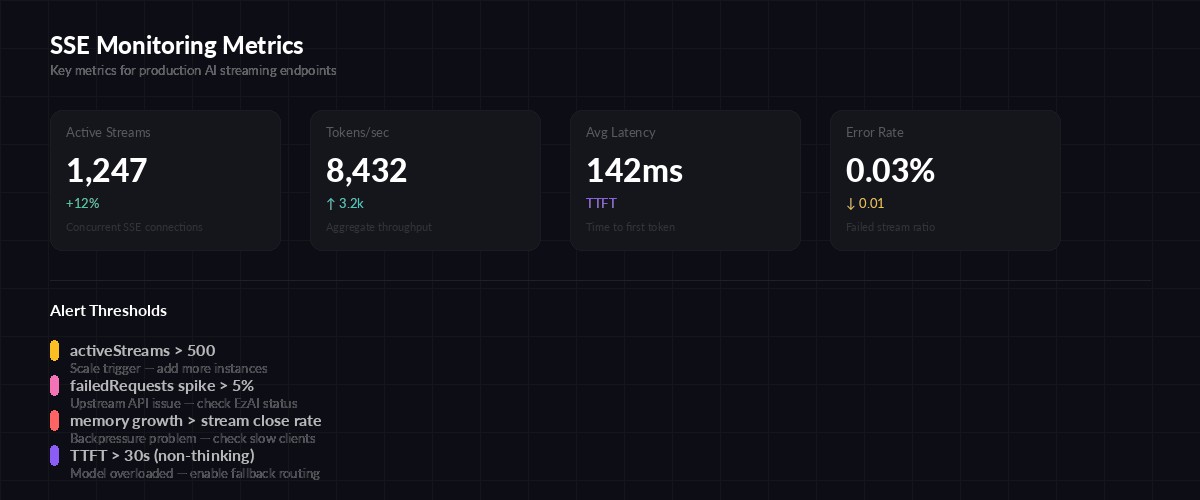
Key metrics to track for production SSE streaming
You need visibility into three things: how many streams are active, how fast tokens flow through, and which ones are stuck. Expose a /health endpoint that your monitoring can scrape:
let totalTokens = 0;
let totalRequests = 0;
let failedRequests = 0;

app.get('/health', (req, res) => {
  res.json({
    status: shuttingDown ? 'draining' : 'healthy',
    activeStreams: activeStreams.size,
    totalRequests,
    failedRequests,
    totalTokens,
    uptimeSeconds: Math.floor(process.uptime()),
    memoryMB: Math.round(
      process.memoryUsage().heapUsed / 1048576
    ),
  });
});
Hook this into your monitoring and alerting stack. Set alerts on activeStreams > 500 (scale trigger), failedRequests spike (upstream issue), and memory growing faster than streams close (backpressure problem).
Nginx Configuration for SSE
The default nginx config will buffer SSE and break streaming. You need three settings — turn off proxy buffering, disable response buffering, and set a longer read timeout for extended thinking:
location /api/chat {
    proxy_pass http://127.0.0.1:3000;
    proxy_http_version 1.1;

    # Disable buffering for SSE
    proxy_buffering off;
    proxy_cache off;

    # Pass SSE headers
    proxy_set_header Connection '';
    proxy_set_header X-Accel-Buffering no;

    # Extended thinking can take 60s+ before first token
    proxy_read_timeout 300s;
    proxy_send_timeout 300s;
}
Without proxy_buffering off, nginx collects the entire response before forwarding — completely defeating the purpose of streaming. The X-Accel-Buffering: no header in our Express code does the same thing from the application side, as a safety net.
Putting It All Together
Here's the production checklist for AI streaming with SSE:
- Use
pipeline()instead of manual.on('data')— automatic backpressure and cleanup - AbortController on client disconnect — stop burning tokens when nobody's listening
- Heartbeats every 15 seconds — keeps proxies from killing idle connections during extended thinking
- Event IDs for resumption — browsers reconnect automatically with
Last-Event-ID - Graceful shutdown with drain — zero-downtime deploys, no corrupted partial responses
- Health endpoint — active stream count, token throughput, memory usage
- Nginx
proxy_buffering off— without this, nothing works
The full working example is about 120 lines. No framework magic, no abstraction layers — just Node.js streams wired correctly. Start with the backpressure-aware version, add heartbeats and shutdown, and you've got a streaming layer that handles thousands of concurrent AI conversations without falling over.
Need to get started with EzAI API? Check the 5-minute quickstart guide or compare pricing plans to find the right fit for your traffic. The streaming endpoint works identically whether you're on the free tier or enterprise — same API, same performance.