EzAI API is a drop-in replacement for both the Anthropic and OpenAI APIs. That means any tool that lets you configure a custom API endpoint can work with EzAI. This guide covers the most popular developer tools and how to set each one up.
For all tools below, you'll need:
- Your EzAI API key (from your dashboard)
- The base URL:
https://ezaiapi.com

Cursor
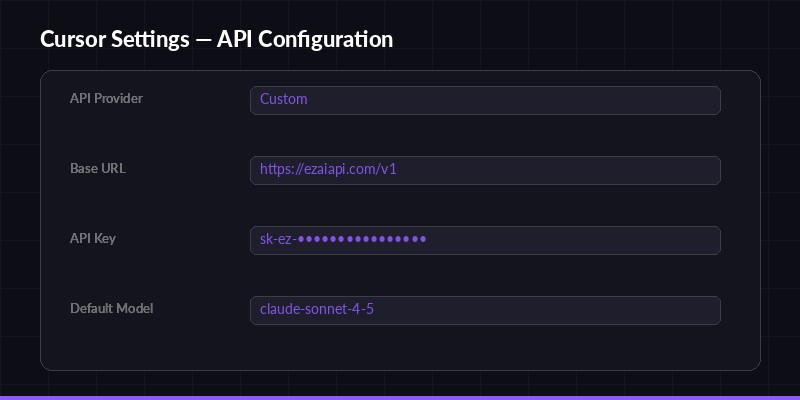
Cursor settings — configure EzAI as your custom API provider
Cursor is an AI-powered code editor that supports custom API providers. Here's how to point it at EzAI:
- Open Cursor and go to Settings (⌘ + , on Mac, Ctrl + , on Windows)
- Navigate to Models → Custom API
- Set the Base URL to
https://ezaiapi.com - Paste your EzAI API key in the API Key field
- Select the model you want to use (e.g.,
claude-sonnet-4-5,gpt-4.1)
That's it. Cursor will now route all AI requests through EzAI. You get access to every model in the EzAI catalog, and you can switch between them from the model dropdown without changing any config.
Cline (VS Code Extension)
Cline is a powerful AI coding assistant that runs as a VS Code extension. It supports custom Anthropic API endpoints out of the box.
- Install Cline from the VS Code marketplace
- Open the Cline sidebar and click the settings gear
- Select "Anthropic" as the API provider
- Set Base URL to
https://ezaiapi.com - Enter your EzAI API key
- Choose your model (e.g.,
claude-sonnet-4-5)
Cline will use the Anthropic Messages API format, which EzAI fully supports. All features including streaming, tool use, and vision work exactly as expected.
Aider
Aider is a terminal-based AI pair programming tool. Configuration is done through environment variables:
export ANTHROPIC_BASE_URL="https://ezaiapi.com"
export ANTHROPIC_API_KEY="sk-your-key"
aider --model claude-sonnet-4-5
Add these exports to your ~/.bashrc or ~/.zshrc to make them permanent. If you ran the EzAI install script, these are already set up for you.
Aider supports switching models mid-session with the /model command, so you can jump between Claude, GPT, and Gemini without restarting.
OpenAI Python SDK
EzAI also exposes an OpenAI-compatible endpoint at /v1/chat/completions. This means you can use the official OpenAI SDK:
from openai import OpenAI

client = OpenAI(
    base_url="https://ezaiapi.com/v1",
    api_key="sk-your-key",
    default_headers={"User-Agent": "EzAI/1.0"}  # Important!
)

response = client.chat.completions.create(
    model="claude-sonnet-4-5",
    messages=[{"role": "user", "content": "Hello!"}]
)

print(response.choices[0].message.content)
⚠️ Important: You must set a custom User-Agent header. The default OpenAI SDK user-agent (OpenAI/Python) is blocked by Cloudflare's bot protection. Setting User-Agent: EzAI/1.0 (or any custom string) fixes this instantly.
Continue (VS Code / JetBrains)
Continue is an open-source AI coding assistant for VS Code and JetBrains. Edit ~/.continue/config.json to add EzAI as a provider:
{
  "models": [
    {
      "title": "Claude via EzAI",
      "provider": "anthropic",
      "model": "claude-sonnet-4-5",
      "apiBase": "https://ezaiapi.com",
      "apiKey": "sk-your-key"
    }
  ]
}
You can add multiple model entries to switch between different models in the Continue UI. Each entry can use a different model name while sharing the same API key and base URL.
LiteLLM
LiteLLM is a Python library that provides a unified interface across 100+ LLM providers. Here's how to use it with EzAI:
import litellm

response = litellm.completion(
    model="anthropic/claude-sonnet-4-5",
    messages=[{"role": "user", "content": "Hello"}],
    api_base="https://ezaiapi.com",
    api_key="sk-your-key"
)

print(response.choices[0].message.content)
Note the model prefix: anthropic/ tells LiteLLM to use the Anthropic provider format. For OpenAI-format models, use openai/ as the prefix and set the base URL to https://ezaiapi.com/v1.
Claude Code (Terminal)
If you use Claude Code in the terminal, the easiest way is to run the install script:
curl -fsSL "https://ezaiapi.com/install.sh?key=YOUR_KEY" | shOr set the environment variables manually:
export ANTHROPIC_BASE_URL="https://ezaiapi.com"
export ANTHROPIC_API_KEY="sk-your-key"
claude
The install script also updates ~/.claude/settings.json to allowlist EzAI as a trusted base URL, so Claude Code won't prompt you about using a non-default endpoint.
Common Issues & Fixes
403 Forbidden with OpenAI SDK
If you get a 403 error when using the OpenAI Python SDK, it's almost always the User-Agent header. Cloudflare blocks the default OpenAI/Python x.x.x user agent. Fix it by adding a custom header:
client = OpenAI(
    base_url="https://ezaiapi.com/v1",
    api_key="sk-your-key",
    default_headers={"User-Agent": "MyApp/1.0"}  # Any custom string works
)
Models Not Showing Up
Some tools auto-discover models from the API. You can verify available models by hitting the models endpoint:
curl https://ezaiapi.com/v1/models \
  -H "x-api-key: sk-your-key"
This returns the full list of available models. If a model isn't in the list, it may have been temporarily removed or renamed.
Slow Initial Response
Some models (especially larger ones like Claude Opus or GPT-4) may take a few seconds before the first token arrives. This is normal — the model needs time to process your prompt. Once streaming starts, tokens flow quickly. If you're consistently seeing slow responses, check your dashboard for any service notices.
That covers the most popular tools. Since EzAI is a standard API proxy, virtually any tool that supports custom Anthropic or OpenAI endpoints will work. If you're using a tool not listed here, the pattern is the same: find the base URL / API endpoint setting, point it to https://ezaiapi.com, and enter your API key.
Questions? Hit us up on Telegram.