A typical dev team running Claude Code or Cursor burns through $300–$600/month on AI API calls. A solo developer using Claude Sonnet for 8 hours a day can easily hit $150+/month direct from Anthropic. These costs add up fast — and most of it is wasted. Here's how to reduce AI API costs by up to 80% with six concrete techniques, complete with real token math and dollar figures.

The Real Cost Breakdown
Let's look at what a typical coding session actually costs. Say you're using Claude Sonnet 4.5 through Claude Code for a full workday:
- System prompt + context: ~4,000 tokens per request (input)
- Your message: ~500 tokens per request (input)
- Model response: ~2,000 tokens per request (output)
- Requests per hour: ~15 (with tool use, retries, etc.)
- Hours per day: 8
That's 120 requests/day × 4,500 input tokens = 540K input tokens and 120 × 2,000 output tokens = 240K output tokens daily.
At Anthropic's direct pricing for Claude Sonnet ($3/MTok input, $15/MTok output):
- Input: 0.54 MTok × $3 = $1.62/day
- Output: 0.24 MTok × $15 = $3.60/day
- Total: $5.22/day → $104/month (20 working days)
Scale that to a 3-person team and you're at $312/month — on Sonnet alone. Throw in a few Opus calls for complex debugging and it climbs past $500 easily. Let's fix that.
Tip 1: Save Money on AI API with Prompt Caching
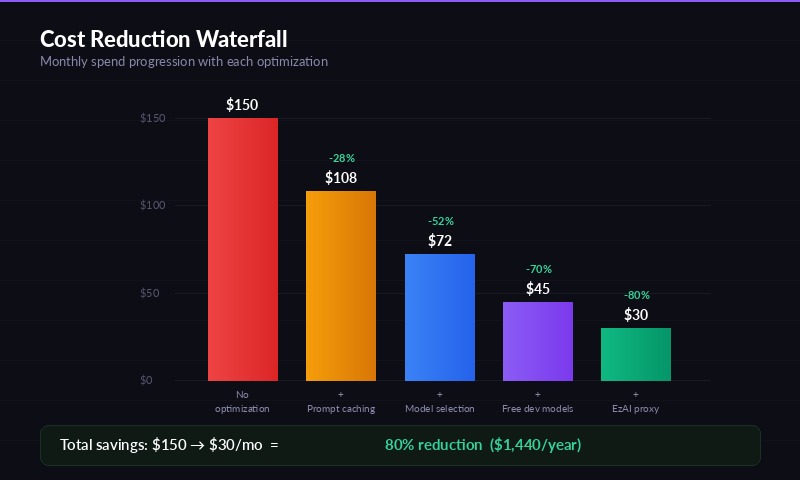
Monthly cost comparison — before and after optimization
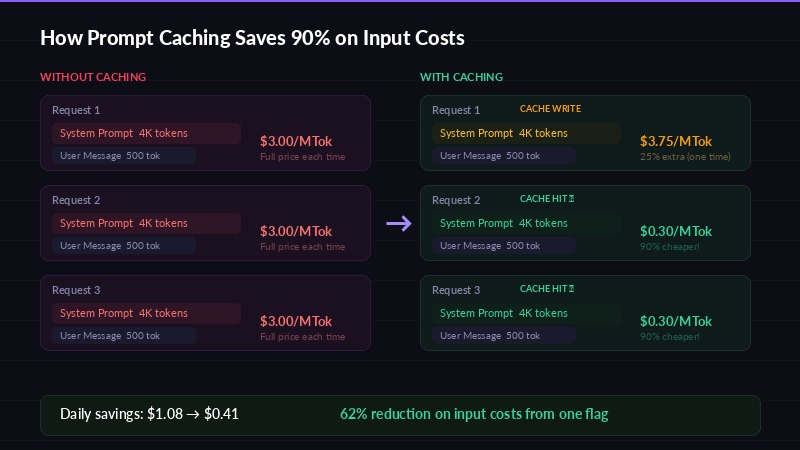
Prompt caching reduces costs by 90% on repeated system prompts
Prompt caching is the single biggest cost lever most developers ignore. When you send the same system prompt or large context block repeatedly, the API provider can cache it and charge a fraction of the normal input price for subsequent reads.
Here's the math for Claude Sonnet on EzAI:
| Operation | Rate (per MTok) | vs. Normal Input |
|---|---|---|
| Normal input | $3.00 | — |
| Cache write (first time) | $3.75 | 25% more |
| Cache read (subsequent) | $0.30 | 90% cheaper |
If your system prompt is 3,000 tokens and you send 120 requests/day, that's 360K tokens of repeated context. Without caching, you pay $1.08/day for that context. With caching, you pay $0.30 for the first write + $0.108 for 119 cached reads = $0.41/day. That's a 62% savings on input costs — from one flag.
Anthropic's API supports caching via the cache_control parameter on system messages. Most tools like Claude Code already use this automatically, but if you're making raw API calls, add it:
{
  "system": [{
    "type": "text",
    "text": "Your long system prompt here...",
    "cache_control": { "type": "ephemeral" }
  }]
}
Tip 2: AI API Pricing Optimization Through Model Selection
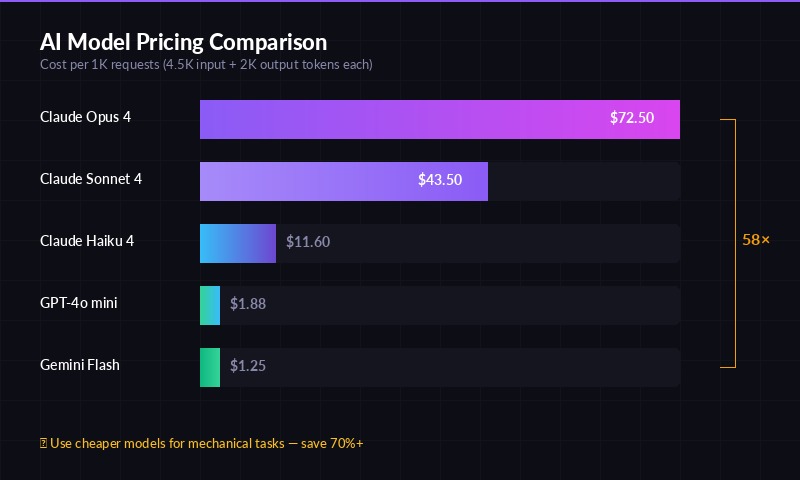
Token pricing across major AI models — pick the right tier for your task
Don't use Opus for everything. This is the most common mistake — defaulting to the most expensive model when a cheaper one would produce identical results.
Here's what each model tier actually costs per 1K requests (assuming 4.5K input + 2K output tokens each):
| Model | Input $/MTok | Output $/MTok | Cost per 1K Requests |
|---|---|---|---|
| Claude Opus 4.5 | $5.00 | $25.00 | $72.50 |
| Claude Sonnet 4.5 | $3.00 | $15.00 | $43.50 |
| Claude Haiku 4.5 | $0.80 | $4.00 | $11.60 |
| GPT-4o mini | $0.15 | $0.60 | $1.88 |
| Gemini 3 Flash | $0.10 | $0.40 | $1.25 |
Opus costs 6.3× more than Haiku and 58× more than Gemini Flash per request. For tasks like code formatting, generating boilerplate, writing commit messages, or summarizing text — Haiku or GPT-4o mini performs equally well at a fraction of the price.
💡 Rule of thumb: Use Opus for architecture decisions and complex debugging. Use Sonnet for daily coding. Use Haiku or GPT-4o mini for everything mechanical.
Tip 3: Use an API Proxy for Claude API Cheap Access
An API proxy like EzAI sits between your tools and the AI providers, offering several cost advantages:
- Aggregated pricing — proxy providers negotiate volume discounts you can't get solo
- No minimums — pay-as-you-go without Anthropic's credit card requirements or OpenAI's usage tiers
- Multi-model access — one API key for Claude, GPT, Gemini, and Grok. Switch models without switching providers
- Smart routing — automatically route requests to the cheapest capable model
EzAI gives you access to 20+ models through a single endpoint that's fully compatible with the Anthropic SDK. You change one line — the base URL — and everything works. Check the docs for the full setup.
Tip 4: Optimize Prompt Length to Reduce Token Costs
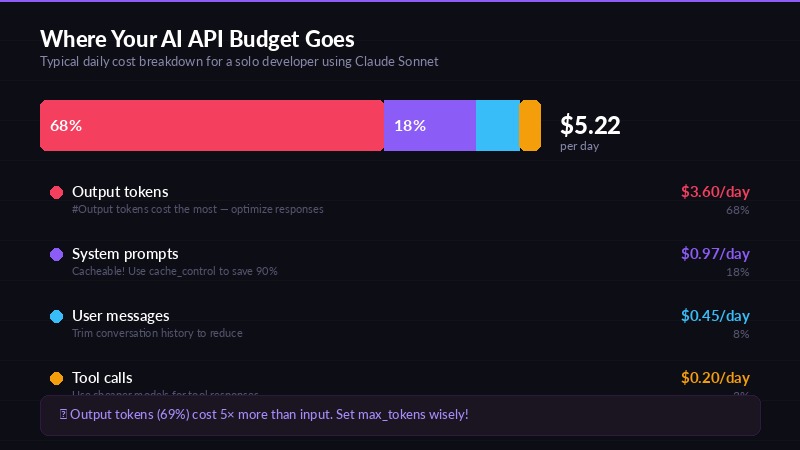
Where your AI API budget actually goes
Every token costs money. Here's the math that makes prompt optimization worth your time:
Cutting 500 tokens from your system prompt across 120 daily requests saves 60K tokens/day. At Claude Sonnet's $3/MTok input rate, that's $0.18/day or $3.60/month. Sounds small — but across a 5-person team, it's $18/month. Across a year, $216. From removing a few paragraphs.
Practical ways to trim:
- Remove redundant instructions. "You are a helpful assistant that helps with coding" adds 10 tokens and zero value
- Use structured references. Instead of pasting an entire file, reference it by path and let the model request it
- Compress examples. One good example beats three mediocre ones. Each example costs tokens on every single request
- Trim conversation history. Keep the last 5-10 exchanges, not 50. Older context rarely matters and costs tokens every turn
Tip 5: Use Free Models for Testing and Development
Here's a tip most developers miss: you don't need a paid model during development. EzAI offers three models at zero cost — no balance required:
- Gemini 3 Flash Preview — fast, capable, great for iteration
- GPT-4o mini — solid general-purpose model
- GPT-5 mini — surprisingly good for a free tier model
Use free models while building prompts, testing integrations, and debugging workflows. Only switch to paid models (Sonnet, Opus) when you need production-quality output. If 60% of your API calls are during dev/test, that's 60% of your spend eliminated.
Tip 6: Set Token Budgets and Monitor Usage
You can't reduce what you don't measure. Most overspend comes from runaway loops — a coding agent retrying failed tool calls, or a conversation growing unbounded.
Concrete steps:
- Set
max_tokensappropriately. Don't default to 4096 when your task needs 500 tokens. Lower limits = lower cost on output - Monitor daily spend. EzAI's dashboard shows real-time cost per request — use it to spot anomalies
- Kill runaway sessions. If a Claude Code session has made 200+ tool calls on one task, something is wrong. Stop and re-prompt
- Track per-project costs. Tag requests by project to see which codebase is eating your budget
Real Numbers: Cost Comparison Table
Here's what a solo developer spending $150/month directly on Anthropic would pay using each optimization:
| Strategy | Monthly Cost | Savings |
|---|---|---|
| Direct Anthropic (Sonnet, no optimization) | $150.00 | — |
| + Prompt caching enabled | $108.00 | −28% |
| + Model selection (Haiku for simple tasks) | $72.00 | −52% |
| + Free models for dev/test | $45.00 | −70% |
| + EzAI proxy (all optimizations combined) | $30.00 | −80% |
The $30/month figure uses EzAI's pricing with prompt caching, Haiku for mechanical tasks, free models for testing, and Sonnet for production coding. That's $120/month saved — $1,440/year per developer.
Start Saving Today
You don't have to implement all six tips at once. Start with the highest-impact changes:
- Enable prompt caching — instant 25-30% savings, zero effort
- Switch to EzAI — takes 5 minutes to set up, gives you access to cheaper models and free tier
- Use Haiku/GPT-4o mini for simple tasks — save 70%+ on those requests
Every dollar saved on API costs is a dollar you can invest in building better products. Create a free EzAI account and start optimizing your AI spend now.