
You've shipped your AI-powered app, users are loving it, and then it happens: 429 Too Many Requests. Your app crashes, users see errors, and you're scrambling to figure out what went wrong. Rate limits are the most common production issue with AI APIs — and the easiest to solve once you understand how they work.
This guide covers everything you need to handle AI API rate limits properly: reading response headers, implementing exponential backoff, building request queues, and designing your app to stay resilient under load. All examples use ezaiapi.com as the endpoint, but the patterns apply to any AI provider.
Why Rate Limits Exist
Every AI API enforces rate limits to prevent abuse and ensure fair access. There are typically two types of limits running simultaneously:
- Request limits — maximum number of API calls per minute (e.g., 60 RPM)
- Token limits — maximum tokens processed per minute (e.g., 100K TPM)
You can hit either one independently. Sending 10 requests with 15K tokens each might stay under your request limit but blow past your token limit. Understanding this distinction is critical — most developers only think about request counts and get blindsided by token limits.
Reading Rate Limit Headers
Every response from the API includes headers that tell you exactly where you stand. Here's how to read them:
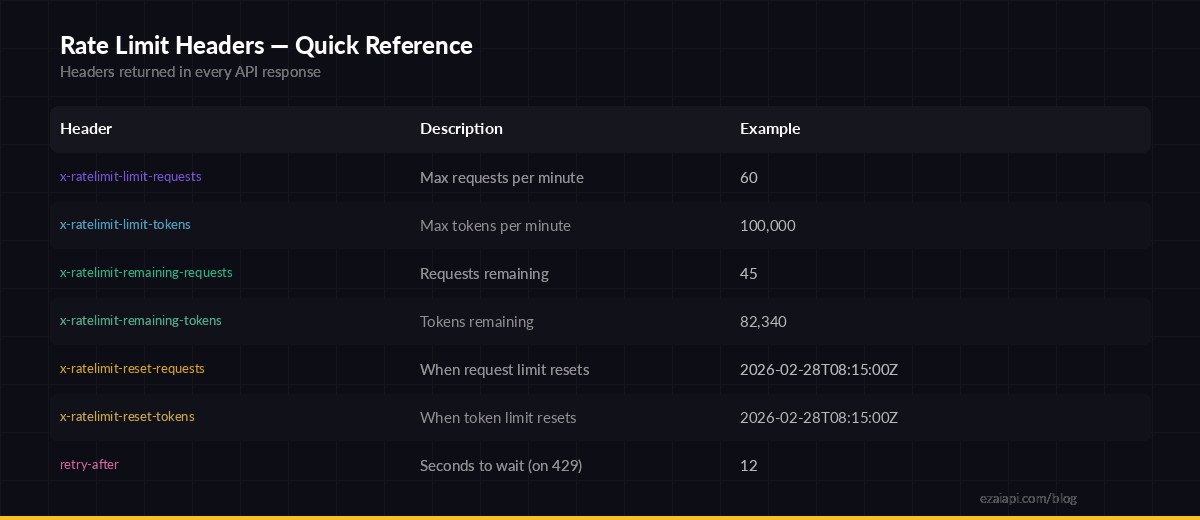
Rate limit headers returned in every API response — monitor these to stay under limits
Here's how to extract these headers in Python:
import httpx

async def check_rate_limits(response):
    remaining_req = response.headers.get("x-ratelimit-remaining-requests")
    remaining_tok = response.headers.get("x-ratelimit-remaining-tokens")
    reset_time = response.headers.get("x-ratelimit-reset-requests")

    if remaining_req and int(remaining_req) < 5:
        print(f"⚠️  Only {remaining_req} requests left, resets at {reset_time}")

    return response

async with httpx.AsyncClient(base_url="https://ezaiapi.com") as client:
    resp = await client.post("/v1/messages",
        headers={"x-api-key": "sk-your-key", "anthropic-version": "2023-06-01"},
        json={"model": "claude-sonnet-4-5", "max_tokens": 1024,
              "messages": [{"role": "user", "content": "Hello"}]}
    )
    await check_rate_limits(resp)
The key insight: check headers on every successful response, not just when you get a 429. By the time you see a 429, you've already lost that request. Proactive monitoring lets you throttle before hitting the wall.
Implementing Exponential Backoff
When you do hit a 429, the correct response is exponential backoff: wait 1 second, then 2, then 4, then 8. Don't retry immediately — that just makes the problem worse.
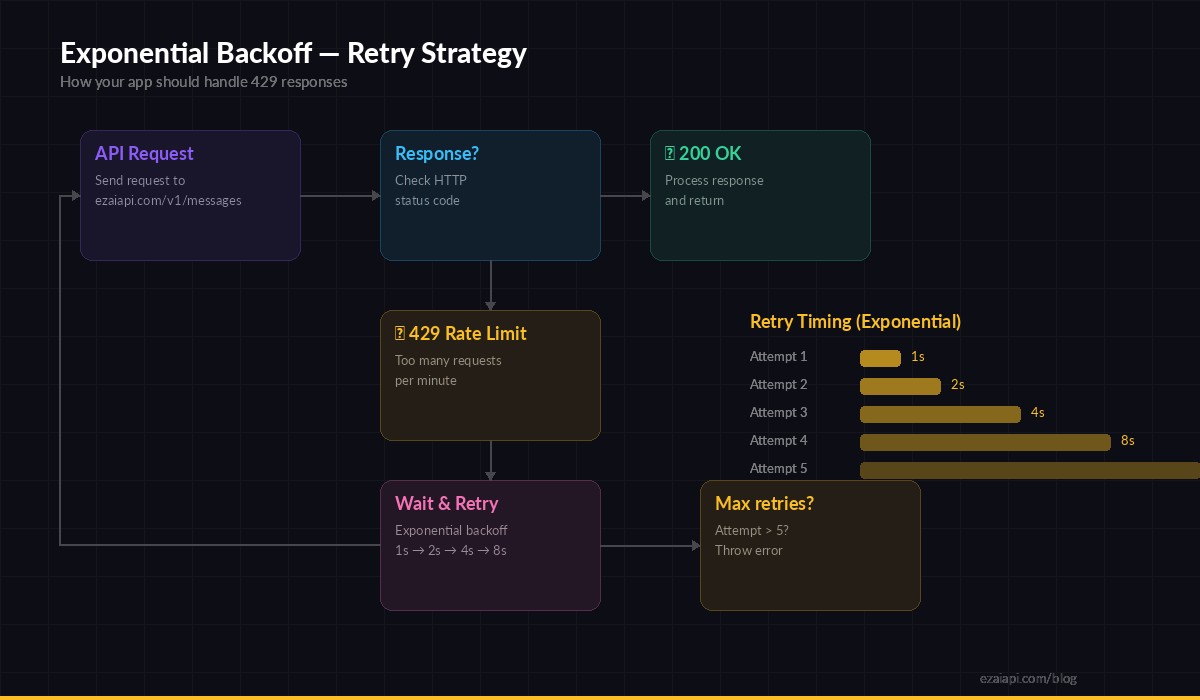
Exponential backoff — each retry doubles the wait time to avoid overwhelming the API
Here's a production-ready retry wrapper:
import asyncio, random
import httpx

async def call_with_retry(client, payload, max_retries=5):
    for attempt in range(max_retries):
        resp = await client.post("/v1/messages",
            headers={
                "x-api-key": "sk-your-key",
                "anthropic-version": "2023-06-01",
                "content-type": "application/json",
            },
            json=payload, timeout=60.0
        )

        if resp.status_code == 200:
            return resp.json()

        if resp.status_code == 429:
            # Use retry-after header if available, otherwise exponential backoff
            retry_after = resp.headers.get("retry-after")
            if retry_after:
                wait = float(retry_after)
            else:
                wait = (2 ** attempt) + random.uniform(0, 1)

            print(f"Rate limited. Waiting {wait:.1f}s (attempt {attempt + 1}/{max_retries})")
            await asyncio.sleep(wait)
            continue

        # Non-retryable error (400, 401, etc.)
        resp.raise_for_status()

    raise Exception("Max retries exceeded")
Two details that matter here: the jitter (random.uniform(0, 1)) prevents thundering herd problems when multiple clients retry at the same time, and checking the retry-after header gives you the server's recommended wait time instead of guessing.
Building a Request Queue
For high-throughput apps — batch processing, chatbots with many concurrent users, or data pipelines — individual retries aren't enough. You need a queue that enforces rate limits before sending requests.
import asyncio
from collections import deque
from time import monotonic

class RateLimiter:
    def __init__(self, max_rpm=50):
        self.max_rpm = max_rpm
        self.timestamps = deque()
        self.lock = asyncio.Lock()

    async def acquire(self):
        async with self.lock:
            now = monotonic()
            # Remove timestamps older than 60 seconds
            while self.timestamps and self.timestamps[0] < now - 60:
                self.timestamps.popleft()

            if len(self.timestamps) >= self.max_rpm:
                wait = 60 - (now - self.timestamps[0])
                await asyncio.sleep(wait)

            self.timestamps.append(monotonic())

limiter = RateLimiter(max_rpm=50)

async def send_request(client, payload):
    await limiter.acquire()
    return await call_with_retry(client, payload)
This limiter uses a sliding window: it tracks the timestamp of every request in the last 60 seconds. If you're at the limit, it calculates exactly how long to wait before the next slot opens. Combined with the retry wrapper above, your app self-heals from any rate limit scenario.
Node.js Implementation
The same pattern works in Node.js with fetch:
async function callWithRetry(payload, maxRetries = 5) {
  for (let attempt = 0; attempt < maxRetries; attempt++) {
    const resp = await fetch("https://ezaiapi.com/v1/messages", {
      method: "POST",
      headers: {
        "x-api-key": "sk-your-key",
        "anthropic-version": "2023-06-01",
        "content-type": "application/json",
      },
      body: JSON.stringify(payload),
    });

    if (resp.ok) return await resp.json();

    if (resp.status === 429) {
      const retryAfter = resp.headers.get("retry-after");
      const wait = retryAfter
        ? parseFloat(retryAfter) * 1000
        : (2 ** attempt) * 1000 + Math.random() * 1000;

      console.log(`Rate limited. Retrying in ${(wait / 1000).toFixed(1)}s`);
      await new Promise(r => setTimeout(r, wait));
      continue;
    }
    throw new Error(`API error: ${resp.status}`);
  }
  throw new Error("Max retries exceeded");
}
Pro Tips for Production Apps
Beyond basic retry logic, here are patterns that separate hobby projects from production-grade AI integrations:
- Cache repeated prompts. If multiple users ask similar questions, cache the response. This alone can cut your request volume by 30-50%. See our guide on reducing AI API costs for caching strategies.
- Use streaming for long responses. A streaming request holds one connection open instead of blocking and retrying. It also starts delivering tokens immediately, improving perceived latency. Learn how in our streaming guide.
- Pick the right model for the job. Don't send every request to Opus when Haiku can handle classification, extraction, and simple Q&A. Smaller models have higher rate limits and lower latency. Check out our free models for tasks that don't need frontier intelligence.
- Monitor with dashboards. Your EzAI dashboard shows real-time request volume and errors. Set up alerts when your usage approaches 80% of your limits.
- Implement circuit breakers. If you get 5 consecutive 429s, stop sending requests entirely for 60 seconds. This prevents cascading failures and gives the rate limiter time to reset.
Common Mistakes to Avoid
- Retrying immediately on 429 — this makes congestion worse. Always wait at least 1 second.
- Ignoring token limits — you can be well under your RPM limit but blow through TPM by sending large context windows.
- No timeout on requests — a hung request blocks your queue. Always set a timeout (30-60s for most calls).
- Same retry timing for all clients — without jitter, 100 clients all retry at second 1, 2, 4, creating synchronized bursts. Add randomness.
- Hardcoding rate limits — limits change. Read the headers dynamically instead of assuming a fixed RPM.
Wrapping Up
Rate limits aren't a bug — they're a feature that keeps AI APIs stable for everyone. The difference between an app that breaks under load and one that gracefully handles spikes comes down to three things: reading headers proactively, implementing exponential backoff with jitter, and queuing requests at the application level.
With EzAI's infrastructure, you get generous rate limits across all models and a real-time dashboard to monitor your usage. Combined with the patterns in this guide, you can build AI apps that scale smoothly from 10 users to 10,000 without a single dropped request.
Ready to build resilient AI apps? Get your EzAI API key and start with 15 free credits — no rate limit headaches included.