
What is EzAI API?
EzAI API is an affordable proxy service that gives you access to 20+ AI models from Anthropic, OpenAI, Google, and xAI — all through a single API endpoint. It's fully compatible with Claude Code, Cursor, Cline, and any tool that supports the Anthropic or OpenAI API format.
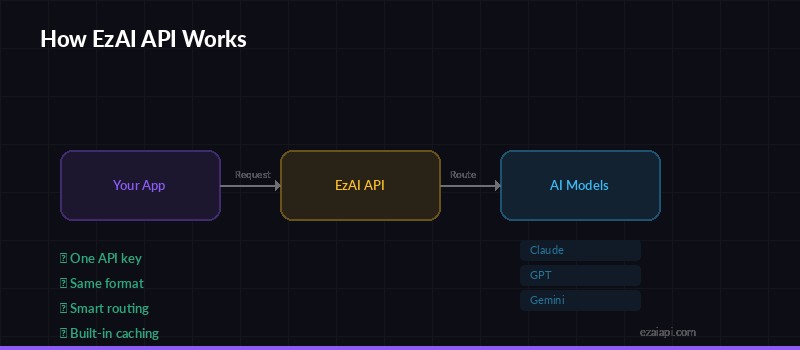
One API, multiple AI models — EzAI routes your requests to Claude, GPT, or Gemini
Think of it as a unified gateway to all major AI models at a fraction of the direct cost. Instead of managing separate API keys and billing for each provider, you get one key, one endpoint, and one dashboard to track everything.
Why EzAI?
- One API, all models — Claude, GPT, Gemini, Grok through the same endpoint
- Massive savings — Smart caching and infrastructure optimization keep costs low
- Drop-in replacement — Just change your base URL, everything else stays the same
- Real-time dashboard — Track your usage and costs live as they happen
- Free tier included — 3 models available at $0 cost, no credit card needed
Setup in 3 Steps
Step 1: Create an Account
Visit ezaiapi.com and sign up. You'll get an API key immediately — no waiting, no approval process. Every new account comes with 15 free credits to try things out.
Step 2: Run the Install Script
The install script configures everything automatically. It sets the right environment variables and updates your Claude Code config.
macOS / Linux:
curl -fsSL "https://ezaiapi.com/install.sh?key=YOUR_KEY" | shWindows (PowerShell):
irm "https://ezaiapi.com/install.ps1?key=YOUR_KEY" | iexThis automatically sets ANTHROPIC_BASE_URL and ANTHROPIC_API_KEY in your shell config and updates ~/.claude/settings.json so Claude Code knows where to route requests.
Step 3: Start Using It
source ~/.bashrc  # or ~/.zshrc
claude  # That's it!
Claude Code will now route through EzAI automatically. You'll have access to all models at reduced pricing, and you can monitor every request on your dashboard.
Your First API Call
Want to test the API directly? Here's a quick curl command to send a message to Claude:
curl https://ezaiapi.com/v1/messages \
  -H "x-api-key: sk-your-key" \
  -H "anthropic-version: 2023-06-01" \
  -H "content-type: application/json" \
  -d '{
    "model": "claude-sonnet-4-5",
    "max_tokens": 1024,
    "messages": [{"role": "user", "content": "Hello!"}]
  }'
The response format is identical to the official Anthropic API. Any code that works with Anthropic's API will work with EzAI — zero changes needed.
Using with Python
If you prefer Python, the official Anthropic SDK works out of the box. Just set the base_url parameter:
import anthropic

client = anthropic.Anthropic(
    api_key="sk-your-key",
    base_url="https://ezaiapi.com"
)

message = client.messages.create(
    model="claude-sonnet-4-5",
    max_tokens=1024,
    messages=[{"role": "user", "content": "Hello!"}]
)

print(message.content[0].text)
That's literally it. Same SDK, same methods, same response objects. The only change is the base_url.
Dashboard
After your first call, head to your dashboard to see real-time usage stats. You'll find:
- Live request history with model, tokens, and cost breakdown
- Current balance and usage trends
- API key management
- Per-model usage analytics
The dashboard updates in real time — no refresh needed. You can see each request as it comes in, making it easy to debug and monitor your spending.
What's Next?
You're up and running! Here are some useful next steps:
- Check out our free models — use AI at zero cost, no balance needed
- Set up Cursor, Cline, and other tools to use EzAI
- Browse the full API documentation for advanced features