Waiting 10–30 seconds for an AI model to finish generating before displaying anything is a terrible user experience. Streaming fixes this by sending tokens to the client the moment they're generated — so your users see the response appear word by word, just like ChatGPT. This guide shows you exactly how to implement streaming with EzAI API using Python, Node.js, and raw HTTP.
Why Streaming Matters
Without streaming, a typical Claude Sonnet request with a 500-token response takes 3–8 seconds. Your user stares at a spinner the entire time. With streaming enabled, the first token arrives in under 200ms and the rest follow in real-time. The total generation time is identical, but the perceived latency drops by 90%.
Streaming also lets you build features that aren't possible otherwise:
- Progressive rendering — show markdown/code as it's generated
- Early cancellation — user can stop generation mid-response
- Live token counting — display token usage as it accumulates
- Typing indicators — show "AI is typing..." with real content
How SSE Streaming Works
AI APIs use Server-Sent Events (SSE) for streaming. When you set "stream": true in your request, instead of one big JSON response, the server sends a series of small events over a long-lived HTTP connection. Each event contains a chunk of the generated text.
The Anthropic Messages API (which EzAI is fully compatible with) sends these event types:
message_start— contains the message ID and model infocontent_block_start— signals a new text block is beginningcontent_block_delta— contains the actual generated text, chunk by chunkcontent_block_stop— signals the text block is completemessage_delta— final usage stats (output tokens, stop reason)message_stop— the stream is done
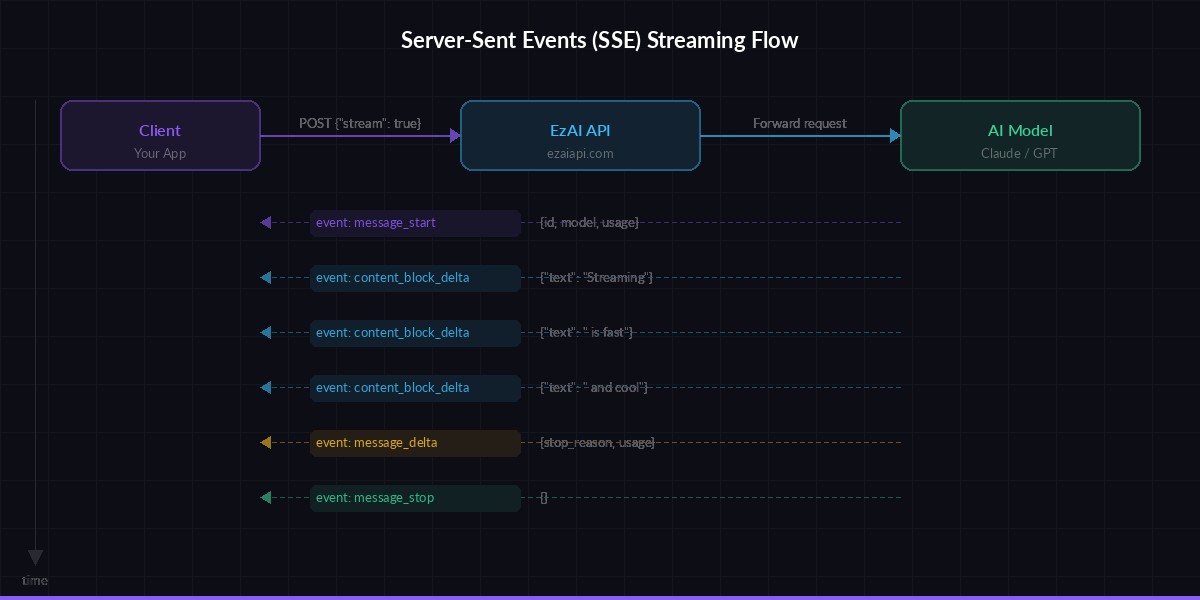
Server-Sent Events flow: one request, many small responses streamed in real-time
Stream with curl — Quick Test
The fastest way to see streaming in action. Add "stream": true to your request body and watch the events arrive:
curl --no-buffer https://ezaiapi.com/v1/messages \
  -H "x-api-key: sk-your-key" \
  -H "anthropic-version: 2023-06-01" \
  -H "content-type: application/json" \
  -d '{
    "model": "claude-sonnet-4-5",
    "max_tokens": 256,
    "stream": true,
    "messages": [{"role": "user", "content": "Explain streaming in 3 sentences."}]
  }'
You'll see a rapid sequence of event: and data: lines. The --no-buffer flag is critical — without it, curl buffers the output and you won't see real-time chunks.
Stream with Python (Anthropic SDK)
The official Anthropic Python SDK has first-class streaming support. Point it at ezaiapi.com and use the .stream() context manager:
import anthropic

client = anthropic.Anthropic(
    api_key="sk-your-key",
    base_url="https://ezaiapi.com"
)

with client.messages.stream(
    model="claude-sonnet-4-5",
    max_tokens=1024,
    messages=[{"role": "user", "content": "Write a haiku about APIs"}]
) as stream:
    for text in stream.text_stream:
        print(text, end="", flush=True)

# Get final message with usage stats
message = stream.get_final_message()
print(f"\nTokens used: {message.usage.input_tokens} in, {message.usage.output_tokens} out")
The text_stream iterator yields each text chunk as it arrives. The flush=True ensures each chunk prints immediately instead of being buffered. After the stream completes, get_final_message() gives you the full message object with token counts.
Async streaming
For web servers and async apps, use the async client. Same API, just with await and async for:
import anthropic
import asyncio

client = anthropic.AsyncAnthropic(
    api_key="sk-your-key",
    base_url="https://ezaiapi.com"
)

async def main():
    async with client.messages.stream(
        model="claude-sonnet-4-5",
        max_tokens=1024,
        messages=[{"role": "user", "content": "Explain WebSockets vs SSE"}]
    ) as stream:
        async for text in stream.text_stream:
            print(text, end="", flush=True)

asyncio.run(main())
Stream with Node.js
The @anthropic-ai/sdk npm package supports streaming natively. Install it and point the base URL to EzAI:
import Anthropic from "@anthropic-ai/sdk";

const client = new Anthropic({
  apiKey: "sk-your-key",
  baseURL: "https://ezaiapi.com",
});

const stream = client.messages.stream({
  model: "claude-sonnet-4-5",
  max_tokens: 1024,
  messages: [{ role: "user", content: "Write a function to parse CSV" }],
});

stream.on("text", (text) => {
  process.stdout.write(text);
});

const message = await stream.finalMessage();
console.log(`\nTokens: ${message.usage.input_tokens} in, ${message.usage.output_tokens} out`);
The Node.js SDK emits text events for each chunk. You can also listen for message, contentBlock, and error events for finer control.
Streaming in a Web App (FastAPI + SSE)
Here's a production-ready pattern for serving streamed AI responses to a browser. The backend proxies the stream from EzAI to the frontend using FastAPI's StreamingResponse:
from fastapi import FastAPI
from fastapi.responses import StreamingResponse
import anthropic

app = FastAPI()
client = anthropic.Anthropic(
    api_key="sk-your-key",
    base_url="https://ezaiapi.com"
)

@app.post("/chat")
async def chat(prompt: str):
    def generate():
        with client.messages.stream(
            model="claude-sonnet-4-5",
            max_tokens=2048,
            messages=[{"role": "user", "content": prompt}]
        ) as stream:
            for text in stream.text_stream:
                yield f"data: {text}\n\n"
            yield "data: [DONE]\n\n"

    return StreamingResponse(
        generate(),
        media_type="text/event-stream"
    )
On the frontend, consume the stream with EventSource or the Fetch API's reader.read() loop. The [DONE] sentinel tells the client the stream is finished.
Error Handling and Edge Cases
Streams can fail mid-response due to network issues, rate limits, or model timeouts. Always wrap your stream consumer in error handling:
- Connection drops — retry with exponential backoff (the SDK handles this automatically)
- Rate limits (429) — the error fires before any content events, so you can retry the whole request
- Partial responses — if the stream dies mid-content, check
stop_reasonon the final message. If it'snull, the response was truncated - Timeouts — set a client-side timeout (30–120s) and cancel the stream if it stalls
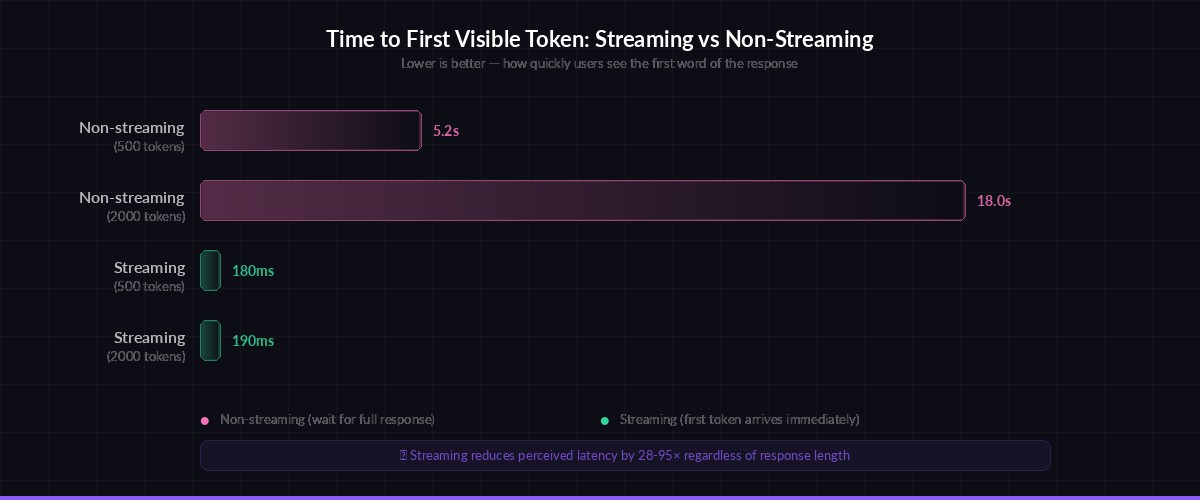
Time-to-first-token: streaming delivers visible output 10–50× faster than waiting for the full response
Performance Tips
A few things that make streaming work better in production:
- Disable response buffering — make sure your reverse proxy (Nginx, Cloudflare) doesn't buffer SSE responses. In Nginx:
proxy_buffering off; - Use HTTP/2 — multiplexing lets you run multiple streams over one connection without head-of-line blocking
- Batch small chunks — on the frontend, use
requestAnimationFrameto batch DOM updates instead of updating on every single token - Track token usage — the
message_deltaevent at the end of the stream gives you exact input/output token counts for cost tracking
When Not to Stream
Streaming isn't always the right call. Skip it when:
- You need JSON output — parsing partial JSON is painful. Use non-streaming and parse the complete response
- Background jobs — if no human is watching, streaming adds complexity for zero benefit
- Very short responses — for classification or yes/no answers, the overhead of SSE isn't worth it
For everything else — chatbots, code generation, content writing, explanations — always stream. Your users will thank you.
Streaming through EzAI works identically to the official Anthropic API. Just change your base_url to https://ezaiapi.com and you're set. Check out the full API docs for advanced features like extended thinking with streaming, or get started if you haven't set up your account yet.