Not everyone needs GPT-4 or Claude Opus for every task. Sometimes you just need a capable model to test an idea, prototype a feature, or handle light workloads. That's exactly why EzAI offers three AI models completely free of charge.
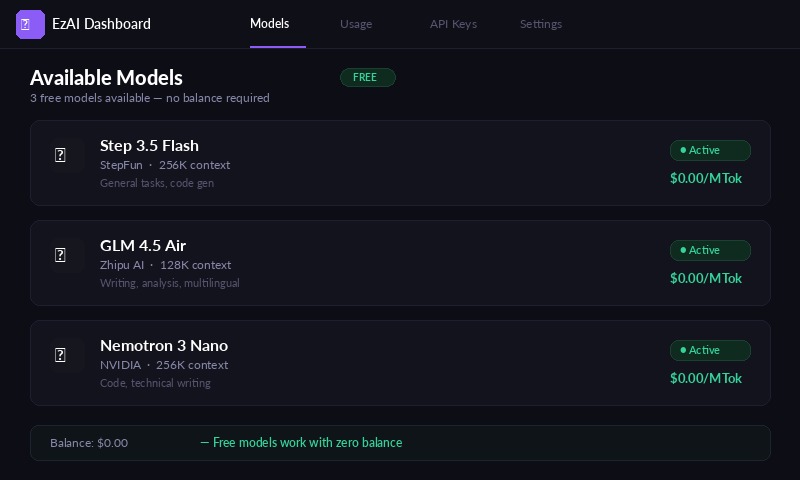
Free models available in the EzAI dashboard — zero cost, no credit card required
No credit card. No minimum balance. No catch. Just sign up, grab your API key, and start making requests.

The Three Free Models
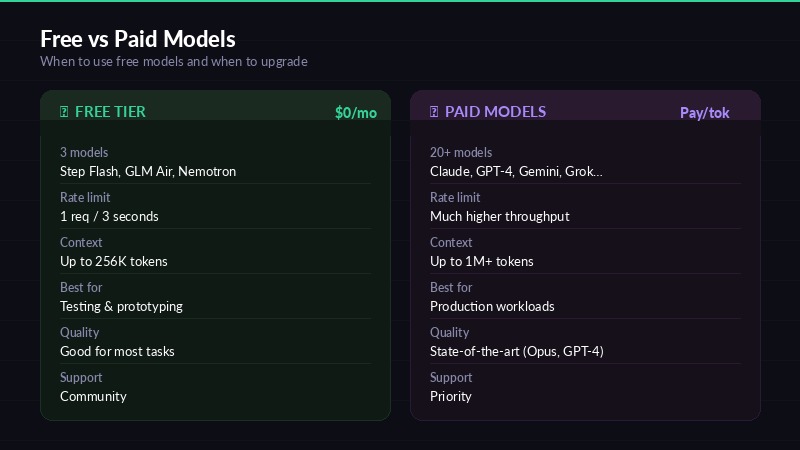
Capability comparison — when to use free models vs paid tiers
These models are available to every EzAI account, including accounts with a $0 balance. They use the same API endpoint and the same key as paid models — just specify a different model name.
Step 3.5 Flash
StepFun · 256K context window
Fast and efficient for general tasks. Great context window means you can feed it entire codebases or long documents. Best for: quick code generation, summarization, and conversational tasks.
GLM 4.5 Air
Z.ai / Zhipu · 128K context window
A well-rounded model from Zhipu AI with solid reasoning capabilities. Handles both English and Chinese well. Best for: writing, analysis, and multilingual tasks.
Nemotron 3 Nano 30B
NVIDIA · 256K context window
NVIDIA's compact powerhouse. 30 billion parameters packed with capability and a massive 256K context. Best for: code assistance, technical writing, and structured data tasks.
How to Use Free Models
The process is identical to using any other model on EzAI. Same endpoint, same API key, same request format. The only difference is the model name you specify.
With curl:
curl https://ezaiapi.com/v1/messages \
  -H "x-api-key: sk-your-key" \
  -H "anthropic-version: 2023-06-01" \
  -H "content-type: application/json" \
  -d '{
    "model": "step-3-5-flash",
    "max_tokens": 1024,
    "messages": [{"role": "user", "content": "Explain recursion simply."}]
  }'
With Python:
import anthropic

client = anthropic.Anthropic(
    api_key="sk-your-key",
    base_url="https://ezaiapi.com"
)

# Use any free model — same syntax as paid models
message = client.messages.create(
    model="step-3-5-flash",        # or "glm-4.5-air" or "nemotron-3-nano-30b"
    max_tokens=1024,
    messages=[{"role": "user", "content": "Write a Python quicksort."}]
)

print(message.content[0].text)
You can also use the OpenAI-compatible endpoint at /v1/chat/completions with the same free models. Both Anthropic and OpenAI formats work.
Rate Limits
Free models have a rate limit of 1 request every 3 seconds. This is per API key, not per model. It's generous enough for testing, prototyping, and light usage, but not designed for production traffic.
If you hit the rate limit, you'll get a standard 429 response. Just wait a moment and retry.
Free vs. Paid Models
Here's a straightforward comparison to help you decide which tier fits your needs:
| Free Models | Paid Models | |
|---|---|---|
| Cost | $0 | Pay per token |
| Models | 3 models | 20+ models |
| Rate limit | 1 req / 3s | Higher limits |
| Best for | Testing, learning | Production |
| Includes | Claude, GPT, etc. | ✓ All premium models |
The free tier is perfect for testing integrations, learning the API, prototyping new features, and handling light personal tasks. When you're ready for Claude Sonnet, GPT-4, or Gemini Pro — just top up your balance and switch the model name.
Getting Started
If you don't have an account yet:
- Sign up at ezaiapi.com
- Copy your API key from the dashboard
- Make a request using any free model name
That's it. No payment setup required. Your account works with free models from minute one.
For the full list of available models and their pricing, check the API documentation or the pricing page.