Extended thinking lets AI models "reason" before answering — spending extra tokens on an internal chain-of-thought before producing the final response. Claude, GPT, and Gemini all support it now. But here's what most developers miss: extended thinking doesn't always help, and using it blindly can 3-5x your API costs with zero quality improvement.
This guide covers exactly when to enable extended thinking, when to skip it, and how to implement it through the API with real code you can run today.
What Extended Thinking Actually Does
When you enable extended thinking, the model generates a hidden reasoning trace before writing its visible response. Think of it like asking someone to show their work on a math problem instead of just blurting out an answer.
Here's what happens under the hood:
- You send your prompt with thinking enabled
- The model generates thinking tokens — internal reasoning that you get billed for but may or may not see
- The model writes the actual response using that reasoning as context
The key tradeoff: more tokens = higher cost and higher latency, but potentially better accuracy on complex tasks. The question is how much better, and whether it's worth it for your use case.
When Extended Thinking Makes a Real Difference
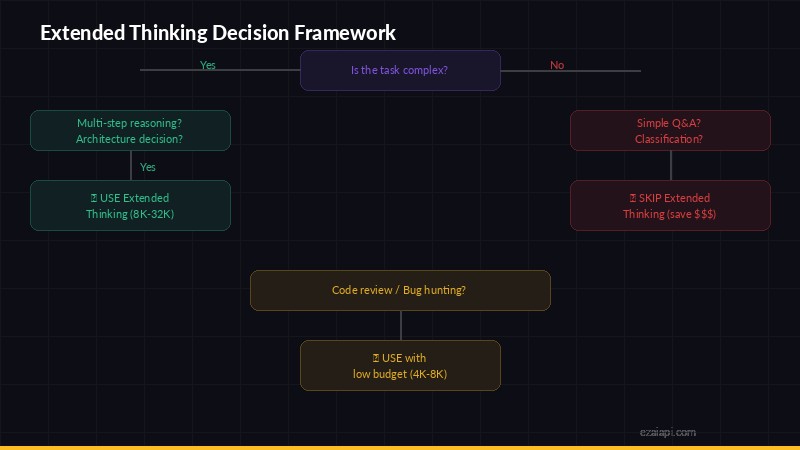
Decision framework — when to enable extended thinking vs when to skip it
Based on benchmarks and real-world testing, extended thinking shines in specific scenarios:
Multi-step math and logic problems
If your prompt involves calculations, proofs, or logic chains with 3+ steps, thinking mode prevents the model from "guessing" intermediate steps. On MATH benchmarks, Claude with extended thinking scores 15-20% higher than without.
Complex code generation
When you're asking for code that involves multiple interacting components — a function that parses data, validates it, transforms it, and handles edge cases — thinking mode helps the model plan the architecture before writing. Single-function tasks? Thinking mode adds cost without improving the output.
Analysis with multiple constraints
"Compare these three pricing plans considering team size, usage patterns, and growth projections" — tasks where the model needs to juggle multiple factors simultaneously benefit from thinking. A simple "summarize this paragraph" does not.
Ambiguous or tricky prompts
If your prompt has edge cases or could be interpreted multiple ways, thinking mode helps the model reason about what you actually want before committing to a direction.
When to Skip Extended Thinking (Save Your Tokens)
For these tasks, thinking mode is pure overhead:
- Simple Q&A — "What's the capital of France?" doesn't need a reasoning chain
- Text formatting/transformation — Converting JSON to CSV, reformatting dates, etc.
- Short creative writing — Generating a tweet, email subject line, or one-liner
- Classification tasks — Sentiment analysis, spam detection, category tagging
- Extraction tasks — Pulling names, dates, or specific fields from text
- Conversation/chat — Casual back-and-forth doesn't benefit from deep reasoning
A good rule of thumb: if a human could answer it in under 5 seconds without thinking hard, skip extended thinking.
How to Enable Extended Thinking via API
Here's how to implement it with each major provider through EzAI's unified endpoint.
Claude (Anthropic API)
Claude supports extended thinking through the thinking parameter. You set a budget_tokens to cap how many tokens the model can spend reasoning:
import anthropic

client = anthropic.Anthropic(
    api_key="sk-your-key",
    base_url="https://ezaiapi.com"
)

response = client.messages.create(
    model="claude-sonnet-4-5",
    max_tokens=16000,
    thinking={
        "type": "enabled",
        "budget_tokens": 10000
    },
    messages=[{
        "role": "user",
        "content": "Write a Python function that finds the longest palindromic substring in O(n) time using Manacher's algorithm. Include edge cases."
    }]
)

# The response contains both thinking and text blocks
for block in response.content:
    if block.type == "thinking":
        print("Thinking:", block.thinking[:200], "...")
    elif block.type == "text":
        print("Answer:", block.text)
The budget_tokens is a cap, not a guarantee. The model might use 500 thinking tokens on a simple request and 9,800 on a hard one. You only pay for what it uses.
GPT (OpenAI API)
OpenAI's reasoning models (o1, o3) have thinking built in — you don't toggle it on or off. Instead, you control depth with reasoning_effort:
from openai import OpenAI

client = OpenAI(
    api_key="sk-your-key",
    base_url="https://ezaiapi.com/openai/v1"
)

response = client.chat.completions.create(
    model="o3-mini",
    reasoning_effort="medium",  # low | medium | high
    messages=[{
        "role": "user",
        "content": "Analyze this SQL query for performance issues and suggest indexes..."
    }]
)

print(response.choices[0].message.content)
Use "low" for quick tasks, "medium" as a default, and "high" only for genuinely hard problems.
Budget Tokens: How Much Thinking Is Enough?
Setting the right budget is the difference between smart spending and burning cash. Here are practical guidelines:
- 1,000-3,000 tokens — Light reasoning. Good for "think before you answer" on moderately complex questions. Most Q&A with nuance fits here.
- 5,000-10,000 tokens — Solid reasoning. Multi-step problems, code architecture, detailed analysis. This is the sweet spot for most developer tasks.
- 10,000-30,000 tokens — Deep reasoning. Complex algorithms, multi-file code generation, research synthesis. Only use this when you know the problem is genuinely hard.
- 30,000+ tokens — Maximum depth. Rarely needed. Reserve for things like "implement a compiler" or "audit this 500-line function for security vulnerabilities."
Start low and increase only if the output quality isn't good enough. Most developers set budget_tokens too high on their first try.
Cost Impact: Real Numbers
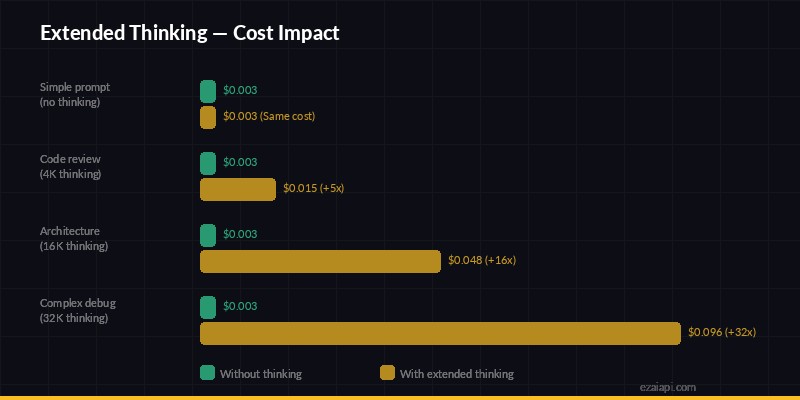
Cost impact — extended thinking can multiply per-request costs by 5-32x
Let's do the math. Say you're using Claude Sonnet 4.5 through EzAI for a code review task:
- Without thinking: ~800 input tokens + ~2,000 output tokens
- With thinking (5k budget): ~800 input + ~4,500 thinking + ~2,500 output
Thinking tokens on Claude are priced the same as output tokens. So you're roughly tripling the output token cost. On a single request that's pennies, but at scale — say 10,000 requests/day — it adds up fast.
The smart approach: use extended thinking selectively. Route simple requests to a standard model call, and only enable thinking for the requests that need it. EzAI's pay-per-token pricing means you only pay for what you use, so there's no penalty for mixing thinking and non-thinking requests.
Streaming with Extended Thinking
One gotcha: when you enable thinking with streaming, the thinking tokens arrive first as thinking_delta events, followed by the actual text_delta response. Your client needs to handle both:
with client.messages.stream(
    model="claude-sonnet-4-5",
    max_tokens=16000,
    thinking={"type": "enabled", "budget_tokens": 8000},
    messages=[{"role": "user", "content": prompt}]
) as stream:
    for event in stream:
        if event.type == "content_block_start":
            if event.content_block.type == "thinking":
                print("[thinking...]", end="")
            elif event.content_block.type == "text":
                print("\n[answer] ", end="")
        elif event.type == "content_block_delta":
            if hasattr(event.delta, "text"):
                print(event.delta.text, end="", flush=True)
There's a noticeable delay before the first visible text arrives because the model finishes thinking first. In a user-facing app, show a "reasoning..." indicator so users don't think the request stalled.
A Decision Framework for Your Codebase
Here's a simple router pattern you can drop into any project:
def should_use_thinking(task_type: str, complexity: str) -> dict | None:
    """Return thinking config or None based on task."""

    # Never use thinking for these
    skip_tasks = {"classify", "extract", "format", "chat", "summarize_short"}
    if task_type in skip_tasks:
        return None

    # Budget based on complexity
    budgets = {
        "low": 2000,
        "medium": 8000,
        "high": 20000,
    }
    budget = budgets.get(complexity, 5000)
    return {"type": "enabled", "budget_tokens": budget}

# Usage
thinking = should_use_thinking("code_review", "medium")

kwargs = {
    "model": "claude-sonnet-4-5",
    "max_tokens": 16000,
    "messages": messages,
}
if thinking:
    kwargs["thinking"] = thinking

response = client.messages.create(**kwargs)
This keeps thinking costs isolated to the requests that actually benefit from it. Everything else runs at normal speed and cost.
TL;DR — The Cheat Sheet
- Use thinking for: math, complex code, multi-constraint analysis, ambiguous prompts
- Skip thinking for: classification, extraction, formatting, chat, simple Q&A
- Start with 5k budget tokens, adjust based on results
- Route selectively — don't blanket-enable thinking for all requests
- Monitor your spending — thinking tokens can 3-5x your costs if unchecked
Extended thinking is a powerful tool when used deliberately. The developers who get the most out of it aren't the ones who enable it everywhere — they're the ones who know exactly which requests need it. Use EzAI's dashboard to track per-request token usage and find your optimal balance between quality and cost.
Ready to try extended thinking? Get set up with EzAI in 5 minutes, or check our API docs for the full parameter reference. Already watching your spending? Read our guide on 7 ways to reduce AI API costs.