TypeScript is the default choice for production Node.js backends and full-stack apps. If you're calling AI APIs from TypeScript, you want compile-time safety on your request shapes, proper types on streamed responses, and sane error handling that doesn't rely on catching unknown. This guide walks through building a type-safe AI client against EzAI's API — from basic calls to streaming, retries, and multi-model fallback.
Project Setup
Start with a fresh TypeScript project. You'll need node-fetch (or use native fetch in Node 18+) and optionally the official Anthropic SDK if you prefer a high-level client.
mkdir ezai-ts-demo && cd ezai-ts-demo
npm init -y
npm i @anthropic-ai/sdk typescript tsx
npx tsc --init --target es2022 --module nodenext --strict
Set your environment variables. The only change vs. direct Anthropic usage is the base URL:
export ANTHROPIC_API_KEY="sk-your-ezai-key"
export ANTHROPIC_BASE_URL="https://api.ezaiapi.com"
Basic Typed Client
The Anthropic TypeScript SDK picks up ANTHROPIC_BASE_URL automatically. Every response is fully typed — message.content is a discriminated union of TextBlock | ToolUseBlock, so you get autocomplete and exhaustive checks out of the box.
import Anthropic from "@anthropic-ai/sdk";

const client = new Anthropic({
  // Reads ANTHROPIC_API_KEY and ANTHROPIC_BASE_URL from env
});

async function ask(prompt: string): Promise<string> {
  const msg = await client.messages.create({
    model: "claude-sonnet-4-20250514",
    max_tokens: 1024,
    messages: [{ role: "user", content: prompt }],
  });

  // TypeScript knows msg.content[0] is TextBlock | ToolUseBlock
  const block = msg.content[0];
  if (block.type === "text") {
    return block.text;
  }
  throw new Error(`Unexpected block type: ${block.type}`);
}

const answer = await ask("What's the fastest sorting algorithm for nearly-sorted data?");
console.log(answer);
Run it with npx tsx src/basic.ts. The SDK handles authentication, request serialization, and response parsing. You get typed access to msg.usage.input_tokens, msg.stop_reason, and every other field without referencing docs.
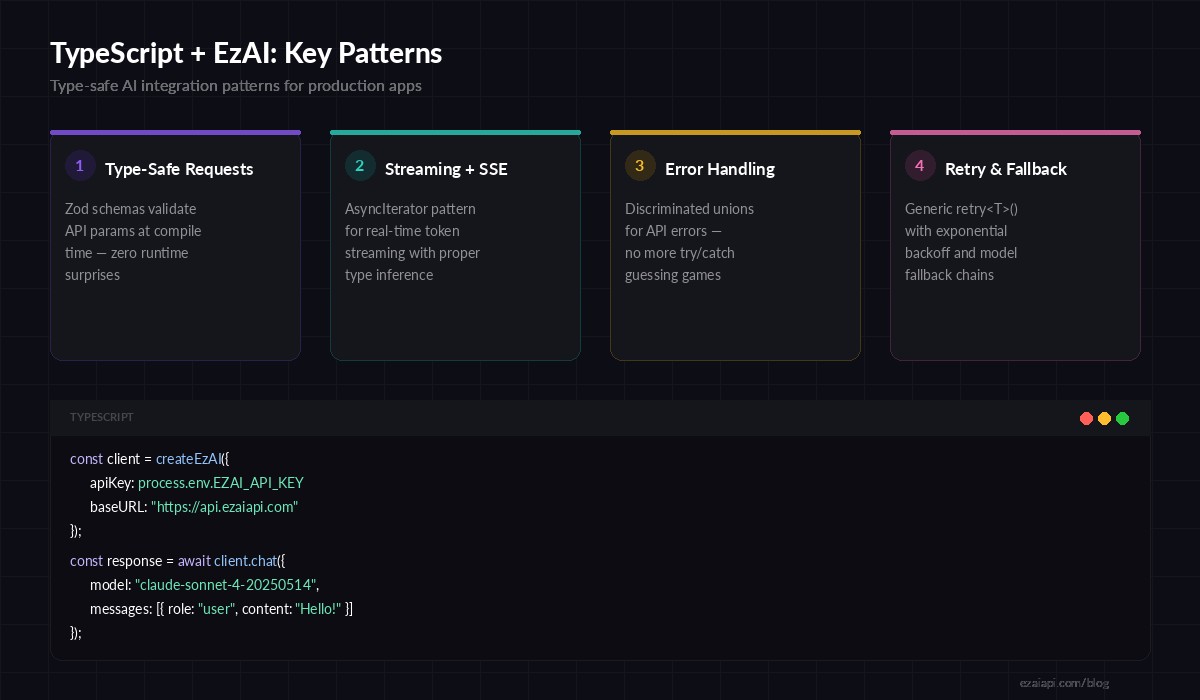
Four core patterns for production TypeScript + EzAI integration
Streaming Responses
For chat UIs or long-running completions, you want tokens as they arrive instead of waiting for the full response. The SDK exposes a .stream() method that returns an AsyncIterable of typed server-sent events.
import Anthropic from "@anthropic-ai/sdk";

const client = new Anthropic();

async function streamChat(prompt: string) {
  const stream = client.messages.stream({
    model: "claude-sonnet-4-20250514",
    max_tokens: 2048,
    messages: [{ role: "user", content: prompt }],
  });

  // Each event is fully typed — no casting needed
  stream.on("text", (text: string) => {
    process.stdout.write(text);
  });

  const finalMessage = await stream.finalMessage();
  console.log("\n\nTokens used:", finalMessage.usage);
}

await streamChat("Explain B-trees in 200 words");
The stream.on("text", ...) callback fires per-delta. The finalMessage() promise resolves to the complete Message object once the stream finishes, giving you token counts and stop reasons for logging. No manual SSE parsing, no ReadableStream gymnastics.
Type-Safe Error Handling
The SDK throws typed exceptions that you can narrow with instanceof. This matters because a 429 (rate limit) requires a different recovery strategy than a 400 (bad request). Catching a generic Error and guessing is how bugs ship.
import Anthropic, {
  APIError,
  RateLimitError,
  AuthenticationError,
} from "@anthropic-ai/sdk";

const client = new Anthropic();

async function safeSend(prompt: string) {
  try {
    return await client.messages.create({
      model: "claude-sonnet-4-20250514",
      max_tokens: 512,
      messages: [{ role: "user", content: prompt }],
    });
  } catch (err) {
    if (err instanceof RateLimitError) {
      const retryAfter = err.headers?.["retry-after"];
      console.warn(`Rate limited. Retry after ${retryAfter ?? 60}s`);
      return null;
    }
    if (err instanceof AuthenticationError) {
      throw new Error("Invalid EzAI API key — check dashboard");
    }
    if (err instanceof APIError) {
      console.error(`API error ${err.status}: ${err.message}`);
      return null;
    }
    throw err;
  }
}
Each error class carries the HTTP status code, headers, and a structured error body. RateLimitError specifically gives you the retry-after header so you can implement precise backoff instead of arbitrary sleeps. Check our retry strategies guide for more on exponential backoff with jitter.
Retry with Exponential Backoff
Production apps need automatic retries for transient failures (5xx, network errors, rate limits). Here's a generic retry wrapper that works with any async operation and preserves type safety:
import { APIError, RateLimitError } from "@anthropic-ai/sdk";

interface RetryOpts {
  maxRetries: number;
  baseDelayMs: number;
}

async function retry<T>(
  fn: () => Promise<T>,
  opts: RetryOpts = { maxRetries: 3, baseDelayMs: 1000 }
): Promise<T> {
  for (let attempt = 0; attempt <= opts.maxRetries; attempt++) {
    try {
      return await fn();
    } catch (err) {
      const isLast = attempt === opts.maxRetries;
      const isRetryable =
        err instanceof RateLimitError ||
        (err instanceof APIError && err.status >= 500);

      if (!isRetryable || isLast) throw err;

      const jitter = Math.random() * 500;
      const delay = opts.baseDelayMs * Math.pow(2, attempt) + jitter;
      await new Promise(r => setTimeout(r, delay));
    }
  }
  throw new Error("Unreachable");
}

// Usage — full type inference preserved
const result = await retry(() =>
  client.messages.create({
    model: "claude-sonnet-4-20250514",
    max_tokens: 1024,
    messages: [{ role: "user", content: "Summarize this PR diff" }],
  })
);
The generic <T> means result is typed as Message — not any, not unknown. TypeScript infers the return type from the callback you pass in.
Multi-Model Fallback
EzAI gives you access to Claude, GPT, and Gemini through the same endpoint. A common production pattern is falling back to a cheaper or more available model when your primary is down or overloaded. Here's how to wire that up with full type safety:
const FALLBACK_CHAIN = [
  "claude-sonnet-4-20250514",
  "claude-3-5-haiku-20241022",
  "gemini-2.5-flash",
] as const;

async function chatWithFallback(prompt: string) {
  for (const model of FALLBACK_CHAIN) {
    try {
      const msg = await retry(() =>
        client.messages.create({
          model,
          max_tokens: 1024,
          messages: [{ role: "user", content: prompt }],
        })
      );
      console.log(`✓ Served by ${model}`);
      return msg;
    } catch (err) {
      console.warn(`✗ ${model} failed, trying next...`);
    }
  }
  throw new Error("All models in fallback chain exhausted");
}

const response = await chatWithFallback("Explain CAP theorem briefly");
This chains through Sonnet → Haiku → Gemini Flash. Each model gets 3 retry attempts (from the retry wrapper above) before the chain advances. In production, you'd log which model ultimately served the request for cost tracking. Read the full multi-model fallback guide for circuit breaker patterns and health-check strategies.
Structured Output with Zod
When you need the AI to return structured data (JSON for downstream processing), combine Claude's JSON mode with Zod for runtime validation that generates TypeScript types:
import { z } from "zod";

const ReviewSchema = z.object({
  summary: z.string(),
  issues: z.array(z.object({
    file: z.string(),
    line: z.number(),
    severity: z.enum(["critical", "warning", "info"]),
    message: z.string(),
  })),
  approved: z.boolean(),
});

type Review = z.infer<typeof ReviewSchema>;

async function reviewCode(diff: string): Promise<Review> {
  const msg = await client.messages.create({
    model: "claude-sonnet-4-20250514",
    max_tokens: 2048,
    messages: [{
      role: "user",
      content: `Review this diff. Reply ONLY with JSON:\n\n${diff}`,
    }],
  });

  const text = msg.content[0].type === "text" ? msg.content[0].text : "";
  return ReviewSchema.parse(JSON.parse(text));
}
If the model returns malformed JSON or misses a field, Zod throws a detailed error instead of letting garbage propagate through your pipeline. The Review type is inferred from the schema — one source of truth for both validation and types. See our structured JSON output guide for advanced patterns with tool use.
Putting It All Together
Here's the production checklist for TypeScript + EzAI:
- Use the official SDK — it handles auth, serialization, and gives you typed responses for free
- Point
ANTHROPIC_BASE_URLto EzAI — one env var change, everything else stays the same - Narrow errors with
instanceof—RateLimitError,AuthenticationError,APIErrorinstead of guessing - Wrap calls in
retry<T>()— preserves type inference through retries - Add model fallback chains — EzAI's multi-model access makes this trivial
- Validate structured output with Zod — runtime safety that generates compile-time types
The advantage of routing through EzAI is that you get access to Claude, GPT, and Gemini through identical request shapes. Your TypeScript types don't care which model is behind the curtain — they validate the contract, not the provider.
Ready to start? Grab your API key and start building. Check the full API documentation for model-specific features like extended thinking and vision inputs.