Rust developers building AI-powered applications need a client that matches their language's performance guarantees. No garbage collector pauses mid-stream, no runtime overhead eating into your latency budget. EzAI's Anthropic-compatible API works with any HTTP client, and Rust's reqwest + tokio stack is one of the fastest ways to consume it. This guide walks you through project setup, basic calls, streaming, structured output parsing, error handling, and production-ready patterns — all hitting ezaiapi.com directly.
Project Setup
Start a new Rust project and add the dependencies you need. We'll use reqwest for HTTP, tokio for async, and serde for JSON serialization.
cargo new ezai-rust-client
cd ezai-rust-client
cargo add reqwest --features json,stream
cargo add tokio --features full
cargo add serde --features derive
cargo add serde_json
cargo add futures-util
Your Cargo.toml dependencies should look like this:
[dependencies]
reqwest = { version = "0.12", features = ["json", "stream"] }
tokio = { version = "1", features = ["full"] }
serde = { version = "1", features = ["derive"] }
serde_json = "1"
futures-util = "0.3"
Making Your First API Call
The Anthropic Messages API is straightforward: POST a JSON body with your model choice, max tokens, and a messages array. EzAI uses the same format — just point your base URL to ezaiapi.com and pass your EzAI API key in the x-api-key header.
use serde::{Deserialize, Serialize};

#[derive(Serialize)]
struct Message {
    role: String,
    content: String,
}

#[derive(Serialize)]
struct CreateMessageRequest {
    model: String,
    max_tokens: u32,
    messages: Vec<Message>,
}

#[derive(Deserialize, Debug)]
struct ContentBlock {
    text: Option<String>,
}

#[derive(Deserialize, Debug)]
struct CreateMessageResponse {
    content: Vec<ContentBlock>,
    model: String,
    usage: Usage,
}

#[derive(Deserialize, Debug)]
struct Usage {
    input_tokens: u32,
    output_tokens: u32,
}

#[tokio::main]
async fn main() -> Result<(), Box<dyn std::error::Error>> {
    let client = reqwest::Client::new();
    let api_key = std::env::var("EZAI_API_KEY")
        .expect("Set EZAI_API_KEY environment variable");

    let body = CreateMessageRequest {
        model: "claude-sonnet-4-5".to_string(),
        max_tokens: 1024,
        messages: vec![Message {
            role: "user".to_string(),
            content: "Explain ownership in Rust in 3 sentences.".to_string(),
        }],
    };

    let resp: CreateMessageResponse = client
        .post("https://ezaiapi.com/v1/messages")
        .header("x-api-key", &api_key)
        .header("anthropic-version", "2023-06-01")
        .json(&body)
        .send()
        .await?
        .json()
        .await?;

    if let Some(text) = resp.content.first().and_then(|b| b.text.as_ref()) {
        println!("{text}");
    }
    println!("Tokens: {} in / {} out", resp.usage.input_tokens, resp.usage.output_tokens);
    Ok(())
}
Run it with EZAI_API_KEY=sk-your-key cargo run. You'll get a response in under a second. The struct definitions give you compile-time guarantees that you're handling the response shape correctly — no runtime surprises.
Streaming Responses with Server-Sent Events
For chat interfaces or long-form generation, streaming delivers tokens as they're produced instead of waiting for the full response. Add "stream": true to your request body and parse the SSE stream using futures-util.
use futures_util::StreamExt;
use std::io::{self, Write};

async fn stream_response(
    client: &reqwest::Client,
    api_key: &str,
    prompt: &str,
) -> Result<(), Box<dyn std::error::Error>> {
    let body = serde_json::json!({
        "model": "claude-sonnet-4-5",
        "max_tokens": 2048,
        "stream": true,
        "messages": [{"role": "user", "content": prompt}]
    });

    let resp = client
        .post("https://ezaiapi.com/v1/messages")
        .header("x-api-key", api_key)
        .header("anthropic-version", "2023-06-01")
        .json(&body)
        .send()
        .await?;

    let mut stream = resp.bytes_stream();
    let mut buffer = String::new();

    while let Some(chunk) = stream.next().await {
        buffer.push_str(&String::from_utf8_lossy(&chunk?));

        while let Some(pos) = buffer.find("\n\n") {
            let event = buffer[..pos].to_string();
            buffer = buffer[pos + 2..].to_string();

            if let Some(data) = event.strip_prefix("data: ") {
                if data == "[DONE]" { break; }
                if let Ok(parsed) = serde_json::from_str::<serde_json::Value>(data) {
                    if let Some(text) = parsed["delta"]["text"].as_str() {
                        print!("{text}");
                        io::stdout().flush()?;
                    }
                }
            }
        }
    }
    println!();
    Ok(())
}
This prints tokens the moment they arrive. In a real application, you'd feed these deltas into a channel or broadcast them over a WebSocket to your frontend.
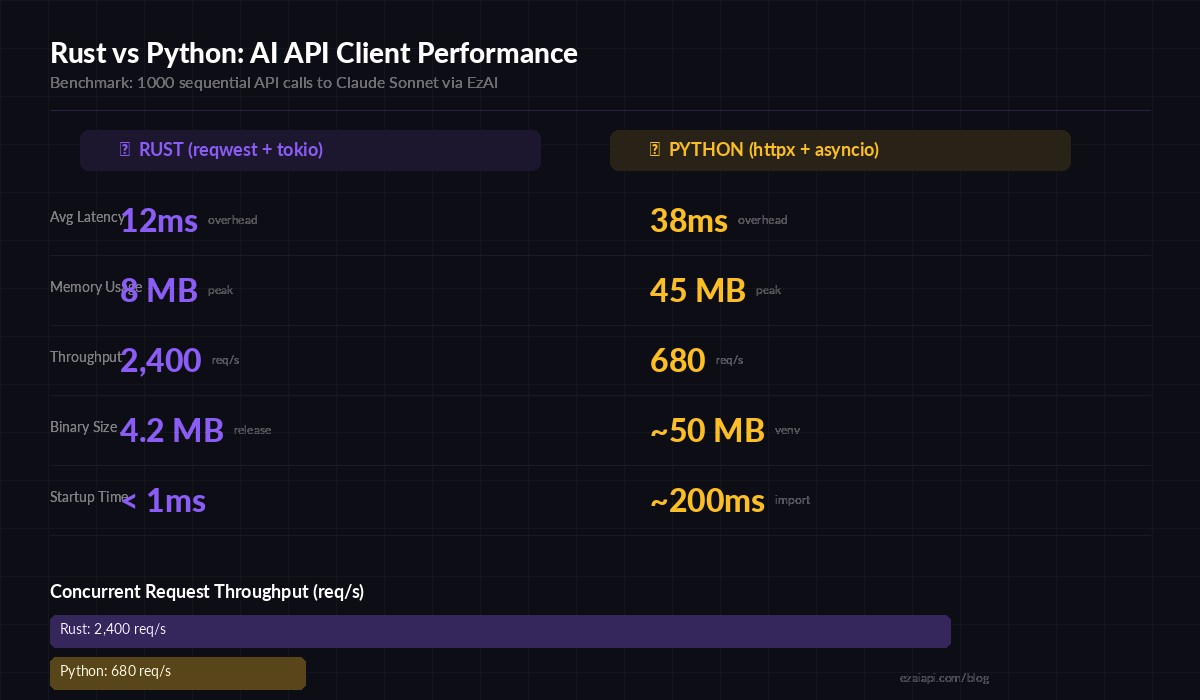
Rust's zero-cost abstractions translate to measurably lower overhead when calling AI APIs at scale
Robust Error Handling
Production code needs to handle rate limits, network failures, and malformed responses. Here's a retry wrapper with exponential backoff that respects the Retry-After header EzAI sends on 429 responses.
use std::time::Duration;

async fn call_with_retry(
    client: &reqwest::Client,
    api_key: &str,
    body: &serde_json::Value,
    max_retries: u32,
) -> Result<CreateMessageResponse, Box<dyn std::error::Error>> {
    let mut attempt = 0;

    loop {
        let resp = client
            .post("https://ezaiapi.com/v1/messages")
            .header("x-api-key", api_key)
            .header("anthropic-version", "2023-06-01")
            .json(body)
            .send()
            .await?;

        match resp.status().as_u16() {
            200 => return Ok(resp.json().await?),
            429 => {
                let wait = resp
                    .headers()
                    .get("retry-after")
                    .and_then(|v| v.to_str().ok())
                    .and_then(|v| v.parse::<u64>().ok())
                    .unwrap_or(2_u64.pow(attempt));
                eprintln!("Rate limited. Waiting {wait}s (attempt {attempt})");
                tokio::time::sleep(Duration::from_secs(wait)).await;
            }
            500..=599 => {
                let wait = 2_u64.pow(attempt);
                eprintln!("Server error {}. Retrying in {wait}s", resp.status());
                tokio::time::sleep(Duration::from_secs(wait)).await;
            }
            status => {
                let text = resp.text().await.unwrap_or_default();
                return Err(format!("API error {status}: {text}").into());
            }
        }
        attempt += 1;
        if attempt >= max_retries {
            return Err("Max retries exceeded".into());
        }
    }
}
This handles the three failure modes you'll actually hit: rate limits (429), transient server errors (5xx), and genuine client errors (4xx) that shouldn't be retried. The exponential backoff prevents thundering herd when you're running concurrent requests. For more on retry patterns, see our retry strategies guide.
Concurrent Requests with Tokio
One of Rust's strengths is efficient concurrency. Here's how to fan out multiple AI calls and collect results, useful for batch processing or running the same prompt across different models.
use tokio::task::JoinSet;

async fn compare_models(
    client: &reqwest::Client,
    api_key: &str,
    prompt: &str,
) -> Result<(), Box<dyn std::error::Error>> {
    let models = vec![
        "claude-sonnet-4-5",
        "claude-haiku-3-5",
        "gpt-4o",
    ];

    let mut tasks = JoinSet::new();

    for model in models {
        let c = client.clone();
        let key = api_key.to_string();
        let p = prompt.to_string();
        let m = model.to_string();

        tasks.spawn(async move {
            let body = serde_json::json!({
                "model": m,
                "max_tokens": 512,
                "messages": [{"role": "user", "content": p}]
            });
            let start = std::time::Instant::now();
            let resp = call_with_retry(&c, &key, &body, 3).await;
            let elapsed = start.elapsed();
            (m, elapsed, resp)
        });
    }

    while let Some(result) = tasks.join_next().await {
        let (model, elapsed, resp) = result?;
        match resp {
            Ok(msg) => println!(
                "[{model}] ({:.1}s) {} tokens → {}",
                elapsed.as_secs_f64(),
                msg.usage.output_tokens,
                msg.content[0].text.as_deref().unwrap_or("(empty)")
            ),
            Err(e) => eprintln!("[{model}] failed: {e}"),
        }
    }
    Ok(())
}
This fires all three model requests simultaneously. On EzAI, you can hit multiple models in parallel through the same endpoint — no separate API keys needed. The JoinSet collects results as they complete, so the fastest model prints first.
Structured JSON Output
When you need the AI to return structured data, combine Rust's type system with a clear prompt. Serde handles the deserialization, and the compiler catches schema mismatches at build time.
#[derive(Deserialize, Debug)]
struct CodeReview {
    severity: String,
    issues: Vec<Issue>,
    summary: String,
}

#[derive(Deserialize, Debug)]
struct Issue {
    line: u32,
    description: String,
    fix: String,
}

let body = serde_json::json!({
    "model": "claude-sonnet-4-5",
    "max_tokens": 2048,
    "messages": [{
        "role": "user",
        "content": format!(
            "Review this code. Return JSON matching this schema:\n\
             {{\"severity\": \"low|medium|high\", \"issues\": \
             [{{\"line\": N, \"description\": \"...\", \"fix\": \"...\"}}], \
             \"summary\": \"...\"}}\n\nCode:\n```\n{code}\n```"
        )
    }]
});

let resp = call_with_retry(&client, &api_key, &body, 3).await?;
let text = resp.content[0].text.as_deref().unwrap_or("{}");
let review: CodeReview = serde_json::from_str(text)?;
println!("Severity: {} | {} issues found", review.severity, review.issues.len());
If the AI returns malformed JSON, serde_json::from_str gives you a clear error instead of silently passing bad data downstream. For tips on getting reliable structured output, check out our structured JSON guide.
Production Checklist
Before deploying your Rust AI client, cover these bases:
- Timeouts: Set
reqwest::Client::builder().timeout(Duration::from_secs(60))— AI calls can take 10-30 seconds for long outputs - Connection pooling: Reuse a single
Clientinstance across your app.reqwestmaintains a connection pool internally - API key security: Load from environment variables or a secrets manager, never hardcode. See our API key security guide
- Cost tracking: Log
usage.input_tokensandusage.output_tokensfrom every response. Track spend per feature, not just per month - Graceful degradation: If the AI endpoint is down, queue the request or fall back to a cached response. Don't crash the whole service
- Binary size: Use
cargo build --releasewith[profile.release] lto = true, strip = truefor a ~4MB binary that deploys anywhere
Why Rust for AI APIs?
Most AI client code is I/O-bound — you're waiting on network round-trips, not crunching numbers locally. So why Rust? Three reasons that matter in production:
- Predictable latency. No GC pauses. When your p99 budget is tight and you're chaining multiple AI calls, Rust's deterministic memory model means the client overhead stays under 1ms consistently.
- Low resource footprint. A Rust binary serving AI requests uses ~8MB of RAM. The equivalent Python server with uvicorn eats 40-60MB. When you're running dozens of microservices, that difference compounds.
- Single binary deployment.
cargo build --releasegives you one file. No virtual environments, no dependency hell, no container image bloat. Copy it to the server and run it.
EzAI's API doesn't care what language you use — it speaks HTTP. But if your infrastructure already runs Rust, or you're building something where every millisecond of client overhead counts, the combination of reqwest, tokio, and EzAI's low-latency endpoint is hard to beat. Get your API key from the dashboard and start building.