Go is a natural fit for AI API integrations. Goroutines handle concurrent requests without thread management overhead, the standard library gives you production-ready HTTP clients, and you ship a single binary with zero runtime dependencies. This guide walks you through building AI-powered Go applications with EzAI API — from your first API call to production-ready patterns with streaming, retries, and concurrent processing.
Project Setup
Create a new Go module and install the dependencies. We only need two packages beyond the standard library: one for SSE streaming and one for environment variable loading.
mkdir ezai-go && cd ezai-go
go mod init github.com/yourname/ezai-go
go get github.com/joho/godotenv
Create an .env file with your EzAI API key:
EZAI_API_KEY=sk-your-key-hereYour First API Call
EzAI's Anthropic-compatible endpoint works with Go's standard net/http client. No third-party SDK needed — just JSON marshaling and an HTTP POST. Here's a complete working example:
package main

import (
    "bytes"
    "encoding/json"
    "fmt"
    "io"
    "net/http"
    "os"
    "time"

    "github.com/joho/godotenv"
)

const baseURL = "https://ezaiapi.com"

type Message struct {
    Role    string `json:"role"`
    Content string `json:"content"`
}

type Request struct {
    Model     string    `json:"model"`
    MaxTokens int       `json:"max_tokens"`
    Messages  []Message `json:"messages"`
}

type ContentBlock struct {
    Type string `json:"type"`
    Text string `json:"text"`
}

type Response struct {
    Content []ContentBlock `json:"content"`
    Model   string         `json:"model"`
    Usage   struct {
        InputTokens  int `json:"input_tokens"`
        OutputTokens int `json:"output_tokens"`
    } `json:"usage"`
}

func main() {
    godotenv.Load()

    body, _ := json.Marshal(Request{
        Model:     "claude-sonnet-4-5",
        MaxTokens: 1024,
        Messages:  []Message{{Role: "user", Content: "Explain goroutines in 2 sentences."}},
    })

    req, _ := http.NewRequest("POST", baseURL+"/v1/messages", bytes.NewReader(body))
    req.Header.Set("x-api-key", os.Getenv("EZAI_API_KEY"))
    req.Header.Set("anthropic-version", "2023-06-01")
    req.Header.Set("content-type", "application/json")

    client := &http.Client{Timeout: 30 * time.Second}
    resp, err := client.Do(req)
    if err != nil {
        fmt.Fprintf(os.Stderr, "request failed: %v\n", err)
        os.Exit(1)
    }
    defer resp.Body.Close()

    data, _ := io.ReadAll(resp.Body)
    var result Response
    json.Unmarshal(data, &result)

    fmt.Println(result.Content[0].Text)
    fmt.Printf("Tokens: %d in / %d out\n", result.Usage.InputTokens, result.Usage.OutputTokens)
}
Run it with go run main.go. The response format matches the Anthropic API exactly — same JSON structure, same content blocks. Your existing knowledge of the Anthropic API transfers directly.
Streaming Responses
For chat interfaces and real-time UIs, streaming is essential. EzAI sends Server-Sent Events (SSE) when you set "stream": true. Here's how to parse the event stream in Go without pulling in heavy dependencies:
type StreamRequest struct {
    Model     string    `json:"model"`
    MaxTokens int       `json:"max_tokens"`
    Messages  []Message `json:"messages"`
    Stream    bool      `json:"stream"`
}

type StreamEvent struct {
    Type  string `json:"type"`
    Delta struct {
        Type string `json:"type"`
        Text string `json:"text"`
    } `json:"delta"`
}

func streamChat(prompt string) error {
    body, _ := json.Marshal(StreamRequest{
        Model: "claude-sonnet-4-5", MaxTokens: 2048,
        Messages: []Message{{Role: "user", Content: prompt}},
        Stream: true,
    })

    req, _ := http.NewRequest("POST", baseURL+"/v1/messages", bytes.NewReader(body))
    req.Header.Set("x-api-key", os.Getenv("EZAI_API_KEY"))
    req.Header.Set("anthropic-version", "2023-06-01")
    req.Header.Set("content-type", "application/json")

    resp, err := http.DefaultClient.Do(req)
    if err != nil { return err }
    defer resp.Body.Close()

    scanner := bufio.NewScanner(resp.Body)
    for scanner.Scan() {
        line := scanner.Text()
        if !strings.HasPrefix(line, "data: ") { continue }
        payload := strings.TrimPrefix(line, "data: ")
        if payload == "[DONE]" { break }

        var event StreamEvent
        json.Unmarshal([]byte(payload), &event)
        if event.Type == "content_block_delta" {
            fmt.Print(event.Delta.Text) // Print tokens as they arrive
        }
    }
    fmt.Println()
    return nil
}
The scanner reads line-by-line from the response body. Each SSE event starts with data: , and we extract the JSON payload to get individual text deltas. First token typically arrives within 200-400ms.
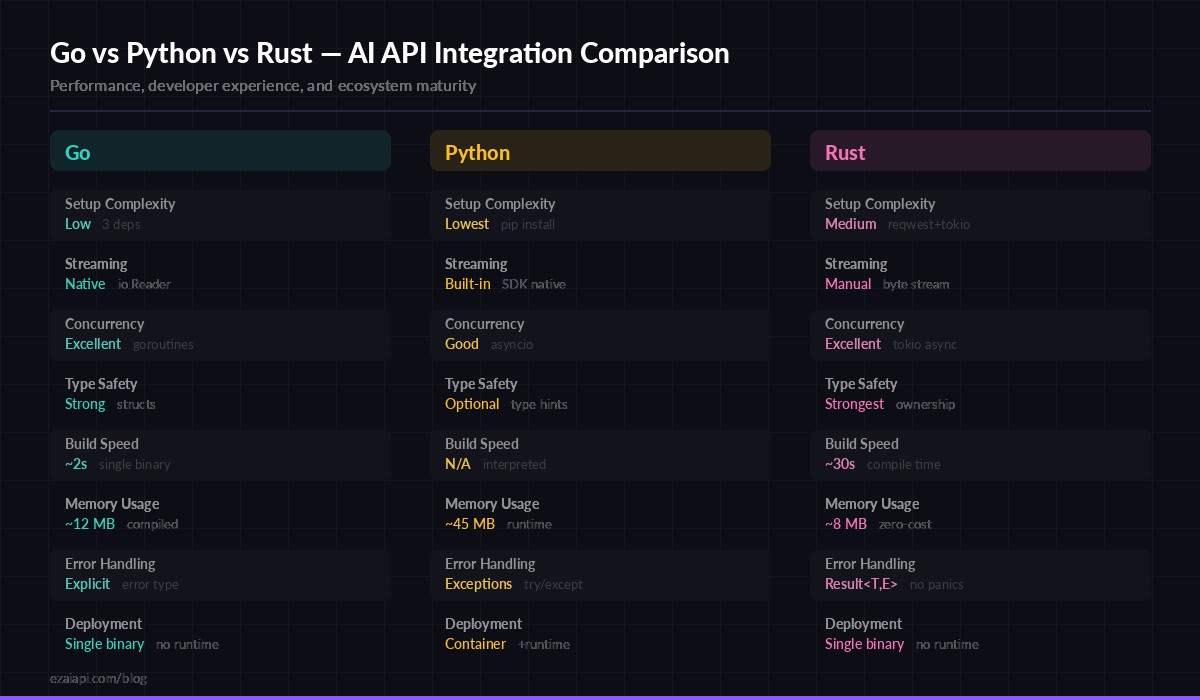
Go vs Python vs Rust — how each language handles AI API integration patterns
Concurrent Requests with Goroutines
This is where Go genuinely shines for AI workloads. Need to run the same prompt against three models and pick the best response? Or fan out 50 classification tasks in parallel? Goroutines make this trivial:
func fanOutModels(prompt string, models []string) []string {
    results := make([]string, len(models))
    var wg sync.WaitGroup

    for i, model := range models {
        wg.Add(1)
        go func(idx int, m string) {
            defer wg.Done()
            resp, err := callEzAI(m, prompt)
            if err != nil {
                results[idx] = fmt.Sprintf("[%s] error: %v", m, err)
                return
            }
            results[idx] = fmt.Sprintf("[%s] %s", m, resp)
        }(i, model)
    }

    wg.Wait()
    return results
}

// Usage: compare responses from 3 models simultaneously
models := []string{"claude-sonnet-4-5", "gpt-4o", "gemini-2.5-pro"}
responses := fanOutModels("Explain dependency injection in Go", models)
All three API calls run simultaneously. With EzAI's unified endpoint, you switch models by changing a string — no separate client initialization or authentication. The total wall-clock time equals the slowest model, not the sum of all three.
Retry Logic with Exponential Backoff
Production code needs to handle transient failures. Rate limits (429), server errors (500+), and network blips are inevitable. Here's a retry wrapper that handles all three with jitter to prevent thundering herds:
func callWithRetry(model, prompt string, maxRetries int) (string, error) {
    for attempt := 0; attempt <= maxRetries; attempt++ {
        resp, statusCode, err := doRequest(model, prompt)
        if err == nil && statusCode == 200 {
            return resp, nil
        }

        // Don't retry client errors (400, 401, 403)
        if statusCode >= 400 && statusCode < 429 {
            return "", fmt.Errorf("client error %d: %s", statusCode, resp)
        }

        if attempt == maxRetries { break }

        // Exponential backoff: 1s, 2s, 4s + jitter
        base := time.Duration(1<Int63n(int64(base / 2)))
        time.Sleep(base + jitter)
    }
    return "", fmt.Errorf("failed after %d retries", maxRetries)
}
Key details: we skip retries for 4xx client errors (bad request, invalid API key) since those won't resolve on retry. For 429 rate limits and 5xx server errors, we back off exponentially with random jitter. Three retries covers the vast majority of transient failures. For more advanced patterns, see our guide on AI API retry strategies.
Structured JSON Output
When you need the AI to return structured data — classification results, extracted entities, config objects — you can marshal the response directly into Go structs. Combine a clear system prompt with Go's type system:
type SentimentResult struct {
    Sentiment  string  `json:"sentiment"`  // positive, negative, neutral
    Confidence float64 `json:"confidence"` // 0.0 to 1.0
    Keywords   []string `json:"keywords"`
}

func analyzeSentiment(text string) (*SentimentResult, error) {
    system := `Analyze the sentiment. Respond ONLY with JSON:
{"sentiment":"positive|negative|neutral","confidence":0.95,"keywords":["word1"]}`

    resp, err := callEzAIWithSystem("claude-sonnet-4-5", system, text)
    if err != nil { return nil, err }

    var result SentimentResult
    if err := json.Unmarshal([]byte(resp), &result); err != nil {
        return nil, fmt.Errorf("invalid JSON from model: %w", err)
    }
    return &result, nil
}

// result.Sentiment == "positive"
// result.Confidence == 0.92
// result.Keywords == ["excellent", "fast", "reliable"]
The struct tags ensure clean JSON round-tripping. If the model returns malformed JSON (rare with Claude, but possible), the error handling catches it immediately. For higher reliability on structured output, check our structured JSON output guide.
Building an HTTP Server with AI
Go excels at building API servers. Here's a minimal HTTP handler that wraps EzAI into your own endpoint — useful for adding AI features to existing Go services:
func aiHandler(w http.ResponseWriter, r *http.Request) {
    var input struct {
        Prompt string `json:"prompt"`
        Model  string `json:"model"`
    }
    if err := json.NewDecoder(r.Body).Decode(&input); err != nil {
        http.Error(w, "bad request", 400)
        return
    }

    if input.Model == "" { input.Model = "claude-sonnet-4-5" }

    result, err := callWithRetry(input.Model, input.Prompt, 2)
    if err != nil {
        http.Error(w, err.Error(), 502)
        return
    }

    w.Header().Set("Content-Type", "application/json")
    json.NewEncoder(w).Encode(map[string]string{"response": result})
}

func main() {
    http.HandleFunc("/api/ai", aiHandler)
    fmt.Println("Listening on :8080")
    http.ListenAndServe(":8080", nil)
}
Deploy this as a single binary — go build -o ai-server && ./ai-server. No Docker container needed for simple deployments. The binary is typically 8-12 MB, starts in milliseconds, and handles thousands of concurrent connections out of the box.
Production Checklist
Before shipping Go + EzAI to production, cover these bases:
- Timeouts everywhere — Set
http.Client.Timeoutfor non-streaming, usecontext.WithTimeoutfor streaming requests. AI calls can take 30-60 seconds for complex prompts. - Retry with backoff — Use the pattern above. Three retries with exponential backoff covers 99% of transient failures.
- Log token usage — Track
input_tokensandoutput_tokensfrom every response. EzAI's dashboard shows aggregate data, but per-request logging helps debug cost spikes. - Graceful shutdown — Use
signal.NotifyContextto drain in-flight AI requests before killing the process. - Connection pooling — Go's
http.DefaultTransportalready pools connections. For high-throughput apps, tuneMaxIdleConnsPerHost(default is 2, bump to 10-20 for AI workloads). - Rate limiting — Check our rate limiting guide if you're doing batch processing. A semaphore channel works perfectly in Go for limiting concurrent API calls.
What's Next?
You now have everything to build AI-powered Go applications with EzAI. Start with the basic call, add streaming for real-time interfaces, and layer in goroutines when you need parallelism. Here are some next steps:
- Use EzAI with Rust — the Rust equivalent of this guide, if you're comparing languages
- Streaming deep dive — advanced streaming patterns across languages
- Getting started — quick setup guide if you don't have an EzAI key yet
- API reference — full endpoint documentation