
You send a prompt asking for a list of products with names, prices, and categories. The model returns beautifully formatted markdown. Your JSON.parse() throws. You regex the backticks out. It works for ten requests, then one comes back with a trailing comma and a helpful "Here's your data:" prefix. Sound familiar?
Getting structured JSON output from AI models is one of the most common production challenges. Free-form text is great for chatbots. It's terrible for pipelines. This guide covers three battle-tested approaches to extract typed, parseable JSON from Claude, GPT, and Gemini — all through the EzAI API.
Why "Just Ask for JSON" Breaks in Production
Telling a model "respond only in JSON" works about 95% of the time. That sounds fine until you're handling 10,000 requests a day and 500 of them blow up your parser. Common failure modes:
- The model wraps output in
```jsoncode fences - It adds preamble text like "Sure! Here's the JSON:"
- Trailing commas, unquoted keys, or single quotes
- Missing fields when the model "decides" a field isn't relevant
- Extra fields the model thought would be helpful
Each of these is a runtime exception waiting to happen. The fix isn't better prompts — it's using the right API features.
Method 1: Claude's Tool Use for Guaranteed Schema
Claude's tool_use feature isn't just for function calling. You can define a "tool" that matches your desired output schema, and Claude will return data in exactly that shape. The model treats the tool's input_schema as a strict contract.
import anthropic

client = anthropic.Anthropic(
    api_key="sk-your-key",
    base_url="https://ezaiapi.com"
)

extract_tool = {
    "name": "extract_products",
    "description": "Extract structured product data from text",
    "input_schema": {
        "type": "object",
        "properties": {
            "products": {
                "type": "array",
                "items": {
                    "type": "object",
                    "properties": {
                        "name": {"type": "string"},
                        "price_usd": {"type": "number"},
                        "category": {
                            "type": "string",
                            "enum": ["electronics", "clothing", "food"]
                        },
                        "in_stock": {"type": "boolean"}
                    },
                    "required": ["name", "price_usd", "category", "in_stock"]
                }
            }
        },
        "required": ["products"]
    }
}

message = client.messages.create(
    model="claude-sonnet-4-5",
    max_tokens=2048,
    tools=[extract_tool],
    tool_choice={"type": "tool", "name": "extract_products"},
    messages=[{
        "role": "user",
        "content": """Extract products from this invoice:
- MacBook Pro 14" M4: $1,999 (available)
- AirPods Max: $549 (backordered)
- iPhone 16 Pro case: $49 (available)"""
    }]
)

# The tool_use block contains valid, schema-conforming JSON
for block in message.content:
    if block.type == "tool_use":
        products = block.input["products"]
        for p in products:
            print(f"{p['name']}: ${p['price_usd']} ({p['category']})")
The key trick is tool_choice: {"type": "tool", "name": "extract_products"}. This forces the model to call the tool — no free-form text, no preamble, just structured data. The enum constraint on category means you'll only ever get one of your three valid values.
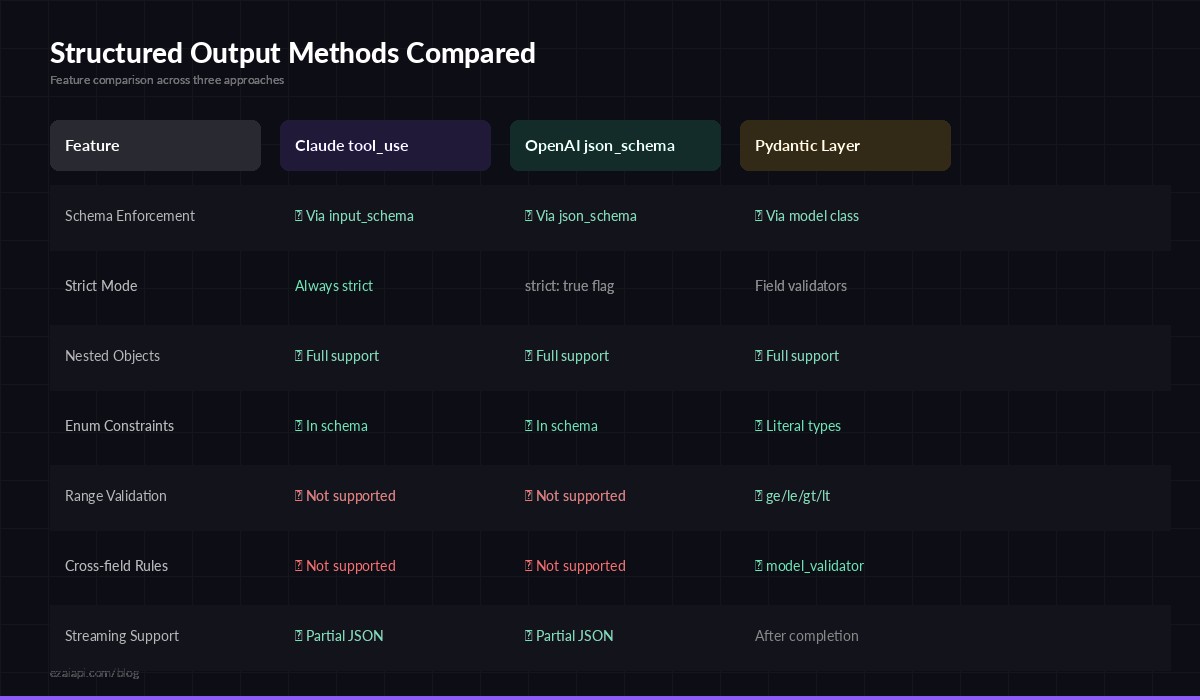
Three approaches to structured output — tool_use, response_format, and prompt engineering
Method 2: OpenAI-Compatible JSON Mode
If you're using OpenAI-compatible models through EzAI, you get access to response_format with JSON schema enforcement. This approach works with GPT-4o, GPT-4-turbo, and compatible models.
from openai import OpenAI

client = OpenAI(
    api_key="sk-your-key",
    base_url="https://ezaiapi.com/openai/v1"
)

response = client.chat.completions.create(
    model="gpt-4o",
    response_format={
        "type": "json_schema",
        "json_schema": {
            "name": "ticket_analysis",
            "strict": True,
            "schema": {
                "type": "object",
                "properties": {
                    "priority": {"type": "string", "enum": ["low", "medium", "high", "critical"]},
                    "summary": {"type": "string"},
                    "assigned_team": {"type": "string"},
                    "estimated_hours": {"type": "number"}
                },
                "required": ["priority", "summary", "assigned_team", "estimated_hours"],
                "additionalProperties": False
            }
        }
    },
    messages=[{
        "role": "user",
        "content": "Analyze this support ticket: 'Our payment gateway has been returning 502 errors for the last 20 minutes. Customers can't check out. Revenue impact estimated at $2k/min.'"
    }]
)

import json
ticket = json.loads(response.choices[0].message.content)
print(ticket)
# {"priority": "critical", "summary": "Payment gateway returning 502 errors...",
#  "assigned_team": "payments-infra", "estimated_hours": 2}
With "strict": true, the model is constrained at the token level. It physically cannot produce output that violates your schema. No trailing commas, no extra fields, no missing required properties.
Method 3: Pydantic Validation Layer
For maximum safety, combine the API-level schema enforcement with client-side validation using Pydantic. This catches edge cases like a model returning 0 for a price when you expected positive numbers, or a suspiciously long string in a field that should be a short label.
from pydantic import BaseModel, Field, field_validator
from typing import Literal
import anthropic, json

class SentimentResult(BaseModel):
    sentiment: Literal["positive", "negative", "neutral"]
    confidence: float = Field(ge=0.0, le=1.0)
    key_phrases: list[str] = Field(max_length=10)
    language: str = Field(max_length=5)  # ISO 639-1

    @field_validator("key_phrases")
    @classmethod
    def no_empty_phrases(cls, v):
        return [p for p in v if p.strip()]

def analyze_sentiment(text: str) -> SentimentResult:
    client = anthropic.Anthropic(
        api_key="sk-your-key",
        base_url="https://ezaiapi.com"
    )

    tool = {
        "name": "record_sentiment",
        "description": "Record the sentiment analysis result",
        "input_schema": SentimentResult.model_json_schema()
    }

    msg = client.messages.create(
        model="claude-sonnet-4-5",
        max_tokens=512,
        tools=[tool],
        tool_choice={"type": "tool", "name": "record_sentiment"},
        messages=[{"role": "user", "content": f"Analyze sentiment: {text}"}]
    )

    raw = next(b.input for b in msg.content if b.type == "tool_use")
    return SentimentResult.model_validate(raw)

result = analyze_sentiment("The new API is blazing fast but the docs need work")
print(result.model_dump_json(indent=2))
The Pydantic model auto-generates a JSON schema via model_json_schema(), which you feed directly to the tool definition. When the response comes back, model_validate() checks types, ranges, enums, and string lengths. If the model hallucinates a confidence of 1.5, Pydantic catches it before it hits your database.
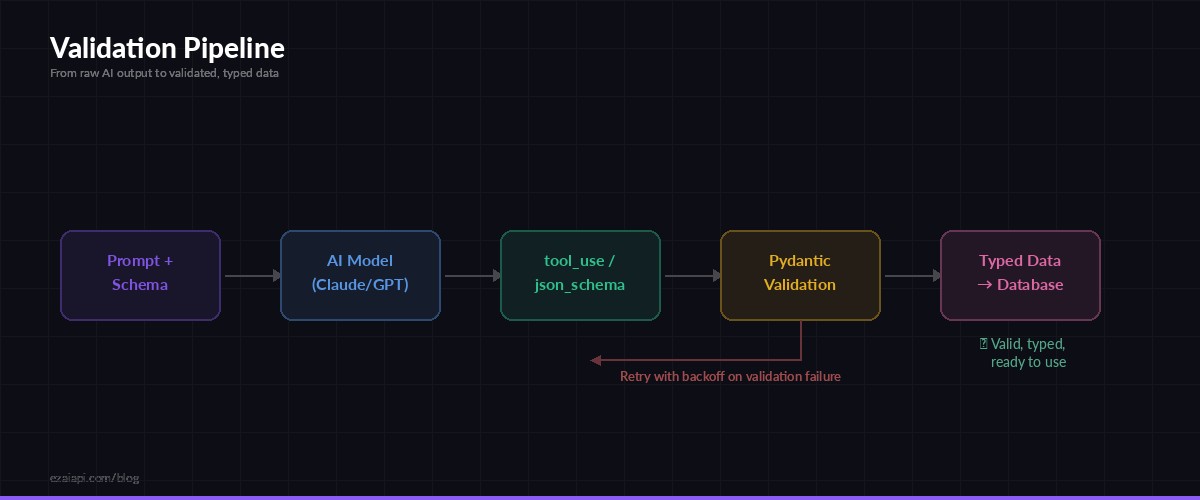
The validation pipeline: AI output → schema check → Pydantic → your database
Handling Failures Gracefully
Even with schema enforcement, you need a retry strategy. Network issues, model timeouts, and occasional schema violations still happen. Here's a production-ready wrapper with exponential backoff:
import time
from pydantic import ValidationError

def extract_with_retry(prompt, schema_model, max_retries=3):
    client = anthropic.Anthropic(
        api_key="sk-your-key",
        base_url="https://ezaiapi.com"
    )
    tool = {
        "name": "extract",
        "description": "Extract structured data",
        "input_schema": schema_model.model_json_schema()
    }

    for attempt in range(max_retries):
        try:
            msg = client.messages.create(
                model="claude-sonnet-4-5",
                max_tokens=2048,
                tools=[tool],
                tool_choice={"type": "tool", "name": "extract"},
                messages=[{"role": "user", "content": prompt}]
            )
            raw = next(b.input for b in msg.content if b.type == "tool_use")
            return schema_model.model_validate(raw)

        except ValidationError as e:
            print(f"Validation failed (attempt {attempt + 1}): {e}")
        except anthropic.APIError as e:
            print(f"API error (attempt {attempt + 1}): {e}")

        time.sleep(2 ** attempt)  # 1s, 2s, 4s

    raise RuntimeError("Failed to extract structured data after retries")
This gives you three attempts with increasing backoff. In production, you'd likely log the failures to a monitoring service and fall back to a different model via multi-model fallback.
Performance Tips
Structured output has real cost implications. Here's how to keep it efficient:
- Keep schemas tight. Every optional field is a field the model might hallucinate. Use
requiredliberally andadditionalProperties: falsewhen possible. - Use
enumfor constrained values. Instead of letting the model invent category names, give it a fixed list. This also cuts output tokens since the model can commit to a value faster. - Sonnet over Opus for extraction. Claude Sonnet 4.5 is 5x cheaper than Opus and follows tool schemas just as reliably for data extraction tasks. Save Opus for complex reasoning.
- Cache the schema. If you're processing batches, use prompt caching to avoid re-encoding the tool definition on every request. The schema tokens become free after the first call in a cache window.
- Set tight
max_tokens. If your expected output is 200 tokens, setmax_tokensto 512, not 4096. This avoids runaway costs if the model hallucinates a novel-length response.
When to Use Which Method
Match the approach to your use case:
- Claude tool_use — Best for Anthropic models. Highest reliability, supports nested schemas, works with streaming. Use this as your default.
- OpenAI json_schema — Required for GPT models. The
strict: trueflag gives token-level enforcement. Slightly more rigid than tool_use but equally reliable. - Pydantic wrapper — Layer this on top of either method for business logic validation (ranges, patterns, cross-field dependencies) that JSON Schema alone can't express.
Through EzAI, you can use all three approaches with a single API key. Switch between Claude and GPT extraction based on which model handles your specific domain better — or use model routing to pick automatically.
What's Next
Structured output is the foundation for reliable AI pipelines. Once you have typed, validated data coming out of your models, you can build real systems on top:
- Feed extracted data into data pipelines without manual parsing
- Power tool-calling agents that operate on structured commands
- Build classification, extraction, and analysis workflows that run at scale with batch processing
Get your API key at ezaiapi.com and start extracting structured data in minutes.