Ruby developers have been quietly building some of the most robust AI integrations in production. Rails apps processing thousands of AI requests per minute, Sidekiq workers running model inference in the background, Sinatra APIs wrapping LLM calls for mobile clients. The ecosystem is mature, the patterns are battle-tested, and with EzAI's Anthropic-compatible API, you can hit Claude, GPT-5, and Gemini from any Ruby app without juggling multiple SDKs.
This guide walks through four approaches — from raw Net::HTTP to Faraday middleware to real-time SSE streaming — so you can pick the one that fits your stack.
Prerequisites
You need three things: Ruby 3.1+ (though 3.3 is recommended), an EzAI API key, and a terminal. Every new account gets 15 free credits — enough to follow this entire guide without spending anything.
# Check Ruby version
ruby -v  # ruby 3.3.0 or higher

# Set your API key
export EZAI_API_KEY="sk-your-key-here"
Approach 1: Net::HTTP (Zero Dependencies)
Ruby's standard library is surprisingly capable for API work. No gems, no Bundler — just require 'net/http' and go. This is the approach for scripts, one-off tools, and situations where you don't want to manage dependencies.
require 'net/http'
require 'json'
require 'uri'

uri = URI("https://ezaiapi.com/v1/messages")

payload = {
  model: "claude-sonnet-4-5",
  max_tokens: 1024,
  messages: [
    { role: "user", content: "Explain Ruby's GVL in 3 sentences." }
  ]
}

http = Net::HTTP.new(uri.host, uri.port)
http.use_ssl = true
http.read_timeout = 30

request = Net::HTTP::Post.new(uri)
request["x-api-key"] = ENV["EZAI_API_KEY"]
request["anthropic-version"] = "2023-06-01"
request["content-type"] = "application/json"
request.body = payload.to_json

response = http.request(request)
data = JSON.parse(response.body)

puts data["content"][0]["text"]
The response body is identical to Anthropic's API. You get content, model, usage with input_tokens and output_tokens — everything you'd expect. EzAI just proxies the request to whichever provider hosts your chosen model.
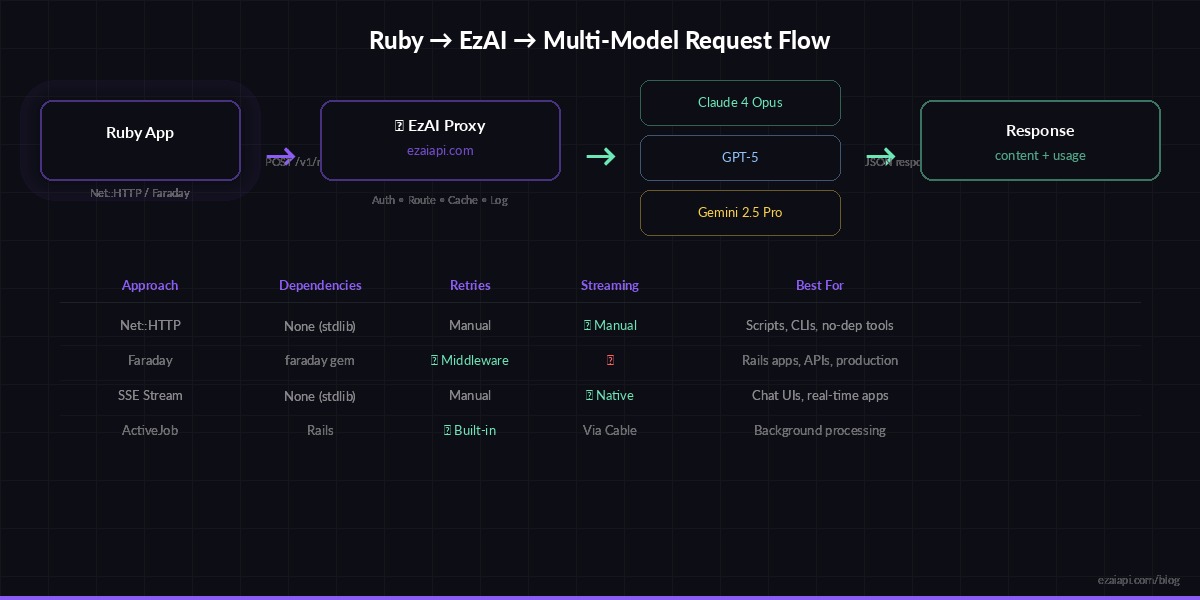
Request flow: Ruby app → EzAI proxy → Claude/GPT/Gemini → response back through the same path
Approach 2: Faraday with Retry Middleware
For production Rails apps, you want retries, timeouts, and structured error handling. Faraday gives you all of that with composable middleware. This is what most teams ship.
# Gemfile
gem "faraday", "~> 2.9"
gem "faraday-retry", "~> 2.2"require 'faraday'
require 'faraday/retry'
class EzaiClient
BASE_URL = "https://ezaiapi.com"
def initialize(api_key: ENV["EZAI_API_KEY"])
@conn = Faraday.new(url: BASE_URL) do |f|
f.request :json
f.response :json
f.request :retry, {
max: 3,
interval: 0.5,
backoff_factor: 2,
retry_statuses: [429, 500, 502, 503]
}
f.options.timeout = 60
f.options.open_timeout = 10
f.headers = {
"x-api-key" => api_key,
"anthropic-version" => "2023-06-01"
}
end
end
def chat(message, model: "claude-sonnet-4-5", max_tokens: 1024)
resp = @conn.post("/v1/messages") do |req|
req.body = {
model: model,
max_tokens: max_tokens,
messages: [{ role: "user", content: message }]
}
end
raise "API error #{resp.status}: #{resp.body}" unless resp.success?
resp.body
end
end
# Usage
client = EzaiClient.new
result = client.chat("Write a haiku about Ruby on Rails")
puts result["content"][0]["text"]
puts "Tokens: #{result["usage"]["input_tokens"]} in / #{result["usage"]["output_tokens"]} out"The retry middleware catches 429 (rate limit) and 5xx errors automatically. With exponential backoff at 0.5s / 1s / 2s, you handle transient failures without writing any retry logic yourself. This matters when you're running Sidekiq workers that fire hundreds of concurrent AI requests.
Streaming with Server-Sent Events
For chat interfaces, streaming is non-negotiable. Users expect to see tokens appear in real time, not stare at a spinner for 8 seconds. EzAI supports the same SSE streaming format as Anthropic's API — set stream: true and read chunks as they arrive.
require 'net/http'
require 'json'

def stream_response(prompt, model: "claude-sonnet-4-5")
  uri = URI("https://ezaiapi.com/v1/messages")

  payload = {
    model: model,
    max_tokens: 2048,
    stream: true,
    messages: [{ role: "user", content: prompt }]
  }

  http = Net::HTTP.new(uri.host, uri.port)
  http.use_ssl = true
  http.read_timeout = 120

  request = Net::HTTP::Post.new(uri)
  request["x-api-key"] = ENV["EZAI_API_KEY"]
  request["anthropic-version"] = "2023-06-01"
  request["content-type"] = "application/json"
  request.body = payload.to_json

  full_text = ""

  http.request(request) do |response|
    response.read_body do |chunk|
      chunk.split("\n").each do |line|
        next unless line.start_with?("data: ")
        data = line.sub("data: ", "")
        next if data == "[DONE]"

        event = JSON.parse(data)
        if event["type"] == "content_block_delta"
          text = event["delta"]["text"]
          full_text << text
          print text  # Real-time output
          $stdout.flush
        end
      end
    end
  end

  puts
  full_text
end

# Watch tokens stream in real time
stream_response("Write a short story about a Ruby developer debugging at 3 AM")
Each SSE event follows Anthropic's format: message_start, content_block_start, content_block_delta (where the actual text lives), and message_stop. You parse the same events whether you're hitting Anthropic directly or going through EzAI.
Multi-Model Switching
One of EzAI's strongest features is model switching through the same endpoint. Need Claude for code review but GPT-5 for creative writing? Just change the model parameter. No separate clients, no different auth flows.
client = EzaiClient.new

# Claude for technical tasks
review = client.chat(
  "Review this Ruby code for N+1 queries:\n#{code}",
  model: "claude-sonnet-4-5"
)

# GPT-5 for natural language
summary = client.chat(
  "Summarize this PR diff for non-technical stakeholders:\n#{diff}",
  model: "gpt-5"
)

# Gemini for long documents
analysis = client.chat(
  "Analyze this 50-page contract:\n#{contract_text}",
  model: "gemini-2.5-pro"
)
Check the pricing page for the full list of available models and their per-token costs. Free-tier models like claude-3-5-haiku are included at zero cost for quick prototyping.
Rails Integration with ActiveJob
AI calls in a web request are risky — they can take 5-30 seconds depending on the model and prompt length. Push them to background jobs and serve results asynchronously. Here's a clean pattern using ActiveJob and ActionCable for real-time updates.
# app/jobs/ai_completion_job.rb
class AiCompletionJob < ApplicationJob
  queue_as :ai_requests
  retry_on Faraday::ServerError, wait: 5, attempts: 3

  def perform(prompt_id)
    prompt = Prompt.find(prompt_id)
    client = EzaiClient.new

    result = client.chat(
      prompt.text,
      model: prompt.model || "claude-sonnet-4-5",
      max_tokens: 2048
    )

    prompt.update!(
      response: result["content"][0]["text"],
      input_tokens: result["usage"]["input_tokens"],
      output_tokens: result["usage"]["output_tokens"],
      completed_at: Time.current
    )

    # Push to frontend via ActionCable
    ActionCable.server.broadcast(
      "prompt_#{prompt_id}",
      { status: "completed", text: prompt.response }
    )
  end
end
Track input_tokens and output_tokens in your database. It costs nothing to store and makes cost attribution trivial — you'll know exactly which feature or user is driving your AI spend. The cost dashboard guide walks through building a full analytics layer on top of this data.
Error Handling That Ships
Production code hits rate limits, timeouts, and model outages. Here's a reusable wrapper that handles all three gracefully:
def safe_chat(prompt, model: "claude-sonnet-4-5", fallback: "claude-3-5-haiku")
  client = EzaiClient.new
  client.chat(prompt, model: model)
rescue Faraday::TooManyRequestsError => e
  wait = e.response&.headers&.[]("retry-after")&.to_i || 5
  Rails.logger.warn("Rate limited, waiting #{wait}s")
  sleep(wait)
  client.chat(prompt, model: model)
rescue Faraday::ServerError
  Rails.logger.warn("Primary model failed, falling back to #{fallback}")
  client.chat(prompt, model: fallback)
rescue Faraday::TimeoutError
  Rails.logger.error("AI request timed out for model #{model}")
  nil
end
The fallback pattern is worth highlighting: if Claude Sonnet is overloaded, drop down to Haiku (which is free on EzAI). Your users get a response within seconds instead of an error page. Read more about multi-model fallback strategies for advanced routing patterns.
What's Next
You've got the foundation. From here, the natural next steps depend on what you're building:
- Chat apps — Use SSE streaming with Turbo Streams for real-time chat UIs in Rails
- Background processing — Read the retry strategies guide for bulletproof Sidekiq workers
- Cost control — Set up spending alerts before your first production deploy
- Testing — Check our AI API testing guide for mock patterns with WebMock and VCR
Everything runs through the same ezaiapi.com endpoint. Switch models by changing a string. Monitor costs on your dashboard. Ship fast.