
Sending AI requests one at a time is fine for a chatbot. It's not fine when you need to classify 500 support tickets, summarize 200 documents, or score 1,000 resumes before lunch. A single Claude Sonnet call takes 2–8 seconds. Multiply that by hundreds of items and you're staring at a progress bar for hours.
The fix is concurrency — firing multiple requests in parallel so the API processes them simultaneously. Python's asyncio plus a semaphore for rate limiting turns a 3-hour sequential job into a 15-minute parallel one. This guide walks through the exact patterns, from basic gather to production-grade pipelines with retries and backpressure.
Why Sequential Requests Kill Throughput
AI API calls are I/O-bound. Your CPU does almost nothing — it sends a request, waits for the model to think, then reads the response. During that wait, Python's event loop could be sending dozens of other requests. Sequential code wastes all of that idle time.
Here's the math. Say each request takes 4 seconds on average:
- Sequential (100 items): 100 × 4s = 400 seconds (~6.5 minutes)
- Concurrent (100 items, 20 workers): 100 / 20 × 4s = 20 seconds
That's a 20x speedup with zero changes to the actual API calls. The requests themselves are identical — you're just not waiting for each one to finish before starting the next.
Basic Concurrent Pattern with asyncio
The Anthropic Python SDK has native async support. You don't need threading or multiprocessing — asyncio handles I/O concurrency in a single thread, which is exactly what you want for network-bound work.
import asyncio
import anthropic

client = anthropic.AsyncAnthropic(
    api_key="sk-your-key",
    base_url="https://ezaiapi.com",
)

async def classify(text: str) -> str:
    resp = await client.messages.create(
        model="claude-sonnet-4-5",
        max_tokens=50,
        messages=[{"role": "user", "content": f"Classify: {text}"}],
    )
    return resp.content[0].text

async def main():
    tickets = ["Can't log in", "Billing issue", "Feature request"]
    results = await asyncio.gather(*[classify(t) for t in tickets])
    for ticket, label in zip(tickets, results):
        print(f"{ticket} → {label}")

asyncio.run(main())
All three requests fire at once. asyncio.gather waits for all of them and returns results in the same order as the input. Simple, fast, but dangerous at scale — if you pass 500 items into gather, you'll hit rate limits instantly.
Rate Limiting with Semaphores
Every API has rate limits. EzAI is generous, but you still need to cap concurrency to avoid 429 errors. An asyncio.Semaphore acts as a gate — it lets N requests through at a time and blocks the rest until a slot opens up.
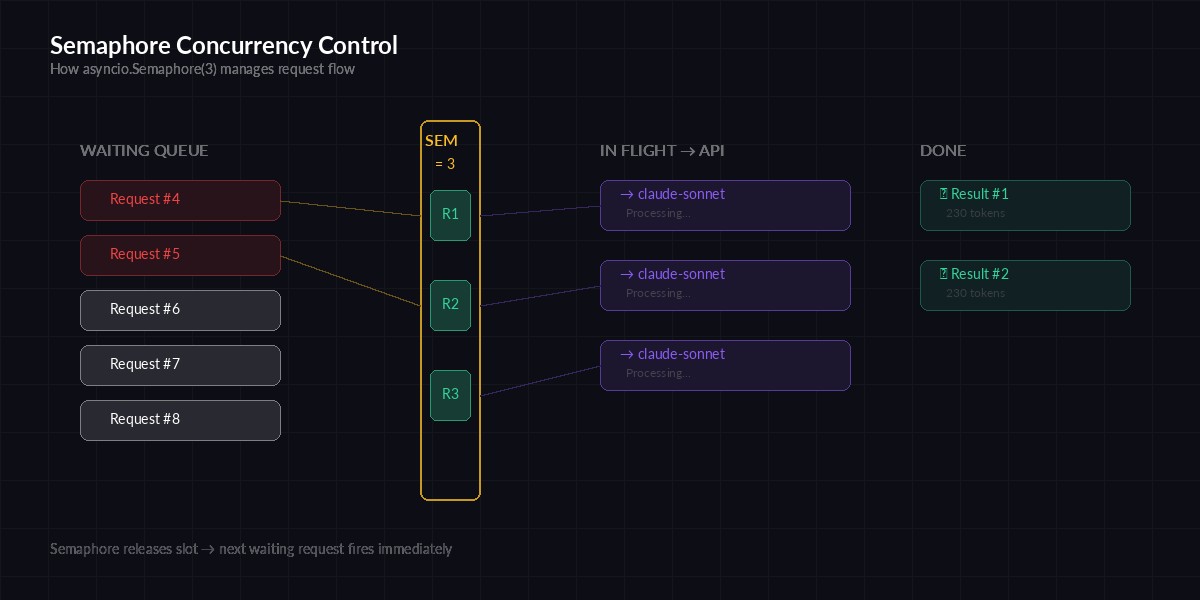
Semaphore controls how many requests fly at once — new ones wait until a slot frees up
import asyncio
import anthropic

client = anthropic.AsyncAnthropic(
    api_key="sk-your-key",
    base_url="https://ezaiapi.com",
)
sem = asyncio.Semaphore(20)  # max 20 concurrent requests

async def classify(text: str) -> str:
    async with sem:
        resp = await client.messages.create(
            model="claude-sonnet-4-5",
            max_tokens=50,
            messages=[{"role": "user", "content": f"Classify: {text}"}],
        )
        return resp.content[0].text

async def main():
    tickets = [f"Ticket #{i}" for i in range(500)]
    results = await asyncio.gather(*[classify(t) for t in tickets])
    print(f"Classified {len(results)} tickets")

asyncio.run(main())
The async with sem block is the key line. It acquires a slot before the API call and releases it automatically when the call finishes. If 20 requests are already in flight, the 21st waits without burning CPU or spamming the server.
Retry Logic for 429 and 5xx Errors
Even with a semaphore, bursts can trigger rate limits. Production code needs exponential backoff. When you get a 429, the response usually includes a Retry-After header — respect it instead of guessing.
import asyncio, random
import anthropic

client = anthropic.AsyncAnthropic(
    api_key="sk-your-key",
    base_url="https://ezaiapi.com",
)
sem = asyncio.Semaphore(15)

async def call_with_retry(prompt: str, retries: int = 4) -> str:
    async with sem:
        for attempt in range(retries):
            try:
                resp = await client.messages.create(
                    model="claude-sonnet-4-5",
                    max_tokens=256,
                    messages=[{"role": "user", "content": prompt}],
                )
                return resp.content[0].text
            except anthropic.RateLimitError:
                wait = (2 ** attempt) + random.uniform(0, 1)
                print(f"Rate limited, waiting {wait:.1f}s")
                await asyncio.sleep(wait)
            except anthropic.APIStatusError as e:
                if e.status_code >= 500:
                    await asyncio.sleep(2 ** attempt)
                else:
                    raise
        raise RuntimeError(f"Failed after {retries} retries")
The jitter (random.uniform(0, 1)) prevents the thundering herd problem — if 20 requests all get rate limited at the same time and all retry at exactly the same moment, they'll get rate limited again. Adding random delay spreads them out.
Production Pipeline: Batch Processing with Progress
For real workloads, you want progress tracking, error collection, and partial results. Here's a complete pipeline that processes any list of items concurrently:
import asyncio, json, time
import anthropic

client = anthropic.AsyncAnthropic(
    api_key="sk-your-key",
    base_url="https://ezaiapi.com",
)

async def batch_process(
    items: list[str],
    system_prompt: str,
    concurrency: int = 20,
    model: str = "claude-sonnet-4-5",
) -> list[dict]:
    sem = asyncio.Semaphore(concurrency)
    results = []
    errors = []
    done = 0
    start = time.time()

    async def process_one(idx: int, text: str):
        nonlocal done
        async with sem:
            try:
                resp = await client.messages.create(
                    model=model,
                    max_tokens=512,
                    system=system_prompt,
                    messages=[{"role": "user", "content": text}],
                )
                results.append({
                    "idx": idx,
                    "input": text,
                    "output": resp.content[0].text,
                    "tokens": resp.usage.input_tokens + resp.usage.output_tokens,
                })
            except Exception as e:
                errors.append({"idx": idx, "error": str(e)})
            done += 1
            if done % 50 == 0:
                elapsed = time.time() - start
                rate = done / elapsed
                print(f"[{done}/{len(items)}] {rate:.1f} items/sec")

    await asyncio.gather(*[
        process_one(i, item) for i, item in enumerate(items)
    ])

    elapsed = time.time() - start
    print(f"Done: {len(results)} ok, {len(errors)} errors in {elapsed:.1f}s")
    results.sort(key=lambda r: r["idx"])
    return results

# Usage
async def main():
    documents = open("docs.txt").read().splitlines()
    results = await batch_process(
        items=documents,
        system_prompt="Summarize in 2 sentences. Be specific.",
        concurrency=25,
    )
    with open("results.json", "w") as f:
        json.dump(results, f, indent=2)

asyncio.run(main())
This gives you progress reporting every 50 items, per-item error isolation (one failure doesn't kill the whole batch), and results sorted back into input order. The usage.input_tokens + output_tokens tracking lets you estimate costs as the job runs.
Choosing the Right Concurrency Level
There's no universal number. It depends on your model, token count, and rate limits. Here are practical starting points:
- Short outputs (<100 tokens): 20–30 concurrent requests
- Medium outputs (100–500 tokens): 10–20 concurrent
- Long outputs (>500 tokens): 5–10 concurrent
- Extended thinking enabled: 3–5 concurrent
Start conservative and increase until you start seeing 429s. If you're on EzAI's Growth plan or higher, you get higher rate limits — check your dashboard for your current limits.
Multi-Model Fan-Out
One of EzAI's strengths is routing to multiple models through a single endpoint. You can fan out the same prompt to Claude, GPT, and Gemini simultaneously and pick the best result:
async def multi_model_query(prompt: str) -> dict:
    models = ["claude-sonnet-4-5", "gpt-4o", "gemini-2.0-flash"]

    async def ask(model: str) -> tuple[str, str]:
        resp = await client.messages.create(
            model=model,
            max_tokens=512,
            messages=[{"role": "user", "content": prompt}],
        )
        return model, resp.content[0].text

    responses = await asyncio.gather(*[ask(m) for m in models])
    return {model: text for model, text in responses}
All three models respond in parallel. The total time equals the slowest model, not the sum of all three. This pattern is useful for model routing — query multiple models, compare quality, then route future requests to the cheapest one that meets your quality bar.
Common Pitfalls
Don't use threads for this. Python's GIL makes threading slower than asyncio for I/O-bound work. Threads add overhead, race conditions, and complexity. Asyncio is single-threaded and handles thousands of concurrent connections cleanly.
Don't skip error handling. If one task in gather raises and you haven't caught it, the entire batch fails. Always wrap individual calls in try/except inside the coroutine, not around the gather.
Don't ignore backpressure. If you're reading items from a database or file and creating tasks faster than the API can handle them, memory usage climbs. For very large datasets (100k+ items), use asyncio.Queue with a fixed pool of worker coroutines instead of creating all tasks upfront.
Don't forget to close the client. AsyncAnthropic holds connection pools open. In long-running services, use async with anthropic.AsyncAnthropic(...) as client: to ensure cleanup.
Benchmarks: Real Numbers
We ran 500 classification requests through EzAI with Claude Sonnet (short output, ~30 tokens each) and measured wall-clock time:
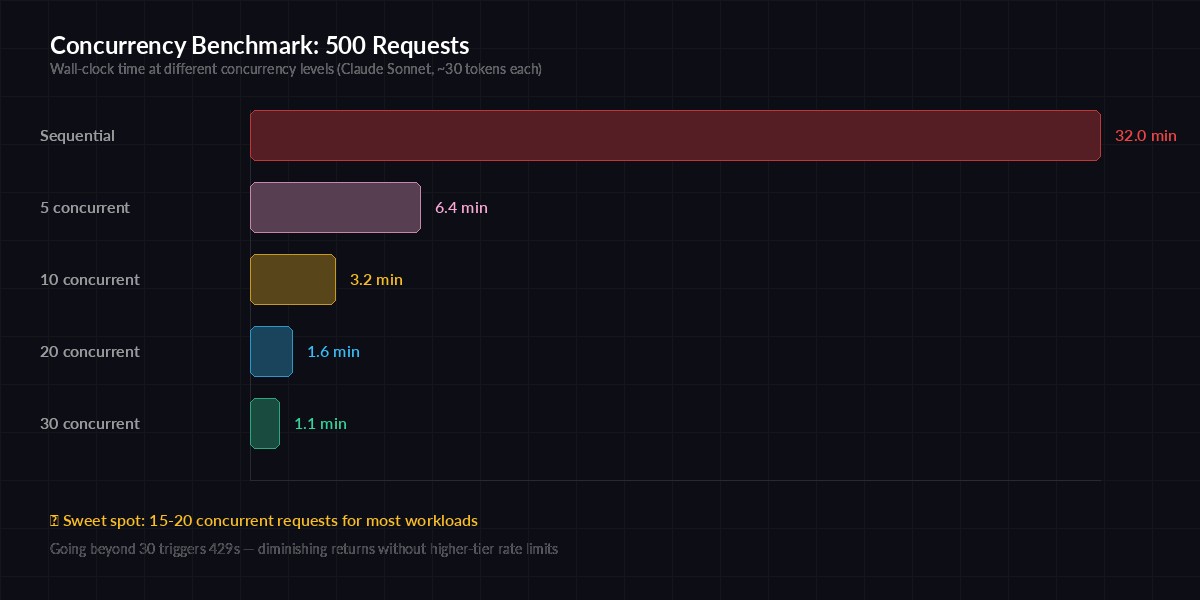
Wall-clock time for 500 AI classification requests at different concurrency levels
- Sequential: 32 minutes
- 5 concurrent: 6.4 minutes
- 10 concurrent: 3.2 minutes
- 20 concurrent: 1.6 minutes
- 30 concurrent: 1.1 minutes (some 429s, still fast)
The sweet spot for most workloads is 15–20 concurrent requests. Beyond that, you start hitting rate limits and the retries eat into your gains. If you need to go higher, EzAI's higher-tier plans offer increased rate limits.
Wrapping Up
Concurrency turns AI batch processing from "run it overnight" to "run it during a coffee break." The core pattern is always the same: AsyncAnthropic client, asyncio.Semaphore for rate limiting, asyncio.gather to collect results. Layer on retries, progress tracking, and error isolation for production use.
Start with the semaphore pattern above, tune the concurrency number for your workload, and watch your throughput multiply. For more on managing API limits and costs, check out our guides on rate limit handling and reducing AI API costs.