GraphQL solves the over-fetching and under-fetching problems that plague REST APIs. Pair it with an AI backend, and you get something genuinely powerful: an API that resolves complex queries by reasoning about your data, not just looking up database rows. This tutorial walks through building a production-ready AI-powered GraphQL API using Python, Strawberry GraphQL, and Claude via the EzAI API.
By the end, you'll have a working GraphQL server that accepts typed queries, routes them to Claude for intelligent resolution, and returns structured responses — all with proper error handling and caching.
Why GraphQL + AI?
Traditional GraphQL resolvers map fields to database columns. That works until your data needs interpretation — summarizing documents, answering questions about relationships between entities, or generating content on the fly. An AI resolver can handle all of that through a single schema.
Consider a product catalog API. A REST endpoint returns raw product data. A GraphQL API lets the client pick which fields to fetch. An AI-powered GraphQL API can do both and answer queries like "find products similar to X but under $50" or "summarize the reviews for this item" — all through the same schema.
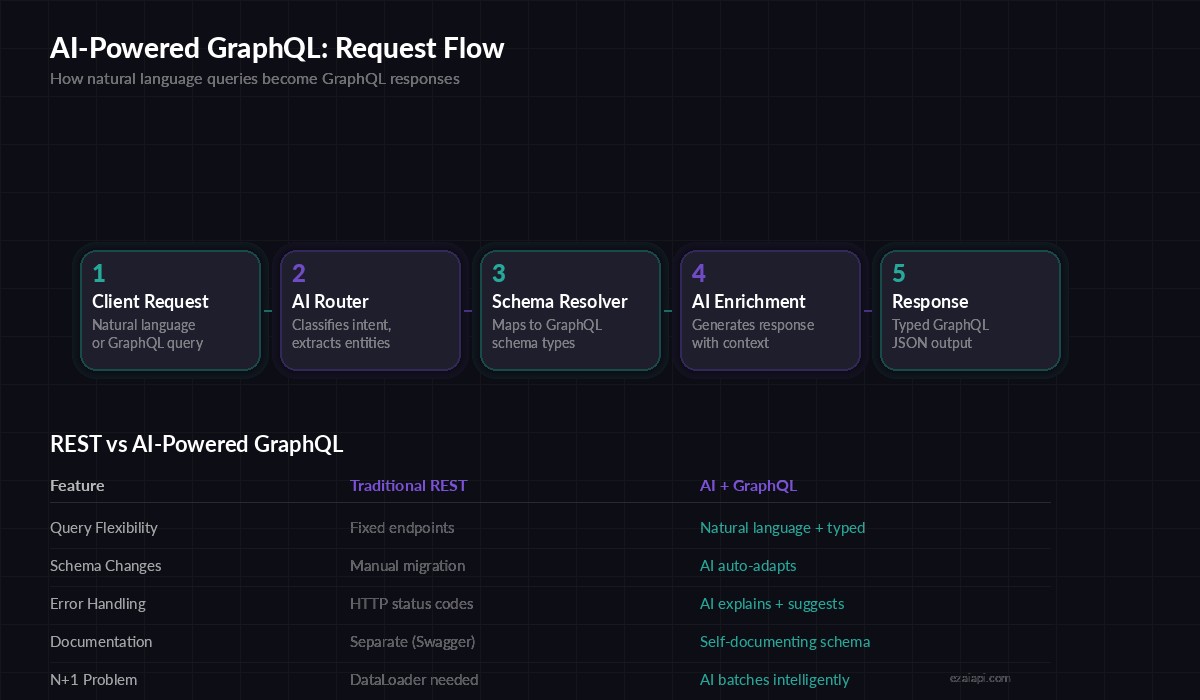
Request flow: natural language or typed GraphQL queries routed through AI resolvers
Project Setup
You'll need Python 3.11+, an EzAI API key, and three packages:
pip install strawberry-graphql[fastapi] anthropic uvicornStrawberry is a code-first GraphQL library — you define your schema with Python dataclasses instead of SDL strings. It integrates cleanly with FastAPI and async resolvers, which is exactly what we need for AI calls.
Define the Schema
Start with types that represent your domain. We'll build a knowledge base API where users can query documents, ask questions, and get AI-generated summaries:
import strawberry
from typing import Optional

@strawberry.type
class Document:
    id: str
    title: str
    content: str
    summary: Optional[str] = None
    tags: list[str] = strawberry.field(default_factory=list)

@strawberry.type
class AIAnswer:
    question: str
    answer: str
    confidence: float
    sources: list[str]

@strawberry.type
class SearchResult:
    documents: list[Document]
    ai_summary: str
    total_count: int
These types define the contract. Clients know exactly what they're getting back — typed fields, not mystery JSON blobs. The AIAnswer type includes a confidence score so callers can decide whether to trust the response or fall back to manual lookup.
Build the AI Resolver
The core of the system is a resolver that sends queries to Claude through EzAI and parses the response into your GraphQL types:
import anthropic
import json

client = anthropic.AsyncAnthropic(
    api_key="sk-your-ezai-key",
    base_url="https://ezaiapi.com"
)

async def ai_resolve(query: str, context: str = "") -> dict:
    """Send a structured query to Claude and parse JSON response."""
    prompt = f"""You are a knowledge base API. Answer the query using
the provided context. Return valid JSON matching this schema:
{{"answer": str, "confidence": float 0-1, "sources": [str]}}

Context: {context}
Query: {query}"""

    response = await client.messages.create(
        model="claude-sonnet-4-5",
        max_tokens=2048,
        messages=[{"role": "user", "content": prompt}]
    )

    text = response.content[0].text
    # Extract JSON from response (handles markdown code blocks)
    if "```json" in text:
        text = text.split("```json")[1].split("```")[0]
    return json.loads(text.strip())
Two things to note here. First, the base_url points to EzAI, which routes the request to Claude at lower cost. Second, we parse JSON from the response defensively — Claude sometimes wraps output in markdown code fences, and the splitter handles that.
Wire Up the Query Root
Connect your resolvers to the GraphQL schema. Each resolver is an async function that calls Claude through the ai_resolve helper:
from functools import lru_cache
from hashlib import sha256

# Simple in-memory cache for repeated queries
_cache: dict[str, dict] = {}

def cache_key(query: str) -> str:
    return sha256(query.encode()).hexdigest()[:16]

@strawberry.type
class Query:
    @strawberry.field
    async def ask(self, question: str) -> AIAnswer:
        key = cache_key(question)
        if key in _cache:
            data = _cache[key]
        else:
            data = await ai_resolve(question)
            _cache[key] = data

        return AIAnswer(
            question=question,
            answer=data["answer"],
            confidence=data["confidence"],
            sources=data.get("sources", [])
        )

    @strawberry.field
    async def summarize(self, text: str, max_words: int = 100) -> str:
        response = await client.messages.create(
            model="claude-sonnet-4-5",
            max_tokens=512,
            messages=[{
                "role": "user",
                "content": f"Summarize in {max_words} words:\n\n{text}"
            }]
        )
        return response.content[0].text

schema = strawberry.Schema(query=Query)
The ask resolver includes a hash-based cache. Identical questions return cached results instead of burning tokens on repeated Claude calls. In production, swap the dict for Redis with a TTL — the caching guide covers this in depth.
Add FastAPI and Launch
Strawberry plugs directly into FastAPI with one import. Add a health check endpoint and you're production-ready:
from fastapi import FastAPI
from strawberry.fastapi import GraphQLRouter

app = FastAPI(title="AI GraphQL API")
graphql_app = GraphQLRouter(schema)

app.include_router(graphql_app, prefix="/graphql")

@app.get("/health")
async def health():
    return {"status": "ok", "cache_size": len(_cache)}

# Run: uvicorn app:app --host 0.0.0.0 --port 8000
Hit http://localhost:8000/graphql and you'll get Strawberry's built-in GraphiQL playground. Try a query:
{
  ask(question: "What are the best practices for API rate limiting?") {
    answer
    confidence
    sources
  }
}
Error Handling That Actually Works
AI calls fail. Networks time out. Models hallucinate invalid JSON. Your API needs to handle all of that without crashing:
import asyncio
from anthropic import APITimeoutError, RateLimitError

async def ai_resolve_safe(query: str, retries: int = 2) -> dict:
    for attempt in range(retries + 1):
        try:
            return await ai_resolve(query)
        except RateLimitError:
            wait = 2 ** attempt
            await asyncio.sleep(wait)
        except APITimeoutError:
            if attempt == retries:
                return {
                    "answer": "Request timed out. Try a simpler query.",
                    "confidence": 0.0,
                    "sources": []
                }
        except json.JSONDecodeError:
            # Model returned non-JSON — retry with stricter prompt
            if attempt == retries:
                return {
                    "answer": "Could not parse AI response.",
                    "confidence": 0.0,
                    "sources": []
                }
    return {"answer": "Service unavailable.", "confidence": 0.0, "sources": []}
The retry logic uses exponential backoff for rate limits and graceful degradation for timeouts. Clients always get a valid AIAnswer shape back — they check the confidence field to know if the response is real or a fallback. For deeper patterns on retry strategies, see the retry strategies guide.
Going to Production
Before you ship this, add these three things:
- Authentication middleware — Strawberry supports permission classes that check API keys or JWTs before resolvers execute
- Query depth limiting — Prevent deeply nested queries from generating massive Claude prompts. Strawberry's
MaxTokensLimiterextension caps this automatically - Cost tracking — Log
response.usage.input_tokensandoutput_tokensper request so you can monitor your AI spending - Swap the cache — Replace the in-memory dict with Redis. Set a TTL of 1-24 hours depending on how fresh your data needs to be
The full pattern — GraphQL schema, AI resolvers, caching, error handling — scales well. Teams at production scale use exactly this stack to power internal knowledge bases, customer-facing search APIs, and document processing pipelines.
What's Next
You now have a working AI-powered GraphQL API. From here, consider adding streaming responses for long-form answers, or wiring in tool use so Claude can call your database resolvers directly. The GraphQL type system keeps everything predictable even as the AI backend grows more capable.
Get your API key from the EzAI dashboard and start building.