You've got an AI prototype running in a notebook. Now your team needs it as a real API — with auth, streaming, error handling, and rate limiting. FastAPI + Claude through EzAI is the fastest path from prototype to production-ready AI endpoint. Here's how to build one in under 200 lines of Python.
Why FastAPI for AI APIs?
FastAPI is the go-to framework for AI backends. It's async-native (critical for streaming LLM responses), auto-generates OpenAPI docs, and handles request validation with Pydantic. Combined with EzAI's unified API, you get a production-grade AI service without managing multiple provider SDKs.
What we're building:
- POST /chat — Send a message, get a Claude response
- POST /chat/stream — Same thing, but with Server-Sent Events streaming
- API key auth — Protect your endpoints
- Rate limiting — Prevent abuse without external tools
Project Setup
Create a new project and install dependencies:
mkdir ai-api && cd ai-api
pip install fastapi uvicorn anthropic python-dotenv
Create a .env file with your EzAI API key:
EZAI_API_KEY=sk-your-key-here
API_SECRET=your-api-secret-for-clients
The Core API
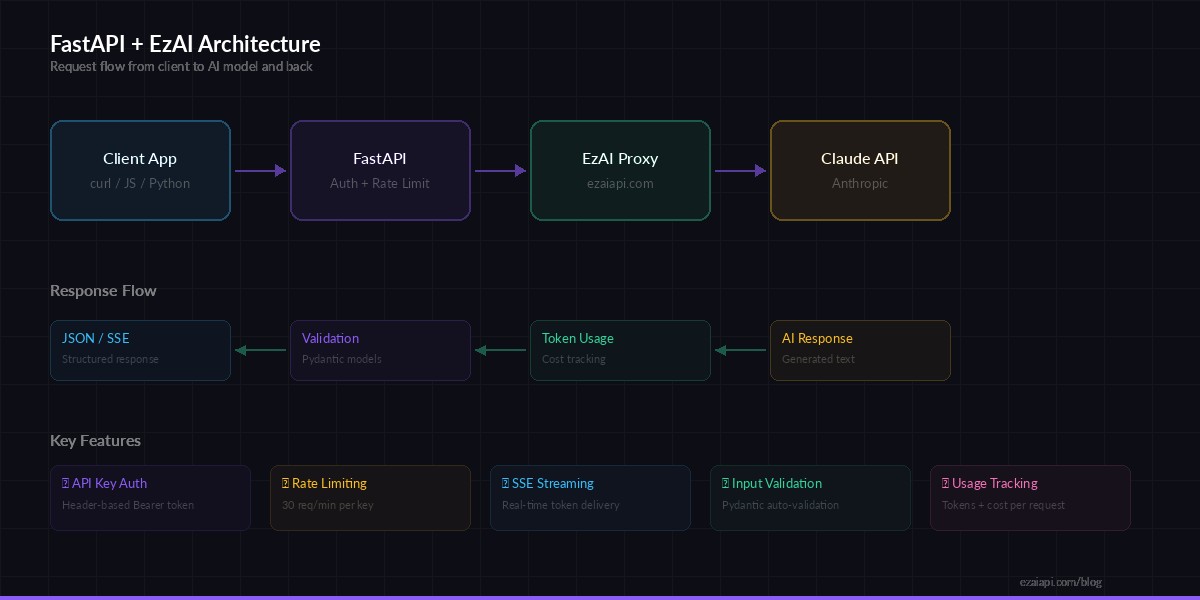
Request flow: Client → FastAPI → EzAI → Claude → Streaming response back to client
Here's the complete API in one file. It handles both synchronous and streaming responses:
# main.py
import os, time, json
from collections import defaultdict
from dotenv import load_dotenv
from fastapi import FastAPI, Header, HTTPException
from fastapi.responses import StreamingResponse
from pydantic import BaseModel, Field
import anthropic

load_dotenv()

app = FastAPI(title="AI Chat API", version="1.0")

client = anthropic.Anthropic(
    api_key=os.environ["EZAI_API_KEY"],
    base_url="https://ezaiapi.com",
)

API_SECRET = os.environ["API_SECRET"]

# --- Request/Response models ---
class ChatRequest(BaseModel):
    message: str = Field(..., max_length=4000)
    model: str = "claude-sonnet-4-5"
    max_tokens: int = Field(default=1024, le=4096)
    system: str | None = None

class ChatResponse(BaseModel):
    response: str
    model: str
    input_tokens: int
    output_tokens: int

# --- Auth middleware ---
def verify_key(authorization: str = Header(...)):
    if authorization != f"Bearer {API_SECRET}":
        raise HTTPException(401, "Invalid API key")

# --- Rate limiter (in-memory) ---
rate_limits: dict = defaultdict(lambda: {"count": 0, "reset": 0})
RATE_LIMIT = 30  # requests per minute

def check_rate(key: str):
    now = time.time()
    bucket = rate_limits[key]
    if now > bucket["reset"]:
        bucket["count"] = 0
        bucket["reset"] = now + 60
    bucket["count"] += 1
    if bucket["count"] > RATE_LIMIT:
        raise HTTPException(429, "Rate limit exceeded")
The ChatRequest model validates input automatically — no manual checks needed. FastAPI rejects malformed requests before your code runs. The rate limiter is a simple in-memory counter that resets every 60 seconds — good enough for single-instance deployments.
Synchronous Chat Endpoint
@app.post("/chat", response_model=ChatResponse)
def chat(req: ChatRequest, authorization: str = Header(...)):
    verify_key(authorization)
    check_rate(authorization)

    kwargs = {
        "model": req.model,
        "max_tokens": req.max_tokens,
        "messages": [{"role": "user", "content": req.message}],
    }
    if req.system:
        kwargs["system"] = req.system

    try:
        resp = client.messages.create(**kwargs)
    except anthropic.APIError as e:
        raise HTTPException(e.status_code, str(e))

    return ChatResponse(
        response=resp.content[0].text,
        model=resp.model,
        input_tokens=resp.usage.input_tokens,
        output_tokens=resp.usage.output_tokens,
    )
Clean, typed, and auto-documented. FastAPI generates an interactive Swagger UI at /docs that your frontend team can use to test endpoints without writing a single line of code.
Streaming Endpoint with SSE
For chat UIs, you want tokens to appear as they're generated. This endpoint streams Claude's response using Server-Sent Events:
@app.post("/chat/stream")
def chat_stream(req: ChatRequest, authorization: str = Header(...)):
    verify_key(authorization)
    check_rate(authorization)

    def generate():
        kwargs = {
            "model": req.model,
            "max_tokens": req.max_tokens,
            "messages": [{"role": "user", "content": req.message}],
        }
        if req.system:
            kwargs["system"] = req.system

        with client.messages.stream(**kwargs) as stream:
            for text in stream.text_stream:
                chunk = json.dumps({"text": text})
                yield f"data: {chunk}\n\n"
            # Final event with usage stats
            final = stream.get_final_message()
            done = json.dumps({
                "done": True,
                "input_tokens": final.usage.input_tokens,
                "output_tokens": final.usage.output_tokens,
            })
            yield f"data: {done}\n\n"

    return StreamingResponse(
        generate(),
        media_type="text/event-stream",
    )
The streaming endpoint uses the same Anthropic SDK — just swap create() for stream(). Each text chunk is sent as an SSE event, and the final event includes token usage so your frontend can display cost information.
Running and Testing
Start the server:
uvicorn main:app --reload --port 8000Test the sync endpoint:
curl http://localhost:8000/chat \
  -H "Authorization: Bearer your-api-secret" \
  -H "Content-Type: application/json" \
  -d '{"message": "What is FastAPI?", "max_tokens": 256}'
Test streaming:
curl -N http://localhost:8000/chat/stream \
  -H "Authorization: Bearer your-api-secret" \
  -H "Content-Type: application/json" \
  -d '{"message": "Explain async Python in 3 sentences"}'
You'll see tokens stream in real time. The -N flag disables curl's output buffering so you see each chunk as it arrives.
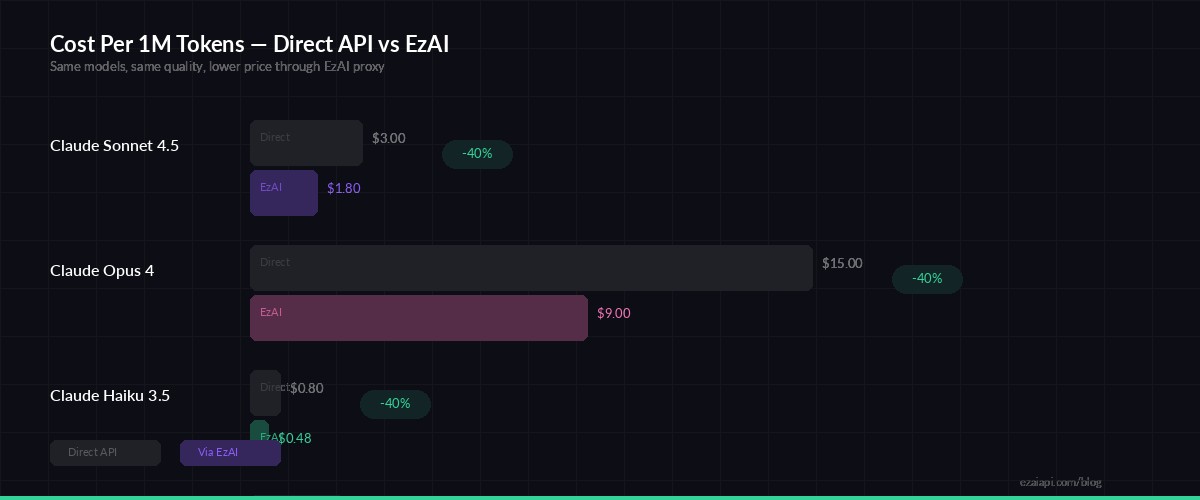
Running through EzAI vs direct API — same code, lower cost per request
Production Hardening Tips
Before deploying, add these to your API:
- CORS middleware — Required if your frontend is on a different domain. Add
CORSMiddlewarefromfastapi.middleware.cors - Request logging — Log model, tokens, and latency for every request. You'll need this for debugging and cost tracking
- Multi-model fallback — If Claude is slow, fall back to another model automatically. EzAI supports 20+ models through the same endpoint
- Redis rate limiting — Replace the in-memory dict with Redis if running multiple instances behind a load balancer
- Conversation history — Store messages in a database and pass them as the
messagesarray for multi-turn chats
For cost optimization, consider caching frequent queries and using claude-haiku-3-5 for simple requests while reserving Sonnet/Opus for complex ones.
Deploy with Docker
Wrap it in a minimal Dockerfile for production:
FROM python:3.12-slim
WORKDIR /app
COPY requirements.txt .
RUN pip install --no-cache-dir -r requirements.txt
COPY . .
CMD ["uvicorn", "main:app", "--host", "0.0.0.0", "--port", "8000"]
Deploy to any container platform — Railway, Fly.io, AWS ECS, or a plain VPS with Docker Compose. The app is stateless (no database required for the basic version), so horizontal scaling is straightforward.
What's Next?
You've got a working AI API with auth, rate limiting, and streaming. From here you can:
- Add RAG capabilities by integrating a vector database for context-aware responses
- Build a Slack bot or Discord bot on top of this API
- Check the EzAI docs for the full list of supported models and features
The full source code for this tutorial is available on GitHub.