
Every time your app sends the same prompt to Claude or GPT, you're paying full price for a response you already have. AI API caching is the single most effective way to reduce costs without changing your model or degrading quality. Teams that implement it typically see 40–70% cost reduction on their first month.
This guide covers three caching strategies — from a simple hash-based cache you can build in 20 minutes, to semantic caching that catches near-duplicate prompts your users don't even realize they're sending.
Why Most AI Costs Are Wasted
Analyze your API logs and you'll find a pattern: a huge chunk of requests are effectively duplicates. Customer support bots answering the same FAQ. Code assistants explaining the same error. Translation services processing identical strings.
Here's what a typical production workload looks like:
- 30-40% of prompts are exact duplicates (same user, same input)
- 15-25% are near-duplicates (different wording, same intent)
- Only 35-55% are genuinely unique requests
That means up to 65% of your AI spend is going toward answers you've already generated. A cache fixes this instantly.
Strategy 1: Hash-Based Exact Cache
The simplest approach — hash the prompt + model + parameters, store the response, return it on match. Zero false positives, zero complexity. This alone catches 30-40% of traffic for most apps.
import hashlib, json, redis
import anthropic

cache = redis.Redis(host="localhost", port=6379, db=0)
client = anthropic.Anthropic(
    api_key="sk-your-key",
    base_url="https://ezaiapi.com"
)

def cache_key(model, messages, max_tokens):
    """Generate a deterministic cache key from request params."""
    payload = json.dumps({
        "model": model,
        "messages": messages,
        "max_tokens": max_tokens
    }, sort_keys=True)
    return f"ai:cache:{hashlib.sha256(payload.encode()).hexdigest()[:16]}"

def ask_ai(prompt, model="claude-sonnet-4-5", max_tokens=1024, ttl=3600):
    messages = [{"role": "user", "content": prompt}]
    key = cache_key(model, messages, max_tokens)

    # Check cache first
    cached = cache.get(key)
    if cached:
        return json.loads(cached)  # Free! No API call

    # Cache miss — call the API
    response = client.messages.create(
        model=model, max_tokens=max_tokens, messages=messages
    )
    result = response.content[0].text

    # Store with TTL
    cache.setex(key, ttl, json.dumps(result))
    return result
This is production-ready in 20 lines. The key insight is using sort_keys=True in the JSON serialization so that {"role": "user", "content": "hi"} and {"content": "hi", "role": "user"} produce the same hash.
Strategy 2: Prompt Normalization
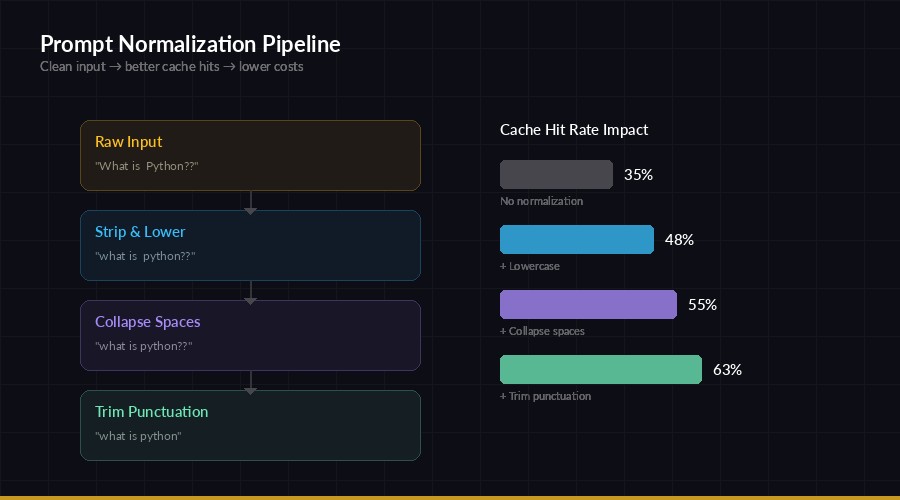
Normalization pipeline — clean prompts before hashing to increase cache hit rate
Users phrase the same question differently. "What is Python?" and "what is python ?" are functionally identical but produce different hashes. Normalization fixes this by cleaning prompts before hashing:
import re

def normalize_prompt(text):
    """Normalize prompt for better cache hits."""
    text = text.strip().lower()
    text = re.sub(r'\s+', ' ', text)  # collapse whitespace
    text = re.sub(r'[.!?]+$', '', text)  # strip trailing punctuation
    return text

# These all become the same cache key:
# "What is Python?"    → "what is python"
# "what is  python"    → "what is python"
# "What is Python!!"   → "what is python"

def ask_ai_normalized(prompt, model="claude-sonnet-4-5", **kwargs):
    normalized = normalize_prompt(prompt)
    messages = [{"role": "user", "content": normalized}]
    key = cache_key(model, messages, kwargs.get("max_tokens", 1024))

    cached = cache.get(key)
    if cached:
        return json.loads(cached)

    # Send original prompt for best output quality
    response = client.messages.create(
        model=model, max_tokens=kwargs.get("max_tokens", 1024),
        messages=[{"role": "user", "content": prompt}]
    )
    result = response.content[0].text
    cache.setex(key, 3600, json.dumps(result))
    return result
Important detail: normalize the prompt for the cache key only. Send the original prompt to the API so the model gets proper capitalization and punctuation. This typically adds another 10-15% cache hit rate on top of exact matching.
Strategy 3: Semantic Caching with Embeddings
This is the heavy hitter. Instead of matching exact strings, you compare the meaning of prompts using vector embeddings. "How do I sort a list in Python?" and "Python list sorting tutorial" have completely different text but identical intent.
import numpy as np
from sentence_transformers import SentenceTransformer
import anthropic, json, redis

# Local embedding model — fast, free, no API calls
embedder = SentenceTransformer("all-MiniLM-L6-v2")
cache = redis.Redis(host="localhost", port=6379, db=1)
client = anthropic.Anthropic(
    api_key="sk-your-key",
    base_url="https://ezaiapi.com"
)

SIMILARITY_THRESHOLD = 0.92  # Tune this — higher = fewer false positives

def get_embedding(text):
    return embedder.encode(text, normalize_embeddings=True)

def cosine_sim(a, b):
    return float(np.dot(a, b))

def semantic_lookup(prompt_embedding):
    """Find the closest cached prompt by meaning."""
    best_score, best_key = 0, None
    for key in cache.scan_iter("sem:emb:*"):
        stored = np.frombuffer(cache.get(key), dtype=np.float32)
        score = cosine_sim(prompt_embedding, stored)
        if score > best_score:
            best_score, best_key = score, key
    if best_score >= SIMILARITY_THRESHOLD:
        resp_key = best_key.decode().replace("sem:emb:", "sem:resp:")
        return json.loads(cache.get(resp_key))
    return None

def ask_ai_semantic(prompt, model="claude-sonnet-4-5"):
    embedding = get_embedding(prompt)
    cached = semantic_lookup(embedding)
    if cached:
        return cached  # Semantic hit!

    response = client.messages.create(
        model=model, max_tokens=1024,
        messages=[{"role": "user", "content": prompt}]
    )
    result = response.content[0].text

    # Store embedding + response
    uid = hashlib.md5(prompt.encode()).hexdigest()[:12]
    cache.setex(f"sem:emb:{uid}", 86400, embedding.tobytes())
    cache.setex(f"sem:resp:{uid}", 86400, json.dumps(result))
    return result
For production, swap the linear scan with a vector database like FAISS or Qdrant. The scan approach works fine up to ~10K cached entries, after which you'll want indexed search.
Choosing the Right TTL
Not all cached responses should live forever. Your TTL (time-to-live) strategy depends on how static the information is:
- Factual / reference queries (what is X, how to Y) → 24-72 hours. These don't change often.
- Code generation → 1-6 hours. Libraries update, best practices shift.
- News / time-sensitive → 15-30 minutes. Stale data is worse than no cache.
- Creative / varied outputs → Don't cache. Users expect different results each time.
A good default is 1 hour for general-purpose caches. You can always tune it per endpoint once you have traffic data.
Production Architecture
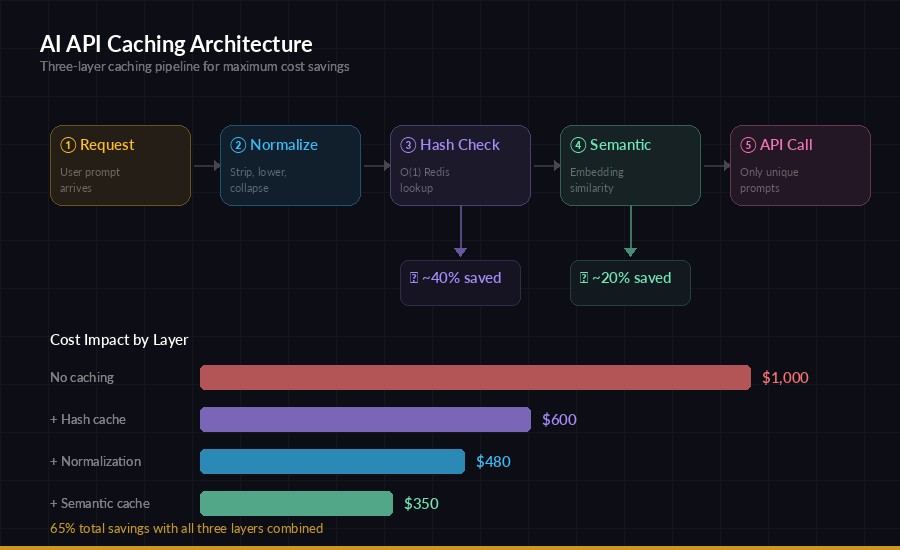
Full caching pipeline — normalize → exact match → semantic match → API call
In production, layer all three strategies together. The request flows through:
- Normalize — clean whitespace, case, punctuation
- Exact hash check — fastest, O(1) lookup in Redis
- Semantic check — catches near-duplicates the hash missed
- API call — only for genuinely new prompts
Each layer is a fallback. Most requests get caught at step 2 (cheap), some at step 3 (slightly more expensive due to embedding), and only unique queries hit the API.
Measuring Your Cache Performance
Track these three metrics to know if your cache is working:
from dataclasses import dataclass, field

@dataclass
class CacheMetrics:
    hits: int = 0
    misses: int = 0
    saved_dollars: float = 0.0

    @property
    def hit_rate(self):
        total = self.hits + self.misses
        return self.hits / total if total > 0 else 0

    def record_hit(self, est_cost=0.003):
        self.hits += 1
        self.saved_dollars += est_cost

    def report(self):
        return {
            "hit_rate": f"{self.hit_rate:.1%}",
            "total_saved": f"${self.saved_dollars:.2f}",
            "cached_responses": self.hits
        }

metrics = CacheMetrics()
# After 1 week: {"hit_rate": "58.3%", "total_saved": "$127.40", ...}
Monitor your hit rate daily. Below 30%? Your TTL might be too short or your traffic is highly diverse. Above 70%? You might be serving stale responses — consider shorter TTLs for time-sensitive endpoints.
When NOT to Cache
Caching isn't always the right call. Skip it when:
- Temperature > 0 and users expect varied responses (creative writing, brainstorming)
- User context matters — personalized responses based on conversation history
- Real-time data — if the prompt references "today" or "current," cached results go stale fast
- Security-sensitive — don't serve User A's cached medical/financial advice to User B
The fix for user-specific caching is simple: include the user ID in your cache key. That way each user has their own cache namespace.
Quick Wins to Start Today
You don't need a full semantic caching pipeline to start saving money. Here's a 30-minute implementation plan:
- Add Redis —
docker run -d redis:alpineif you don't have one - Wrap your API calls with the hash-based cache from Strategy 1
- Add normalization from Strategy 2 for another 10-15% boost
- Monitor hit rates with the metrics class above
- Tune TTLs per endpoint based on a week of data
This gets you 40-60% cost reduction with minimal effort. Add semantic caching later when you have the traffic data to justify the complexity.
Caching works especially well with other cost reduction strategies like model routing and prompt optimization. Stack them together and you can easily cut your AI API bill by 80% or more. If you're running through EzAI's API, the savings stack on top of already-reduced pricing — meaning your effective per-token cost drops to a fraction of direct API pricing.