Waiting 10 seconds for an AI model to finish generating before showing a single character is a terrible user experience. AI streaming with Server-Sent Events (SSE) solves this by pushing tokens to your Python client the moment they're generated — dropping time-to-first-token from seconds to milliseconds. This guide walks through implementing streaming in Python using EzAI API, from basic SDK usage to production-grade async handlers.
Why Streaming Matters for AI Applications
When you make a standard (non-streaming) API call to Claude or GPT, the server generates the entire response internally, then sends it back as one JSON blob. For a 500-token response from Claude Opus, that means your user stares at a loading spinner for 5-15 seconds before seeing anything.
Streaming flips this model. The server starts sending tokens as soon as the first one is generated — typically within 50-150ms. Your client renders each chunk immediately. The total generation time stays the same, but the perceived latency drops by 90% because users see text appearing in real-time.
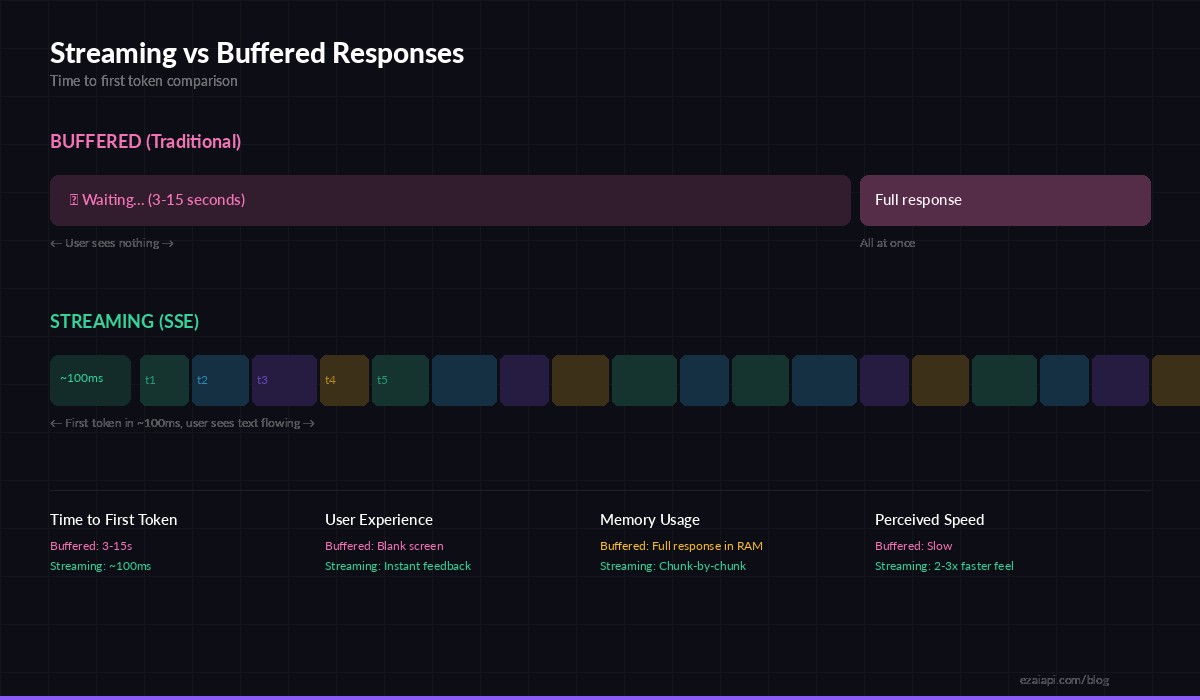
Streaming delivers first tokens in ~100ms vs 3-15s for buffered responses
Beyond UX, streaming has practical benefits: you can cancel generation mid-stream if the output goes off-track (saving tokens and money), implement typewriter effects in chat UIs, and process partial results for pipelines that don't need the full response before acting.
Setting Up the Python Client
The Anthropic Python SDK has first-class streaming support built in. Install it alongside httpx for async HTTP:
pip install anthropic httpxHere's the simplest streaming call through EzAI — just add stream=True and iterate over events:
import anthropic

client = anthropic.Anthropic(
    api_key="sk-your-ezai-key",
    base_url="https://ezaiapi.com"
)

with client.messages.stream(
    model="claude-sonnet-4-5",
    max_tokens=1024,
    messages=[{"role": "user", "content": "Explain SSE in 3 sentences."}]
) as stream:
    for text in stream.text_stream:
        print(text, end="", flush=True)
print()  # newline after stream ends
The .stream() context manager opens an SSE connection and yields events as they arrive. The .text_stream iterator filters for just the text deltas, giving you raw string chunks you can print, buffer, or forward to a WebSocket client.
How SSE Events Work Under the Hood
When you enable streaming, the EzAI API returns a text/event-stream response instead of JSON. Each event follows the SSE protocol — a event: line, a data: line with JSON payload, and a blank line separator. The stream emits eight distinct event types in order:
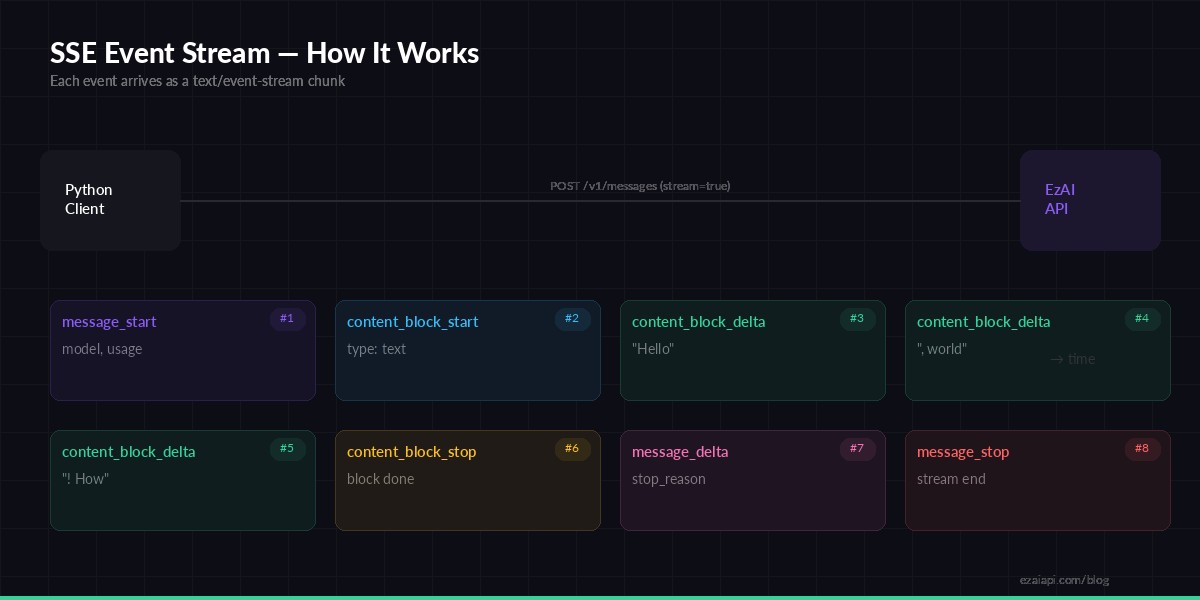
The lifecycle of an SSE stream — 8 event types from start to finish
The content_block_delta events carry the actual generated text. In a typical response, you'll see dozens to hundreds of these events, each containing a few tokens. The SDK's .text_stream iterator abstracts this away, but understanding the raw event flow is essential when you need to track usage, handle tool calls, or build custom streaming logic.
Async Streaming for Production Apps
For web servers, FastAPI endpoints, or any async Python application, use the async client. It plays nicely with asyncio event loops and doesn't block your server while waiting for tokens:
import asyncio
import anthropic

client = anthropic.AsyncAnthropic(
    api_key="sk-your-ezai-key",
    base_url="https://ezaiapi.com"
)

async def stream_response(prompt: str) -> str:
    chunks = []
    async with client.messages.stream(
        model="claude-sonnet-4-5",
        max_tokens=2048,
        messages=[{"role": "user", "content": prompt}]
    ) as stream:
        async for text in stream.text_stream:
            chunks.append(text)
            print(text, end="", flush=True)
    return "".join(chunks)

result = asyncio.run(stream_response("Write a Python function to parse CSV files."))
The async version is nearly identical — swap Anthropic for AsyncAnthropic, with for async with, and for for async for. The SDK handles connection pooling and keepalive automatically through httpx.
Building a Streaming CLI Tool
Here's a practical example: a CLI tool that streams AI responses with timing metrics and token usage tracking. This is the kind of thing you'd build to test models or debug streaming behavior:
import time, sys, anthropic

client = anthropic.Anthropic(
    api_key="sk-your-ezai-key",
    base_url="https://ezaiapi.com"
)

def stream_with_metrics(prompt, model="claude-sonnet-4-5"):
    t0 = time.perf_counter()
    first_token_time = None
    token_count = 0

    with client.messages.stream(
        model=model,
        max_tokens=2048,
        messages=[{"role": "user", "content": prompt}]
    ) as stream:
        for text in stream.text_stream:
            if first_token_time is None:
                first_token_time = time.perf_counter() - t0
            token_count += 1
            sys.stdout.write(text)
            sys.stdout.flush()

        # Access final message for usage stats
        final = stream.get_final_message()

    elapsed = time.perf_counter() - t0
    print(f"\n\n--- Metrics ---")
    print(f"First token:  {first_token_time*1000:.0f}ms")
    print(f"Total time:   {elapsed:.2f}s")
    print(f"Input tokens:  {final.usage.input_tokens}")
    print(f"Output tokens: {final.usage.output_tokens}")

stream_with_metrics("Compare Python async frameworks: asyncio, trio, and anyio.")
The stream.get_final_message() call gives you the completed message object with full usage stats after the stream closes — input tokens, output tokens, and the stop reason. This is critical for cost tracking in production.
Handling Errors and Reconnection
Streams can drop. Network hiccups, proxy timeouts, model overload — all real scenarios. Here's a resilient wrapper that retries on transient failures:
import time, anthropic
from anthropic import APIStatusError, APIConnectionError

def stream_with_retry(client, messages, max_retries=3):
    for attempt in range(max_retries):
        try:
            with client.messages.stream(
                model="claude-sonnet-4-5",
                max_tokens=2048,
                messages=messages
            ) as stream:
                full_text = []
                for text in stream.text_stream:
                    full_text.append(text)
                    yield text
                return  # success — exit retry loop

        except APIConnectionError:
            if attempt < max_retries - 1:
                time.sleep(2 ** attempt)  # exponential backoff
                continue
            raise

        except APIStatusError as e:
            if e.status_code == 529:  # overloaded
                time.sleep(5)
                continue
            raise  # 4xx errors — don't retry

# Usage
client = anthropic.Anthropic(
    api_key="sk-your-ezai-key",
    base_url="https://ezaiapi.com"
)
msgs = [{"role": "user", "content": "List 10 Python best practices."}]
for chunk in stream_with_retry(client, msgs):
    print(chunk, end="")
Key patterns here: exponential backoff on connection failures, special handling for 529 (overloaded) status, and yielding chunks as a generator so the caller can still process tokens in real time even with retry logic wrapped around the stream.
Streaming with Extended Thinking
Claude's extended thinking feature works with streaming too. You get thinking blocks streamed before the final response — useful for debugging reasoning or showing a "thinking..." indicator:
with client.messages.stream(
    model="claude-sonnet-4-5",
    max_tokens=16000,
    thinking={"type": "enabled", "budget_tokens": 10000},
    messages=[{"role": "user", "content": "Solve: what's 28! / 25!?"}]
) as stream:
    for event in stream:
        if event.type == "content_block_start":
            if event.content_block.type == "thinking":
                print("🧠 Thinking...")
            elif event.content_block.type == "text":
                print("\n📝 Response:")
        elif event.type == "text":
            print(event.text, end="")
Iterate over the raw stream object (not .text_stream) to get all event types, including thinking blocks. This gives you full control over how you display each phase of the model's response.
Performance Tips for Production
- Use async in web servers. A sync streaming call blocks the thread. With FastAPI or Starlette, always use
AsyncAnthropicto avoid starving your worker pool. - Set realistic
max_tokens. Don't default to 4096 when you need 200 tokens. Lower limits mean faster streams and lower costs — check token optimization for strategies. - Forward SSE directly to the client. If your backend proxies AI responses to a browser, use
StreamingResponsein FastAPI to pipe chunks through without buffering the full response in memory. - Track time-to-first-token (TTFT). This is the metric that matters most for perceived speed. Log it per request — if TTFT spikes above 500ms consistently, something is wrong upstream.
- Enable prompt caching for repeated system prompts. Cached prompts reduce both TTFT and cost because the model skips re-processing the cached prefix.
Wrapping Up
Streaming is the single biggest UX win you can get from an AI API integration. The code is minimal — adding stream=True to your existing Anthropic SDK calls is the only change. Combine it with async handlers, proper error recovery, and TTFT monitoring, and you've got a production-grade streaming setup that makes AI responses feel instantaneous.
All code examples in this guide work directly with EzAI API. Point your base_url to https://ezaiapi.com, use your EzAI key, and you're streaming against Claude, GPT, or Gemini at a fraction of direct pricing.