Tool use (also called function calling) is the feature that turns an AI model from a text generator into an actual agent. Instead of guessing answers, the model can call your functions — query a database, hit an API, send an email, or execute any code you define. This guide walks through implementing tool use with Claude's API through EzAI, with working code you can copy and run.
How Tool Calling Works
The flow is straightforward. You define tools (functions) with a name, description, and JSON Schema for parameters. When the model decides it needs to call a tool, it returns a tool_use content block instead of plain text. Your code executes the function, then sends the result back as a tool_result message. The model reads the result and generates its final response.
Here's the full cycle:
- You send a message with tool definitions attached
- Claude analyzes the query and decides which tool(s) to call
- You receive a response with
stop_reason: "tool_use" - Your code executes the tool and returns the result
- Claude reads the result and gives a final answer
Defining Your First Tool
Tools are defined as JSON objects with an input_schema using standard JSON Schema. Here's a practical example — a weather lookup tool:
import anthropic

client = anthropic.Anthropic(
    api_key="sk-your-key",
    base_url="https://ezaiapi.com"
)

tools = [
    {
        "name": "get_weather",
        "description": "Get current weather for a city. Returns temperature, conditions, and humidity.",
        "input_schema": {
            "type": "object",
            "properties": {
                "city": {
                    "type": "string",
                    "description": "City name, e.g. 'San Francisco'"
                },
                "units": {
                    "type": "string",
                    "enum": ["celsius", "fahrenheit"],
                    "description": "Temperature units"
                }
            },
            "required": ["city"]
        }
    }
]
The description field matters more than you think. Claude uses it to decide when to call the tool and what parameters to pass. Be specific — "Get current weather" is better than "Weather tool".
The Tool Use Loop
Here's a complete working example that handles the full request-execute-respond cycle. This is the pattern you'll use in every tool-calling application:
import anthropic, json

client = anthropic.Anthropic(
    api_key="sk-your-key",
    base_url="https://ezaiapi.com"
)

def get_weather(city: str, units: str = "celsius") -> dict:
    # Replace with a real API call (OpenWeatherMap, etc.)
    return {"city": city, "temp": 22, "units": units,
            "conditions": "partly cloudy", "humidity": 65}

# Map tool names to actual functions
TOOL_HANDLERS = {"get_weather": get_weather}

def run_agent(user_message: str) -> str:
    messages = [{"role": "user", "content": user_message}]

    while True:
        response = client.messages.create(
            model="claude-sonnet-4-5",
            max_tokens=1024,
            tools=tools,
            messages=messages
        )

        # If the model is done, return the text
        if response.stop_reason == "end_turn":
            return response.content[0].text

        # Process tool calls
        messages.append({"role": "assistant", "content": response.content})

        tool_results = []
        for block in response.content:
            if block.type == "tool_use":
                handler = TOOL_HANDLERS[block.name]
                result = handler(**block.input)
                tool_results.append({
                    "type": "tool_result",
                    "tool_use_id": block.id,
                    "content": json.dumps(result)
                })

        messages.append({"role": "user", "content": tool_results})

print(run_agent("What's the weather in Tokyo?"))
The while True loop is key. Claude might call multiple tools in sequence — check the weather, then look up a restaurant, then book a table. The loop keeps running until the model returns stop_reason: "end_turn", which means it's done calling tools and has a final answer.
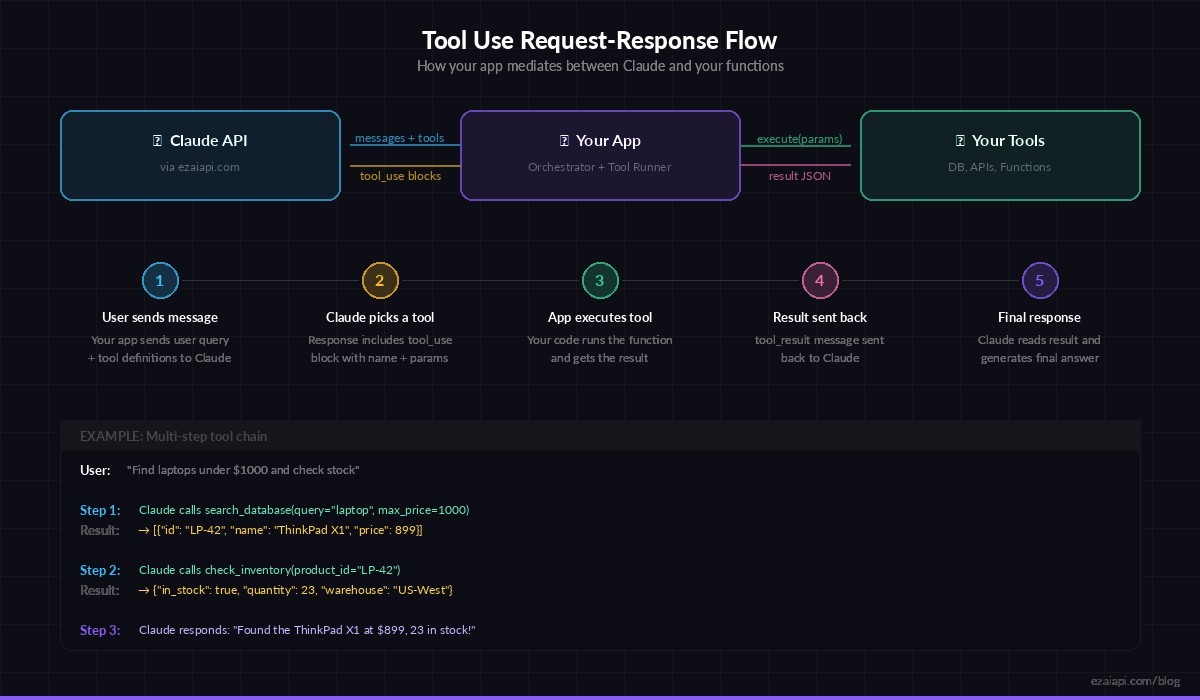
The tool use loop: your app mediates between Claude and your functions
Multiple Tools in One Request
Real-world agents need more than one tool. Here's how to define multiple tools and let Claude decide which ones to call — and in what order:
tools = [
    {
        "name": "search_database",
        "description": "Search the product database by name or category. Returns matching products with price and stock.",
        "input_schema": {
            "type": "object",
            "properties": {
                "query": {"type": "string"},
                "category": {"type": "string", "enum": ["electronics", "clothing", "books"]}
            },
            "required": ["query"]
        }
    },
    {
        "name": "check_inventory",
        "description": "Check real-time inventory for a specific product ID.",
        "input_schema": {
            "type": "object",
            "properties": {
                "product_id": {"type": "string"}
            },
            "required": ["product_id"]
        }
    },
    {
        "name": "create_order",
        "description": "Place an order for a product. Returns order confirmation.",
        "input_schema": {
            "type": "object",
            "properties": {
                "product_id": {"type": "string"},
                "quantity": {"type": "integer", "minimum": 1}
            },
            "required": ["product_id", "quantity"]
        }
    }
]

# Ask: "Find a laptop under $1000 and order it"
# Claude will: search_database → check_inventory → create_order
# Each step uses data from the previous result
Claude handles multi-step reasoning automatically. Ask "find a laptop under $1000 and order it" and it will chain the three tools in the right order, passing product IDs between calls. You don't need to orchestrate this — the model figures out the dependency chain.
Error Handling That Actually Works
In production, tools fail. APIs time out, databases go down, inputs are invalid. Here's how to handle errors gracefully so Claude can recover or inform the user:
for block in response.content:
    if block.type == "tool_use":
        try:
            handler = TOOL_HANDLERS.get(block.name)
            if not handler:
                raise ValueError(f"Unknown tool: {block.name}")
            result = handler(**block.input)
            tool_results.append({
                "type": "tool_result",
                "tool_use_id": block.id,
                "content": json.dumps(result)
            })
        except Exception as e:
            tool_results.append({
                "type": "tool_result",
                "tool_use_id": block.id,
                "content": json.dumps({"error": str(e)}),
                "is_error": True
            })
The is_error: True flag tells Claude the tool call failed. Claude will typically explain the error to the user or try an alternative approach — it won't hallucinate a result. This is one of the most underrated features of tool use: the model gracefully handles failures when you give it proper error signals.
Cost Optimization Tips
Tool definitions count toward your input tokens. With 5-10 tools, that overhead adds up fast. Here are practical ways to keep costs down:
- Only send relevant tools — If you know the user is asking about weather, don't send your database tools. Route by intent first, then attach tools.
- Keep descriptions concise — "Get weather for a city" works as well as a 3-paragraph description. Short schemas = fewer tokens.
- Use
tool_choice— Force a specific tool with"tool_choice": {"type": "tool", "name": "get_weather"}when you already know which tool is needed. This skips the model's reasoning about which tool to pick. - Cache with EzAI — Tool definitions rarely change between requests. EzAI's prompt caching can significantly reduce costs when the same tools are sent repeatedly.
On EzAI, you get all of this at significantly lower pricing than direct API access. The same tool-use calls, the same response format — just cheaper.
Real-World Pattern: AI Customer Support Agent
Here's how this comes together in production. This skeleton shows an AI support agent that can look up orders, check status, and initiate refunds:
support_tools = [
    {"name": "lookup_order", "description": "Find order by ID or customer email",
     "input_schema": {"type": "object", "properties": {
         "order_id": {"type": "string"},
         "email": {"type": "string"}
     }}},
    {"name": "initiate_refund", "description": "Start refund process for an order",
     "input_schema": {"type": "object", "properties": {
         "order_id": {"type": "string"},
         "reason": {"type": "string"}
     }, "required": ["order_id", "reason"]}}
]

system = """You are a support agent for Acme Store.
Rules:
- Always look up the order before taking any action
- Confirm refund details with the customer before initiating
- Never share internal system IDs with customers"""

response = client.messages.create(
    model="claude-sonnet-4-5",
    max_tokens=1024,
    system=system,
    tools=support_tools,
    messages=[{"role": "user",
               "content": "I want a refund for order #12345"}]
)
The system prompt gives Claude guardrails — always look up first, confirm before refunding. These rules work because Claude respects them even during tool-use loops. The model will call lookup_order first, then ask the user to confirm before calling initiate_refund.
What's Next
Tool use unlocks the most powerful AI patterns: autonomous agents, RAG systems, multi-step workflows. Start with one or two tools, get the loop working, then add more as your use case grows. All of this works through EzAI at a fraction of direct API costs.
- Read the EzAI API docs for full tool-use reference
- Learn to reduce AI API costs when running tool-heavy agents
- Build a RAG chatbot that uses tools for document retrieval
- Check out Anthropic's tool use documentation for the full spec