
Your web API takes a user request, calls Claude, waits 8 seconds for a response, then sends it back. Meanwhile the connection sits open, the client shows a spinner, and your server thread is locked up doing nothing. Scale that to 200 concurrent users and you've got a bottleneck that no amount of horizontal scaling can fix cheaply.
The fix is dead simple: decouple the AI call from the HTTP request. Push the work onto a Redis queue, let background workers process it, and poll or push the result back to the client. This post walks through building exactly that — a production-grade async AI job processor using Python, Redis, and the EzAI API.
Why Background Jobs for AI Calls?
AI API calls are slow by nature. Claude Opus might take 15-30 seconds on a complex prompt. GPT-5 with extended thinking can run even longer. Holding an HTTP connection open for that duration creates three problems:
- Thread exhaustion — Each pending request ties up a worker thread or async slot. At 50 concurrent AI calls, most WSGI servers are maxed out.
- Timeout cascades — Load balancers, CDNs, and browser fetch APIs all have timeout limits. A 30-second AI call can trip any of them.
- No retry isolation — If the AI call fails mid-response, you lose the entire request. With a queue, the worker retries independently.
Background jobs solve all three. Your API returns a job ID in 50ms. The heavy lifting happens elsewhere.
Architecture Overview
The system has four moving parts: a FastAPI web server that accepts requests and returns job IDs, a Redis instance that holds the job queue and results, worker processes that pull jobs and call the AI API, and a polling endpoint (or webhook) that lets clients fetch completed results.
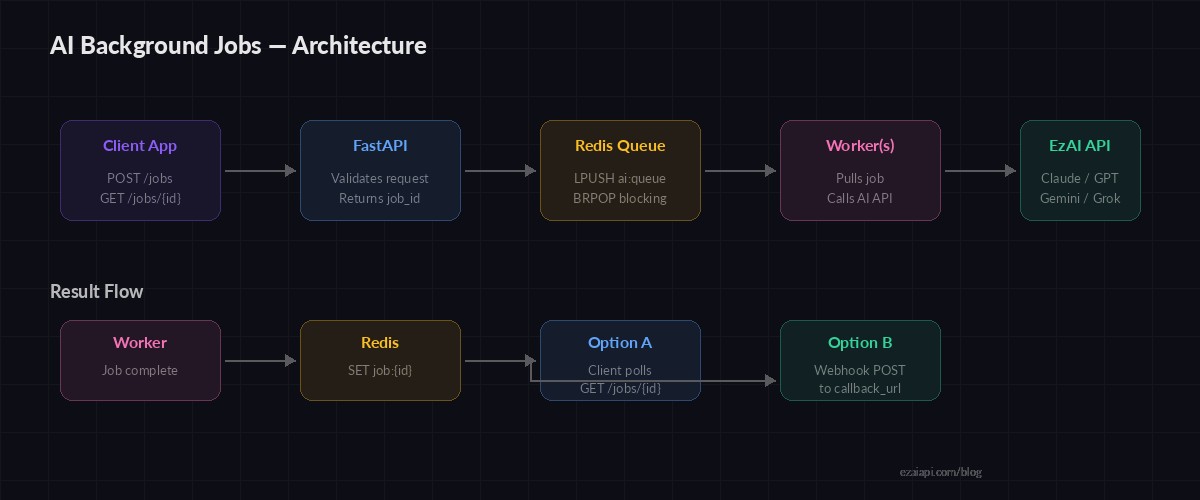
Request flow: API → Redis queue → Worker → AI API → Redis result → Client poll
Setting Up the Project
Install dependencies and make sure Redis is running:
pip install fastapi uvicorn redis anthropic
# Make sure Redis is running
redis-cli ping  # Should return PONG
The Web API: Accept Jobs Fast
The API server does one thing: validate the request, push a job onto Redis, and return a job ID. No AI calls happen here.
# api.py
import json, uuid
from fastapi import FastAPI, HTTPException
from pydantic import BaseModel
import redis

app = FastAPI()
rdb = redis.Redis(host="localhost", port=6379, db=0)

class JobRequest(BaseModel):
    prompt: str
    model: str = "claude-sonnet-4-5"
    max_tokens: int = 2048

@app.post("/jobs")
def create_job(req: JobRequest):
    job_id = str(uuid.uuid4())
    payload = {
        "id": job_id,
        "prompt": req.prompt,
        "model": req.model,
        "max_tokens": req.max_tokens,
        "status": "queued",
    }
    # Store job metadata
    rdb.set(f"job:{job_id}", json.dumps(payload), ex=3600)
    # Push to work queue
    rdb.lpush("ai:queue", job_id)
    return {"job_id": job_id, "status": "queued"}

@app.get("/jobs/{job_id}")
def get_job(job_id: str):
    raw = rdb.get(f"job:{job_id}")
    if not raw:
        raise HTTPException(404, "Job not found")
    return json.loads(raw)
The POST /jobs endpoint runs in under 5ms. It pushes the job ID onto a Redis list (ai:queue) and stores the full payload under a key with a 1-hour TTL. The GET /jobs/{id} endpoint lets clients poll for results.
The Worker: Process Jobs with EzAI
Workers run as separate processes. They block on BRPOP, which pops a job ID from the queue as soon as one arrives — no busy-waiting, no polling loops.
# worker.py
import json, time, os
import redis, anthropic

rdb = redis.Redis(host="localhost", port=6379, db=0)
client = anthropic.Anthropic(
    api_key=os.environ["EZAI_API_KEY"],
    base_url="https://ezaiapi.com",
)

def process_job(job_id: str):
    raw = rdb.get(f"job:{job_id}")
    if not raw:
        return

    job = json.loads(raw)
    job["status"] = "processing"
    job["started_at"] = time.time()
    rdb.set(f"job:{job_id}", json.dumps(job), ex=3600)

    try:
        resp = client.messages.create(
            model=job["model"],
            max_tokens=job["max_tokens"],
            messages=[{"role": "user", "content": job["prompt"]}],
        )
        job["status"] = "completed"
        job["result"] = resp.content[0].text
        job["tokens"] = {
            "input": resp.usage.input_tokens,
            "output": resp.usage.output_tokens,
        }
    except anthropic.RateLimitError:
        # Re-queue with backoff
        job["status"] = "queued"
        job["retries"] = job.get("retries", 0) + 1
        if job["retries"] <= 3:
            time.sleep(2 ** job["retries"])
            rdb.lpush("ai:queue", job_id)
    except Exception as e:
        job["status"] = "failed"
        job["error"] = str(e)

    job["finished_at"] = time.time()
    rdb.set(f"job:{job_id}", json.dumps(job), ex=3600)

if __name__ == "__main__":
    print("Worker started. Waiting for jobs...")
    while True:
        _, job_id = rdb.brpop("ai:queue")
        print(f"Processing {job_id.decode()}")
        process_job(job_id.decode())
The worker handles rate limits by re-queuing with exponential backoff (2s, 4s, 8s) up to 3 retries. Unexpected errors mark the job as failed immediately — no silent loops.
Scaling Workers and Priority Queues
Running more workers is trivial — spin up multiple processes and they'll compete for jobs on the same Redis queue. For smarter routing, split into priority queues:
# Priority worker: checks high queue first
QUEUES = ["ai:queue:high", "ai:queue:default", "ai:queue:bulk"]

while True:
    # BRPOP checks queues in order, blocks on last
    result = rdb.brpop(QUEUES, timeout=30)
    if result:
        queue_name, job_id = result
        print(f"[{queue_name.decode()}] Processing {job_id.decode()}")
        process_job(job_id.decode())

# In your API, route by model cost:
def queue_for_model(model: str) -> str:
    if "opus" in model:
        return "ai:queue:high"       # Expensive → priority
    elif "haiku" in model:
        return "ai:queue:bulk"       # Cheap → bulk lane
    return "ai:queue:default"
BRPOP with multiple keys checks them in order, so high-priority jobs always get picked up first. You can run dedicated workers per queue or let general workers drain all three. This pattern pairs well with model routing strategies where different prompts map to different models based on complexity.
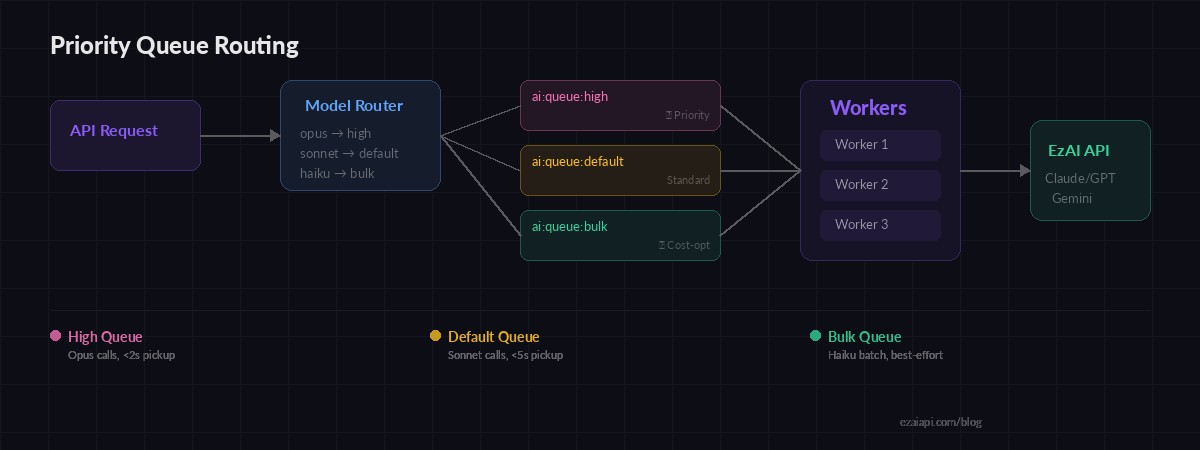
Priority queues route expensive models (Opus) to fast lanes while bulk Haiku jobs wait in line
Production Hardening: Dead Letter Queue
Jobs that fail 3 times shouldn't clog the system. Move them to a dead letter queue for manual inspection:
MAX_RETRIES = 3

def handle_failure(job_id, job, error):
    job["retries"] = job.get("retries", 0) + 1

    if job["retries"] > MAX_RETRIES:
        # Move to dead letter queue
        job["status"] = "dead"
        job["last_error"] = str(error)
        rdb.lpush("ai:dead_letter", job_id)
        rdb.set(f"job:{job_id}", json.dumps(job), ex=86400)
        print(f"💀 Job {job_id} moved to dead letter queue")
    else:
        # Retry with backoff
        delay = 2 ** job["retries"]
        job["status"] = "retry_pending"
        rdb.set(f"job:{job_id}", json.dumps(job), ex=3600)
        time.sleep(delay)
        rdb.lpush("ai:queue", job_id)
Dead letter jobs get a 24-hour TTL instead of 1 hour, giving your team time to investigate. Pair this with a monitoring dashboard — the AI cost dashboard we built previously can track queue depth and failure rates alongside spend.
Webhook Delivery: Push Results Instead of Polling
Polling works fine for simple cases, but webhooks eliminate wasted requests. When the client submits a job, they include a callback_url. The worker POSTs the result there when finished:
import httpx

async def deliver_result(job: dict):
    callback = job.get("callback_url")
    if not callback:
        return

    payload = {
        "job_id": job["id"],
        "status": job["status"],
        "result": job.get("result"),
        "tokens": job.get("tokens"),
        "error": job.get("error"),
    }

    async with httpx.AsyncClient() as http:
        try:
            await http.post(
                callback, json=payload, timeout=10
            )
        except httpx.HTTPError:
            # Client can still poll /jobs/{id}
            print(f"Webhook delivery failed for {job['id']}")
Webhook delivery is best-effort. If it fails, the result is still in Redis and the client can fall back to polling. This dual-path approach keeps things reliable without complex acknowledgment protocols.
Running It
Start the API and workers in separate terminals:
# Terminal 1: API server
EZAI_API_KEY=sk-your-key uvicorn api:app --port 8000

# Terminal 2-4: Workers (run as many as you need)
EZAI_API_KEY=sk-your-key python worker.py
EZAI_API_KEY=sk-your-key python worker.py
EZAI_API_KEY=sk-your-key python worker.py

# Submit a job:
curl -X POST http://localhost:8000/jobs \
  -H "content-type: application/json" \
  -d '{"prompt": "Explain quantum computing in 3 sentences"}'
# → {"job_id": "a1b2c3...", "status": "queued"}

# Poll for result:
curl http://localhost:8000/jobs/a1b2c3...
Three workers gives you 3x throughput with zero code changes. During peak load, spin up more. During off-hours, scale down to one. Each worker runs independently — if one crashes, the others keep processing.
Cost Optimization Tips
Background jobs pair naturally with cost-saving patterns. Since the user isn't waiting in real-time, you can:
- Use cheaper models for bulk — Route classification tasks to Haiku ($0.25/M tokens) instead of Sonnet. Check EzAI pricing for per-model rates.
- Batch similar prompts — Combine 10 short prompts into one request with numbered outputs. Saves overhead on per-request latency.
- Cache duplicate prompts — Hash the prompt and check Redis before queuing. If someone asked the same thing 5 minutes ago, return the cached result. Our caching guide covers this in depth.
- Leverage prompt caching — For jobs sharing the same system prompt, prompt caching on EzAI gives you up to 90% savings on input tokens.
What's Next
You now have a production-ready async AI job system that decouples your API from AI latency, retries failed calls, routes by priority, and scales with zero coordination. The full code runs with EzAI's API — just set your base URL to ezaiapi.com and use any model from Claude to GPT to Gemini through the same endpoint.
For deeper dives on related patterns, check out batch processing, rate limit handling, and multi-model fallback.