
You've got 5,000 customer support tickets that need AI-generated summaries. Or 10,000 product descriptions to classify. Running them one at a time takes hours. Running them all at once gets you rate-limited. The answer is batch processing — controlled concurrency that maxes out your throughput without tripping any limits.
This guide walks through a production-ready async Python setup for sending thousands of AI API requests through EzAI. We'll cover the semaphore pattern, retry logic with exponential backoff, result collection, and a real benchmark comparing sequential vs. batched execution.
Why Sequential Calls Kill Your Throughput
A single Claude Sonnet request takes around 1–3 seconds round-trip depending on output length. If you have 1,000 items to process, that's 16–50 minutes of pure waiting. The API can handle far more concurrent requests than that — you're just not asking it to.
The math is straightforward. With a concurrency of 20, that same 1,000 items finishes in under 3 minutes. At 50 concurrent, you're looking at about 60 seconds. The bottleneck shifts from network latency to your rate limit ceiling.
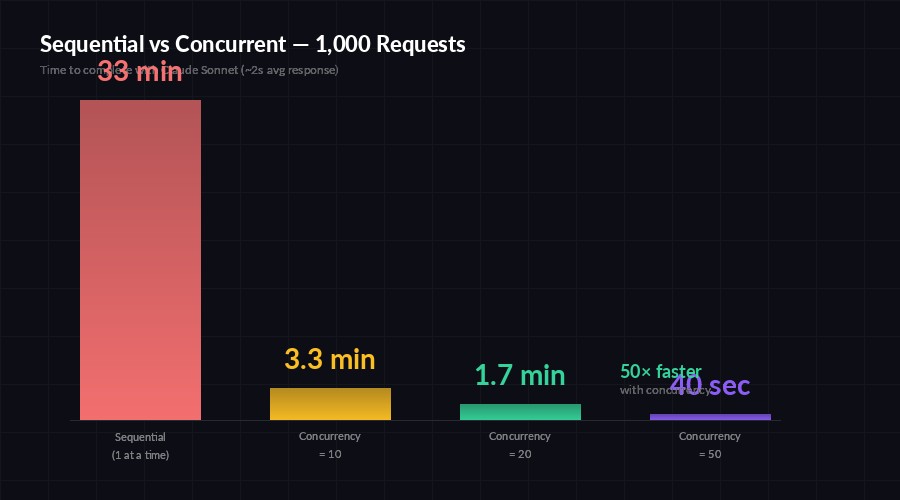
Sequential processing wastes 95% of available throughput — concurrency closes the gap
The Semaphore Pattern
Python's asyncio.Semaphore is the cleanest way to cap concurrency. It acts like a bouncer at the door — only N requests get through at once, the rest wait their turn. No thread pools, no queue managers, just 3 lines of code on top of your existing async client.
import asyncio
import anthropic

client = anthropic.AsyncAnthropic(
    api_key="sk-your-key",
    base_url="https://ezaiapi.com",
)
semaphore = asyncio.Semaphore(20)  # max 20 concurrent

async def process_item(item: str) -> str:
    async with semaphore:
        resp = await client.messages.create(
            model="claude-sonnet-4-5",
            max_tokens=512,
            messages=[{"role": "user", "content": item}],
        )
        return resp.content[0].text

async def main():
    items = [f"Summarize ticket #{i}: ..." for i in range(1000)]
    results = await asyncio.gather(*[process_item(t) for t in items])
    print(f"Processed {len(results)} items")

asyncio.run(main())
The async with semaphore block is doing all the heavy lifting. When 20 requests are already in flight, the 21st coroutine parks itself until one completes. No busy-waiting, no wasted CPU cycles.
Adding Retry Logic with Exponential Backoff
At high concurrency, you'll occasionally hit 429 (rate limited) or 529 (overloaded) responses. Instead of crashing the whole batch, wrap each call in a retry loop that backs off exponentially. The API's Retry-After header tells you exactly how long to wait — use it when present, fall back to doubling intervals when it's not.
import random

async def process_with_retry(item: str, max_retries: int = 5) -> str:
    async with semaphore:
        for attempt in range(max_retries):
            try:
                resp = await client.messages.create(
                    model="claude-sonnet-4-5",
                    max_tokens=512,
                    messages=[{"role": "user", "content": item}],
                )
                return resp.content[0].text
            except anthropic.RateLimitError as e:
                wait = float(
                    getattr(e.response, "headers", {})
                    .get("retry-after", 2 ** attempt)
                )
                jitter = random.uniform(0, wait * 0.1)
                await asyncio.sleep(wait + jitter)
            except anthropic.APIStatusError as e:
                if e.status_code >= 500:
                    await asyncio.sleep(2 ** attempt)
                else:
                    raise
        raise RuntimeError(f"Failed after {max_retries} retries")
The jitter is critical. Without it, all 20 blocked requests wake up at the exact same moment and immediately saturate the rate limit again. A small random offset spreads them out across the retry window.
Tracking Progress on Large Batches
When you're processing thousands of items, silent gather() calls are nerve-wracking. Did it hang? Is it at 10% or 90%? A lightweight progress tracker using asyncio.as_completed solves this without adding any external dependencies.
import time

async def batch_process(items: list[str]) -> list[str]:
    tasks = [process_with_retry(item) for item in items]
    results = [None] * len(tasks)
    done_count = 0
    start = time.monotonic()

    for i, coro in enumerate(asyncio.as_completed(tasks)):
        results[i] = await coro
        done_count += 1
        if done_count % 50 == 0:
            elapsed = time.monotonic() - start
            rate = done_count / elapsed
            eta = (len(tasks) - done_count) / rate
            print(f"  {done_count}/{len(tasks)} done"
                  f" | {rate:.1f} req/s | ETA {eta:.0f}s")

    return results
This prints a status line every 50 completions with throughput and ETA. For production pipelines, swap the print with structured logging or push it to a metrics endpoint.
Choosing the Right Concurrency Level
There's no magic number. It depends on your EzAI plan rate limits, the model you're using, and how much output each request generates. Here's a practical starting matrix:
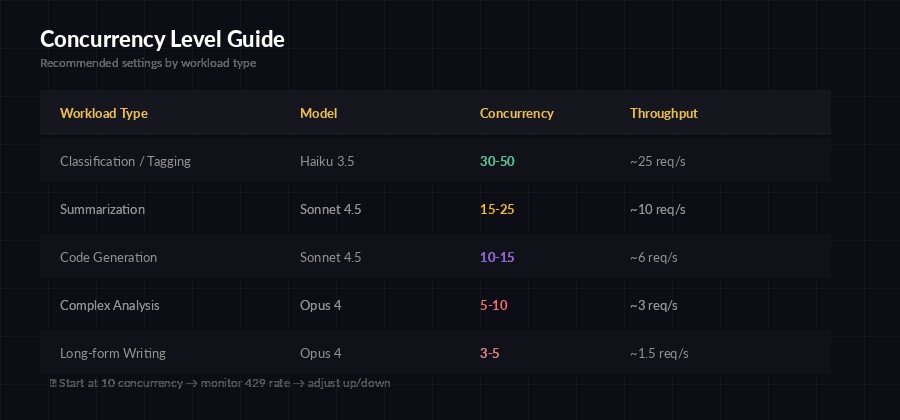
Start conservative and ramp up — monitor your 429 rate to find the sweet spot
The rule of thumb: start at 10, bump to 20, and watch your 429 rate. If fewer than 5% of requests get rate-limited, push higher. If you're seeing 15%+ retries, dial it back. EzAI's dashboard shows your rate limit usage in real time, so you can tune this while a batch is running.
Cost Optimization: Smaller Models for Bulk Work
Batch workloads are the perfect use case for model tiering. Not every task needs Opus. For classification, extraction, and summarization at scale, Claude Haiku runs 30x cheaper than Opus and handles structured tasks just as reliably.
# Use Haiku for bulk classification — 30x cheaper
async def classify_ticket(ticket: str) -> str:
    async with semaphore:
        resp = await client.messages.create(
            model="claude-haiku-3-5",  # fast + cheap
            max_tokens=64,
            messages=[{
                "role": "user",
                "content": f"Classify this support ticket into exactly"
                         f" one category: billing, technical, feature"
                         f" request, or other.\n\nTicket: {ticket}"
            }],
        )
        return resp.content[0].text.strip()
With Haiku at EzAI's pricing, classifying 10,000 tickets costs around $0.50. Doing the same with Sonnet runs closer to $5, and Opus would be $15+. For structured output where accuracy is comparable across models, always reach for the cheapest one that works. Check the cost reduction guide for more strategies.
Saving Results: Don't Lose Your Batch
A batch that completes but doesn't persist is a wasted batch. Write results incrementally — not after the whole run finishes. If your process crashes at item 8,000 out of 10,000, you want those 8,000 results on disk, not in garbage-collected memory.
import json, aiofiles

async def process_and_save(item: dict, outfile) -> None:
    result = await process_with_retry(item["text"])
    line = json.dumps({
        "id": item["id"],
        "result": result
    })
    await outfile.write(line + "\n")

async def main():
    items = json.loads(open("tickets.json").read())
    async with aiofiles.open("results.jsonl", "a") as f:
        await asyncio.gather(
            *[process_and_save(item, f) for item in items]
        )
    print(f"Wrote {len(items)} results to results.jsonl")
JSONL (one JSON object per line) is the ideal format for batch output. Each line is independently parseable, so a truncated file is still useful. You can also track which IDs are already processed and skip them on restart — instant resumability.
Putting It All Together
Here's the full production template. Copy this, swap in your prompt and data loader, and you're running batches in under a minute:
pip install anthropic aiofilesimport asyncio, json, time, random
import anthropic, aiofiles
CONCURRENCY = 20
MODEL = "claude-sonnet-4-5"
client = anthropic.AsyncAnthropic(
api_key="sk-your-key",
base_url="https://ezaiapi.com",
)
sem = asyncio.Semaphore(CONCURRENCY)
async def call_ai(prompt: str, retries: int = 5) -> str:
async with sem:
for i in range(retries):
try:
r = await client.messages.create(
model=MODEL, max_tokens=512,
messages=[{"role": "user", "content": prompt}],
)
return r.content[0].text
except anthropic.RateLimitError:
await asyncio.sleep(2**i + random.random())
except anthropic.APIStatusError as e:
if e.status_code >= 500:
await asyncio.sleep(2**i)
else: raise
raise RuntimeError("Max retries exceeded")
async def main():
data = json.loads(open("input.json").read())
start = time.monotonic()
async with aiofiles.open("output.jsonl", "a") as f:
async def run(item):
result = await call_ai(item["prompt"])
await f.write(json.dumps({
"id": item["id"], "result": result
}) + "\n")
await asyncio.gather(*[run(d) for d in data])
elapsed = time.monotonic() - start
print(f"Done: {len(data)} items in {elapsed:.1f}s"
f" ({len(data)/elapsed:.1f} req/s)")
asyncio.run(main())Run it with python batch_runner.py and watch your throughput numbers. With EzAI's infrastructure and smart rate limit handling, this pattern handles anything from 100 quick classifications to 50,000 document extractions without breaking a sweat.
For more on handling errors gracefully at scale, check out our production error handling guide. And if you want to understand rate limits at a deeper level, the rate limits walkthrough covers the mechanics and best practices in detail.