If you're sending the same system prompt with every API call — and most applications do — you're paying full price for tokens the model has already processed. Prompt caching fixes this by storing frequently-used prompt prefixes server-side, so subsequent requests skip the redundant computation. The result: up to 90% lower input costs and response times that drop from 800ms to under 200ms.
This isn't a theoretical optimization. Claude's prompt caching launched in mid-2024, and OpenAI followed with automatic caching shortly after. If you're running any kind of chatbot, coding assistant, or document processing pipeline through EzAI API, caching is the single biggest cost lever you're not pulling.
How Prompt Caching Actually Works
Every time you call an AI model, the entire prompt gets processed token-by-token. For a typical application, 80-95% of that prompt is identical across requests — system instructions, few-shot examples, knowledge base context. Without caching, the model re-reads all of it every single time.
Prompt caching works by marking a prefix of your prompt as cacheable. The first request processes everything normally and stores the computed state. Subsequent requests that share the same prefix skip the cached portion entirely. The model picks up processing only from where the cache ends.
The cache has a 5-minute TTL (time-to-live) on Claude. Each cache hit resets that timer, so active applications keep the cache warm indefinitely. After 5 minutes of no requests, the cache expires and the next call pays full price again.
Cost Savings Breakdown
Let's run real numbers. Claude Sonnet charges $3 per million input tokens at regular price. With prompt caching, cache hits cost $0.30 per million — a 90% discount. There's a small write premium of $3.75 per million on the first request, but it pays for itself after just 2 cache hits.
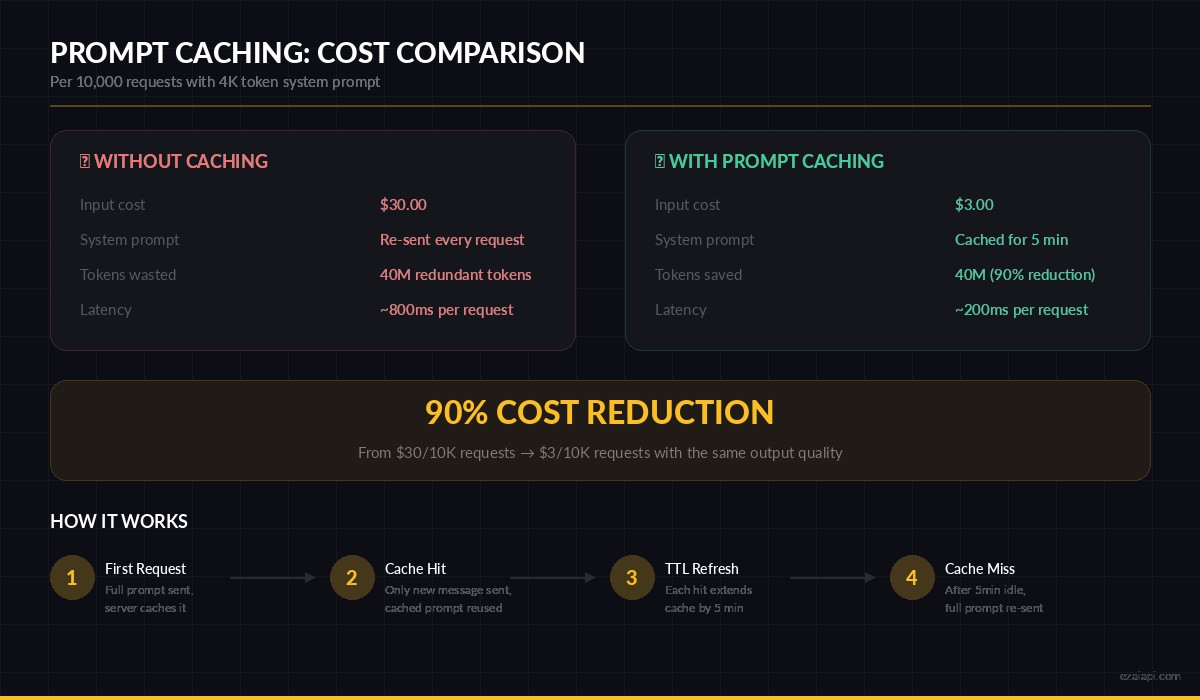
Prompt caching reduces input costs by 90% for repeated system prompts
For a production chatbot handling 10,000 conversations per day with a 4,000-token system prompt, that translates to roughly $27 saved daily — or $810 per month. Scale that to 100K conversations and you're looking at $8,100/month in savings from a feature that takes 10 minutes to implement.
Implementing Prompt Caching with Python
Claude's caching uses a cache_control field on message content blocks. You mark the boundary where the cache should end, and everything before that point gets cached. Here's a working example through EzAI:
import anthropic

client = anthropic.Anthropic(
    api_key="sk-your-key",
    base_url="https://ezaiapi.com"
)

# System prompt with cache_control marker
response = client.messages.create(
    model="claude-sonnet-4-20250514",
    max_tokens=1024,
    system=[
        {
            "type": "text",
            "text": """You are a senior code reviewer. Analyze code for:
            - Security vulnerabilities (SQL injection, XSS, CSRF)
            - Performance bottlenecks (N+1 queries, memory leaks)
            - Best practice violations (SOLID, DRY, error handling)
            - Type safety issues
            Respond in structured JSON with severity levels.""",
            "cache_control": {"type": "ephemeral"}
        }
    ],
    messages=[
        {"role": "user", "content": "Review this function:\ndef get_user(id):\n  return db.query(f'SELECT * FROM users WHERE id={id}')"}
    ]
)

# Check cache performance in the response
print(f"Cache write tokens: {response.usage.cache_creation_input_tokens}")
print(f"Cache read tokens:  {response.usage.cache_read_input_tokens}")
print(f"Regular tokens:     {response.usage.input_tokens}")
The first call returns cache_creation_input_tokens — that's the write cost. Every subsequent call with the same system prompt within 5 minutes returns cache_read_input_tokens at the discounted rate. You can monitor both values in your EzAI dashboard to track actual savings.
Caching Multi-Turn Conversations
The real power shows up in multi-turn conversations. Each turn, you can extend the cache boundary to include previous messages, so the model never re-processes conversation history:
def chat_with_caching(conversation_history, new_message):
    # Mark the last message in history as the cache boundary
    messages = []
    for i, msg in enumerate(conversation_history):
        entry = {"role": msg["role"], "content": msg["content"]}
        if i == len(conversation_history) - 1:
            # Set cache breakpoint at the end of existing history
            entry["content"] = [{
                "type": "text",
                "text": msg["content"],
                "cache_control": {"type": "ephemeral"}
            }]
        messages.append(entry)

    # New user message is the only uncached portion
    messages.append({"role": "user", "content": new_message})

    return client.messages.create(
        model="claude-sonnet-4-20250514",
        max_tokens=2048,
        system=[{
            "type": "text",
            "text": "You are a helpful coding assistant.",
            "cache_control": {"type": "ephemeral"}
        }],
        messages=messages
    )
On turn 10 of a conversation, the model processes only the new message — not the previous 9 exchanges. For long conversations with substantial back-and-forth, this compounds into massive savings.
Node.js Implementation
The same pattern works in TypeScript with the Anthropic SDK. Here's a production-ready wrapper that handles caching automatically:
import Anthropic from "@anthropic-ai/sdk";

const client = new Anthropic({
  apiKey: "sk-your-key",
  baseURL: "https://ezaiapi.com",
});

const SYSTEM_PROMPT = `You are a customer support agent for Acme Corp.
You have access to our knowledge base, return policies, and FAQ.
Always verify the customer's order ID before making changes.
Respond professionally but warmly.`;

async function cachedCompletion(userMessage: string) {
  const response = await client.messages.create({
    model: "claude-sonnet-4-20250514",
    max_tokens: 1024,
    system: [{
      type: "text",
      text: SYSTEM_PROMPT,
      cache_control: { type: "ephemeral" }
    }],
    messages: [{ role: "user", content: userMessage }],
  });

  // Log cache efficiency
  const { input_tokens, cache_read_input_tokens } = response.usage;
  const hitRate = cache_read_input_tokens
    ? (cache_read_input_tokens / (input_tokens + cache_read_input_tokens) * 100).toFixed(1)
    : "0";
  console.log(`Cache hit rate: ${hitRate}%`);

  return response;
}
Common Pitfalls to Avoid
Caching is straightforward, but there are a few ways to accidentally nullify the savings:
- Minimum token threshold — Claude requires at least 1,024 tokens in the cached prefix (2,048 for Opus). Short system prompts won't qualify. Pad with few-shot examples or knowledge base content to cross the threshold.
- Dynamic content in cached prefix — If your system prompt includes timestamps, user names, or session IDs, every request generates a unique prefix and never hits the cache. Move dynamic content after the cache breakpoint.
- Multiple cache breakpoints — You can set up to 4 breakpoints, but each one adds overhead. Use one or two breakpoints maximum for best efficiency.
- Cold start awareness — The first request always pays full price plus the write premium. If your traffic is bursty with long gaps, consider a keep-alive ping to maintain the cache during quiet periods.
Measuring Your Cache Performance
Track three metrics to know if caching is working:
def log_cache_stats(response):
    usage = response.usage
    cached = getattr(usage, "cache_read_input_tokens", 0) or 0
    written = getattr(usage, "cache_creation_input_tokens", 0) or 0
    regular = usage.input_tokens

    total_input = cached + written + regular
    hit_rate = (cached / total_input * 100) if total_input else 0

    # Estimate cost savings (Sonnet pricing)
    normal_cost = total_input * 3.0 / 1_000_000
    actual_cost = (regular * 3.0 + cached * 0.3 + written * 3.75) / 1_000_000
    saved = normal_cost - actual_cost

    print(f"Cache hit rate: {hit_rate:.1f}%")
    print(f"Cost this call: ${actual_cost:.6f} (saved ${saved:.6f})")
A healthy production setup should show 85%+ cache hit rates. If you're below 50%, check for dynamic content leaking into your cached prefix or TTL expiration between requests.
Combining Caching with Other Cost Strategies
Prompt caching pairs well with other cost-reduction techniques. Use it alongside token optimization to trim the non-cached portion of your prompts. Combine it with multi-model fallback to route simple queries to cheaper models while keeping the cache warm on your primary model. And if you're processing documents in bulk, batch your requests to maintain cache continuity.
The math is simple: a 4,000-token system prompt sent 10,000 times costs $120 without caching. With caching, the same workload costs $12 — plus a one-time $0.015 write cost. That's a 90% reduction for adding 3 lines of code.
Prompt caching is available on all Claude models through EzAI, and OpenAI's automatic caching works on GPT-4o and newer models. If you haven't enabled it yet, you're leaving money on the table. Check your EzAI dashboard after implementing — the savings show up immediately.