
Traditional ETL pipelines break on messy data. Inconsistent date formats, mixed languages, free-text fields with typos — regex and rule-based parsers choke on all of it. An AI data pipeline uses Claude to handle the ambiguity that deterministic code can't, turning chaotic inputs into structured, enriched outputs ready for your database or analytics layer.
In this guide, you'll build a production-ready data pipeline with Python that uses Claude via EzAI API to clean, normalize, and enrich CSV data. We'll process records in batches, handle failures gracefully, and keep costs under control with smart prompting.
Why AI in Your Data Pipeline?
Consider a CSV dump from a CRM. The company_name field contains "Google LLC", "google", "GOOGLE INC.", and "Alphabet (Google)". The address column mixes formats across countries. The notes field has free-text descriptions you need categorized.
A traditional pipeline needs hand-written rules for each edge case. With Claude in the loop, you describe the desired output once and let the model handle the variations. The tradeoff is latency and cost — which is why batching and caching matter.
Architecture Overview
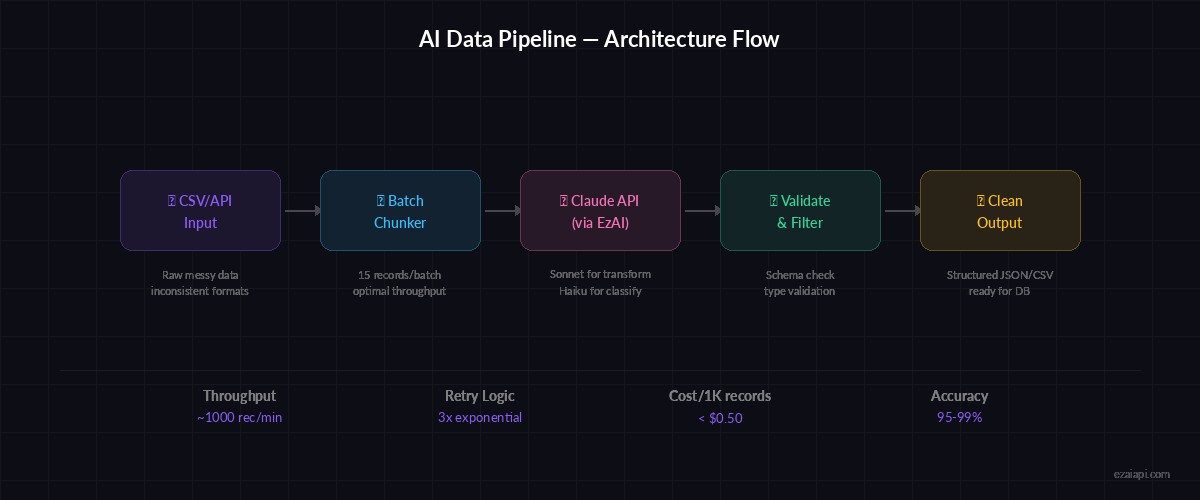
Pipeline flow: raw CSV → batch chunking → Claude API (via EzAI) → validated JSON → clean output
The pipeline follows four stages: ingest raw data from CSV or API, chunk records into batches of 10-20 for efficient API usage, transform each batch through Claude with a structured prompt, and validate the output before writing to your destination. Each stage is isolated, so failures in one batch don't kill the whole run.
Setting Up the Project
You'll need Python 3.10+ and an EzAI API key. If you don't have one yet, grab a key here — new accounts get 15 free credits.
pip install anthropic pandasBuilding the Pipeline Core
The heart of the pipeline is a class that reads raw records, sends them to Claude in batches, and collects structured results. Here's the complete implementation:
import json, csv, time
from pathlib import Path
import anthropic

client = anthropic.Anthropic(
    api_key="sk-your-key",
    base_url="https://ezaiapi.com"
)

TRANSFORM_PROMPT = """You are a data cleaning pipeline. For each record, return a JSON object with:
- company_name: normalized legal name (e.g., "Google LLC")
- industry: one of [tech, finance, healthcare, retail, manufacturing, other]
- country_code: ISO 3166-1 alpha-2 (e.g., "US")
- confidence: float 0-1 for your classification confidence

Input records:
{records}

Return ONLY a JSON array. No markdown, no explanation."""

def chunk_records(records, size=15):
    for i in range(0, len(records), size):
        yield records[i:i + size]

def transform_batch(batch, retries=3):
    records_str = json.dumps(batch, indent=2)
    for attempt in range(retries):
        try:
            response = client.messages.create(
                model="claude-sonnet-4-5",
                max_tokens=4096,
                messages=[{
                    "role": "user",
                    "content": TRANSFORM_PROMPT.format(records=records_str)
                }]
            )
            return json.loads(response.content[0].text)
        except json.JSONDecodeError:
            print(f"JSON parse failed, attempt {attempt + 1}/{retries}")
            time.sleep(2 ** attempt)
        except anthropic.RateLimitError:
            print("Rate limited, backing off...")
            time.sleep(30)
    return None
The chunk_records generator splits your data into manageable batches. Sending 15 records per request hits the sweet spot between throughput and response quality — too many records and Claude starts dropping fields; too few and you burn tokens on repeated system context.
Running the Full Pipeline
Wire it together with a runner function that processes the entire CSV and writes clean output:
import pandas as pd

def run_pipeline(input_csv, output_csv):
    df = pd.read_csv(input_csv)
    raw_records = df.to_dict(orient="records")

    results = []
    failed_batches = []

    for i, batch in enumerate(chunk_records(raw_records)):
        print(f"Processing batch {i + 1}...")
        cleaned = transform_batch(batch)

        if cleaned:
            results.extend(cleaned)
        else:
            failed_batches.append(i)
            print(f"Batch {i + 1} failed after retries, skipping")

        time.sleep(0.5)  # gentle rate limiting

    out_df = pd.DataFrame(results)
    out_df.to_csv(output_csv, index=False)

    print(f"\n✅ Processed {len(results)}/{len(raw_records)} records")
    if failed_batches:
        print(f"⚠️ Failed batches: {failed_batches}")

    return out_df

# Run it
run_pipeline("messy_crm_export.csv", "clean_companies.csv")
Each batch gets three retry attempts with exponential backoff. Failed batches are logged but don't halt the pipeline — you can reprocess them later or inspect the raw data manually. The half-second delay between batches keeps you well within rate limits.
Adding Data Enrichment
Cleaning is just the start. The real power comes from enrichment — extracting structured information that doesn't exist in the raw data. Here's an enrichment prompt that pulls insights from free-text notes:
ENRICH_PROMPT = """Analyze these customer notes and extract structured data.

For each record, return:
- sentiment: positive | neutral | negative
- topics: list of up to 3 keywords
- action_required: boolean
- priority: low | medium | high | urgent
- summary: one-sentence summary (max 100 chars)

Notes:
{notes}

Return ONLY a JSON array."""

def enrich_notes(notes_batch):
    notes_str = json.dumps(notes_batch, indent=2)
    response = client.messages.create(
        model="claude-haiku-3-5",  # cheaper model for classification
        max_tokens=2048,
        messages=[{
            "role": "user",
            "content": ENRICH_PROMPT.format(notes=notes_str)
        }]
    )
    return json.loads(response.content[0].text)
Notice we use claude-haiku-3-5 for enrichment tasks. Classification and entity extraction don't need the reasoning depth of Sonnet — Haiku handles them at 10x lower cost. Use the right model for each stage. Check our model routing guide for more strategies.
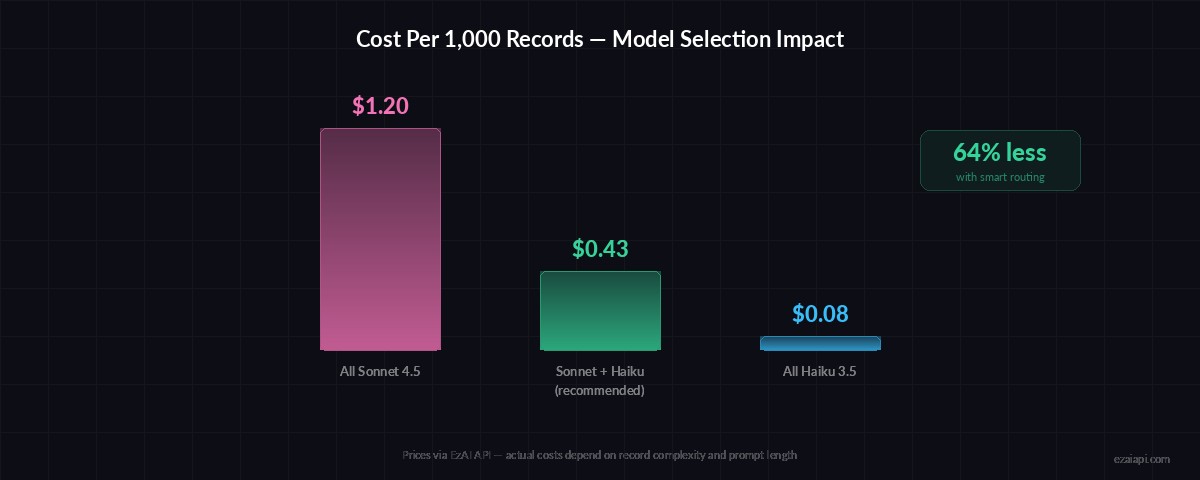
Model selection impact: using Haiku for classification stages cuts pipeline costs by 60-80%
Production Hardening
Before shipping this to production, add three things: output validation, checkpointing, and cost tracking.
Validate every Claude response against your expected schema. JSON parsing can succeed but still return garbage — missing fields, wrong types, values outside your allowed set. A quick validation function catches these before they hit your database:
VALID_INDUSTRIES = {"tech", "finance", "healthcare", "retail", "manufacturing", "other"}

def validate_record(record):
    required = ["company_name", "industry", "country_code", "confidence"]
    if not all(k in record for k in required):
        return False
    if record["industry"] not in VALID_INDUSTRIES:
        return False
    if not isinstance(record["confidence"], (int, float)):
        return False
    if len(record["country_code"]) != 2:
        return False
    return True

# Filter valid results
cleaned = [r for r in transform_batch(batch) if validate_record(r)]
For checkpointing, write results to disk after each batch. If the pipeline crashes at batch 47 of 100, you resume from 47 instead of starting over. Store the last processed index in a .checkpoint file and read it on startup.
Cost Breakdown
Running 1,000 records through this pipeline with a 15-record batch size costs roughly:
- Transform stage (Sonnet): ~67 batches × ~2K tokens each ≈ 134K tokens → ~$0.40
- Enrichment stage (Haiku): ~67 batches × ~1.5K tokens each ≈ 100K tokens → ~$0.03
- Total: Under $0.50 for 1,000 records — less with prompt caching
Through EzAI's pricing, that same run costs roughly 30-50% less than hitting Anthropic directly. The pricing page has the exact per-model rates.
When Not to Use AI in Your Pipeline
AI pipelines aren't always the right call. Skip them when:
- Your data follows strict, predictable formats — regex is faster and free
- Latency matters more than accuracy — Claude adds 500ms-2s per batch
- You're processing millions of records daily — cost scales linearly
- The transformation is purely structural (CSV → JSON, date reformatting)
Use AI for the messy 20% of your data that breaks deterministic rules. Chain it after your regex/rule-based stages so you're only sending the hard cases to Claude.
Next Steps
You now have a working AI data pipeline that handles real-world messy data. Extend it further by adding a log analysis stage for monitoring pipeline health, or connect it to a FastAPI endpoint for on-demand processing.
The full source code is on GitHub. If you're running into rate limits on large datasets, check our guide on handling rate limits — it covers retry strategies, concurrent batching, and how EzAI's built-in queue management helps.