Java powers more production backends than any other language. If your team runs Spring Boot and wants to integrate Claude, GPT-4, or Gemini without managing multiple API keys or dealing with provider-specific SDKs, EzAI API gives you a single OpenAI-compatible endpoint that works with Java's built-in HTTP clients and Spring's reactive WebClient out of the box.
This guide walks through four approaches — from a raw HttpClient call to a full Spring Boot service with streaming SSE responses — so you can pick whatever fits your stack.
Prerequisites
- Java 17+ (LTS recommended)
- An EzAI API key — sign up takes 30 seconds, includes 15 free credits
- Spring Boot 3.2+ if you're using the WebClient examples
- Maven or Gradle — examples use Maven, but translation is trivial
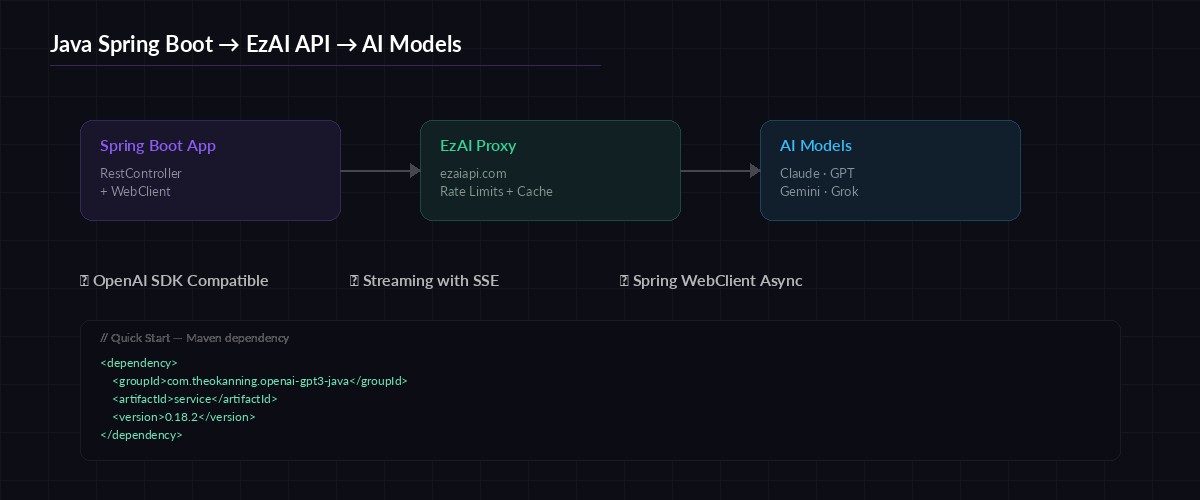
Request flow: Spring Boot → EzAI proxy → Claude / GPT / Gemini
Option 1: Java HttpClient (Zero Dependencies)
Java 11 shipped a built-in HTTP client that handles async requests and streaming natively. No libraries needed — this works in any Java 11+ project, Spring or not.
import java.net.URI;
import java.net.http.*;
import java.net.http.HttpResponse.BodyHandlers;

public class EzAIQuickStart {
    private static final String BASE_URL = "https://ezaiapi.com";
    private static final String API_KEY  = System.getenv("EZAI_API_KEY");

    public static void main(String[] args) throws Exception {
        var client = HttpClient.newHttpClient();

        String body = """
            {
              "model": "claude-sonnet-4-5",
              "max_tokens": 1024,
              "messages": [
                {"role": "user", "content": "Explain Java records in 3 sentences."}
              ]
            }
            """;

        var request = HttpRequest.newBuilder()
            .uri(URI.create(BASE_URL + "/v1/messages"))
            .header("x-api-key", API_KEY)
            .header("anthropic-version", "2023-06-01")
            .header("content-type", "application/json")
            .POST(HttpRequest.BodyPublishers.ofString(body))
            .build();

        HttpResponse<String> response = client.send(
            request, BodyHandlers.ofString()
        );

        System.out.println(response.body());
    }
}
That's 25 lines of code, zero dependencies, and it hits Claude through EzAI. The response format is identical to the official Anthropic API — any JSON parser you already use will work.
Option 2: Spring Boot WebClient (Recommended)
For production Spring Boot apps, WebClient is the standard choice. It's non-blocking, integrates with Project Reactor, and handles connection pooling automatically.
First, add the WebFlux dependency to your pom.xml:
<dependency>
    <groupId>org.springframework.boot</groupId>
    <artifactId>spring-boot-starter-webflux</artifactId>
</dependency>
Then create a reusable service bean that wraps the EzAI API:
@Service
public class EzAIService {

    private final WebClient webClient;

    public EzAIService(
        @Value("${ezai.api-key}") String apiKey
    ) {
        this.webClient = WebClient.builder()
            .baseUrl("https://ezaiapi.com")
            .defaultHeader("x-api-key", apiKey)
            .defaultHeader("anthropic-version", "2023-06-01")
            .defaultHeader("content-type", "application/json")
            .build();
    }

    public Mono<String> chat(String model, String message) {
        String body = """
            {
              "model": "%s",
              "max_tokens": 4096,
              "messages": [{"role": "user", "content": "%s"}]
            }
            """.formatted(model, message);

        return webClient.post()
            .uri("/v1/messages")
            .bodyValue(body)
            .retrieve()
            .bodyToMono(String.class);
    }
}
Add your key to application.yml:
ezai:
  api-key: ${EZAI_API_KEY}
Now any controller or service can inject EzAIService and call .chat("claude-sonnet-4-5", "your prompt"). The Mono<String> return type integrates cleanly with Spring's reactive pipeline — no thread blocking.
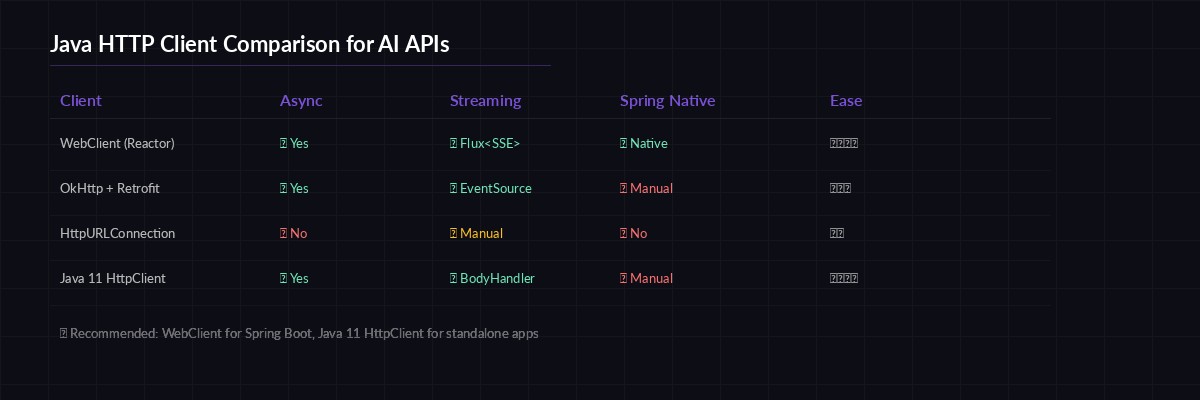
Choosing the right HTTP client for your Java AI integration
Streaming Responses with SSE
For chatbot UIs or any scenario where you want tokens to appear as they're generated, EzAI supports server-sent events. Here's how to consume them with Spring's WebClient:
public Flux<String> streamChat(String model, String prompt) {
    String body = """
        {
          "model": "%s",
          "max_tokens": 4096,
          "stream": true,
          "messages": [{"role": "user", "content": "%s"}]
        }
        """.formatted(model, prompt);

    return webClient.post()
        .uri("/v1/messages")
        .bodyValue(body)
        .retrieve()
        .bodyToFlux(String.class)
        .filter(chunk -> chunk.contains("content_block_delta"))
        .map(this::extractText);
}

private String extractText(String chunk) {
    // Parse the SSE delta to extract the text token
    int start = chunk.indexOf("\"text\":\"") + 8;
    int end = chunk.indexOf("\"", start);
    return chunk.substring(start, end);
}
Wire this into a controller that streams to the browser:
@RestController
public class ChatController {

    private final EzAIService ezai;

    public ChatController(EzAIService ezai) {
        this.ezai = ezai;
    }

    @GetMapping(value = "/chat/stream",
               produces = MediaType.TEXT_EVENT_STREAM_VALUE)
    public Flux<String> stream(
        @RequestParam String prompt
    ) {
        return ezai.streamChat("claude-sonnet-4-5", prompt);
    }
}
Hit GET /chat/stream?prompt=explain+monads and tokens flow back as SSE events. The browser's EventSource API or any SSE client picks them up automatically.
Switching Models at Runtime
One of EzAI's biggest advantages is model routing. Your Java code doesn't need separate SDKs for each provider — just change the model string:
// Claude — best for code generation
ezai.chat("claude-sonnet-4-5", prompt);

// GPT-4o — strong at structured output
ezai.chat("gpt-4o", prompt);

// Gemini 2.5 Pro — huge context window
ezai.chat("gemini-2.5-pro", prompt);

// Free tier — zero cost for prototyping
ezai.chat("gemini-2.0-flash", prompt);
Same endpoint, same auth, same response format. You can build model selection into your app config or even A/B test different models per request — check our guide on A/B testing AI models for the full pattern.
Error Handling and Retries
Production code needs to handle rate limits, timeouts, and transient failures. Here's a resilient version using Reactor's retry operators:
public Mono<String> chatWithRetry(String model, String msg) {
    return chat(model, msg)
        .timeout(Duration.ofSeconds(30))
        .retryWhen(Retry
            .backoff(3, Duration.ofSeconds(1))
            .maxBackoff(Duration.ofSeconds(10))
            .filter(ex -> ex instanceof WebClientResponseException wce
                && (wce.getStatusCode().value() == 429
                ||  wce.getStatusCode().is5xxServerError()))
        )
        .onErrorResume(ex -> {
            log.error("EzAI call failed after retries", ex);
            return Mono.just("{\"error\": \"AI service unavailable\"}");
        });
}
This retries up to 3 times with exponential backoff on 429 (rate limit) and 5xx errors, times out at 30 seconds, and falls back to an error response instead of crashing. For more patterns, see our retry strategies guide.
What's Next
You've got Java talking to every major AI model through a single endpoint. From here, explore these related guides:
- Production SSE streaming patterns — applies to any language
- Reduce AI API costs — caching, batching, and model selection strategies
- Handle rate limits — circuit breakers and queue-based approaches
- EzAI pricing — full model list with per-token costs
Java's type system and Spring's dependency injection make it straightforward to build a clean, testable AI integration layer. The code above runs in production today at teams using EzAI — no wrapper libraries, no SDK lock-in, just HTTP calls to a stable endpoint.