
You picked Claude Sonnet because a blog post said it was "the best." Three months later, you're burning $400/month on an API that's overkill for half your requests. Sound familiar? Most teams pick their AI model based on vibes — a benchmark tweet, a colleague's recommendation, or whatever showed up first in the docs. That's not engineering. That's guessing.
A/B testing AI models lets you make decisions based on actual data from your workload, your prompts, and your quality bar. The result is usually a mix of models — expensive ones for complex tasks, cheap ones for simple stuff — that cuts costs 40-60% without touching output quality.
Why Benchmarks Don't Tell the Full Story
Public benchmarks like MMLU, HumanEval, and GPQA measure generic capability on standardized test sets. Your production traffic looks nothing like those tests. A model that scores 92% on coding benchmarks might struggle with your specific codebase conventions. A model that ranks lower on reasoning tasks might nail your customer support summarization because the writing style fits better.
Three things benchmarks can't capture:
- Your prompt patterns — How a model handles your specific system prompts, few-shot examples, and output schemas matters more than aggregate scores
- Tail latency under your load — P99 latency at 2 AM is different from P99 at 2 PM. Benchmarks test cold, you run hot.
- Cost per useful output — A cheaper model that needs two retries costs more than an expensive model that gets it right the first time
Setting Up Your A/B Testing Framework
The core idea is straightforward: send the same prompt to multiple models, record everything, then compare. Here's a Python framework that does exactly that using EzAI's unified API — one endpoint, all models, no separate API key management.
import anthropic
import time
import json

client = anthropic.Anthropic(
    api_key="sk-your-ezai-key",
    base_url="https://ezaiapi.com"
)

MODELS = [
    "claude-sonnet-4-5",
    "claude-haiku-3-5",
    "gpt-4o",
    "gemini-2.0-flash",
]

def test_model(model, prompt, system=""):
    start = time.perf_counter()
    response = client.messages.create(
        model=model,
        max_tokens=1024,
        system=system,
        messages=[{"role": "user", "content": prompt}]
    )
    elapsed = time.perf_counter() - start

    return {
        "model": model,
        "latency_ms": round(elapsed * 1000),
        "input_tokens": response.usage.input_tokens,
        "output_tokens": response.usage.output_tokens,
        "text": response.content[0].text,
        "stop_reason": response.stop_reason,
    }
That's your base measurement function. It records latency, token usage, output text, and stop reason for each model. Since EzAI supports Claude, GPT, and Gemini through the same Anthropic-compatible endpoint, you don't need three different SDKs or auth flows.
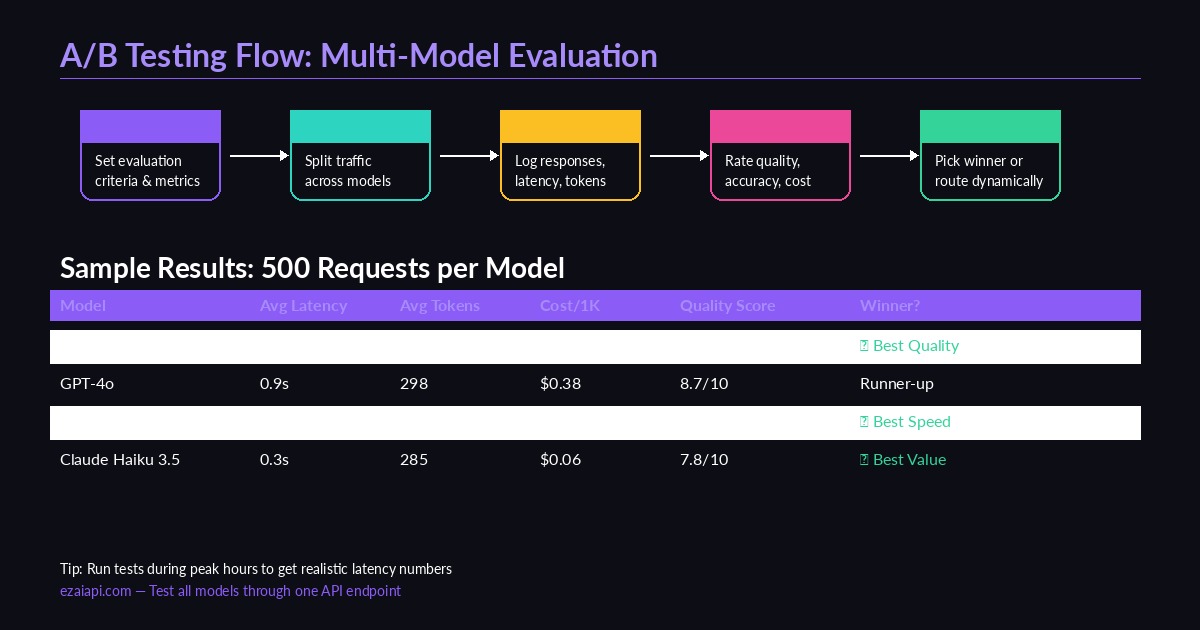
Multi-model A/B testing flow — define criteria, route traffic, collect metrics, pick winners
Running Tests at Scale
Testing one prompt tells you nothing. You need statistical significance — at least 100 requests per model, ideally 500+. Here's how to batch it with concurrent requests:
import asyncio
from anthropic import AsyncAnthropic

async_client = AsyncAnthropic(
    api_key="sk-your-ezai-key",
    base_url="https://ezaiapi.com"
)

async def run_ab_test(prompts, models, concurrency=5):
    semaphore = asyncio.Semaphore(concurrency)
    results = []

    async def test_one(model, prompt):
        async with semaphore:
            start = time.perf_counter()
            resp = await async_client.messages.create(
                model=model,
                max_tokens=1024,
                messages=[{"role": "user", "content": prompt}]
            )
            elapsed = time.perf_counter() - start
            results.append({
                "model": model,
                "prompt_hash": hash(prompt) % 10000,
                "latency_ms": round(elapsed * 1000),
                "tokens": resp.usage.output_tokens,
                "text": resp.content[0].text,
            })

    tasks = [
        test_one(model, prompt)
        for prompt in prompts
        for model in models
    ]
    await asyncio.gather(*tasks)
    return results

# Load your real prompts from production logs
test_prompts = ["Summarize this error log...", "Write a unit test for..."]
results = asyncio.run(run_ab_test(test_prompts, MODELS))
The semaphore prevents you from hammering the API with 500 concurrent requests. Start with 5-10 concurrency, then bump it up. EzAI handles the rate limiting across providers automatically, so you don't need per-model throttling logic.
Scoring Quality: The Hard Part
Latency and cost are easy to measure. Quality is subjective — but you can make it less subjective with a structured scoring approach.
Option 1: LLM-as-Judge. Use a strong model (like Claude Opus) to score outputs from cheaper models. This scales well and costs pennies per evaluation:
JUDGE_PROMPT = """Score this AI response on a 1-10 scale.
Criteria: accuracy (40%), completeness (30%), clarity (30%).

Original prompt: {prompt}
Response to evaluate: {response}

Return JSON: {"score": N, "reasoning": "..."}"""

def judge_response(prompt, response):
    result = client.messages.create(
        model="claude-opus-4",
        max_tokens=256,
        messages=[{
            "role": "user",
            "content": JUDGE_PROMPT.format(
                prompt=prompt, response=response
            )
        }]
    )
    return json.loads(result.content[0].text)
Option 2: Automated checks. For structured outputs (JSON, code, SQL), validate programmatically. Does the JSON parse? Does the code compile? Does the SQL query return expected results? Combine pass/fail checks with LLM scoring for a hybrid metric.
Option 3: Human review on a sample. Grade 50-100 response pairs manually using a simple A-vs-B comparison. You don't need to score everything — just enough to calibrate your automated scoring.
Analyzing Results and Picking Winners
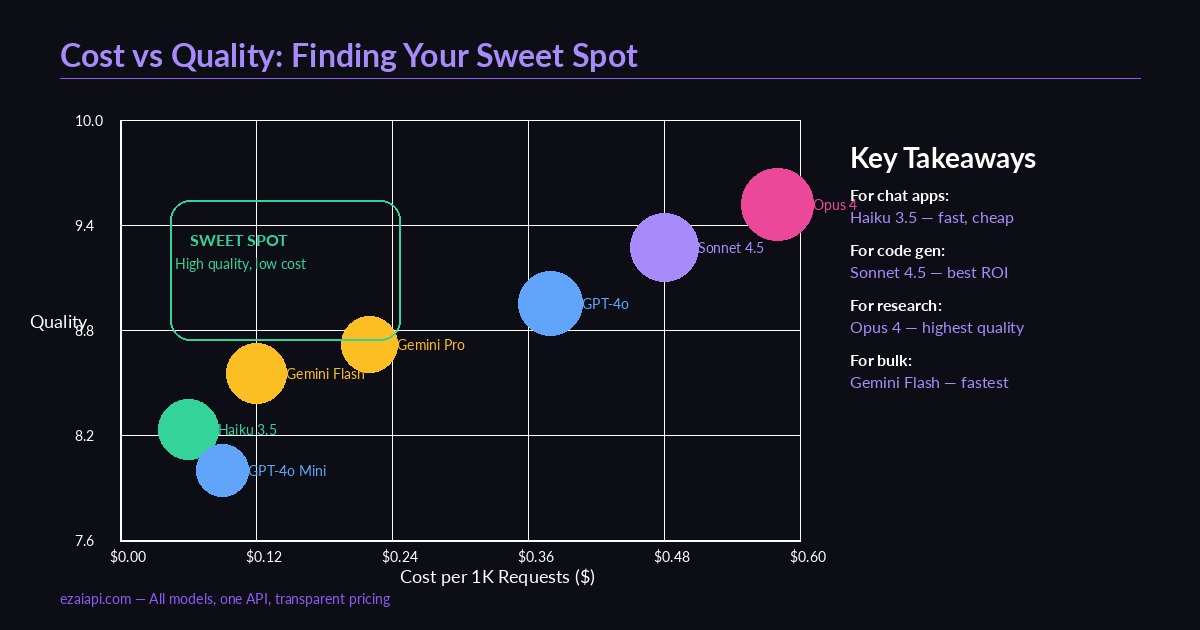
Cost vs quality across models — the sweet spot is high quality at low cost
Once you have 500+ scored results per model, the analysis is straightforward. Aggregate by model and look at three dimensions:
- Quality score (median) — Use median, not mean. Outliers from hallucinations will skew averages.
- Latency (P50 and P95) — P50 is your typical experience. P95 catches the slow tail that frustrates users.
- Effective cost per quality point — Total cost divided by total quality score. This reveals which model gives you the most quality per dollar.
In practice, you rarely end up with one winner. The smart move is model routing — use different models for different task categories. Simple classification? Haiku. Code generation? Sonnet. Research synthesis? Opus. EzAI makes this trivial since all models share the same endpoint — just change the model parameter per request.
MODEL_ROUTES = {
    "classification": "claude-haiku-3-5",     # Fast, cheap, 7.8 quality
    "code_generation": "claude-sonnet-4-5",    # Best code quality, 9.1
    "summarization": "gemini-2.0-flash",      # Good enough, 0.4s avg
    "research": "claude-opus-4",             # Highest accuracy, 9.4
}

def route_request(task_type, prompt):
    model = MODEL_ROUTES.get(task_type, "claude-sonnet-4-5")
    return client.messages.create(
        model=model,
        max_tokens=2048,
        messages=[{"role": "user", "content": prompt}]
    )
Continuous Testing: Don't Set and Forget
Models update. Providers ship new versions. Pricing changes. Your A/B test results from January are stale by March. Build testing into your pipeline:
- Shadow traffic (5-10%) — Route a fraction of production requests to challenger models. Compare async, never block the user.
- Weekly regression checks — Run your test suite every Monday with the latest model versions. Flag any quality drops.
- Cost alerts — Track your cost dashboard for unexpected spikes. A model that starts generating longer outputs costs more even at the same per-token rate.
The goal isn't to find the "best" model once. It's to build a system that continuously optimizes for your specific quality-cost-latency triangle. Teams that do this consistently spend 40-60% less than teams that pick one model and stick with it.
Quick Start Checklist
- Export 200+ real prompts from your production logs
- Run them through 3-4 models via EzAI's API
- Score with LLM-as-Judge + automated checks
- Build a routing table based on task type
- Set up shadow testing on 5% of traffic
- Review results monthly, update routes quarterly
The whole setup takes an afternoon. The savings compound every month. If you're already on EzAI, you have access to every model through one key — fire up the test script above and let the data decide.