Deno ships with native TypeScript, top-level await, and a built-in fetch API — three things that make calling AI APIs feel like writing pseudocode. This guide walks through connecting Deno to EzAI API, from a basic message call all the way to production-grade streaming with error handling. Every code example runs as-is with deno run.
Why Deno for AI APIs
If you've built AI features in Node.js, you know the drill: install TypeScript, configure tsconfig.json, set up a bundler, add node-fetch polyfills for older runtimes. Deno skips all of that. You write .ts files and run them directly.
For AI API work specifically, Deno gives you three advantages:
- Top-level
awaiteverywhere — No wrapping your API calls in async IIFEs. Writeconst response = await fetch(...)at the module level. - Built-in Web Streams — Server-Sent Events (SSE) streaming from AI APIs maps directly to Deno's
ReadableStreamwith zero dependencies. - Permissions model — Deno blocks network access by default. You explicitly grant
--allow-net=ezaiapi.com, so your AI scripts can't accidentally phone home to unexpected domains.
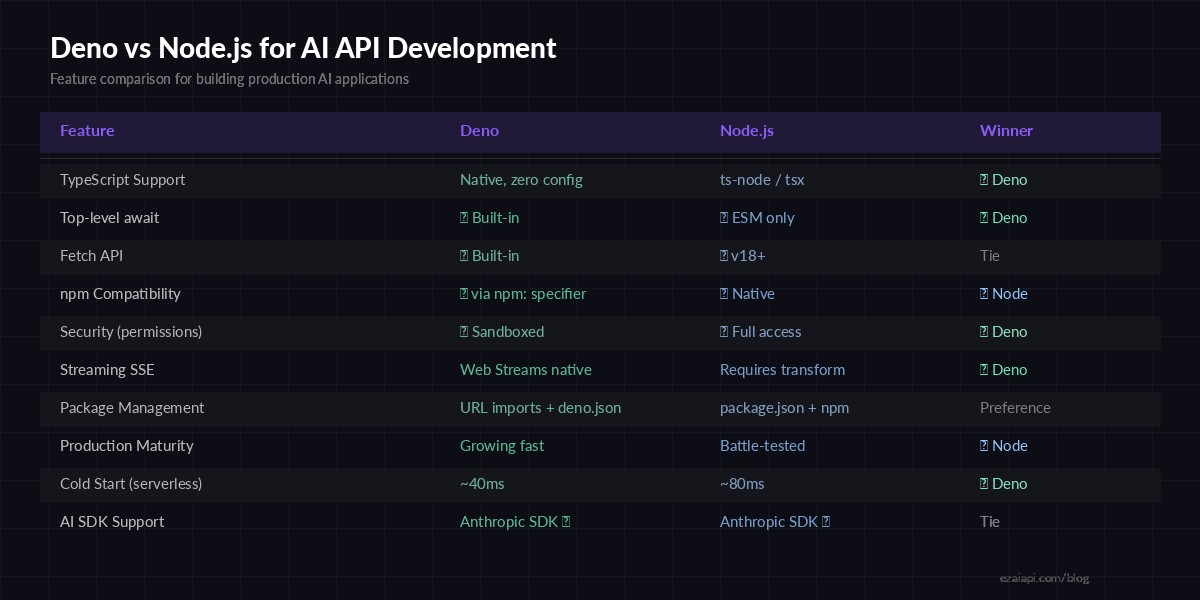
Feature comparison: Deno vs Node.js for AI API development
Setup: One Environment Variable
Install Deno if you haven't (deno.com has one-liner installers for every OS). Then set your EzAI API key:
# Add to your .bashrc, .zshrc, or .env
export EZAI_API_KEY="sk-your-key-here"
Grab your key from the EzAI dashboard. New accounts get 15 free credits — enough to follow this entire guide.
Your First Call: Messages API
Create a file called chat.ts and paste this. No package.json, no install step:
// chat.ts — Run: deno run --allow-net --allow-env chat.ts

const API_KEY = Deno.env.get("EZAI_API_KEY");

const response = await fetch("https://ezaiapi.com/v1/messages", {
  method: "POST",
  headers: {
    "x-api-key": API_KEY!,
    "anthropic-version": "2023-06-01",
    "content-type": "application/json",
  },
  body: JSON.stringify({
    model: "claude-sonnet-4-5",
    max_tokens: 1024,
    messages: [{ role: "user", content: "Explain Deno in 3 sentences." }],
  }),
});

const data = await response.json();
console.log(data.content[0].text);
Run it:
deno run --allow-net=ezaiapi.com --allow-env=EZAI_API_KEY chat.tsNotice the granular permissions: --allow-net=ezaiapi.com locks network access to only EzAI's domain. If a dependency tries to call a different host, Deno blocks it. That's real security for scripts handling API keys.
Streaming Responses in Deno
Streaming is where Deno shines. The runtime gives you native ReadableStream support, so parsing SSE events from AI APIs needs zero external libraries:
// stream.ts — Real-time streaming with zero dependencies

const API_KEY = Deno.env.get("EZAI_API_KEY")!;

const response = await fetch("https://ezaiapi.com/v1/messages", {
  method: "POST",
  headers: {
    "x-api-key": API_KEY,
    "anthropic-version": "2023-06-01",
    "content-type": "application/json",
  },
  body: JSON.stringify({
    model: "claude-sonnet-4-5",
    max_tokens: 2048,
    stream: true,
    messages: [{ role: "user", content: "Write a haiku about TypeScript." }],
  }),
});

const reader = response.body!
  .pipeThrough(new TextDecoderStream())
  .getReader();

let buffer = "";

while (true) {
  const { done, value } = await reader.read();
  if (done) break;

  buffer += value;
  const lines = buffer.split("\n");
  buffer = lines.pop() ?? "";

  for (const line of lines) {
    if (!line.startsWith("data: ")) continue;
    const payload = line.slice(6);
    if (payload === "[DONE]") break;

    const event = JSON.parse(payload);
    if (event.type === "content_block_delta") {
      Deno.stdout.writeSync(
        new TextEncoder().encode(event.delta.text)
      );
    }
  }
}
console.log();  // trailing newline
No eventsource-parser, no @anthropic-ai/sdk, no node-fetch. Just Deno's built-in streams piped through a TextDecoderStream. The SSE parsing logic is 15 lines.
Using the Anthropic SDK with Deno
Prefer the official SDK? Deno supports npm packages natively via the npm: specifier. No install command needed — Deno downloads it on first run:
// sdk-chat.ts — Anthropic SDK, Deno-style

import Anthropic from "npm:@anthropic-ai/[email protected]";

const client = new Anthropic({
  apiKey: Deno.env.get("EZAI_API_KEY")!,
  baseURL: "https://ezaiapi.com",
});

const msg = await client.messages.create({
  model: "claude-sonnet-4-5",
  max_tokens: 1024,
  messages: [{
    role: "user",
    content: "What is Deno Deploy?",
  }],
});

console.log(msg.content[0].text);
The SDK's TypeScript types work immediately — autocompletion, error types, response interfaces. No separate @types/ packages, no tsconfig tweaks.
Production Pattern: HTTP Server with AI
Deno's built-in Deno.serve makes it straightforward to build an AI-powered HTTP endpoint. This example proxies user questions to Claude and streams the response back:
// server.ts — AI HTTP server in 40 lines

const API_KEY = Deno.env.get("EZAI_API_KEY")!;
const BASE = "https://ezaiapi.com/v1/messages";

Deno.serve({ port: 8080 }, async (req) => {
  if (req.method !== "POST") {
    return new Response("POST /ask with { question: string }", { status: 405 });
  }

  const { question } = await req.json();

  const aiRes = await fetch(BASE, {
    method: "POST",
    headers: {
      "x-api-key": API_KEY,
      "anthropic-version": "2023-06-01",
      "content-type": "application/json",
    },
    body: JSON.stringify({
      model: "claude-sonnet-4-5",
      max_tokens: 2048,
      stream: true,
      messages: [{ role: "user", content: question }],
    }),
  });

  // Pipe the SSE stream directly to the client
  return new Response(aiRes.body, {
    headers: {
      "content-type": "text/event-stream",
      "cache-control": "no-cache",
    },
  });
});

console.log("AI server running on http://localhost:8080");
That's a working AI server. No Express, no Hono, no framework. Deno's Deno.serve handles HTTP/2, TLS, and graceful shutdown out of the box. The SSE stream from EzAI passes directly through to the client — zero buffering overhead.
Error Handling and Retries
Production code needs to handle rate limits and transient failures. Here's a retry wrapper with exponential backoff that works with EzAI's error responses:
// retry.ts — Exponential backoff for AI API calls

async function callWithRetry(
  body: Record<string, unknown>,
  maxRetries = 3,
) {
  const API_KEY = Deno.env.get("EZAI_API_KEY")!;

  for (let attempt = 0; attempt <= maxRetries; attempt++) {
    const res = await fetch("https://ezaiapi.com/v1/messages", {
      method: "POST",
      headers: {
        "x-api-key": API_KEY,
        "anthropic-version": "2023-06-01",
        "content-type": "application/json",
      },
      body: JSON.stringify(body),
    });

    if (res.ok) return await res.json();

    // 429 = rate limited, 529 = overloaded — retry these
    if ((res.status === 429 || res.status >= 500) && attempt < maxRetries) {
      const retryAfter = res.headers.get("retry-after");
      const delay = retryAfter
        ? parseInt(retryAfter) * 1000
        : Math.min(1000 * 2 ** attempt, 30000);
      console.warn(`Retry ${attempt + 1}/${maxRetries} in ${delay}ms`);
      await new Promise((r) => setTimeout(r, delay));
      continue;
    }

    const err = await res.text();
    throw new Error(`EzAI ${res.status}: ${err}`);
  }
}

// Usage
const result = await callWithRetry({
  model: "claude-sonnet-4-5",
  max_tokens: 1024,
  messages: [{ role: "user", content: "Hello from Deno!" }],
});
console.log(result.content[0].text);
The wrapper respects Retry-After headers from EzAI and falls back to exponential backoff (1s, 2s, 4s) for 429s and 5xx errors. Non-retryable errors throw immediately.
Deploy to Deno Deploy
Deno Deploy gives you globally distributed edge functions with ~40ms cold starts. Perfect for AI-powered APIs that need low latency worldwide. Deploy the server from earlier with one command:
deployctl deploy --project=my-ai-api server.tsSet EZAI_API_KEY as an environment variable in the Deno Deploy dashboard, and your AI server is live on a global CDN edge network. The Cloudflare Workers deployment guide covers similar patterns for the Cloudflare ecosystem.
What's Next
You've gone from zero to a production AI server with Deno and EzAI. Here's where to go from here:
- Add production streaming patterns (SSE keepalives, timeout handling)
- Implement multi-model fallback — if Claude is down, route to GPT automatically
- Check out the full EzAI API docs for tool use, vision, and extended thinking
- Browse pricing to see per-model costs and volume discounts