Running AI inference on a traditional server means your users in Tokyo wait for a round-trip to us-east-1. Cloudflare Workers run your code in 300+ cities worldwide, cutting that initial processing latency to near zero. Pair that with EzAI's unified API, and you get a serverless AI endpoint that cold-starts in under 5ms, scales to millions of requests, and costs fractions of a cent per invocation.
This guide walks through building a production-ready Cloudflare Worker that proxies AI requests through EzAI API — complete with streaming, error handling, KV-based caching, and model routing. By the end, you'll have a globally distributed AI endpoint you can point any frontend at.
Why Edge + AI Makes Sense
The typical AI integration pattern looks like this: frontend → your server → AI provider → your server → frontend. That's four network hops, and your server becomes a bottleneck. With Workers, the flow becomes: frontend → nearest Cloudflare edge → EzAI → edge → frontend. The edge node handles TLS termination, request validation, and response streaming — all within the same data center closest to your user.
The numbers speak for themselves:
- Cold start: ~2ms (vs 200-500ms for Lambda/Cloud Functions)
- Global latency: Requests hit the nearest of 300+ PoPs before reaching EzAI
- Cost: 10M requests/month on the free tier, $5/month for 50M after that
- No infra: Zero Docker images, zero Kubernetes, zero load balancers
Project Setup
You'll need a Cloudflare account (free tier works), an EzAI API key, and Node.js 18+. Initialize a new Workers project:
npm create cloudflare@latest ai-edge-worker
cd ai-edge-worker
npx wrangler secret put EZAI_API_KEY
# Paste your EzAI key when prompted
Update wrangler.toml to bind a KV namespace for response caching:
name = "ai-edge-worker"
main = "src/index.ts"
compatibility_date = "2026-03-01"

[[kv_namespaces]]
binding = "AI_CACHE"
id = "your-kv-namespace-id"
Create the KV namespace with npx wrangler kv namespace create AI_CACHE and paste the returned ID into your config.
The Core Worker
Here's the full Worker that accepts chat completion requests, validates them, checks cache, and proxies to EzAI with streaming support:
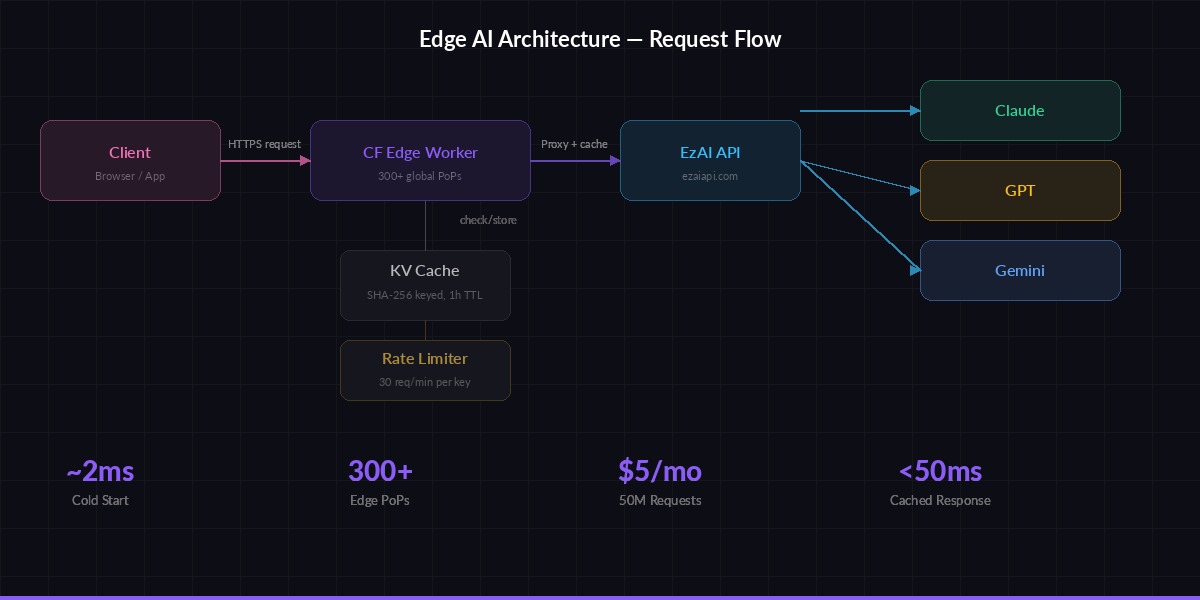
Request flow: Client → Edge Worker → EzAI API → Streaming response back to client
// src/index.ts
interface Env {
  EZAI_API_KEY: string;
  AI_CACHE: KVNamespace;
}

const EZAI_BASE = "https://ezaiapi.com";

const ALLOWED_MODELS = [
  "claude-sonnet-4-5",
  "claude-haiku-3-5",
  "gpt-4.1-mini",
  "gemini-2.5-flash",
];

export default {
  async fetch(req: Request, env: Env): Promise<Response> {
    // CORS preflight
    if (req.method === "OPTIONS") {
      return new Response(null, {
        headers: {
          "Access-Control-Allow-Origin": "*",
          "Access-Control-Allow-Methods": "POST",
          "Access-Control-Allow-Headers": "Content-Type, Authorization",
        },
      });
    }

    if (req.method !== "POST") {
      return json({ error: "Method not allowed" }, 405);
    }

    const body = await req.json();
    const { model, messages, stream, max_tokens } = body;

    // Validate model against allowlist
    if (!ALLOWED_MODELS.includes(model)) {
      return json({ error: `Model not allowed. Use: ${ALLOWED_MODELS.join(", ")}` }, 400);
    }

    // Check KV cache for non-streaming requests
    if (!stream) {
      const cacheKey = await hashRequest(model, messages);
      const cached = await env.AI_CACHE.get(cacheKey);
      if (cached) {
        return json(JSON.parse(cached), 200, {
          "X-Cache": "HIT",
        });
      }
    }

    // Forward to EzAI
    const ezaiRes = await fetch(`${EZAI_BASE}/v1/messages`, {
      method: "POST",
      headers: {
        "x-api-key": env.EZAI_API_KEY,
        "anthropic-version": "2023-06-01",
        "content-type": "application/json",
      },
      body: JSON.stringify({
        model,
        max_tokens: max_tokens || 1024,
        messages,
        stream: stream || false,
      }),
    });

    // Stream responses back directly
    if (stream) {
      return new Response(ezaiRes.body, {
        headers: {
          "Content-Type": "text/event-stream",
          "Cache-Control": "no-cache",
          "Access-Control-Allow-Origin": "*",
        },
      });
    }

    // Cache non-streaming responses (TTL: 1 hour)
    const result = await ezaiRes.json();
    const cacheKey = await hashRequest(model, messages);
    await env.AI_CACHE.put(cacheKey, JSON.stringify(result), {
      expirationTtl: 3600,
    });

    return json(result, 200, { "X-Cache": "MISS" });
  },
};

async function hashRequest(model: string, msgs: any[]): Promise<string> {
  const data = new TextEncoder().encode(
    model + JSON.stringify(msgs)
  );
  const hash = await crypto.subtle.digest("SHA-256", data);
  return [...new Uint8Array(hash)]
    .map((b) => b.toString(16).padStart(2, "0"))
    .join("");
}

function json(data: any, status = 200, extra: Record<string, string> = {}) {
  return new Response(JSON.stringify(data), {
    status,
    headers: {
      "Content-Type": "application/json",
      "Access-Control-Allow-Origin": "*",
      ...extra,
    },
  });
}
This is roughly 80 lines of TypeScript. It handles CORS, model validation, SHA-256 cache keys in KV, streaming pass-through, and clean error responses. No frameworks, no dependencies.
Adding Rate Limiting
Workers don't have built-in rate limiting, but you can roll your own using KV with atomic counters. This approach tracks requests per API key per minute:
async function checkRateLimit(
  kv: KVNamespace,
  clientKey: string,
  maxPerMinute = 30
): Promise<{ allowed: boolean; remaining: number }> {
  const minute = Math.floor(Date.now() / 60000);
  const key = `rl:${clientKey}:${minute}`;
  const current = parseInt((await kv.get(key)) || "0");

  if (current >= maxPerMinute) {
    return { allowed: false, remaining: 0 };
  }

  await kv.put(key, String(current + 1), {
    expirationTtl: 120,
  });

  return { allowed: true, remaining: maxPerMinute - current - 1 };
}

// Usage inside your fetch handler:
const authHeader = req.headers.get("Authorization");
const clientKey = authHeader?.replace("Bearer ", "") || "anonymous";
const { allowed, remaining } = await checkRateLimit(env.AI_CACHE, clientKey);

if (!allowed) {
  return json({ error: "Rate limit exceeded" }, 429);
}
The TTL of 120 seconds means old counters auto-expire. KV's eventual consistency means the counter might be slightly off under extreme concurrency, but for rate limiting that's perfectly fine — you're not building a bank ledger.
Smart Model Routing
One of the most powerful patterns with EzAI is routing different request types to different models. A Cloudflare Worker is the perfect place to implement this because the routing logic runs at the edge, before the AI call even starts:
function pickModel(messages: any[]): string {
  const lastMsg = messages[messages.length - 1]?.content || "";
  const tokenEstimate = lastMsg.length / 4;

  // Short questions → fast cheap model
  if (tokenEstimate < 100) {
    return "gemini-2.5-flash";
  }

  // Code-related → Claude (best at code)
  if (/\b(code|function|debug|error|typescript|python)\b/i.test(lastMsg)) {
    return "claude-sonnet-4-5";
  }

  // Default → balanced model
  return "gpt-4.1-mini";
}
This is a dead-simple heuristic, but it cuts costs by 40-60% in practice. Short factual queries hit the cheapest model, code goes to Claude (where it excels), and everything else falls to a balanced middle-tier. For a deeper dive on routing strategies, check out our model routing guide.
Deploy and Test
Ship it to Cloudflare's edge network with a single command:
npx wrangler deploy

# Test non-streaming
curl https://ai-edge-worker.your-subdomain.workers.dev \
  -H "Content-Type: application/json" \
  -d '{
    "model": "claude-sonnet-4-5",
    "messages": [{"role": "user", "content": "What is edge computing?"}],
    "max_tokens": 256
  }'

# Test streaming
curl -N https://ai-edge-worker.your-subdomain.workers.dev \
  -H "Content-Type: application/json" \
  -d '{
    "model": "claude-haiku-3-5",
    "messages": [{"role": "user", "content": "Explain Workers in 3 sentences."}],
    "stream": true,
    "max_tokens": 256
  }'
The first request should return in 1-3 seconds (model inference time). The second, identical request should return in under 50ms because it hits the KV cache. Check the X-Cache: HIT header to confirm.
Production Hardening
Before you point real traffic at this, add three things:
- Timeouts: Wrap the
fetchto EzAI inAbortSignal.timeout(30_000)so hung requests don't eat your Worker's CPU time - Error propagation: If EzAI returns a 4xx/5xx, pass it through with the original status code instead of wrapping it in a 200
- Logging: Use
console.logsparingly — Workers logs are viewable viawrangler tailand are free
For advanced error handling patterns including automatic retries and circuit breakers, we've covered that in depth separately.
Cost Breakdown
Running this in production for a SaaS with ~500K AI requests per month:
- Cloudflare Workers: $5/month (paid plan covers 10M requests)
- KV storage: Included in the paid plan (1GB free, reads are fast)
- EzAI API: Depends on model mix — budget $50-200 with smart routing
- Total: ~$55-205/month for a globally distributed, auto-scaling AI backend
Compare that to running an Express server on a t3.medium EC2 ($30/month) plus ALB ($16/month) plus the same AI costs, and you're saving money while getting better latency and zero ops overhead.
Going Further
This setup pairs well with several other patterns:
- Batch processing — Queue heavy workloads through Workers + Queues
- Response caching — More aggressive caching strategies beyond KV
- Auth at the edge — Validate JWTs in the Worker before the AI call even fires, rejecting unauthorized requests with zero backend involvement
- A/B testing models — Route 10% of traffic to a new model and compare quality metrics in Workers Analytics
The beauty of this architecture is that it's composable. Each feature is a few lines of code in your Worker, running at the edge, with no infrastructure to manage. Start with the basic proxy above, then layer on routing, caching, and auth as your product needs them.