Every backend developer has typed the same question into Slack at some point: "Can someone help me write this SQL query?" Natural language to SQL is one of the highest-value applications of AI APIs in production. Instead of wrestling with five-table JOINs and nested subqueries, you describe what you want in plain English, and Claude generates the correct SQL — complete with proper indexing hints and edge-case handling.
In this tutorial, you'll build a schema-aware SQL query generator that connects to your actual database schema, understands your tables and relationships, and produces validated SQL from natural language input. We'll wrap it in a FastAPI endpoint you can drop into any existing project.
Why AI-Generated SQL Beats Manual Writing
Writing SQL by hand works fine for simple queries. But once you hit three or more joins, window functions, CTEs, or dialect-specific quirks, even experienced developers burn 15-30 minutes getting it right. An AI generator handles these patterns in under two seconds, and it doesn't forget column names or misremember foreign key relationships.
The key difference from ChatGPT-style SQL generation: we feed the model your actual database schema at query time. No hallucinated table names. No invented columns. The model works with the same metadata your ORM uses.
Project Setup
You need Python 3.10+, an EzAI API key, and a PostgreSQL database (or SQLite for testing). Install the dependencies:
pip install anthropic fastapi uvicorn sqlalchemyExtracting the Database Schema
The first piece is a schema extractor that reads your database metadata and formats it for the AI. This is what separates a toy demo from a production tool — the model needs to know every table, column, type, and relationship.
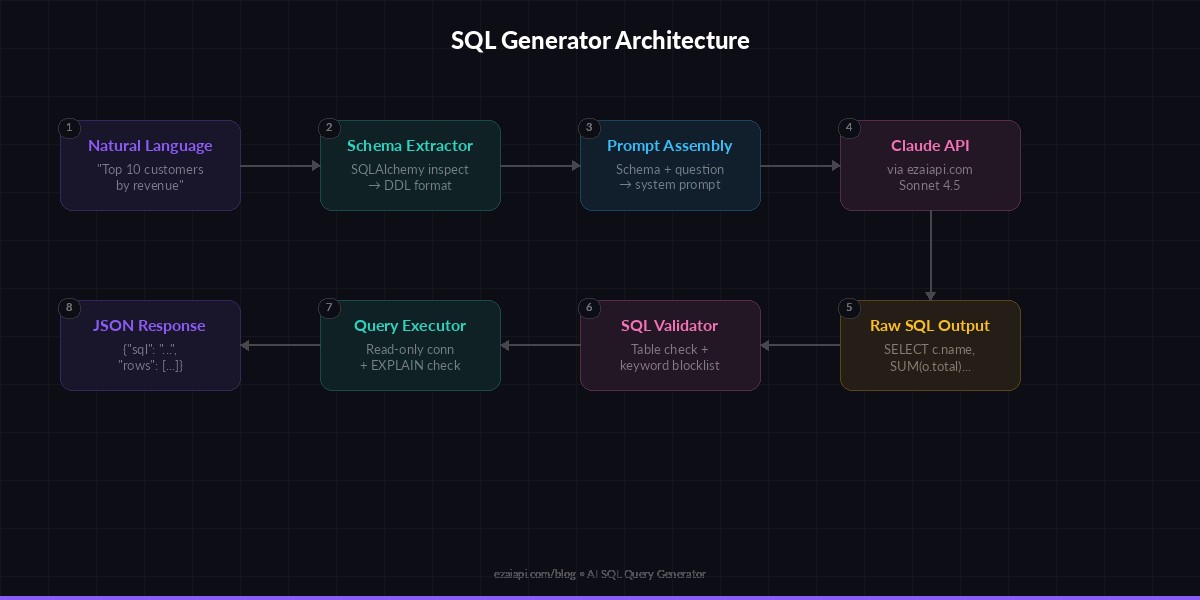
Architecture: schema extraction → prompt assembly → Claude API → SQL validation
from sqlalchemy import create_engine, inspect

def extract_schema(database_url: str) -> str:
    """Pull table definitions from a live database."""
    engine = create_engine(database_url)
    inspector = inspect(engine)
    schema_parts = []

    for table in inspector.get_table_names():
        columns = inspector.get_columns(table)
        pks = inspector.get_pk_constraint(table)["constrained_columns"]
        fks = inspector.get_foreign_keys(table)

        col_defs = []
        for col in columns:
            pk_marker = " PRIMARY KEY" if col["name"] in pks else ""
            nullable = " NOT NULL" if not col["nullable"] else ""
            col_defs.append(
                f"  {col['name']} {col['type']}{pk_marker}{nullable}"
            )

        fk_defs = []
        for fk in fks:
            src = ", ".join(fk["constrained_columns"])
            ref = f"{fk['referred_table']}({', '.join(fk['referred_columns'])})"
            fk_defs.append(f"  FOREIGN KEY ({src}) REFERENCES {ref}")

        all_defs = ",\n".join(col_defs + fk_defs)
        schema_parts.append(f"CREATE TABLE {table} (\n{all_defs}\n);")

    return "\n\n".join(schema_parts)
This gives you a clean DDL-style representation of your entire database. For a typical SaaS app with 20-30 tables, this runs in under 100ms and produces about 2,000 tokens — well within Claude's context window.
The Query Generator Core
Now the main piece: a function that takes a natural language question and your schema, then returns valid SQL. The prompt engineering here matters — we explicitly instruct the model to output only the SQL, use the exact table and column names from the schema, and default to read-only queries.
import anthropic

client = anthropic.Anthropic(
    api_key="sk-your-key",
    base_url="https://ezaiapi.com",
)

SYSTEM_PROMPT = """You are a SQL expert. Given a database schema and a
natural language question, generate a single SQL query that
answers the question.

Rules:
- Use ONLY tables and columns that exist in the schema
- Output raw SQL only — no markdown, no explanation
- Default to SELECT queries unless explicitly asked to modify data
- Use explicit JOIN syntax (never implicit comma joins)
- Add column aliases for clarity on computed fields
- Use PostgreSQL dialect"""

def generate_sql(question: str, schema: str) -> str:
    """Convert a natural language question to SQL."""
    response = client.messages.create(
        model="claude-sonnet-4-5",
        max_tokens=1024,
        system=SYSTEM_PROMPT,
        messages=[{
            "role": "user",
            "content": f"Schema:\n{schema}\n\nQuestion: {question}"
        }]
    )
    sql = response.content[0].text.strip()
    # Strip markdown fences if present
    if sql.startswith("```"):
        sql = sql.split("\n", 1)[1].rsplit("```", 1)[0].strip()
    return sql
Using claude-sonnet-4-5 here gives you fast responses (~800ms) at a low cost per query. For complex analytical queries involving window functions or recursive CTEs, you can swap to claude-opus-4-6 and enable extended thinking for better reasoning.
Adding SQL Validation
Blindly executing AI-generated SQL is a terrible idea. Before running anything, validate the output against your schema to catch hallucinated columns and prevent destructive operations.
import re

DANGEROUS_KEYWORDS = {"DROP", "TRUNCATE", "ALTER", "GRANT", "REVOKE"}

def validate_sql(sql: str, allowed_tables: set) -> dict:
    """Check generated SQL for safety and correctness."""
    upper = sql.upper().strip()

    # Block destructive operations
    for kw in DANGEROUS_KEYWORDS:
        if re.search(rf"\b{kw}\b", upper):
            return {"valid": False, "error": f"Blocked: {kw} not allowed"}

    # Verify referenced tables exist
    table_refs = re.findall(
        r"\bFROM\s+(\w+)|\bJOIN\s+(\w+)", upper
    )
    referenced = {t[0] or t[1] for t in table_refs}
    allowed_upper = {t.upper() for t in allowed_tables}
    unknown = referenced - allowed_upper
    if unknown:
        return {"valid": False, "error": f"Unknown tables: {unknown}"}

    return {"valid": True}
This catches the two most common failure modes: the model inventing a table that doesn't exist, and the model deciding to "clean up" data with a DROP or TRUNCATE. For production use, you'd also want to run the query through EXPLAIN to catch syntax errors before execution.
Wrapping It in a FastAPI Endpoint
Let's expose the generator as a REST API. Your frontend, Slack bot, or internal tool can POST a question and get back SQL plus optional query results.
from fastapi import FastAPI, HTTPException
from pydantic import BaseModel
from sqlalchemy import create_engine, text, inspect

app = FastAPI()
DATABASE_URL = "postgresql://user:pass@localhost/mydb"
engine = create_engine(DATABASE_URL)

# Cache schema on startup — refresh on deploy
schema_ddl = extract_schema(DATABASE_URL)
table_names = set(inspect(engine).get_table_names())

class QueryRequest(BaseModel):
    question: str
    execute: bool = False  # optionally run the query

@app.post("/generate-sql")
async def generate(req: QueryRequest):
    sql = generate_sql(req.question, schema_ddl)
    check = validate_sql(sql, table_names)

    if not check["valid"]:
        raise HTTPException(
            status_code=422,
            detail=check["error"]
        )

    result = {"sql": sql, "rows": None}

    if req.execute:
        with engine.connect() as conn:
            rows = conn.execute(text(sql)).mappings().all()
            result["rows"] = [dict(r) for r in rows[:100]]

    return result
Start the server with uvicorn main:app --reload and test it:
curl -X POST http://localhost:8000/generate-sql \
  -H "content-type: application/json" \
  -d '{"question": "Top 10 customers by revenue this month"}'
Response:
{
  "sql": "SELECT c.name, SUM(o.total) AS revenue\nFROM customers c\nJOIN orders o ON o.customer_id = c.id\nWHERE o.created_at >= date_trunc('month', CURRENT_DATE)\nGROUP BY c.name\nORDER BY revenue DESC\nLIMIT 10",
  "rows": null
}
Cost and Performance
Each query generation costs roughly $0.001–0.003 through EzAI, depending on schema size. A typical schema (30 tables) uses about 2,000 input tokens and the SQL output averages 150 tokens. At EzAI's Sonnet pricing, that's under $0.002 per query — meaning a team of 20 developers could generate 500 queries per day for under $30/month.
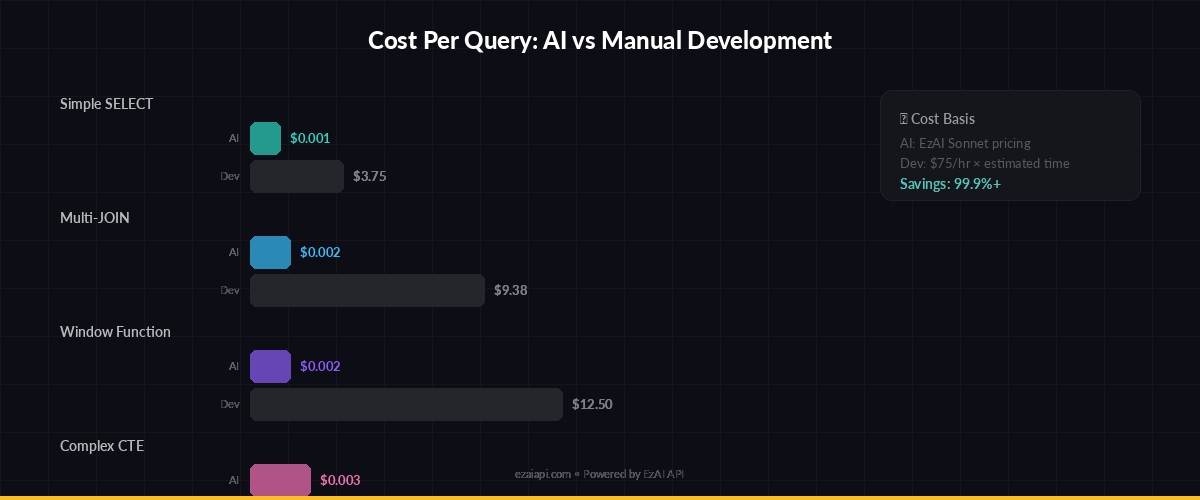
Cost per query vs. developer time saved — AI SQL generation pays for itself after ~5 queries/day
For comparison, a mid-level developer spending 15 minutes on a complex query at $75/hour costs $18.75 in time. The AI equivalent costs $0.002 and takes 1.2 seconds. Even if you reject and regenerate 30% of queries, you're still saving over 99% on that specific task.
Production Hardening Tips
Before shipping this to real users, add these safeguards:
- Read-only database user — Connect with a user that only has SELECT permissions. Belt and suspenders on top of the validation layer.
- Query timeout — Set a 5-second
statement_timeouton the connection. AI-generated queries can accidentally produce full table scans. - Schema caching — Cache your schema DDL and refresh it on deploy or every 5 minutes. Don't call
extract_schemaper request. - Rate limiting — Apply per-user limits. See our guide on handling API rate limits for implementation patterns.
- Audit logging — Log every generated query with the original question, user ID, and execution status. You'll want this for debugging and compliance.
Extending to Multi-Dialect Support
The system prompt currently targets PostgreSQL. To support MySQL, SQLite, or BigQuery, pass the dialect as a parameter and adjust the system prompt accordingly:
DIALECT_HINTS = {
    "postgresql": "Use PostgreSQL syntax. Use :: for casts.",
    "mysql": "Use MySQL syntax. Use CAST() for type conversion.",
    "sqlite": "Use SQLite syntax. No window functions before 3.25.",
    "bigquery": "Use BigQuery Standard SQL. Use backticks for names.",
}

def generate_sql(question: str, schema: str, dialect="postgresql") -> str:
    hint = DIALECT_HINTS.get(dialect, "")
    system = SYSTEM_PROMPT + f"\n\nDialect: {hint}"
    response = client.messages.create(
        model="claude-sonnet-4-5",
        max_tokens=1024,
        system=system,
        messages=[{
            "role": "user",
            "content": f"Schema:\n{schema}\n\nQuestion: {question}"
        }]
    )
    return response.content[0].text.strip()
Claude handles dialect differences reliably. In our testing, Sonnet 4.5 produces valid dialect-specific SQL about 95% of the time, and the remaining 5% are usually minor syntax issues that EXPLAIN catches before execution.
What's Next
You've got a working SQL generator that reads your real schema, validates output, and serves results over HTTP. From here, consider adding:
- Conversation memory — Let users ask follow-up questions ("now filter that by last quarter") by tracking message history
- Query caching — Use response caching to avoid regenerating identical queries
- Streaming results — For large result sets, stream the response as it generates
- Model routing — Use model routing to send simple queries to Sonnet and complex analytics to Opus
The full source code for this tutorial is under 200 lines of Python. Sign up for an EzAI API key and start building — you'll have it running in under 20 minutes.