Discord has over 200 million monthly active users. If you're building developer tools, running a community, or just want a smart assistant in your server, an AI Discord bot is one of the most practical projects you can ship. In this tutorial, you'll build a fully functional Discord bot powered by Claude API through EzAI — handling mentions, slash commands, and conversation threads in under 100 lines of Python.
What You'll Build
By the end of this guide, your bot will:
- Respond when mentioned with
@YourBotin any channel - Support a
/askslash command for structured queries - Maintain conversation context within Discord threads
- Stream long responses so users see output in real-time
Total cost? Roughly $0.002 per message using Claude Sonnet through EzAI's pricing. A 1,000-message-per-day bot costs about $2/month.
Prerequisites
You need three things before writing any code:
- A Discord bot token — Create an application at discord.com/developers, add a bot, and copy the token
- An EzAI API key — Sign up at ezaiapi.com (15 free credits included)
- Python 3.10+ with
pip
Install the dependencies:
pip install discord.py anthropic python-dotenvProject Setup
Create a .env file in your project root. Never commit this to git.
DISCORD_TOKEN=your-discord-bot-token
EZAI_API_KEY=sk-your-ezai-key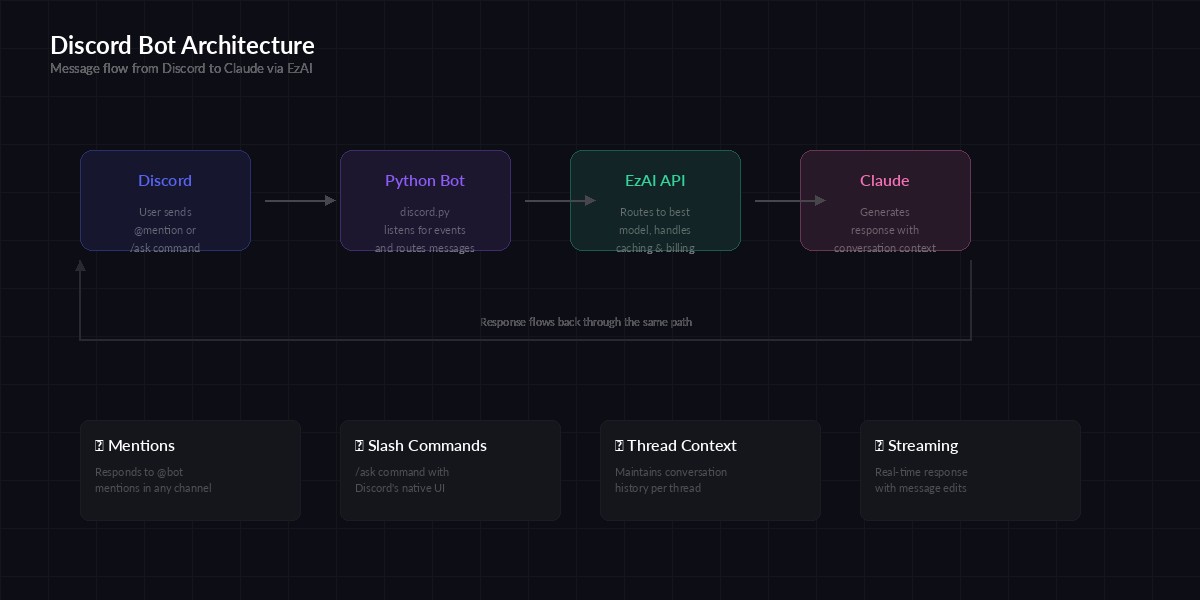
Architecture: Discord events → Python bot → EzAI API → Claude response
The Core Bot
Here's the complete bot. It handles mentions and slash commands, with conversation history tracked per thread:
import os, discord, anthropic
from dotenv import load_dotenv
from collections import defaultdict

load_dotenv()

# EzAI client — just set base_url, everything else is standard
ai = anthropic.Anthropic(
    api_key=os.getenv("EZAI_API_KEY"),
    base_url="https://ezaiapi.com",
)

# Track conversation history per channel/thread
history = defaultdict(lambda: [])
MAX_HISTORY = 20  # Keep last 20 messages per thread

SYSTEM_PROMPT = """You are a helpful assistant in a Discord server.
Keep responses concise (under 1900 chars for Discord's limit).
Use markdown formatting — Discord renders it natively.
If asked about code, use fenced code blocks with language tags."""

intents = discord.Intents.default()
intents.message_content = True
bot = discord.Client(intents=intents)
tree = discord.app_commands.CommandTree(bot)

async def ask_claude(channel_id: int, user_msg: str) -> str:
    """Send a message to Claude via EzAI and return the response."""
    history[channel_id].append(
        {"role": "user", "content": user_msg}
    )
    # Trim history to avoid token overflow
    if len(history[channel_id]) > MAX_HISTORY:
        history[channel_id] = history[channel_id][-MAX_HISTORY:]

    response = ai.messages.create(
        model="claude-sonnet-4-5",
        max_tokens=1024,
        system=SYSTEM_PROMPT,
        messages=history[channel_id],
    )
    reply = response.content[0].text
    history[channel_id].append(
        {"role": "assistant", "content": reply}
    )
    return reply

@bot.event
async def on_ready():
    await tree.sync()
    print(f"Bot ready as {bot.user}")

@bot.event
async def on_message(message):
    if message.author.bot:
        return
    if bot.user not in message.mentions:
        return

    clean = message.content.replace(
        f"<@{bot.user.id}>", ""
    ).strip()
    if not clean:
        return

    async with message.channel.typing():
        reply = await ask_claude(message.channel.id, clean)
    await message.channel.send(reply)

@tree.command(name="ask", description="Ask the AI a question")
async def ask_command(interaction, question: str):
    await interaction.response.defer()
    reply = await ask_claude(interaction.channel_id, question)
    await interaction.followup.send(reply)

bot.run(os.getenv("DISCORD_TOKEN"))
That's 65 lines. The bot listens for @mentions and the /ask slash command, sends each message to Claude through EzAI, and tracks conversation history per channel so follow-up questions work naturally.
Adding Streaming for Long Responses
Claude sometimes generates longer answers. Instead of making users stare at "Bot is typing..." for 10 seconds, you can stream the response and edit the message as chunks arrive:
import asyncio

async def ask_claude_stream(channel, user_msg: str) -> str:
    """Stream Claude's response, editing the Discord message every 1s."""
    history[channel.id].append(
        {"role": "user", "content": user_msg}
    )

    # Send initial placeholder
    msg = await channel.send("▍")
    full_text = ""
    last_edit = 0

    with ai.messages.stream(
        model="claude-sonnet-4-5",
        max_tokens=1024,
        system=SYSTEM_PROMPT,
        messages=history[channel.id][-MAX_HISTORY:],
    ) as stream:
        for text in stream.text_stream:
            full_text += text
            now = asyncio.get_event_loop().time()
            if now - last_edit > 1.0:
                await msg.edit(content=full_text + "▍")
                last_edit = now

    await msg.edit(content=full_text)
    history[channel.id].append(
        {"role": "assistant", "content": full_text}
    )
    return full_text
The streaming version edits the message every second with new content. Users see the response build up in real-time — same UX as ChatGPT. The ▍ cursor gives visual feedback that the bot is still generating. For more on streaming patterns, check our streaming guide.
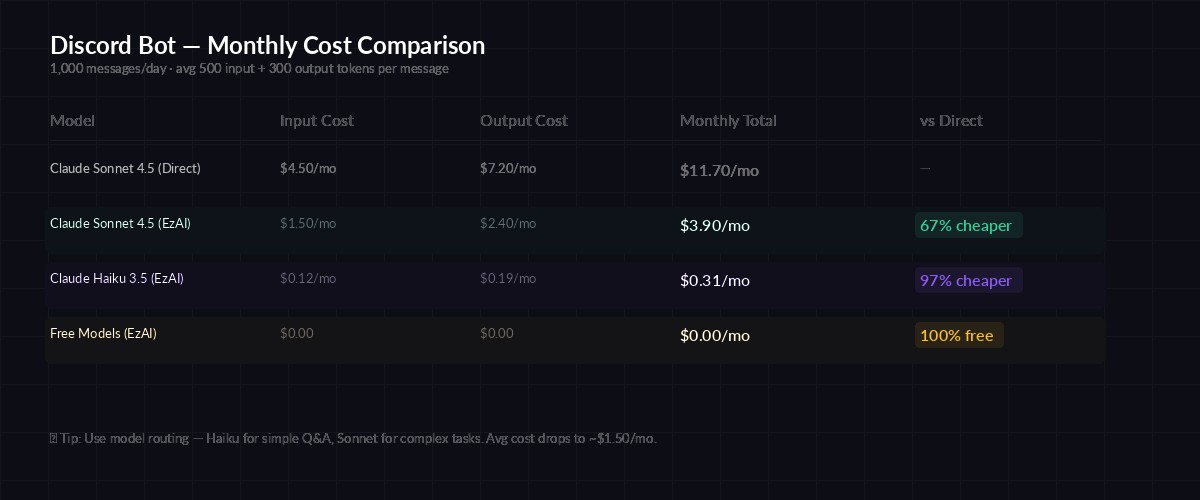
Monthly cost estimates for a Discord bot processing 1,000 messages/day
Bot Permissions and Invite Link
Your bot needs specific permissions to work. In the Discord Developer Portal, go to OAuth2 → URL Generator and select these scopes:
- bot — Required for the bot to join servers
- applications.commands — Required for slash commands
Under Bot Permissions, enable:
- Send Messages and Read Message History
- Use Slash Commands
- Manage Messages (if you want the bot to edit its own messages for streaming)
Copy the generated URL and open it in your browser to invite the bot to your server.
Production Tips
Before deploying to a real server with active users, handle these edge cases:
Rate Limiting
Discord rate-limits message edits to ~5 per 5 seconds per channel. The 1-second edit interval in the streaming code stays well within this. If you're seeing 429 errors, increase the interval to 2 seconds. For more strategies, see our rate limit handling guide.
Error Handling
try:
    reply = await ask_claude(channel_id, user_msg)
except anthropic.RateLimitError:
    reply = "⏳ Rate limited — try again in a few seconds."
except anthropic.APIError as e:
    reply = f"❌ API error: {e.message}"
except Exception:
    reply = "Something went wrong. Try again."
Message Length
Discord caps messages at 2,000 characters. If Claude's response exceeds that, split it:
async def send_long(channel, text, limit=1900):
    """Split long responses into multiple messages."""
    chunks = [text[i:i+limit] for i in range(0, len(text), limit)]
    for chunk in chunks:
        await channel.send(chunk)
Cost Optimization with EzAI
Running an AI bot can get expensive fast if you're paying direct API prices. Here's what makes EzAI a solid choice for Discord bots:
- Lower per-token pricing — EzAI's rates are significantly cheaper than direct Anthropic billing
- Model flexibility — Use Sonnet for most messages, switch to Opus for complex questions, or use free models for simple responses
- No subscription lock-in — Pay per token, scale up or down instantly
- Caching — Repeated system prompts get cached automatically, cutting costs further
A bot serving a 500-person Discord server averaging 300 messages per day costs roughly $1.50/month through EzAI with Sonnet — compared to ~$6/month at direct Anthropic rates.
Deploying Your Bot
For production, run the bot as a background service. A simple approach with systemd on any Linux VPS:
# /etc/systemd/system/discord-bot.service
[Unit]
Description=AI Discord Bot
After=network.target

[Service]
Type=simple
User=deploy
WorkingDirectory=/opt/discord-bot
ExecStart=/opt/discord-bot/venv/bin/python bot.py
Restart=always
RestartSec=5
EnvironmentFile=/opt/discord-bot/.env

[Install]
WantedBy=multi-user.target
Then enable and start:
sudo systemctl enable discord-bot
sudo systemctl start discord-bot
sudo journalctl -u discord-bot -f  # Watch logs
What's Next
You've got a working AI Discord bot. Here are some ideas to extend it:
- Add image understanding — Claude supports vision. Pass image attachments as base64 in the messages array
- Per-server system prompts — Let server admins customize the bot's personality with a
/configurecommand - Usage tracking — Log token counts per user from the API response to set daily limits
- Multi-model routing — Use our model routing guide to pick cheaper models for simple questions
The full source code is on GitHub. If you run into issues, drop by our Telegram — we're happy to help.