You want your chatbot to answer questions about your data — not just regurgitate training data from 2024. That's exactly what RAG (Retrieval Augmented Generation) does. Instead of fine-tuning, you build a RAG chatbot that fetches relevant documents at query time and feeds them to the LLM as context. It's cheaper, more accurate, and you can update your knowledge base without retraining anything.
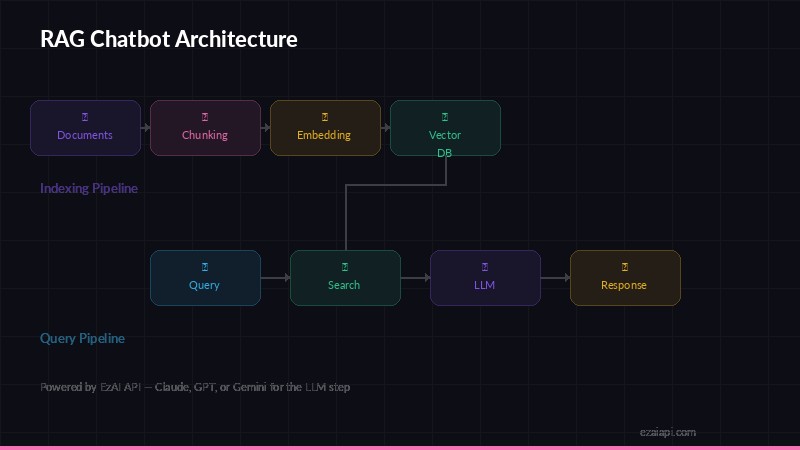
RAG architecture — indexing pipeline (top) and query pipeline (bottom)
This guide walks you through building a working RAG pipeline in Python using Claude's API through EzAI. By the end, you'll have a chatbot that answers questions grounded in your own documents — with citations.

How RAG Works (30-Second Version)
The retrieval augmented generation pipeline has three stages:
- Index — Split your documents into chunks, generate embeddings, store them in a vector database
- Retrieve — When a user asks a question, find the most relevant chunks using semantic search
- Generate — Feed those chunks to Claude as context, get a grounded answer
That's it. No model training, no GPU clusters, no ML expertise required. Just text processing and API calls.
Prerequisites and Setup
You'll need Python 3.10+, an EzAI API key, and three packages:
pip install anthropic numpy chromadbWe're using ChromaDB as our vector store because it runs locally with zero config — great for prototyping. For production, swap it out for Pinecone, Weaviate, or pgvector. The ChromaDB docs cover setup if you want to explore further.
Step 1: Chunk Your Documents
LLMs have context windows, and embeddings work best on focused text. Split your documents into chunks of ~500 tokens with some overlap so you don't cut sentences mid-thought:
def chunk_text(text: str, chunk_size: int = 500, overlap: int = 50) -> list[str]:
    """Split text into overlapping chunks by word count."""
    words = text.split()
    chunks = []
    start = 0

    while start < len(words):
        end = start + chunk_size
        chunk = " ".join(words[start:end])
        chunks.append(chunk)
        start = end - overlap  # overlap keeps context between chunks

    return chunks

# Example: chunk a document
with open("docs/product-guide.md") as f:
    raw_text = f.read()

chunks = chunk_text(raw_text)
print(f"Split into {len(chunks)} chunks")
Step 2: Build the Vector Index with Embeddings
Now turn those chunks into vectors and store them. ChromaDB handles embedding generation internally using its default model, which keeps things simple. For production, you might want OpenAI's text-embedding-3-small or Cohere's embeddings via EzAI's OpenAI-compatible endpoint.
import chromadb

# Create a persistent local vector store
client = chromadb.PersistentClient(path="./vectordb")
collection = client.get_or_create_collection("knowledge_base")

# Add chunks with metadata for citation
collection.add(
    documents=chunks,
    ids=[f"chunk_{i}" for i in range(len(chunks))],
    metadatas=[{"source": "product-guide.md", "chunk_index": i} for i in range(len(chunks))]
)

print(f"Indexed {collection.count()} chunks")
You only run indexing once (or when documents change). The vector store persists to disk, so restarts are instant.
Step 3: Retrieve Relevant Context
When a user asks a question, query the vector store to find the most relevant chunks. ChromaDB uses cosine similarity under the hood:
def retrieve(query: str, top_k: int = 5) -> list[dict]:
    """Find the most relevant chunks for a query."""
    results = collection.query(
        query_texts=[query],
        n_results=top_k
    )

    # Pair documents with their metadata
    context_chunks = []
    for doc, meta in zip(results["documents"][0], results["metadatas"][0]):
        context_chunks.append({"text": doc, "source": meta["source"]})

    return context_chunks

# Test retrieval
results = retrieve("How do I reset my password?")
print(f"Found {len(results)} relevant chunks")
Step 4: Generate Answers with Claude
Now the core of the RAG chatbot — take the retrieved context and ask Claude to answer based on it. The system prompt is critical here. You want the model to cite its sources and refuse to hallucinate when the context doesn't contain the answer:
import anthropic

claude = anthropic.Anthropic(
    api_key="sk-your-ezai-key",
    base_url="https://ezaiapi.com"
)

SYSTEM_PROMPT = """You are a helpful assistant that answers questions based on
the provided context documents. Rules:
1. Only use information from the provided context
2. If the context doesn't contain the answer, say so honestly
3. Cite which source document your answer comes from
4. Be concise and direct"""

def ask(question: str) -> str:
    # 1. Retrieve relevant context
    chunks = retrieve(question, top_k=5)

    # 2. Format context for the prompt
    context = "\n\n".join(
        f"[Source: {c['source']}]\n{c['text']}"
        for c in chunks
    )

    # 3. Ask Claude with context
    response = claude.messages.create(
        model="claude-sonnet-4-5",
        max_tokens=1024,
        system=SYSTEM_PROMPT,
        messages=[{
            "role": "user",
            "content": f"Context:\n{context}\n\nQuestion: {question}"
        }]
    )

    return response.content[0].text

# Try it
answer = ask("How do I reset my password?")
print(answer)
That's a working RAG chatbot in under 80 lines of Python. Ask it a question, it searches your docs, and Claude generates an answer grounded in your actual content.
Making It Production-Ready
The code above works, but production needs a few more things. Here are the most impactful improvements:
Add Conversation Memory
RAG chatbots need to remember earlier messages in the conversation. Pass the full chat history to Claude, but only retrieve context for the latest question:
def chat(question: str, history: list) -> str:
    chunks = retrieve(question, top_k=5)
    context = "\n\n".join(f"[{c['source']}] {c['text']}" for c in chunks)

    messages = history + [{
        "role": "user",
        "content": f"Context:\n{context}\n\nQuestion: {question}"
    }]

    response = claude.messages.create(
        model="claude-sonnet-4-5",
        max_tokens=1024,
        system=SYSTEM_PROMPT,
        messages=messages
    )

    answer = response.content[0].text
    # Append to history for next turn
    history.append({"role": "user", "content": question})
    history.append({"role": "assistant", "content": answer})
    return answer
Use Prompt Caching for Cost Savings
Your system prompt and frequently-retrieved chunks get sent over and over. Use prompt caching to cut input token costs by up to 90% on repeat calls — a huge win for chatbots with many concurrent users.
Pick the Right Model Per Query
Not every question needs Sonnet. Simple factual lookups ("What's the refund policy?") run great on Haiku at a fraction of the cost. Complex queries ("Compare our enterprise and startup plans and recommend one for a 50-person team") deserve Sonnet or Opus. See our cost optimization guide for routing strategies.
Common Pitfalls to Avoid
- Chunks too large — Big chunks dilute relevance. Keep them under 500 words. If your answers cite irrelevant paragraphs, your chunks are too big.
- No overlap — Without overlap, you'll split sentences and lose meaning at chunk boundaries. 50-100 word overlap fixes this.
- Stuffing too many chunks — Retrieving 20 chunks means Claude has to read a wall of text. 3-5 chunks is the sweet spot for most use cases.
- No "I don't know" — Without explicit instructions to refuse, Claude will try to be helpful and fabricate answers. Your system prompt must tell it to say "I don't have that information" when context is insufficient.
- Ignoring metadata — Store source filename, page number, last-updated date with each chunk. This enables citations and lets you filter by freshness.
Where to Go from Here
You've got a working RAG chatbot. Here's how to level up:
- Add streaming — Use Claude's streaming API for real-time token-by-token output. Way better UX for chat interfaces.
- Hybrid search — Combine vector search with keyword search (BM25) for better retrieval. ChromaDB supports this natively.
- Evaluation — Track retrieval precision and answer quality. If users ask follow-up questions, your first answer probably wasn't good enough.
- Multiple doc types — Parse PDFs, HTML, and Markdown. Libraries like
unstructuredhandle this well.
If you're new to EzAI, grab a free API key from the getting started guide — you get 15 free credits and access to free models to prototype your RAG pipeline before committing any budget. All the code in this post works with EzAI's Anthropic-compatible endpoint with zero modifications.