Most AI chat tutorials stop at HTTP request-response. Send a message, wait 3-8 seconds, get the full answer back. That works for demos, but real users expect to see tokens appear as the model thinks — the same streaming experience you get in ChatGPT or Claude.ai.
In this tutorial, you'll build a real-time AI chat server that accepts messages over WebSockets and streams Claude's response back token-by-token. The frontend sees text appear instantly, and the connection stays open for follow-up messages without re-handshaking. We'll use Node.js, the ws library, and EzAI API for the Claude backend.
Why WebSockets Beat HTTP Polling
Before writing code, it helps to understand why WebSockets matter for AI chat. With standard HTTP, every message is a separate request-response cycle. If you want streaming, you need Server-Sent Events (SSE) — which only goes server-to-client and requires a new connection per conversation turn.
WebSockets give you a persistent, bidirectional channel. The client connects once, and both sides can send data at any time. For AI chat, this means:
- Instant token delivery — each chunk from the model reaches the client within milliseconds
- No reconnection overhead — one handshake for an entire conversation session
- Bidirectional control — the client can send "stop generating" mid-stream
- Lower server load — fewer TCP connections, less TLS negotiation
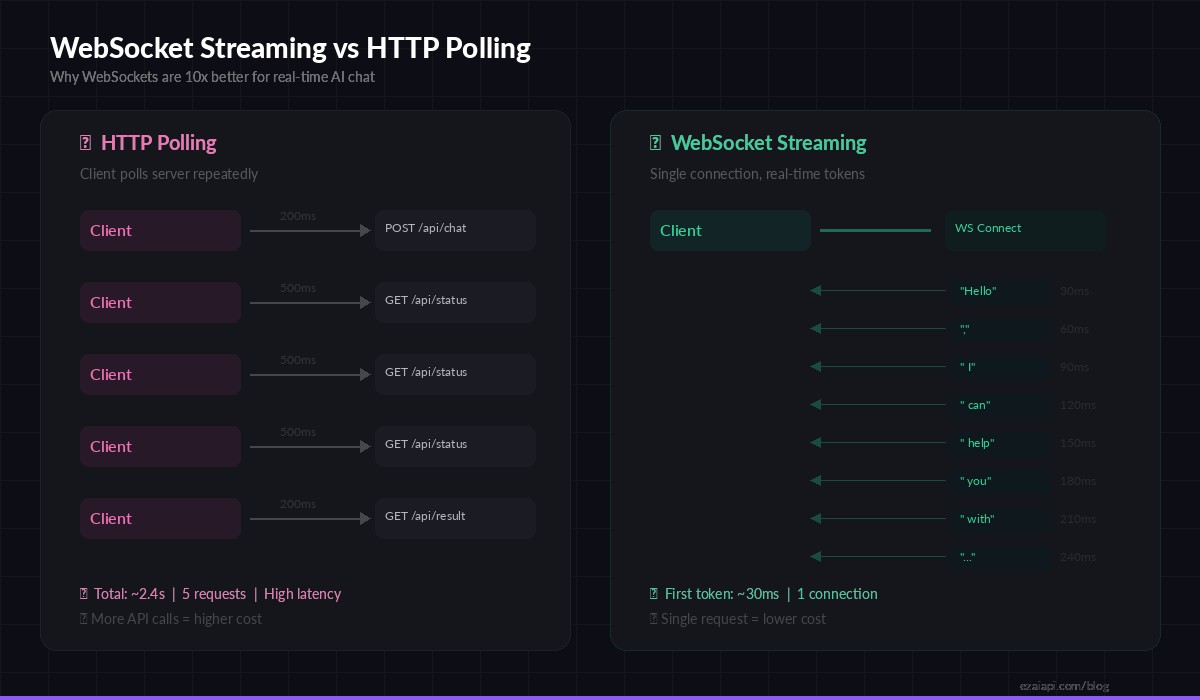
WebSocket streaming delivers the first token in ~30ms vs ~2.4s total wait with HTTP polling
Project Setup
Create a new project directory and install the dependencies. You need ws for WebSocket handling and the Anthropic SDK (which works with EzAI out of the box):
mkdir ai-chat-ws && cd ai-chat-ws
npm init -y
npm install ws @anthropic-ai/sdk
Set your EzAI API key as an environment variable. If you don't have one yet, grab a free key from the dashboard — every account starts with 15 credits:
export ANTHROPIC_API_KEY="sk-your-ezai-key"The WebSocket Server
Here's the core server. It accepts WebSocket connections, parses incoming JSON messages, calls the EzAI-proxied Claude API with streaming enabled, and pipes each text chunk back to the client in real time:
import { WebSocketServer } from "ws";
import Anthropic from "@anthropic-ai/sdk";

const anthropic = new Anthropic({
  baseURL: "https://ezaiapi.com",
  // reads ANTHROPIC_API_KEY from env automatically
});

const wss = new WebSocketServer({ port: 8080 });

wss.on("connection", (ws) => {
  const history = [];
  let controller = null;

  ws.on("message", async (raw) => {
    const { type, content } = JSON.parse(raw);

    // Allow client to abort mid-stream
    if (type === "stop") {
      controller?.abort();
      return;
    }

    history.push({ role: "user", content });
    controller = new AbortController();

    try {
      const stream = anthropic.messages.stream({
        model: "claude-sonnet-4-5",
        max_tokens: 4096,
        messages: history,
      }, { signal: controller.signal });

      let full = "";

      stream.on("text", (chunk) => {
        full += chunk;
        ws.send(JSON.stringify({
          type: "delta", text: chunk
        }));
      });

      await stream.finalMessage();
      history.push({ role: "assistant", content: full });

      ws.send(JSON.stringify({
        type: "done",
        usage: stream.currentMessage.usage
      }));
    } catch (err) {
      if (err.name !== "AbortError") {
        ws.send(JSON.stringify({
          type: "error", message: err.message
        }));
      }
    }
  });
});

console.log("WebSocket AI chat server running on ws://localhost:8080");
A few things to note in this implementation:
- Conversation memory — the
historyarray persists per connection, so follow-up messages have full context - Abort support — sending
{"type": "stop"}cancels the in-flight stream, which also stops billing for ungenerated tokens - Usage tracking — the
doneevent includes input/output token counts from the API response
Connecting from the Client
On the frontend (or in any WebSocket client), connecting is straightforward. Here's a minimal browser implementation that renders streamed tokens into a div:
const ws = new WebSocket("ws://localhost:8080");
const output = document.getElementById("response");

ws.addEventListener("message", (event) => {
  const msg = JSON.parse(event.data);

  if (msg.type === "delta") {
    output.textContent += msg.text;  // append each token
  }
  if (msg.type === "done") {
    console.log(`Tokens: ${msg.usage.input_tokens}in / ${msg.usage.output_tokens}out`);
  }
  if (msg.type === "error") {
    output.textContent += `\n[Error: ${msg.message}]`;
  }
});

function sendMessage(text) {
  output.textContent = "";
  ws.send(JSON.stringify({ type: "chat", content: text }));
}

function stopGeneration() {
  ws.send(JSON.stringify({ type: "stop" }));
}
The client renders tokens the instant they arrive. No buffering, no polling. Users see text materialize character by character, exactly like they'd expect from a modern chat interface.
Adding Reconnection and Error Recovery
Production WebSocket apps need to handle disconnects gracefully. Network blips, server restarts, and mobile background transitions all kill connections. Here's a robust reconnection wrapper:
function createReconnectingWS(url, { maxRetries = 5, baseDelay = 1000 } = {}) {
  let retries = 0;
  let ws;

  function connect() {
    ws = new WebSocket(url);

    ws.addEventListener("open", () => {
      retries = 0;  // reset on successful connect
      console.log("Connected to AI chat server");
    });

    ws.addEventListener("close", () => {
      if (retries < maxRetries) {
        const delay = baseDelay * Math.pow(2, retries);
        console.log(`Reconnecting in ${delay}ms...`);
        setTimeout(connect, delay);
        retries++;
      }
    });

    return ws;
  }

  return connect();
}
Exponential backoff prevents hammering your server during outages. The retry counter resets on every successful connection, so transient network issues recover cleanly without burning through the retry budget.
Scaling to Multiple Users
The single-process server above handles dozens of concurrent connections easily — each WebSocket session maintains its own history array and streams independently. But for production deployments with hundreds of users, you'll want a few additions:
- Session IDs — attach a UUID to each connection for logging and analytics
- Rate limiting — cap messages per connection per minute to prevent abuse
- Health checks — implement WebSocket ping/pong to detect dead connections
- Horizontal scaling — use Redis pub/sub to synchronize state across multiple server instances
Here's a quick rate limiter you can bolt onto the server:
const RATE_LIMIT = 10;  // max 10 messages per minute

wss.on("connection", (ws) => {
  const timestamps = [];

  ws.on("message", (raw) => {
    const now = Date.now();
    while (timestamps.length && timestamps[0] < now - 60000) {
      timestamps.shift();
    }

    if (timestamps.length >= RATE_LIMIT) {
      ws.send(JSON.stringify({
        type: "error",
        message: "Rate limit exceeded. Wait a moment."
      }));
      return;
    }

    timestamps.push(now);
    // ... handle message normally
  });
});
Deploying Behind a Reverse Proxy
In production, your WebSocket server will sit behind nginx or Caddy. The key configuration is ensuring the proxy upgrades HTTP connections to WebSocket. Here's the nginx snippet:
location /ws {
    proxy_pass http://127.0.0.1:8080;
    proxy_http_version 1.1;
    proxy_set_header Upgrade $http_upgrade;
    proxy_set_header Connection "upgrade";
    proxy_set_header Host $host;
    proxy_read_timeout 86400;  # keep alive for 24h
}
The proxy_read_timeout is critical. Without it, nginx kills idle WebSocket connections after 60 seconds — which means your users disconnect during long AI generation pauses.
Cost Optimization Tips
Streaming over WebSockets doesn't change API pricing — you pay the same per-token rate whether you stream or buffer. But the architecture enables several cost optimizations:
- Cancel early — if the user sends "stop", abort the stream immediately. Ungenerated tokens aren't billed
- Trim history — keep only the last 10-20 messages in the
historyarray to avoid ballooning input tokens - Use prompt caching — EzAI supports Anthropic's prompt caching, which can cut costs by up to 90% on repeated system prompts
- Pick the right model — use
claude-haiku-3-5for quick responses and reserveclaude-sonnet-4-5for complex reasoning. Check the pricing page for per-model rates
What's Next
You now have a working AI chat server that streams responses in real time over WebSockets. From here, you could:
- Add authentication with JWT tokens validated during the WebSocket handshake
- Persist conversation history to a database like PostgreSQL or Redis
- Build a Discord bot or Slack bot that connects via this same WebSocket server
- Implement multi-model fallback so if one model is overloaded, the server switches to another
The full code from this tutorial is production-ready. Drop in your EzAI API key, deploy it, and you've got a real-time AI chat backend that handles streaming, cancellation, and conversation context out of the box.