Most AI chatbot tutorials are Python-first. That's fine if your stack is Python — but if you're already running Node.js in production, spinning up a separate Python service just for AI feels wrong. You end up managing two runtimes, two dependency trees, and two deployment pipelines for what should be a single endpoint.
This guide builds a complete AI chatbot API with Express, TypeScript, and the Anthropic SDK, routed through EzAI for multi-model access at lower cost. You'll get streaming Server-Sent Events, per-session conversation memory, and proper error handling — all in under 100 lines of core logic.
What You'll Build
A REST API with two endpoints:
POST /api/chat— Send a message, get a streamed AI responseDELETE /api/chat/:sessionId— Clear conversation history for a session
Each session maintains its own conversation thread. The chatbot remembers previous messages within a session, so users can ask follow-up questions without repeating context. Responses stream back as Server-Sent Events — your frontend sees tokens appear in real time instead of waiting for the full response.
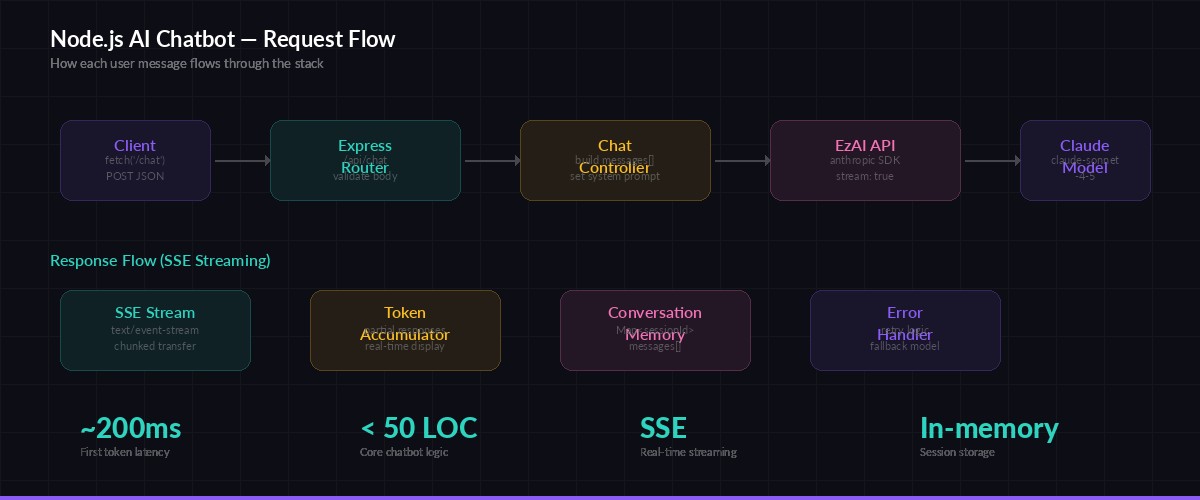
Request flow — from client POST to streamed AI response via EzAI
Project Setup
Initialize a TypeScript project and install the dependencies. You need express for routing, @anthropic-ai/sdk for the AI calls, and uuid for generating session IDs.
mkdir ai-chatbot && cd ai-chatbot
npm init -y
npm i express @anthropic-ai/sdk uuid
npm i -D typescript @types/express @types/uuid tsx
npx tsc --init --target es2022 --module nodenext --outDir dist
Set your EzAI API key as an environment variable. If you've already run the install script, this is already configured:
export ANTHROPIC_API_KEY="sk-your-ezai-key"
export ANTHROPIC_BASE_URL="https://ezaiapi.com"
The Chatbot Server
Here's the full implementation. Create src/server.ts:
import express from "express";
import Anthropic from "@anthropic-ai/sdk";
import { v4 as uuid } from "uuid";

const app = express();
app.use(express.json());

// EzAI client — reads ANTHROPIC_API_KEY and ANTHROPIC_BASE_URL from env
const client = new Anthropic();

// In-memory conversation store
type Message = { role: "user" | "assistant"; content: string };
const sessions = new Map<string, Message[]>();

const SYSTEM_PROMPT = `You are a helpful coding assistant. Be concise.
Give code examples when relevant. Use markdown formatting.`;

const MAX_MESSAGES = 50; // trim older messages to control token usage

app.post("/api/chat", async (req, res) => {
  const { message, sessionId = uuid() } = req.body;

  if (!message || typeof message !== "string") {
    return res.status(400).json({ error: "message is required" });
  }

  // Get or create conversation history
  if (!sessions.has(sessionId)) sessions.set(sessionId, []);
  const history = sessions.get(sessionId)!;
  history.push({ role: "user", content: message });

  // Trim to last N messages to avoid token explosion
  if (history.length > MAX_MESSAGES) {
    history.splice(0, history.length - MAX_MESSAGES);
  }

  // Set up SSE headers
  res.setHeader("Content-Type", "text/event-stream");
  res.setHeader("Cache-Control", "no-cache");
  res.setHeader("Connection", "keep-alive");
  res.setHeader("X-Session-Id", sessionId);

  try {
    const stream = client.messages.stream({
      model: "claude-sonnet-4-5",
      max_tokens: 2048,
      system: SYSTEM_PROMPT,
      messages: history,
    });

    let fullResponse = "";

    stream.on("text", (text) => {
      fullResponse += text;
      res.write(`data: ${JSON.stringify({ type: "text", text })}\n\n`);
    });

    await stream.finalMessage();

    // Save assistant response to history
    history.push({ role: "assistant", content: fullResponse });

    // Send final event with metadata
    const usage = (await stream.finalMessage()).usage;
    res.write(`data: ${JSON.stringify({
      type: "done",
      sessionId,
      usage: { input: usage.input_tokens, output: usage.output_tokens }
    })}\n\n`);
    res.end();
  } catch (err: any) {
    res.write(`data: ${JSON.stringify({ type: "error", error: err.message })}\n\n`);
    res.end();
  }
});

// Clear a session's conversation history
app.delete("/api/chat/:sessionId", (req, res) => {
  sessions.delete(req.params.sessionId);
  res.json({ cleared: true });
});

app.listen(3000, () => console.log("Chatbot API running on :3000"));
That's the entire backend. Run it with npx tsx src/server.ts and you've got a working AI chatbot API.
Streaming on the Frontend
The server pushes tokens as SSE events. On the client side, you consume them with the EventSource API or a simple fetch reader. Here's the fetch approach — it gives you more control over headers and error handling:
async function chat(message: string, sessionId: string) {
  const res = await fetch("http://localhost:3000/api/chat", {
    method: "POST",
    headers: { "Content-Type": "application/json" },
    body: JSON.stringify({ message, sessionId }),
  });

  const reader = res.body!.getReader();
  const decoder = new TextDecoder();
  let buffer = "";

  while (true) {
    const { done, value } = await reader.read();
    if (done) break;

    buffer += decoder.decode(value, { stream: true });
    const lines = buffer.split("\n");
    buffer = lines.pop() ?? "";

    for (const line of lines) {
      if (!line.startsWith("data: ")) continue;
      const event = JSON.parse(line.slice(6));

      if (event.type === "text") {
        process.stdout.write(event.text); // or append to DOM
      } else if (event.type === "done") {
        console.log(`\n[${event.usage.input}in / ${event.usage.output}out tokens]`);
      }
    }
  }
}
Adding Error Recovery
Production chatbots need to handle API failures gracefully. EzAI supports multi-model fallback, but you should also handle transient errors in your server code. Wrap the streaming call with a retry:
async function streamWithRetry(
  messages: Message[],
  retries = 2,
  models = ["claude-sonnet-4-5", "gpt-4.1-mini"]
) {
  for (const model of models) {
    for (let attempt = 0; attempt <= retries; attempt++) {
      try {
        return client.messages.stream({
          model,
          max_tokens: 2048,
          system: SYSTEM_PROMPT,
          messages,
        });
      } catch (err: any) {
        if (err.status === 429) {
          // Rate limited — wait and retry
          await new Promise(r => setTimeout(r, 1000 * (attempt + 1)));
          continue;
        }
        if (err.status >= 500) break; // try next model
        throw err; // 4xx (not 429) = client error, don't retry
      }
    }
  }
  throw new Error("All models failed");
}
This tries Claude Sonnet 4.5 first, and if it's down or rate-limited, falls back to GPT-4.1 Mini — both available through the same EzAI endpoint with no code changes. Your users never see a failure.
Managing Token Costs
Conversation memory grows fast. A 50-message thread can burn 30k+ input tokens per request because you're re-sending the full history every time. Three strategies to keep costs under control:
- Sliding window — Keep only the last N messages (the
MAX_MESSAGESconstant above). Simple and effective for most chatbots. - Summarize and compress — Every 20 messages, ask the model to summarize the conversation so far, then replace the history with the summary. Cuts tokens by 80%+.
- Use cheaper models for simple turns — Route short factual questions to
claude-haiku-3.5at 1/10th the cost. Save Sonnet for complex reasoning. EzAI lets you route dynamically per request.
Check your actual spending on the EzAI dashboard — it shows per-request token counts and costs in real time.
Deploy and Test
Add a start script to package.json and test it end-to-end:
# Start the server
npx tsx src/server.ts

# In another terminal — test with curl
curl -N http://localhost:3000/api/chat \
  -H "Content-Type: application/json" \
  -d '{"message": "How do I read a file in Node.js?", "sessionId": "test-1"}'
You'll see tokens stream back in real time. Send a follow-up message with the same sessionId to verify conversation memory works — the bot will remember your previous question.
For production deployments, swap the in-memory Map for Redis or a database, add authentication middleware, and you're shipping a real product. The core AI logic stays exactly the same.
Wrapping Up
You've built a streaming AI chatbot API that handles conversation memory, error recovery, and multi-model fallback — entirely in TypeScript, running on the same Node.js stack as the rest of your app. No Python runtime, no extra infrastructure.
The full code is under 100 lines. EzAI handles the model routing and cost optimization behind the scenes, so you can focus on building the product instead of managing API keys across providers.
- Sign up for EzAI and grab your API key
- Read the API docs for advanced features like extended thinking
- Check out the streaming guide for deeper SSE patterns