PDFs are everywhere — contracts, research papers, invoices, reports. But extracting useful information from them programmatically is painful. Regular text extraction gives you raw characters with no understanding. Claude changes that. In this tutorial, you'll build a Python tool that reads any PDF and uses Claude API to summarize it, answer questions about it, and extract structured data — all in under 100 lines of code.
What You'll Build
A command-line PDF analyzer that does three things:
- Summarize — condense a 50-page report into key points
- Query — ask natural language questions about the document
- Extract — pull structured JSON data (names, dates, amounts) from unstructured text
The whole thing runs locally, talks to Claude via EzAI API, and handles PDFs up to 200k tokens — which covers most real-world documents.
Prerequisites and Setup
You need Python 3.9+ and an EzAI API key. If you don't have one yet, grab a free account — it comes with 15 credits, plenty for testing.
Install the dependencies:
pip install anthropic pymupdfpymupdf (imported as fitz) is the fastest Python PDF parser — it handles text extraction, OCR fallback, and even scanned documents. anthropic is the official SDK that works with EzAI out of the box.
Step 1: Extract Text from PDF
First, build a function that pulls text from every page. PyMuPDF handles multi-column layouts, embedded fonts, and Unicode correctly — unlike pdfminer or PyPDF2 which choke on complex layouts.
import fitz  # pymupdf

def extract_pdf_text(path: str, max_pages: int = 100) -> str:
    """Extract text from PDF, page by page with markers."""
    doc = fitz.open(path)
    pages = []
    for i, page in enumerate(doc[:max_pages]):
        text = page.get_text("text")
        if text.strip():
            pages.append(f"--- Page {i + 1} ---\n{text.strip()}")
    doc.close()
    return "\n\n".join(pages)
The page markers (--- Page 3 ---) matter. When Claude references something, you'll know exactly which page it came from. This is useful for contracts where you need to cite specific sections.
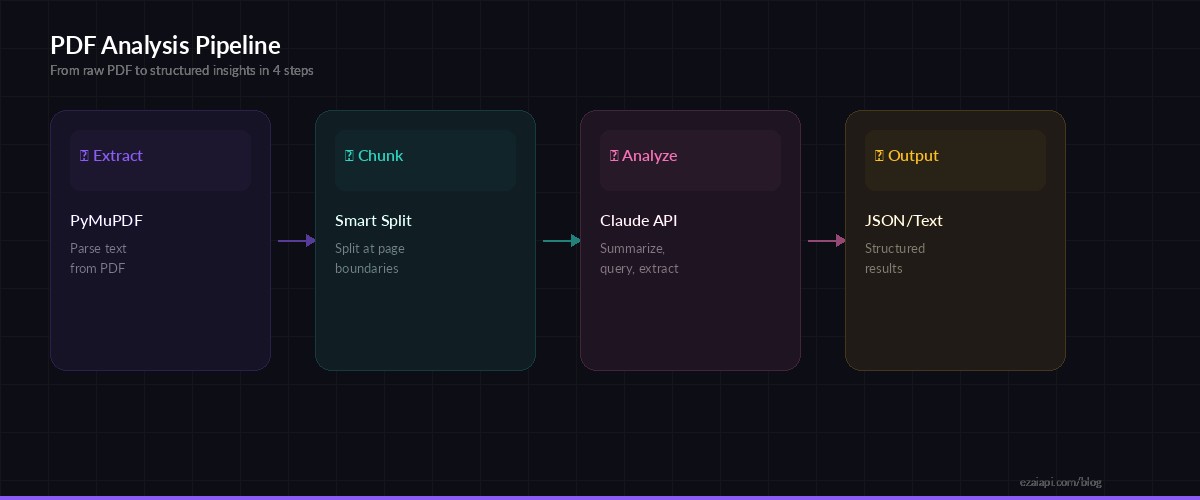
The PDF analysis pipeline: extract text, chunk if needed, send to Claude, return structured results
Step 2: Build the Analyzer Class
Wrap everything in a class that holds the API client and document text. This keeps things clean when you want to run multiple queries against the same PDF without re-extracting.
import anthropic
import json

class PDFAnalyzer:
    def __init__(self, api_key: str, pdf_path: str):
        self.client = anthropic.Anthropic(
            api_key=api_key,
            base_url="https://ezaiapi.com"
        )
        self.text = extract_pdf_text(pdf_path)
        self.model = "claude-sonnet-4-5"
        print(f"Loaded {len(self.text):,} chars from {pdf_path}")

    def _ask(self, system: str, prompt: str, max_tokens: int = 4096) -> str:
        """Send a prompt with the PDF context to Claude."""
        msg = self.client.messages.create(
            model=self.model,
            max_tokens=max_tokens,
            system=system,
            messages=[{
                "role": "user",
                "content": f"<document>\n{self.text}\n</document>\n\n{prompt}"
            }]
        )
        return msg.content[0].text
Notice the <document> XML tags wrapping the text. Claude handles structured input well — the tags tell it exactly where the document content starts and stops, which reduces hallucination on document boundaries.
Step 3: Add Summarize, Query, and Extract
Now add the three core methods. Each one uses a different system prompt tuned for the task.
    def summarize(self, detail: str = "concise") -> str:
        """Summarize the document. detail: 'concise' | 'detailed'"""
        system = "You are a document analyst. Summarize precisely, cite page numbers."
        length = "3-5 bullet points" if detail == "concise" else "comprehensive section-by-section"
        return self._ask(system, f"Summarize this document ({length}). Include page references.")

    def query(self, question: str) -> str:
        """Ask a natural language question about the document."""
        system = (
            "You are a document analyst. Answer questions based ONLY on "
            "the provided document. If the answer isn't in the document, "
            "say so. Cite page numbers."
        )
        return self._ask(system, question)

    def extract(self, schema: dict) -> dict:
        """Extract structured data matching a JSON schema."""
        system = (
            "You are a data extraction engine. Extract the requested fields "
            "from the document. Return ONLY valid JSON, no explanation."
        )
        prompt = f"Extract data matching this schema:\n{json.dumps(schema, indent=2)}"
        raw = self._ask(system, prompt, max_tokens=2048)
        return json.loads(raw)
The extract method is the real power move. Pass it a schema like {"vendor_name": "string", "total_amount": "number", "line_items": [{"description": "string", "amount": "number"}]} and Claude will pull that exact structure from invoices, contracts, or any document. No regex, no custom parsers.
Step 4: Handle Large Documents
Claude Sonnet supports a 200k context window, but very large PDFs (300+ pages) need chunking. Here's a practical approach that splits by page groups and merges results:
def chunk_text(text: str, max_chars: int = 150_000) -> list[str]:
    """Split document text into chunks at page boundaries."""
    pages = text.split("--- Page ")
    chunks, current = [], ""
    for page in pages:
        if not page.strip():
            continue
        candidate = current + "--- Page " + page
        if len(candidate) > max_chars and current:
            chunks.append(current)
            current = "--- Page " + page
        else:
            current = candidate
    if current:
        chunks.append(current)
    return chunks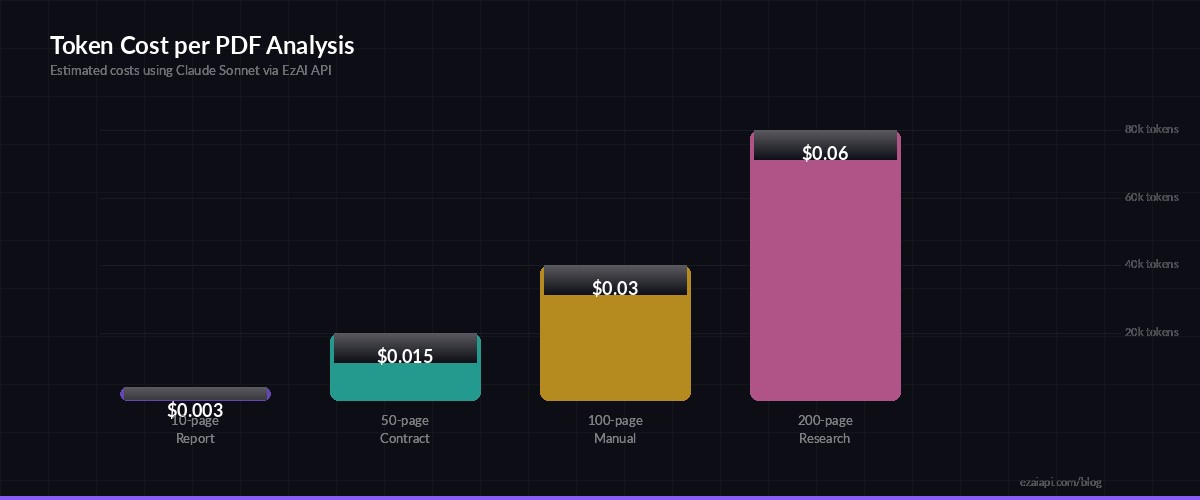
Estimated token costs per analysis — most documents fit in a single API call
Putting It All Together
Here's the complete CLI tool. Save it as pdf_analyzer.py and point it at any PDF:
import sys

if __name__ == "__main__":
    pdf_path = sys.argv[1]  # e.g., report.pdf
    api_key = "sk-your-ezai-key"

    analyzer = PDFAnalyzer(api_key, pdf_path)

    # Summarize
    print("=== Summary ===")
    print(analyzer.summarize())

    # Ask a question
    print("\n=== Query ===")
    print(analyzer.query("What are the key risks mentioned in this document?"))

    # Extract structured data
    print("\n=== Extracted Data ===")
    schema = {
        "title": "string",
        "authors": ["string"],
        "date": "string",
        "key_findings": ["string"]
    }
    data = analyzer.extract(schema)
    print(json.dumps(data, indent=2))
Run it:
python pdf_analyzer.py quarterly-report.pdfCost and Performance
With EzAI, you get significant savings on every call. Here's what a typical analysis costs:
- 10-page report — ~4k input tokens → $0.003 with Sonnet via EzAI
- 50-page contract — ~20k input tokens → $0.015
- 200-page research paper — ~80k input tokens → $0.06
Compare that to hiring someone to manually summarize a 200-page document. For bulk processing, check out our guide on batching AI API requests to analyze hundreds of PDFs concurrently.
Production Tips
Before shipping this to production, add these hardening steps:
- Token counting — use token counting to estimate costs before sending. Reject files that would exceed your budget.
- Retry logic — wrap API calls with exponential backoff. Our error handling guide covers the exact pattern.
- Caching — hash the PDF content and cache results. Same document, same question = same answer. No need to pay twice.
- Model selection — use Sonnet for summaries (fast, cheap), switch to Opus for complex legal extraction where accuracy matters more than speed.
What's Next
You now have a working PDF analyzer that can summarize, query, and extract structured data from any document. From here, you could:
- Add a FastAPI endpoint to turn this into a web service
- Build a batch processor for invoice parsing across thousands of files
- Combine with OCR for scanned documents (PyMuPDF supports this natively)
- Add streaming responses for real-time UI feedback using our streaming guide
The full source code fits in a single file under 100 lines. Clone it, adapt the schemas, and start processing your document backlog. Get your EzAI API key to get started.