Every AI API call you make is billed by tokens — not characters, not words, not requests. If you don't understand how tokens work, you're probably overspending by 40-60% without realizing it. This guide breaks down exactly what tokens are, how to count them before you hit send, and five concrete strategies to cut your token bill dramatically.
What Are Tokens, Really?
A token is a chunk of text that an AI model processes as a single unit. For English, one token is roughly 4 characters or 0.75 words. But the mapping isn't consistent — common words like "the" are single tokens, while uncommon words get split into multiple tokens.
Here's what matters for your bill:
- Input tokens — everything you send: system prompt, conversation history, user message
- Output tokens — everything the model generates in its response
- Output tokens cost 3-5× more than input tokens across every major provider
That last point is critical. A 500-token response costs more than a 2,000-token prompt on most models. If you're not managing output length, you're bleeding money on the expensive side of the equation.
How to Count Tokens Before Sending
Don't guess token counts — measure them. Every major AI SDK includes a tokenizer, and you can count tokens client-side before making an API call. This lets you estimate costs, enforce budgets, and trim context when it gets too long.
Python: Using the Anthropic Tokenizer
import anthropic

client = anthropic.Anthropic(
    api_key="sk-your-key",
    base_url="https://ezaiapi.com"
)

# Count tokens before sending
result = client.messages.count_tokens(
    model="claude-sonnet-4-5",
    messages=[{"role": "user", "content": "Explain quicksort in Python"}],
    system="You are a concise coding assistant."
)

print(f"Input tokens: {result.input_tokens}")
# Input tokens: 18
Quick Estimation Without an SDK
If you need a rough estimate without importing a library, use this rule of thumb:
def estimate_tokens(text: str) -> int:
    """Rough token estimate: ~4 chars per token for English."""
    return max(1, len(text) // 4)

def estimate_cost(input_tokens: int, output_tokens: int, model: str = "claude-sonnet-4-5") -> float:
    """Estimate cost in USD based on EzAI pricing."""
    pricing = {
        "claude-sonnet-4-5": (3.0, 15.0),   # per 1M tokens (input, output)
        "claude-opus-4":     (15.0, 75.0),
        "claude-haiku-3.5":  (0.8, 4.0),
        "gpt-4o":            (2.5, 10.0),
    }
    inp_rate, out_rate = pricing.get(model, (3.0, 15.0))
    return (input_tokens * inp_rate + output_tokens * out_rate) / 1_000_000

# Example: estimate before sending
prompt = "Write a Python function that validates email addresses"
est_input = estimate_tokens(prompt)
est_output = 300  # typical code response
cost = estimate_cost(est_input, est_output)
print(f"Estimated cost: ${cost:.6f}")
# Estimated cost: $0.004537
The 4-characters-per-token rule works well for English prose and code. For CJK languages (Chinese, Japanese, Korean), expect 1-2 characters per token — they're more expensive to tokenize.
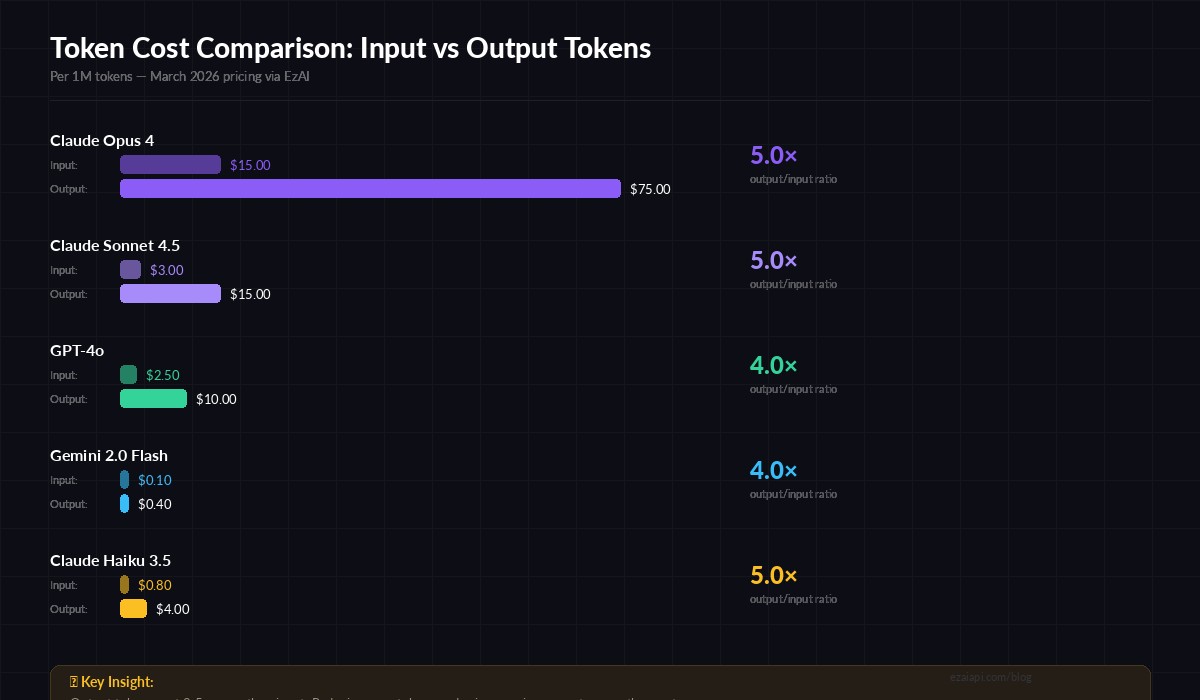
Output tokens cost 3-5× more than input tokens across all major models
5 Strategies to Cut Your Token Costs
These aren't theoretical — they're techniques that teams running production AI apps use daily. Applied together, they can reduce your API spend by 60-85%.
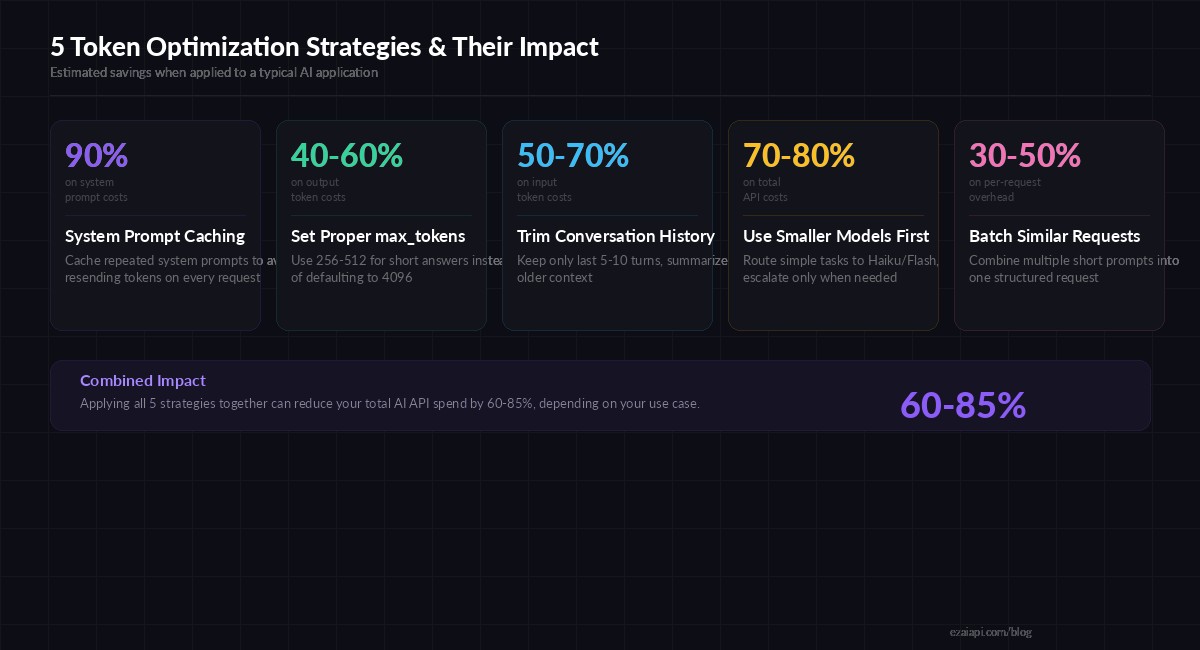
Combined impact: 60-85% reduction in total API spend
1. Cache Your System Prompts
If you're sending the same system prompt on every request — and most apps do — you're paying for those tokens over and over. Anthropic's prompt caching lets you cache the system prompt and only pay 10% of the normal input token rate on subsequent calls.
# Enable prompt caching via EzAI — same Anthropic API format
response = client.messages.create(
    model="claude-sonnet-4-5",
    max_tokens=1024,
    system=[{
        "type": "text",
        "text": "You are a senior Python developer...",  # your long system prompt
        "cache_control": {"type": "ephemeral"}
    }],
    messages=[{"role": "user", "content": "Review this function..."}]
)

# Check cache performance
print(f"Cache read: {response.usage.cache_read_input_tokens}")
print(f"Cache miss: {response.usage.cache_creation_input_tokens}")
For a 2,000-token system prompt called 100 times, caching saves you ~$0.54 on Sonnet alone. Scale that across thousands of daily requests and it adds up fast.
2. Set Tight max_tokens Limits
The default max_tokens of 4096 is way too high for most tasks. If you're asking for a one-line answer, you don't need 4,096 tokens of output budget. Set it to what you actually need:
- Classification/labeling:
max_tokens: 50 - Short answers:
max_tokens: 256 - Code generation:
max_tokens: 1024 - Long-form writing:
max_tokens: 2048
This doesn't just save money — it makes responses faster. The model stops generating once it hits the limit, reducing latency.
3. Trim Conversation History Aggressively
Every message in your conversation history costs input tokens. A 20-turn chat can easily hit 10,000+ input tokens per request. Keep only the last 5-10 turns, and summarize older context into a compact system message:
def trim_history(messages, max_turns=8, max_tokens=4000):
    """Keep recent messages within token budget."""
    recent = messages[-max_turns:]
    total = sum(estimate_tokens(m["content"]) for m in recent)

    while total > max_tokens and len(recent) > 2:
        removed = recent.pop(0)
        total -= estimate_tokens(removed["content"])

    return recent
4. Route to the Right Model
Not every request needs Opus. A simple "format this JSON" call works perfectly on Haiku or Flash at 1/20th the cost. Build a simple router that picks the model based on task complexity:
- Simple tasks (formatting, extraction, classification) → Claude Haiku 3.5 or Gemini Flash
- Medium tasks (code generation, analysis) → Claude Sonnet 4.5 or GPT-4o
- Complex tasks (architecture, research, creative) → Claude Opus 4
Check out our model routing guide for a full implementation with automatic fallback.
5. Batch Similar Requests
If you're making 10 separate API calls to classify 10 emails, combine them into one structured request. You pay the system prompt tokens once instead of ten times:
# Instead of 10 separate calls, batch them
emails = ["Subject: Invoice #123...", "Subject: Meeting tomorrow...", ...]

batch_prompt = "Classify each email as: urgent, normal, or spam.\n\n"
for i, email in enumerate(emails):
    batch_prompt += f"Email {i+1}: {email[:200]}\n\n"

response = client.messages.create(
    model="claude-haiku-3.5",  # cheap model for classification
    max_tokens=200,
    messages=[{"role": "user", "content": batch_prompt}]
)
# 1 API call instead of 10 — saves ~80% on system prompt overhead
Monitor Your Token Usage in Real Time
The EzAI dashboard shows per-request token breakdowns — input, output, cache hits, and cost — in real time. Use it to spot which endpoints are burning tokens and apply the strategies above where they'll have the biggest impact.
Every API response also includes usage data in the response headers and body, so you can log it programmatically and build your own analytics.
TL;DR — What to Do Right Now
- Count tokens before sending — use the
count_tokensAPI or the 4-chars-per-token estimate - Enable prompt caching — 90% savings on repeated system prompts
- Set realistic max_tokens — don't default to 4096
- Trim conversation history — last 5-10 turns, summarize the rest
- Route by complexity — Haiku costs 20× less than Opus
- Batch when possible — one call beats ten calls
Start with prompt caching and max_tokens — those two changes alone can cut your bill by 40-50% with minimal code changes. Then layer in history trimming and model routing as your usage grows.