A leaked AI API key can drain your account in minutes. GitHub's secret scanning catches thousands of exposed API keys every day, and AI keys are among the most costly to leak — a single compromised key connected to GPT-4 or Claude Opus can rack up hundreds of dollars in charges before you notice. This guide covers four concrete layers of defense that keep your AI API credentials safe from commit to production.
The Real Cost of a Leaked Key
When an AI API key ends up in a public repo, scrapers find it within minutes. Automated bots continuously scan GitHub, GitLab, and Bitbucket for patterns like sk-ant-, sk-proj-, and OPENAI_API_KEY=. Once they grab it, they spin up token-heavy requests — often crypto-related spam or content generation farms — burning through your balance at the maximum rate the provider allows.
The damage isn't just financial. A compromised key means someone else is making API calls under your identity. If they generate harmful content, that's linked to your account. Some providers will flag or suspend accounts with unusual activity patterns, which means your legitimate production traffic goes down too.
The fix isn't complicated. It's just about building the right habits and using the right tools from day one.
Layer 1: Environment Variables — The Bare Minimum
If you're still hardcoding API keys anywhere in your source code, stop. Environment variables are the absolute minimum baseline for credential management. Every language has a built-in way to read them.
import os
import anthropic

# ✅ Read from environment — never hardcode
api_key = os.getenv("ANTHROPIC_API_KEY")
if not api_key:
    raise RuntimeError("ANTHROPIC_API_KEY not set")

client = anthropic.Anthropic(
    api_key=api_key,
    base_url="https://ezaiapi.com"
)
For local development, use a .env file with python-dotenv or Node's dotenv package. The critical rule: add .env to your .gitignore before you create it. Not after. Before.
# Add to .gitignore FIRST
echo ".env" >> .gitignore

# Then create your env file
cat > .env << 'EOF'
ANTHROPIC_API_KEY=sk-your-key-here
ANTHROPIC_BASE_URL=https://ezaiapi.com
EOF

# Verify it's ignored
git status  # .env should NOT appear
Environment variables solve the "key in code" problem, but they're not enough for production. Anyone with SSH access to your server can run env and see everything. You need deeper layers.
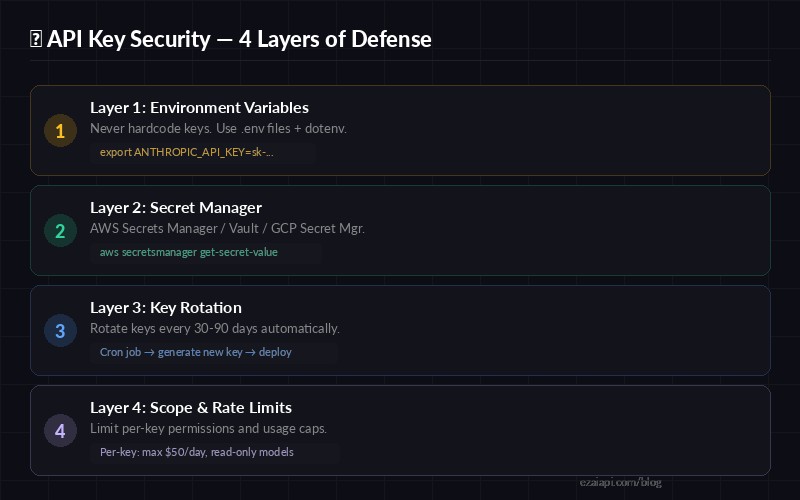
Four layers of API key defense — each layer catches what the previous one misses
Layer 2: Secret Managers for Production
Secret managers store your credentials encrypted at rest, control who can access them through IAM policies, and provide full audit logs of every read. The three big options are AWS Secrets Manager, HashiCorp Vault, and GCP Secret Manager.
Here's how to load your EzAI API key from AWS Secrets Manager at application startup:
import json
import boto3
import anthropic

def get_api_key():
    client = boto3.client("secretsmanager", region_name="us-east-1")
    resp = client.get_secret_value(SecretId="prod/ezai-api-key")
    secret = json.loads(resp["SecretString"])
    return secret["ANTHROPIC_API_KEY"]

# Load once at startup, reuse the client
ai_client = anthropic.Anthropic(
    api_key=get_api_key(),
    base_url="https://ezaiapi.com"
)
The key advantage over raw environment variables: if someone compromises your server, they still need the right IAM role to read the secret. Plus, you get a CloudTrail log of every access, so you know exactly when and where a key was read.
Layer 3: Automated Key Rotation
Static keys are a ticking time bomb. The longer a key exists, the more places it might have been copied, logged, or cached. Automated rotation limits the blast radius — even if a key leaks, it expires before attackers can do serious damage.
With EzAI, you can generate new API keys from the dashboard and revoke old ones. Here's a rotation script that creates a new key and updates your secret manager:
#!/bin/bash
# rotate-key.sh — run via cron every 60 days
# Generates a new EzAI key, updates Secrets Manager, restarts app

NEW_KEY=$(curl -s -X POST https://ezaiapi.com/api/keys/rotate \
  -H "Authorization: Bearer $ADMIN_TOKEN" | jq -r '.newKey')

# Update secret store
aws secretsmanager update-secret \
  --secret-id prod/ezai-api-key \
  --secret-string "{\"ANTHROPIC_API_KEY\": \"$NEW_KEY\"}"

# Rolling restart — zero downtime
pm2 reload my-app

echo "✅ Key rotated at $(date)"
Set this up as a cron job that runs every 60 days. If you're using Kubernetes, External Secrets Operator can handle rotation automatically by syncing with your secret backend.
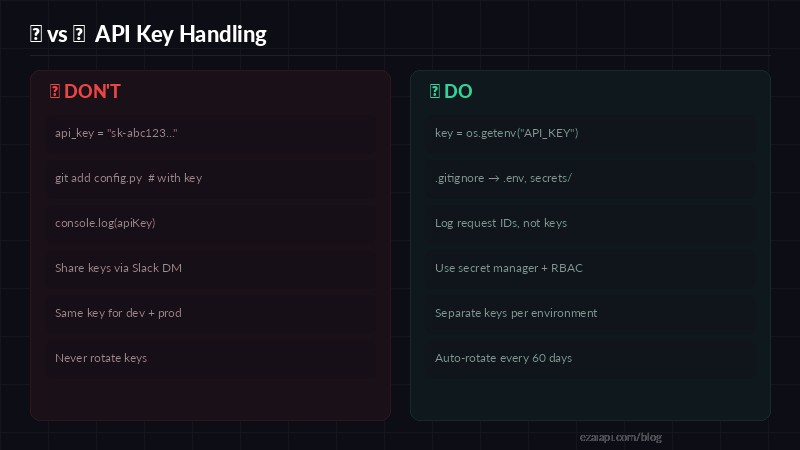
Quick reference — the most common API key mistakes and their fixes
Layer 4: Scope and Rate Limits
Even with rotation and secret managers, a compromised key with unlimited access is still dangerous. Scope your keys to the minimum permissions needed. EzAI lets you set per-key spending limits from the dashboard — if a key leaks, the attacker can only burn through whatever budget you assigned.
Best practices for key scoping:
- Separate keys per environment — dev, staging, and production each get their own key with different limits
- Separate keys per service — your chatbot and your batch processor shouldn't share credentials
- Set daily spend caps — a $20/day cap on a dev key prevents runaway costs during testing
- Monitor usage patterns — sudden spikes in token consumption usually mean something is wrong
// Node.js — use different keys per environment
import Anthropic from "@anthropic-ai/sdk";

const keyMap = {
  development: process.env.EZAI_KEY_DEV,    // $5/day cap
  staging:     process.env.EZAI_KEY_STAGING, // $20/day cap
  production:  process.env.EZAI_KEY_PROD,    // $200/day cap
};

const client = new Anthropic({
  apiKey: keyMap[process.env.NODE_ENV] || keyMap.development,
  baseURL: "https://ezaiapi.com",
});
Pre-Commit Hooks: Catch Keys Before They Ship
Prevention beats recovery. Install detect-secrets or gitleaks as a pre-commit hook to scan for credentials before they reach your repository. Here's a quick setup with detect-secrets:
# Install detect-secrets
pip install detect-secrets

# Create baseline (scans existing codebase)
detect-secrets scan > .secrets.baseline

# Add pre-commit hook
cat > .git/hooks/pre-commit << 'EOF'
#!/bin/bash
detect-secrets-hook --baseline .secrets.baseline $(git diff --cached --name-only)
EOF
chmod +x .git/hooks/pre-commit
Now any git commit that includes a string matching an API key pattern will be blocked before it ever hits the remote. This single step prevents the majority of accidental key leaks.
Emergency Response: What to Do When a Key Leaks
If a key does get exposed, every minute counts. Here's the playbook:
- Revoke immediately — go to your EzAI dashboard and delete the compromised key. Don't wait to investigate first — revoke, then investigate.
- Generate a new key — create a replacement and update your secret store or environment variables.
- Check usage logs — review your dashboard for unusual requests. Look for unfamiliar models, high token counts, or requests from unexpected IPs.
- Scrub git history — if the key was committed, use
git filter-repoor BFG Repo Cleaner to remove it from all commits. Force-push the cleaned history. - Post-mortem — figure out how the key leaked and add a safeguard to prevent it. Was it a missing
.gitignore? No pre-commit hook? A developer sharing credentials via chat?
The faster you revoke, the less damage occurs. With EzAI's spending caps, even a brief leak stays contained to whatever daily limit you set.
Quick Security Checklist
Print this out, tape it to your monitor, or pin it in your team's Slack channel:
- ☐
.envin.gitignore— confirmed before first commit - ☐ No hardcoded keys anywhere in source — grep for
sk-and verify - ☐ Pre-commit hook installed —
detect-secretsorgitleaks - ☐ Secret manager configured for production — not raw env vars on servers
- ☐ Separate keys for dev / staging / prod
- ☐ Daily spending cap set on each key
- ☐ Key rotation scheduled — every 60-90 days minimum
- ☐ Usage monitoring active — alerts on spending spikes
None of these steps are hard. Each one takes less than 10 minutes to set up. Together, they form a defense-in-depth strategy that makes a leaked key an inconvenience instead of a catastrophe. Start with your EzAI setup, apply these layers, and ship with confidence.