LangChain is the most popular framework for building AI-powered applications in Python. It handles prompt templates, chains, agents, memory, and retrieval — so you can focus on your app logic instead of raw API plumbing. The catch? You still need a reliable, affordable model backend. That's where EzAI API comes in.
By pointing LangChain at ezaiapi.com instead of Anthropic or OpenAI directly, you get access to 20+ models at reduced cost, with built-in caching, load balancing, and a real-time dashboard to track every token. The setup takes about 90 seconds.
Why Use EzAI as Your LangChain Backend
LangChain's ChatAnthropic and ChatOpenAI classes both accept a base_url parameter. That one parameter is all you need to route every LangChain call through EzAI. Here's what you get:
- Multi-model access — Claude 4 Opus, GPT-5, Gemini 2.5 Pro, Grok 3 through a single provider config
- Significant cost savings — EzAI's infrastructure optimization and caching reduce per-token costs
- Zero lock-in — Swap models by changing one string. No SDK changes, no refactoring
- Usage visibility — Every LangChain call shows up in your EzAI dashboard with token counts and cost
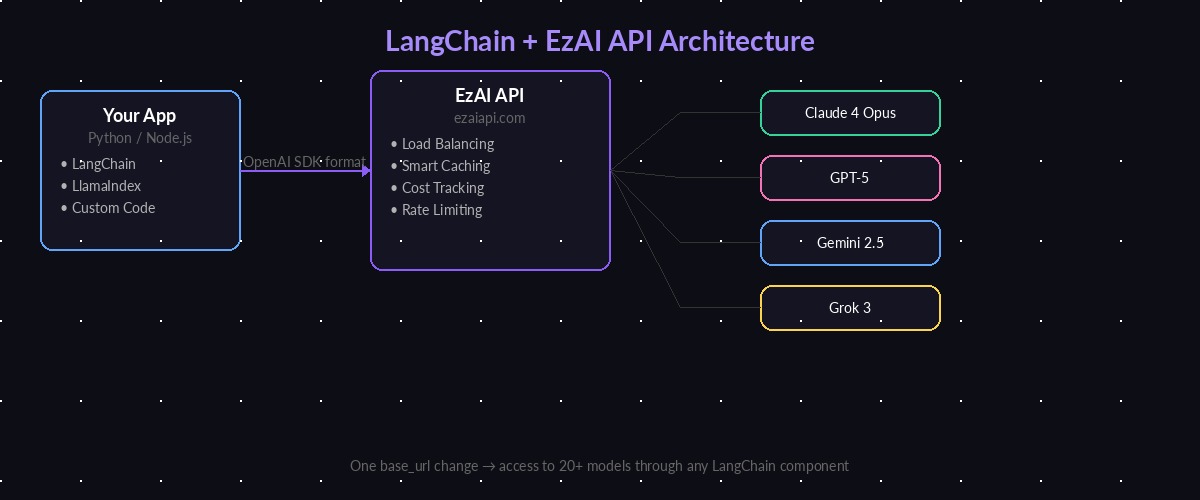
LangChain connects to EzAI API, which routes requests to Claude, GPT, Gemini, or Grok
Installation and Setup
Install the required packages. LangChain split into separate packages in v0.2, so you need the provider-specific ones:
pip install langchain langchain-anthropic langchain-openaiSet your EzAI API key as an environment variable. Grab one from your dashboard if you haven't already:
export EZAI_API_KEY="sk-your-ezai-key"Basic Chat Completions with ChatAnthropic
The ChatAnthropic class is the primary way to use Claude models in LangChain. Point it at EzAI by setting anthropic_api_url:
import os
from langchain_anthropic import ChatAnthropic

llm = ChatAnthropic(
    model="claude-sonnet-4-5",
    anthropic_api_key=os.environ["EZAI_API_KEY"],
    anthropic_api_url="https://ezaiapi.com",
    max_tokens=1024,
)

response = llm.invoke("Explain WebSockets in 3 sentences.")
print(response.content)
That's the entire integration. Every call LangChain makes goes through EzAI's endpoint. The response format is identical — LangChain can't tell the difference.
Using OpenAI Models via ChatOpenAI
EzAI also proxies OpenAI-compatible models. Use ChatOpenAI with the /openai endpoint to hit GPT-5 or other OpenAI models:
from langchain_openai import ChatOpenAI

llm_gpt = ChatOpenAI(
    model="gpt-4o",
    api_key=os.environ["EZAI_API_KEY"],
    base_url="https://ezaiapi.com/openai/v1",
)

response = llm_gpt.invoke("What's the difference between REST and GraphQL?")
print(response.content)
Both ChatAnthropic and ChatOpenAI are interchangeable in LangChain. You can swap between Claude and GPT by changing two lines — the class name and the model string.
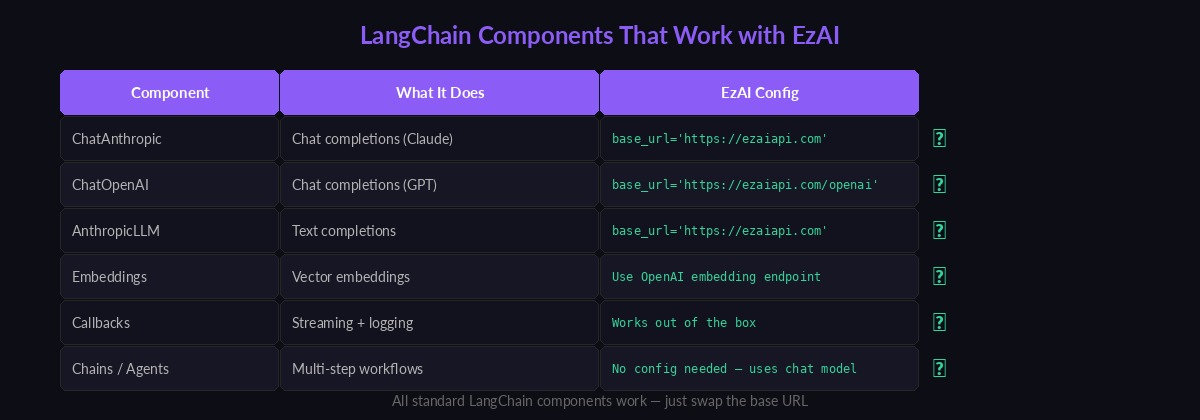
Every standard LangChain component works with EzAI — just swap the base URL
Streaming Responses
Streaming is critical for user-facing apps. LangChain's .stream() method works with EzAI out of the box. Each chunk arrives as soon as the model generates it:
from langchain_anthropic import ChatAnthropic
from langchain_core.messages import HumanMessage

llm = ChatAnthropic(
    model="claude-sonnet-4-5",
    anthropic_api_key=os.environ["EZAI_API_KEY"],
    anthropic_api_url="https://ezaiapi.com",
    streaming=True,
)

for chunk in llm.stream([HumanMessage("Write a Python function to merge two sorted lists.")]):
    print(chunk.content, end="", flush=True)
EzAI proxies the SSE stream byte-for-byte. Time-to-first-token is nearly identical to calling Anthropic directly — typically under 400ms for Sonnet.
Building Chains with Prompt Templates
Chains are where LangChain shines. Combine a prompt template with a model and an output parser into a reusable pipeline. Here's a code review chain that takes a function and returns structured feedback:
from langchain_anthropic import ChatAnthropic
from langchain_core.prompts import ChatPromptTemplate
from langchain_core.output_parsers import StrOutputParser

llm = ChatAnthropic(
    model="claude-sonnet-4-5",
    anthropic_api_key=os.environ["EZAI_API_KEY"],
    anthropic_api_url="https://ezaiapi.com",
)

prompt = ChatPromptTemplate.from_messages([
    ("system", "You are a senior code reviewer. Be concise and specific."),
    ("human", "Review this code and list issues:\n\n```{language}\n{code}\n```"),
])

chain = prompt | llm | StrOutputParser()

result = chain.invoke({
    "language": "python",
    "code": """
def get_user(id):
    users = db.query("SELECT * FROM users WHERE id=" + str(id))
    return users[0] if users else None
""",
})

print(result)
The chain composes cleanly: prompt formatting → model call through EzAI → parsed string output. You can swap the model from Sonnet to Opus or GPT-5 without touching the chain logic.
Multi-Model Fallback Pattern
One of the biggest advantages of routing through EzAI is easy multi-model setups. Here's a pattern that tries Claude first, falls back to GPT if it fails:
from langchain_anthropic import ChatAnthropic
from langchain_openai import ChatOpenAI
from langchain_core.runnables import RunnableWithFallbacks

primary = ChatAnthropic(
    model="claude-sonnet-4-5",
    anthropic_api_key=os.environ["EZAI_API_KEY"],
    anthropic_api_url="https://ezaiapi.com",
)

fallback = ChatOpenAI(
    model="gpt-4o",
    api_key=os.environ["EZAI_API_KEY"],
    base_url="https://ezaiapi.com/openai/v1",
)

# Tries Claude first, falls back to GPT on any error
robust_llm = primary.with_fallbacks([fallback])

result = robust_llm.invoke("Explain the CAP theorem in distributed systems.")
print(result.content)
Both models route through the same EzAI API key. Your dashboard shows which model handled each request, so you can see exactly when fallbacks kicked in. Read our multi-model fallback guide for advanced patterns including weighted routing and latency-based selection.
Tool Calling and Agents
LangChain agents use tool calling to let the model execute functions. EzAI passes through Claude's native tool-use API, so agents work without modification:
from langchain_core.tools import tool
from langgraph.prebuilt import create_react_agent

@tool
def get_weather(city: str) -> str:
    """Get the current weather for a city."""
    # Replace with your actual weather API call
    return f"It's 24°C and sunny in {city}."

llm = ChatAnthropic(
    model="claude-sonnet-4-5",
    anthropic_api_key=os.environ["EZAI_API_KEY"],
    anthropic_api_url="https://ezaiapi.com",
)

agent = create_react_agent(llm, [get_weather])

result = agent.invoke({
    "messages": [{"role": "user", "content": "What's the weather in Tokyo?"}]
})
print(result["messages"][-1].content)
The agent decides when to call get_weather, passes the city parameter, gets the result, and formulates a natural response. EzAI handles the tool-use protocol transparently — the model sends tool calls, EzAI relays them, LangChain executes them, and the results go back through EzAI to the model.
Cost Tracking and Monitoring
Every LangChain request shows up in your EzAI dashboard with full token breakdowns. For programmatic tracking, use LangChain's callback system to log costs per chain:
from langchain_community.callbacks import get_openai_callback

with get_openai_callback() as cb:
    result = chain.invoke({"language": "python", "code": "print('hello')"})

print(f"Tokens: {cb.total_tokens}")
print(f"Prompt: {cb.prompt_tokens}, Completion: {cb.completion_tokens}")
Combine this with the EzAI dashboard for complete visibility. The dashboard gives you per-request cost data that LangChain's callbacks can't calculate — actual dollar amounts based on EzAI's pricing.
Production Tips
A few things to keep in mind when deploying LangChain + EzAI to production:
- Set timeouts — Add
timeout=30to your model constructor. Long-running chains can stack up fast without limits. - Use streaming for user-facing apps — Time-to-first-token matters more than total latency for perceived performance.
- Cache where possible — LangChain has built-in LLM caching that stacks with EzAI's server-side cache. Read our prompt caching guide for details.
- Handle rate limits — EzAI has generous limits, but if you're doing batch processing, add
max_retries=3andrequest_timeout=60to your model config. - Monitor costs — Set up alerts in your EzAI dashboard. A runaway agent loop can burn through credits in minutes.
What's Next
You're now running LangChain against EzAI's full model catalog. From here:
- Build a RAG chatbot with retrieval-augmented generation
- Set up tool calling for complex agent workflows
- Add SSE streaming to your FastAPI or Flask backend
- Explore the full API documentation for features like extended thinking and batch requests