Migrating from OpenAI's Chat Completions API to Claude's Messages API is one of the most common moves teams make in 2026. Claude consistently outperforms GPT on coding benchmarks, handles longer contexts more reliably, and — when routed through EzAI — costs significantly less. The APIs are similar enough that most codebases can be migrated in under 30 minutes.
This guide walks you through every difference between the two APIs, with working code you can copy-paste. By the end, you'll have a running Claude integration without breaking your existing architecture.
Why Teams Are Switching
Before diving into code, here's what's driving the migration trend:
- Better coding performance — Claude Sonnet 4.5 scores 65%+ on SWE-Bench, consistently beating GPT-4o on real-world code tasks
- 200K context window — Feed entire codebases without chunking tricks
- Lower hallucination rates — Claude is more likely to say "I don't know" than fabricate an answer
- Cost savings via EzAI — Access Claude at reduced rates through the EzAI proxy, often 30-60% cheaper than direct API pricing
- Extended thinking — Claude's chain-of-thought reasoning mode tackles problems that flat-out stump other models
Key API Differences at a Glance
The two APIs share the same mental model — send messages, get a response — but differ in field names and structure. Here's the full mapping:
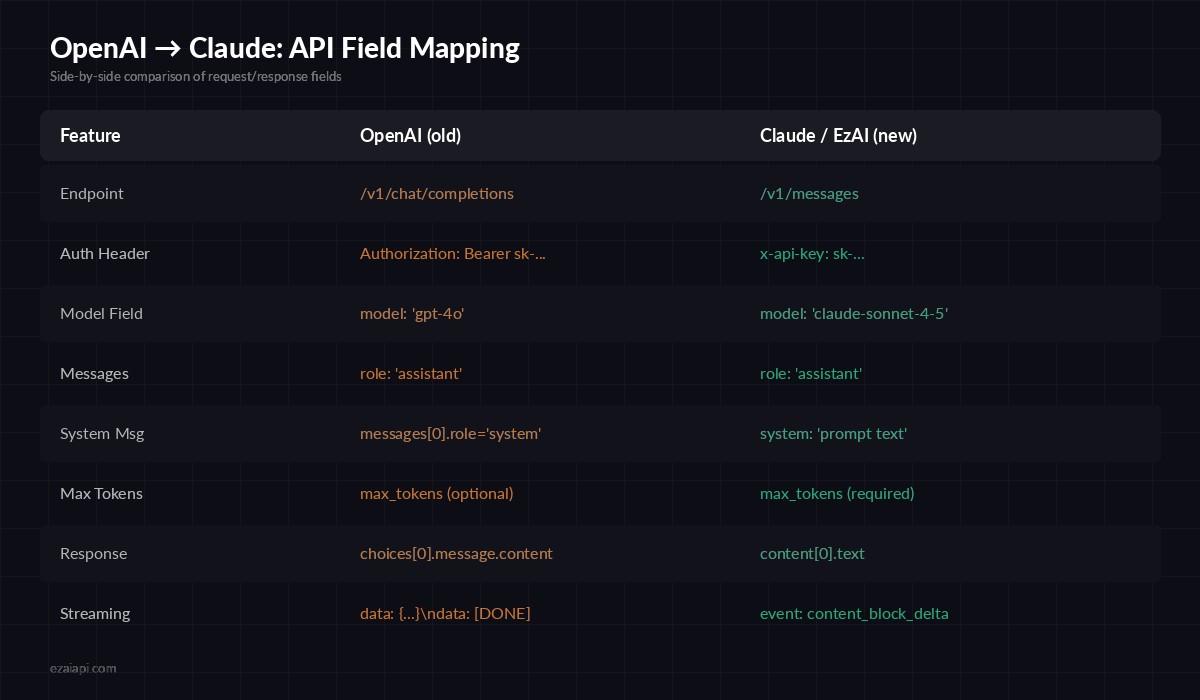
Complete field mapping — OpenAI Chat Completions vs Claude Messages API
The biggest structural change: system messages move out of the messages array and into a top-level system field. Everything else is a straightforward rename.
Step 1: Update Your HTTP Calls
If you're calling the API directly with curl or an HTTP client, here's the before-and-after. The OpenAI version you're probably running:
curl https://api.openai.com/v1/chat/completions \
  -H "Authorization: Bearer sk-openai-key" \
  -H "Content-Type: application/json" \
  -d '{
    "model": "gpt-4o",
    "messages": [
      {"role": "system", "content": "You are a helpful assistant."},
      {"role": "user", "content": "Explain recursion"}
    ]
  }'
And the Claude equivalent through EzAI:
curl https://ezaiapi.com/v1/messages \
  -H "x-api-key: sk-your-ezai-key" \
  -H "anthropic-version: 2023-06-01" \
  -H "Content-Type: application/json" \
  -d '{
    "model": "claude-sonnet-4-5",
    "max_tokens": 1024,
    "system": "You are a helpful assistant.",
    "messages": [
      {"role": "user", "content": "Explain recursion"}
    ]
  }'
Four changes: endpoint URL, auth header format, system message placement, and max_tokens is now required. That's it.
Step 2: Migrate Your Python Code
Most teams use the official SDKs. Here's how to swap from the OpenAI Python SDK to Anthropic's. First, install the Anthropic SDK:
pip install anthropicThen update your client initialization and message calls:
from openai import OpenAI

client = OpenAI(api_key="sk-openai-key")

response = client.chat.completions.create(
    model="gpt-4o",
    messages=[
        {"role": "system", "content": "You are a code reviewer."},
        {"role": "user", "content": "Review this function: def add(a,b): return a+b"}
    ]
)

print(response.choices[0].message.content)import anthropic
client = anthropic.Anthropic(
api_key="sk-your-ezai-key",
base_url="https://ezaiapi.com"
)
response = client.messages.create(
model="claude-sonnet-4-5",
max_tokens=1024,
system="You are a code reviewer.",
messages=[
{"role": "user", "content": "Review this function: def add(a,b): return a+b"}
]
)
print(response.content[0].text)The response structure changes from choices[0].message.content to content[0].text. If you have a shared utility function for extracting responses, update it once and you're done everywhere.
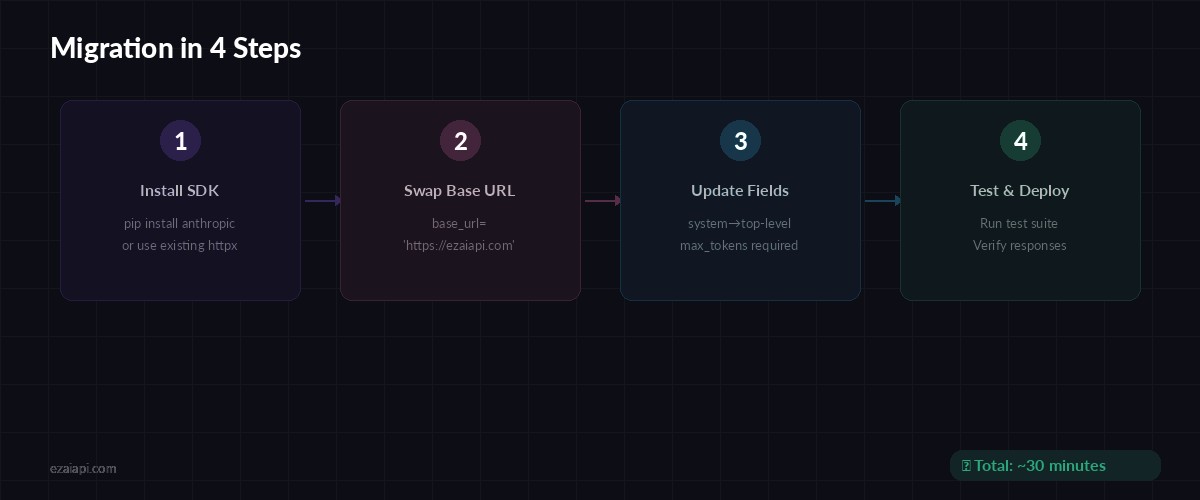
The complete migration flow — most teams finish in under 30 minutes
Step 3: Handle Streaming Differences
If you're streaming responses, the event format differs. OpenAI uses a simple data: {...} format terminated by data: [DONE]. Claude uses Server-Sent Events with typed event names. Here's how to migrate streaming in Python:
import anthropic

client = anthropic.Anthropic(
    api_key="sk-your-ezai-key",
    base_url="https://ezaiapi.com"
)

with client.messages.stream(
    model="claude-sonnet-4-5",
    max_tokens=1024,
    messages=[{"role": "user", "content": "Write a Python quicksort"}]
) as stream:
    for text in stream.text_stream:
        print(text, end="", flush=True)
The Anthropic SDK's .stream() helper handles SSE parsing for you. If you were using stream=True with OpenAI and iterating over chunks, this is the direct replacement. For more details, see our streaming guide.
Step 4: Write a Translation Layer (Optional)
If your codebase has hundreds of OpenAI calls and you want to minimize changes, write a thin wrapper that translates OpenAI-format requests into Claude format. Here's a production-ready example:
import anthropic

MODEL_MAP = {
    "gpt-4o": "claude-sonnet-4-5",
    "gpt-4o-mini": "claude-haiku-3-5",
    "gpt-4-turbo": "claude-sonnet-4-5",
}

client = anthropic.Anthropic(
    api_key="sk-your-ezai-key",
    base_url="https://ezaiapi.com"
)

def chat(messages, model="gpt-4o", max_tokens=1024):
    # Extract system message if present
    system = None
    user_msgs = []
    for msg in messages:
        if msg["role"] == "system":
            system = msg["content"]
        else:
            user_msgs.append(msg)

    kwargs = {
        "model": MODEL_MAP.get(model, "claude-sonnet-4-5"),
        "max_tokens": max_tokens,
        "messages": user_msgs,
    }
    if system:
        kwargs["system"] = system

    resp = client.messages.create(**kwargs)
    return resp.content[0].text
Drop this into your utils and replace openai.chat.completions.create() calls with chat(). The MODEL_MAP automatically translates your existing model names to their Claude equivalents.
Common Gotchas
A few things that trip people up during migration:
max_tokensis required — OpenAI defaults to the model's maximum. Claude requires you to set it explicitly. Use1024for short responses,4096for longer ones.- No
nparameter — Claude doesn't support generating multiple completions per request. If you relied onn=3for best-of-N selection, send 3 separate requests instead. - Tool/function calling syntax differs — Claude uses a
toolsarray withinput_schemainstead ofparameters. The structure is similar but not identical — check the EzAI docs for the exact format. - Stop sequences — OpenAI uses
stop, Claude usesstop_sequences(an array). Same behavior, different field name. - Temperature range — Both use 0-1, but Claude's default is
1.0while OpenAI defaults to1.0as well. If you set custom temperatures, they transfer directly.
Testing Your Migration
Before going to production, validate the migration with a few checks:
- Run your existing test suite against the new endpoint — response shapes will differ, so update assertions on
choices[0].message.content→content[0].text - Compare output quality on 10-20 real prompts from your production logs
- Check token counts on your EzAI dashboard — Claude's tokenizer counts differently from OpenAI's, so costs may shift
- Monitor latency — time-to-first-token is typically faster with Claude, but total generation time depends on output length
If you're running both models during the transition, EzAI makes this easy — you can access both Claude and GPT models through the same API key and endpoint.
What You Get After Migrating
Once you're on Claude through EzAI, you unlock a few things that weren't available with OpenAI:
- Extended thinking — Claude can reason step-by-step on hard problems. See our extended thinking guide for implementation details.
- Multi-model fallback — EzAI routes to Claude, GPT, or Gemini. If one provider has an outage, your requests still get served.
- Unified billing — One dashboard for all models. No juggling separate OpenAI and Anthropic invoices.
- Prompt caching — Claude's built-in prompt caching reduces costs on repeated system prompts by up to 90%.
That's the complete migration. Four changes to your API calls, a few field renames in your response parsing, and you're running Claude through EzAI. The whole process takes about 30 minutes for a typical codebase — less if you use the translation wrapper approach.
Ready to switch? Grab your EzAI API key and start migrating. Your first 15 credits are free.