Traditional web scrapers break the moment a site changes its HTML structure. You spend hours writing CSS selectors, XPath expressions, and regex patterns — only to wake up to a broken pipeline because someone moved a <div>. AI-powered scraping flips this entirely: instead of telling the scraper where data lives in the DOM, you tell it what data you want. Claude reads the raw HTML and extracts structured JSON, regardless of how the markup is organized.
This tutorial walks through building an AI web scraper with Python that fetches any webpage, sends its HTML to Claude via EzAI API, and returns clean, structured data. Total cost per page: roughly $0.002–$0.01 depending on page size.
Why AI Scraping Beats Traditional Scraping
CSS selectors are fragile. A site redesign, an A/B test, or even a minor template change can silently break your extraction logic. With AI scraping, you describe the schema you want and the model figures out how to pull it from whatever HTML it receives.
- No selectors to maintain — Claude parses the semantic meaning, not the DOM structure
- Works across sites — the same prompt extracts product data from Amazon, eBay, or any custom storefront
- Handles messy HTML — inline styles, nested tables, JavaScript-rendered content (after rendering) — none of it matters
- Schema enforcement — Claude returns exactly the JSON shape you specify, every time
Project Setup
You need three packages: httpx for async HTTP requests, anthropic for the Claude SDK, and beautifulsoup4 to strip unnecessary HTML noise before sending it to the model.
pip install httpx anthropic beautifulsoup4Set your EzAI API key as an environment variable. If you don't have one yet, grab a free key — new accounts get 15 credits to start.
export EZAI_API_KEY="sk-your-key-here"The Core Scraper
The scraper has three stages: fetch the page, clean the HTML (strip scripts, styles, and navigation), then send the stripped content to Claude with a JSON schema prompt.
import httpx, json, os
from bs4 import BeautifulSoup
import anthropic

def clean_html(raw_html: str) -> str:
    """Strip scripts, styles, nav, and footer — keep the meat."""
    soup = BeautifulSoup(raw_html, "html.parser")
    for tag in soup.find_all(["script", "style", "nav", "footer", "header"]):
        tag.decompose()
    text = soup.get_text(separator="\n", strip=True)
    # Collapse blank lines, cap at 12k chars to stay under token limits
    lines = [l for l in text.splitlines() if l.strip()]
    return "\n".join(lines)[:12000]

def scrape_with_ai(url: str, schema: dict) -> dict:
    # 1. Fetch the page
    resp = httpx.get(url, headers={"User-Agent": "Mozilla/5.0"}, follow_redirects=True)
    resp.raise_for_status()
    cleaned = clean_html(resp.text)

    # 2. Send to Claude via EzAI
    client = anthropic.Anthropic(
        api_key=os.environ["EZAI_API_KEY"],
        base_url="https://ezaiapi.com",
    )

    message = client.messages.create(
        model="claude-sonnet-4-5",
        max_tokens=2048,
        messages=[{
            "role": "user",
            "content": f"""Extract data from this webpage content.

Return ONLY valid JSON matching this schema:
{json.dumps(schema, indent=2)}

Webpage content:
---
{cleaned}
---

Respond with the JSON object only. No markdown, no explanation."""
        }],
    )

    return json.loads(message.content[0].text)
The clean_html function is important. Raw HTML from most sites is 80% boilerplate — navigation menus, ad scripts, tracking pixels. Stripping that cuts your token usage by 5–10x, which directly reduces cost. A cleaned page typically runs 2k–6k tokens instead of 20k–60k.
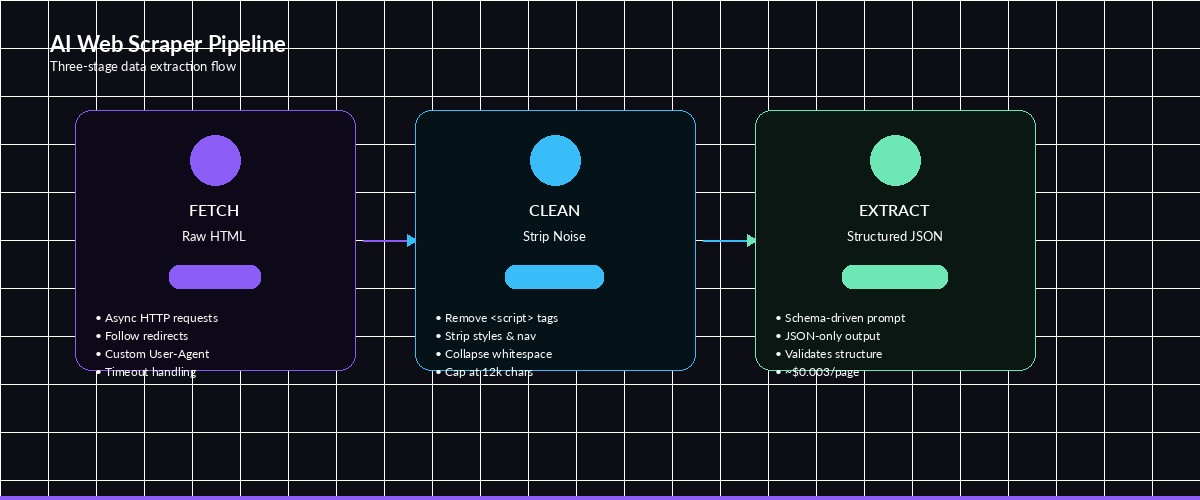
The three-stage pipeline: fetch raw HTML, clean it down, send to Claude for structured extraction
Scraping Product Listings
Here's a real example — extracting product data from an e-commerce page. Define the schema you want and let Claude figure out the rest:
product_schema = {
    "products": [{
        "name": "string",
        "price": "number (USD)",
        "rating": "number (0-5)",
        "review_count": "integer",
        "in_stock": "boolean",
        "description": "string (first 100 chars)"
    }]
}

data = scrape_with_ai(
    "https://example.com/electronics/keyboards",
    product_schema
)

for p in data["products"]:
    print(f"{p['name']}: ${p['price']} ({p['rating']}★, {p['review_count']} reviews)")
Output looks something like this:
Keychron Q1 Pro: $169.99 (4.7★, 2341 reviews)
HHKB Professional Hybrid: $289.00 (4.8★, 876 reviews)
Logitech MX Keys S: $109.99 (4.5★, 5210 reviews)
The same schema works on any product listing page — Amazon, Best Buy, a random Shopify store. You don't rewrite selectors per site.
Handling Large Pages with Chunking
Some pages exceed Claude's context window after cleaning. For those, split the content into overlapping chunks and merge the results:
import anthropic, json, os

def chunk_text(text: str, chunk_size=10000, overlap=500) -> list:
    chunks = []
    start = 0
    while start < len(text):
        end = start + chunk_size
        chunks.append(text[start:end])
        start = end - overlap
    return chunks

def scrape_large_page(url: str, schema: dict) -> dict:
    resp = httpx.get(url, headers={"User-Agent": "Mozilla/5.0"})
    cleaned = clean_html(resp.text)
    chunks = chunk_text(cleaned)

    client = anthropic.Anthropic(
        api_key=os.environ["EZAI_API_KEY"],
        base_url="https://ezaiapi.com",
    )

    all_items = []
    for i, chunk in enumerate(chunks):
        msg = client.messages.create(
            model="claude-sonnet-4-5",
            max_tokens=2048,
            messages=[{
                "role": "user",
                "content": f"""Extract items from chunk {i+1}/{len(chunks)}.
Return JSON matching: {json.dumps(schema)}
Content:
---
{chunk}
---
JSON only."""
            }],
        )
        result = json.loads(msg.content[0].text)
        # Merge arrays from each chunk
        for key, val in result.items():
            if isinstance(val, list):
                all_items.extend(val)

    # Deduplicate by name
    seen = set()
    unique = []
    for item in all_items:
        key = item.get("name", str(item))
        if key not in seen:
            seen.add(key)
            unique.append(item)

    return {"items": unique}
The 500-character overlap prevents items that span a chunk boundary from getting split in half. Claude is good at recognizing partial entries and either completing them or skipping them cleanly.
Cost Optimization
AI scraping is cheap when you do it right. Here's the cost breakdown for different approaches using EzAI's discounted pricing:
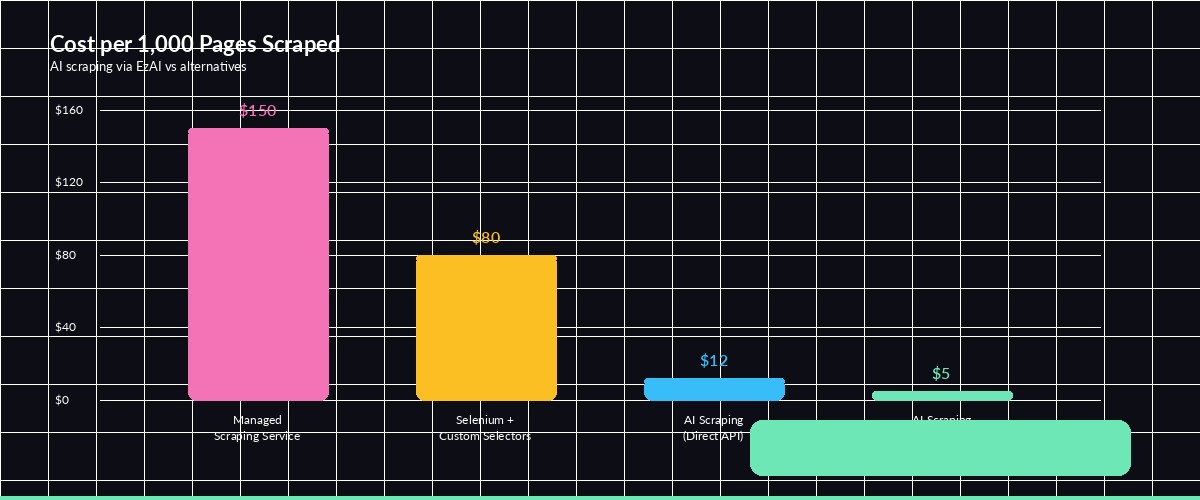
Cost per 1,000 pages scraped — AI scraping through EzAI is significantly cheaper than managed scraping services
Three tactics to keep costs down:
- Use Sonnet, not Opus —
claude-sonnet-4-5handles extraction just as well as Opus for structured data tasks, at 1/5 the price - Strip aggressively — remove every HTML tag that isn't content. Scripts, styles, SVGs, ads — all of it. Less tokens in = less money out
- Cache responses — if you're scraping the same page repeatedly (price monitoring), cache the AI response and only re-extract when the page content actually changes
With these optimizations, you can scrape 1,000 pages for under $5 through EzAI. Compare that to managed scraping services charging $50–200 for the same volume.
Error Handling and Retries
Production scrapers need to handle failures gracefully. Here's a wrapper that retries on transient errors and validates the JSON output:
import time

def scrape_with_retry(url: str, schema: dict, max_retries=3) -> dict:
    for attempt in range(max_retries):
        try:
            result = scrape_with_ai(url, schema)
            # Validate: ensure all schema keys exist
            for key in schema:
                if key not in result:
                    raise ValueError(f"Missing key: {key}")
            return result

        except json.JSONDecodeError:
            print(f"Attempt {attempt+1}: Invalid JSON, retrying...")
        except anthropic.RateLimitError:
            wait = 2 ** attempt
            print(f"Rate limited, waiting {wait}s...")
            time.sleep(wait)
        except httpx.HTTPStatusError as e:
            print(f"HTTP {e.response.status_code} for {url}")
            if e.response.status_code >= 500:
                time.sleep(1)
                continue
            raise

    raise RuntimeError(f"Failed after {max_retries} attempts: {url}")
The retry logic uses exponential backoff for rate limits and re-attempts JSON parsing failures. Claude occasionally wraps its response in markdown code fences — if that happens consistently, add a strip step that removes ```json wrappers before parsing.
When to Use AI Scraping (and When Not To)
AI scraping shines for unstructured or semi-structured content where traditional selectors would require constant maintenance. It's perfect for:
- Multi-site extraction — one schema, many websites, zero per-site customization
- Unstructured content — articles, reviews, forum posts where the "structure" is semantic
- Prototype-speed projects — get a working scraper in 20 minutes instead of 2 days
- Low-volume, high-value data — competitor pricing, job postings, regulatory filings
Stick with traditional scrapers when you're processing millions of pages per day (the API cost adds up), or when the source has a well-documented API you can hit directly.
Full Working Example
Here's a complete, copy-paste-ready script that scrapes job listings from any careers page:
#!/usr/bin/env python3
"""AI-powered job listing scraper using Claude via EzAI."""

import httpx, json, os
from bs4 import BeautifulSoup
import anthropic

client = anthropic.Anthropic(
    api_key=os.environ["EZAI_API_KEY"],
    base_url="https://ezaiapi.com",
)

JOB_SCHEMA = {
    "jobs": [{
        "title": "string",
        "department": "string",
        "location": "string",
        "type": "full-time | part-time | contract",
        "salary_range": "string or null",
        "apply_url": "string or null"
    }]
}

def scrape_jobs(url: str) -> list:
    resp = httpx.get(url, headers={"User-Agent": "Mozilla/5.0"})
    soup = BeautifulSoup(resp.text, "html.parser")
    for t in soup.find_all(["script", "style", "nav", "footer"]):
        t.decompose()
    content = soup.get_text("\n", strip=True)[:12000]

    msg = client.messages.create(
        model="claude-sonnet-4-5",
        max_tokens=4096,
        messages=[{
            "role": "user",
            "content": f"""Extract all job listings.
Return JSON: {json.dumps(JOB_SCHEMA)}
Content:
---
{content}
---"""
        }],
    )
    return json.loads(msg.content[0].text)["jobs"]

if __name__ == "__main__":
    jobs = scrape_jobs("https://example.com/careers")
    for j in jobs:
        print(f"📌 {j['title']} — {j['location']} ({j['type']})")
        if j.get("salary_range"):
            print(f"   💰 {j['salary_range']}")
Swap the URL for any company's careers page — Stripe, Vercel, Linear, whatever. The schema stays the same, and Claude adapts to each site's format automatically.
AI-powered scraping through EzAI costs a fraction of what traditional scraping services charge, and you get structured data without maintaining brittle CSS selectors. Check the API docs for advanced features like streaming and extended thinking for complex extraction tasks. Questions? Hit us up on Telegram.