Tab completion hasn't changed much since the 1990s. It matches file names and known commands against a static list — nothing more. What if your terminal could understand what you're trying to do and suggest the right command before you finish typing? That's what we're building: a Python-based AI autocomplete that uses Claude via EzAI to deliver context-aware shell suggestions in under 200ms.
The tool reads your current directory, recent command history, and git status to generate intelligent completions. Type git ch inside a repo with uncommitted changes, and instead of just listing checkout and cherry-pick, it suggests git checkout -b fix/login-bug based on your branch naming patterns. It runs as a lightweight daemon so latency stays minimal.
How It Works
The autocomplete system has four stages: capture the partial input, collect surrounding context (working directory, git state, last 20 commands), send a structured prompt to Claude Haiku through EzAI, and return ranked suggestions. Haiku is the right model here — fast enough for interactive use, smart enough to understand shell semantics.
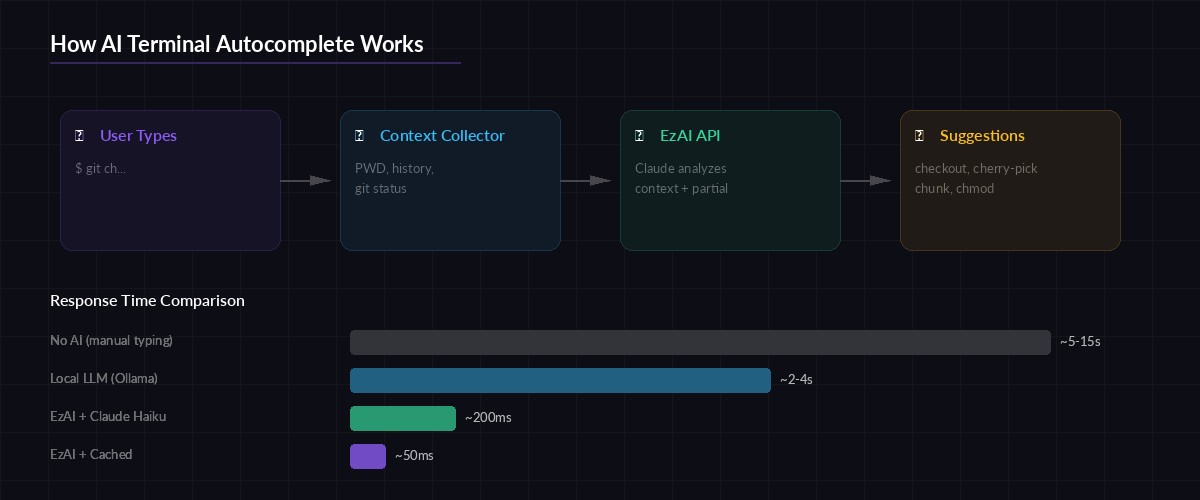
Architecture flow: user input → context collection → EzAI API → ranked suggestions
The key insight is that shell context is compact. Your PWD, the last 20 commands, and git status --short output fit comfortably in 500 tokens. That means each completion request costs fractions of a cent and returns in 100-200ms through EzAI's cached endpoints.
Setting Up the Project
Create a new directory and install the dependencies. We need httpx for async HTTP, click for the CLI wrapper, and prompt_toolkit if you want the inline completion experience.
mkdir ai-autocomplete && cd ai-autocomplete
pip install httpx click prompt_toolkit
Set your EzAI API key. If you've already run the install script, this is already in your environment:
export EZAI_API_KEY="sk-your-key-here"Building the Context Collector
The context collector grabs everything the AI needs to make smart suggestions. It pulls three data points: the current working directory and its contents, recent shell history, and git status if you're inside a repository. All of this runs in under 10ms locally.
import os, subprocess

def collect_context():
    ctx = {
        "cwd": os.getcwd(),
        "files": os.listdir(".")[:30],
    }

    # Last 20 commands from shell history
    history_file = os.path.expanduser("~/.bash_history")
    if os.path.exists(history_file):
        with open(history_file) as f:
            ctx["history"] = f.readlines()[-20:]

    # Git context (if in a repo)
    try:
        branch = subprocess.check_output(
            ["git", "branch", "--show-current"],
            stderr=subprocess.DEVNULL
        ).decode().strip()
        status = subprocess.check_output(
            ["git", "status", "--short"],
            stderr=subprocess.DEVNULL
        ).decode().strip()
        ctx["git"] = {"branch": branch, "status": status}
    except (subprocess.CalledProcessError, FileNotFoundError):
        ctx["git"] = None

    return ctx
The Completion Engine
This is the core: a function that takes the partial command and context, sends it to Claude Haiku through EzAI's API, and parses the response into a list of completion candidates. We use max_tokens=150 and a tightly scoped system prompt to keep responses fast and focused.
import httpx, json, os

EZAI_URL = "https://ezaiapi.com/v1/messages"
API_KEY = os.environ["EZAI_API_KEY"]

SYSTEM_PROMPT = """You are a shell command autocomplete engine.
Given a partial command and context, return 3-5 completion suggestions.
Output ONLY a JSON array of strings. No explanations.
Rank by likelihood. Include flags when contextually appropriate.
Example: ["git checkout -b feature/auth", "git checkout main"]"""

async def get_completions(partial: str, context: dict) -> list[str]:
    user_msg = json.dumps({
        "partial_command": partial,
        "cwd": context["cwd"],
        "recent_files": context["files"][:15],
        "history": context.get("history", [])[:10],
        "git": context.get("git"),
    })

    async with httpx.AsyncClient(timeout=5.0) as client:
        resp = await client.post(
            EZAI_URL,
            headers={
                "x-api-key": API_KEY,
                "anthropic-version": "2023-06-01",
                "content-type": "application/json",
            },
            json={
                "model": "claude-haiku-3-5",
                "max_tokens": 150,
                "system": SYSTEM_PROMPT,
                "messages": [{"role": "user", "content": user_msg}],
            },
        )
        resp.raise_for_status()

    text = resp.json()["content"][0]["text"]
    return json.loads(text)
Notice we're using claude-haiku-3-5 here. Through EzAI, Haiku costs a fraction of direct pricing and responds in 100-200ms — fast enough that completions feel instant. For heavier analysis (generating multi-command workflows), you could swap to claude-sonnet-4-5 without changing anything else.
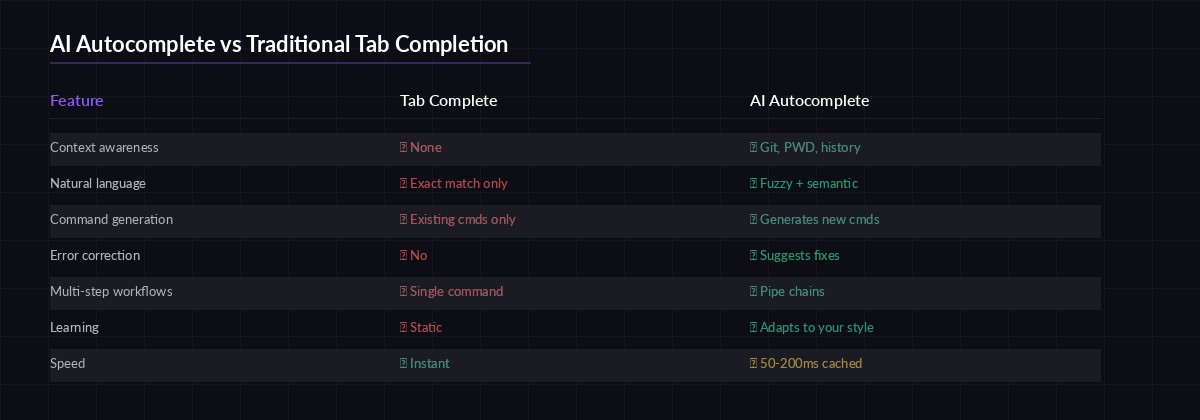
AI autocomplete understands intent, not just string prefixes
Wiring It Into Your Shell
The cleanest integration is a Zsh widget that triggers on a custom keybinding. When you press Ctrl+Space, the widget captures your current buffer, calls the completion engine, and presents results with fzf. You select one, and it replaces your input line.
#!/usr/bin/env python3
# ai_complete.py — called by the Zsh widget
import asyncio, sys, json

async def main():
    partial = sys.argv[1] if len(sys.argv) > 1 else ""
    if not partial.strip():
        sys.exit(0)

    ctx = collect_context()
    suggestions = await get_completions(partial, ctx)

    # Output one suggestion per line for fzf
    for s in suggestions:
        print(s)

asyncio.run(main())
Now add the Zsh widget to your ~/.zshrc:
# AI autocomplete widget (Ctrl+Space)
ai_complete_widget() {
  local result
  result=$(python3 ~/ai-autocomplete/ai_complete.py "$BUFFER" | \
    fzf --height=8 --reverse --no-info \
    --prompt="⚡ " --color="bg+:#1a1a2e,fg+:#a78bfa")
  if [[ -n "$result" ]]; then
    BUFFER="$result"
    CURSOR=${#BUFFER}
    zle redisplay
  fi
}
zle -N ai_complete_widget
bindkey '^@' ai_complete_widget  # Ctrl+Space
Adding a Local Cache Layer
Hitting the API for every keypress is wasteful. A simple in-memory cache with a 30-second TTL eliminates redundant calls. If you type git ch and then git che, the second request can be filtered locally from the first response instead of making another API call.
import time
from collections import OrderedDict

class CompletionCache:
    def __init__(self, ttl=30, max_size=50):
        self.cache = OrderedDict()
        self.ttl = ttl
        self.max_size = max_size

    def get(self, partial: str) -> list[str] | None:
        # Exact match
        if partial in self.cache:
            ts, results = self.cache[partial]
            if time.time() - ts < self.ttl:
                return results

        # Prefix filter — reuse parent query results
        for key in reversed(self.cache):
            if partial.startswith(key):
                ts, results = self.cache[key]
                if time.time() - ts < self.ttl:
                    filtered = [r for r in results
                                if r.lower().startswith(partial.lower())]
                    if filtered:
                        return filtered
        return None

    def put(self, partial: str, results: list[str]):
        self.cache[partial] = (time.time(), results)
        if len(self.cache) > self.max_size:
            self.cache.popitem(last=False)

cache = CompletionCache()
With this cache, repeated completions for the same prefix resolve in microseconds instead of making a network round trip. It's a simple optimization that cuts your API costs significantly during heavy terminal sessions.
Error Handling and Graceful Fallback
The worst thing an autocomplete can do is block your terminal. If the API is slow or down, the widget should fail silently and let you keep typing. Wrap the completion call with a strict timeout and a fallback to standard tab completion.
async def safe_complete(partial: str, context: dict) -> list[str]:
    # Check cache first
    cached = cache.get(partial)
    if cached:
        return cached

    try:
        results = await asyncio.wait_for(
            get_completions(partial, context),
            timeout=2.0  # Hard 2s ceiling
        )
        cache.put(partial, results)
        return results
    except (asyncio.TimeoutError, httpx.HTTPError, json.JSONDecodeError):
        # Fail silently — return empty so shell falls back
        return []
    except KeyError:
        # API returned unexpected format
        return []
The 2-second timeout is generous — most EzAI responses come back in 150-300ms. But network hiccups happen, and your terminal should never freeze because of them. Check our retry strategies guide for more advanced patterns.
Cost Breakdown
Running this in practice is cheap. Each completion request uses roughly 300-500 input tokens and 50-100 output tokens on Haiku. With EzAI's pricing, that works out to about $0.0001 per completion — or roughly 10,000 completions per dollar. Even a heavy terminal user triggering 200 completions per day would spend less than $0.60 per month.
Factor in the cache hit rate (typically 40-60% after a few minutes of use) and real costs drop even further. Compare that to the time saved by not googling tar flags for the hundredth time.
Taking It Further
This tutorial covers the core loop, but there's plenty of room to extend it:
- Pipe chain generation — type
find all large filesin natural language, getfind . -type f -size +100M -exec ls -lh {} \;back - Error correction — detect typos and suggest the right command with
did you mean...? - History-based learning — weight suggestions by your personal command frequency
- Multi-model routing — use Haiku for simple completions, switch to Sonnet for complex ones using EzAI's model routing
The full source code for this project is under 200 lines of Python. Clone it, swap the model, add your own context sources. EzAI makes the AI part trivial — the interesting work is deciding what context matters. Start with a free account and build something your terminal has been missing since the 90s.