Every developer has that moment: you're staring at a log file, a CSV dump, or a config you don't recognize, and you think "I wish I could just ask someone what this means." That someone can be an AI model — and you can build the tool to talk to it in about 15 minutes.
In this tutorial, we'll build ask — a CLI tool that sends questions to Claude through EzAI API, handles piped input from other commands, analyzes files, and maintains conversation context. The final script is under 100 lines of Python.
What We're Building
The finished tool supports three usage patterns that cover most real-world CLI workflows:
- Direct questions —
ask "What's the difference between asyncio and threading?" - Piped input —
cat error.log | ask "What went wrong here?" - File analysis —
ask -f config.yaml "Is there anything wrong with this config?"
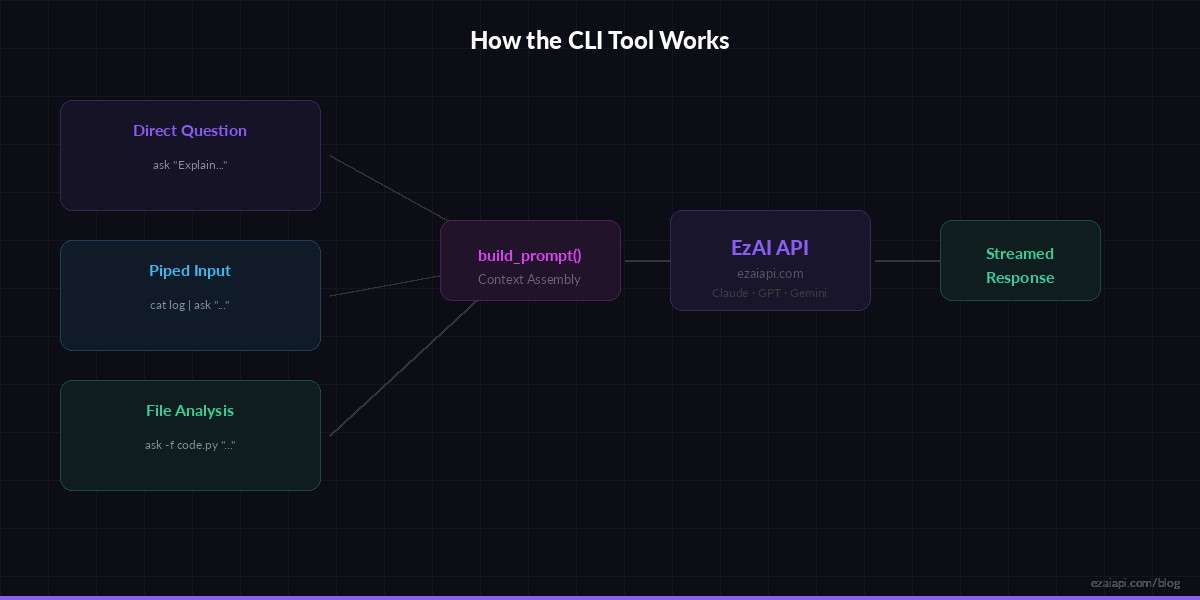
Three input modes converge into a single API call — the tool handles context assembly automatically
Prerequisites
You need Python 3.8+ and an EzAI API key. Install the only dependency:
pip install anthropicSet your API key as an environment variable. If you ran the EzAI install script, this is already done:
export ANTHROPIC_API_KEY="sk-your-ezai-key"
export ANTHROPIC_BASE_URL="https://ezaiapi.com"
The Core Script
Create a file called ask (no extension — we want it to feel like a native command). Here's the complete tool:
#!/usr/bin/env python3
import sys, os, argparse
import anthropic

def build_prompt(question, stdin_text=None, file_text=None):
    parts = []
    if stdin_text:
        parts.append(f"Here is the piped input:\n\n```\n{stdin_text}\n```")
    if file_text:
        parts.append(f"Here is the file content:\n\n```\n{file_text}\n```")
    parts.append(question)
    return "\n\n".join(parts)

def main():
    parser = argparse.ArgumentParser(description="Ask AI anything from your terminal")
    parser.add_argument("question", nargs="+", help="Your question")
    parser.add_argument("-f", "--file", help="File to include as context")
    parser.add_argument("-m", "--model", default="claude-sonnet-4-5",
                        help="Model to use (default: claude-sonnet-4-5)")
    parser.add_argument("-t", "--tokens", type=int, default=2048,
                        help="Max response tokens (default: 2048)")
    args = parser.parse_args()

    question = " ".join(args.question)

    # Read piped stdin if available
    stdin_text = None
    if not sys.stdin.isatty():
        stdin_text = sys.stdin.read().strip()
        if len(stdin_text) > 50000:
            stdin_text = stdin_text[:50000] + "\n... (truncated)"

    # Read file if specified
    file_text = None
    if args.file:
        with open(args.file) as f:
            file_text = f.read().strip()

    prompt = build_prompt(question, stdin_text, file_text)

    client = anthropic.Anthropic(
        api_key=os.environ["ANTHROPIC_API_KEY"],
        base_url=os.environ.get("ANTHROPIC_BASE_URL", "https://ezaiapi.com"),
    )

    # Stream the response for instant feedback
    with client.messages.stream(
        model=args.model,
        max_tokens=args.tokens,
        messages=[{"role": "user", "content": prompt}],
    ) as stream:
        for text in stream.text_stream:
            sys.stdout.write(text)
            sys.stdout.flush()
    print()

if __name__ == "__main__":
    main()
Make it executable and move it to your PATH:
chmod +x ask
mv ask /usr/local/bin/  # or ~/.local/bin/
Real-World Usage Examples
Here's where it gets practical. These are actual workflows you'll use daily:
Debug a Stack Trace
# Pipe the last 50 lines of a log into the tool
tail -50 /var/log/app/error.log | ask "What caused this error and how do I fix it?"

# Analyze a specific file
ask -f docker-compose.yml "Are there any security issues in this config?"

# Use a different model for complex analysis
ask -m claude-opus-4 -f main.py "Review this code for performance issues"
Quick Data Analysis
# Summarize a CSV
head -100 sales.csv | ask "Summarize the trends in this data"

# Explain a git diff
git diff HEAD~3 | ask "Write a changelog entry for these changes"

# Parse JSON output
kubectl get pods -o json | ask "Which pods are unhealthy and why?"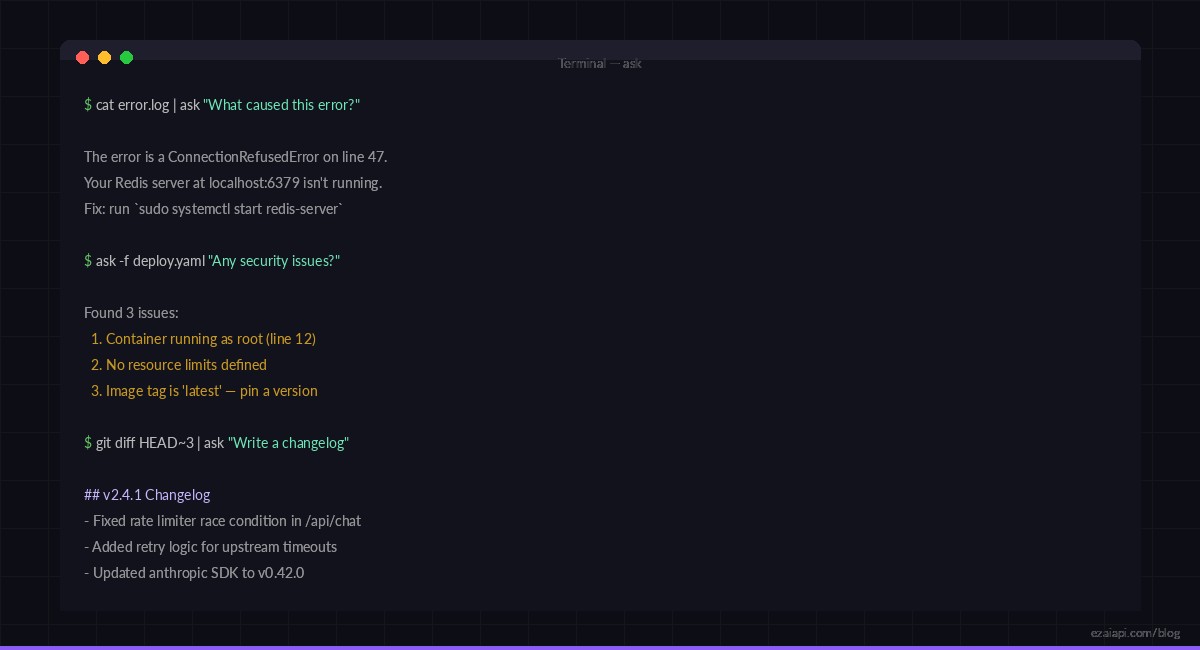
Pipe any command output into ask — logs, diffs, JSON, CSV — and get instant analysis
Adding Conversation History
Single-shot questions are useful, but sometimes you need follow-up. Here's how to add conversation persistence with a local JSON file — about 25 extra lines:
import json
from pathlib import Path

HISTORY = Path.home() / ".ask_history.json"

def load_history():
    if HISTORY.exists():
        return json.loads(HISTORY.read_text())
    return []

def save_history(messages):
    # Keep last 10 exchanges to control token usage
    trimmed = messages[-20:]
    HISTORY.write_text(json.dumps(trimmed, indent=2))

# In your main function, replace the single message with:
messages = load_history()
messages.append({"role": "user", "content": prompt})

with client.messages.stream(
    model=args.model,
    max_tokens=args.tokens,
    messages=messages,
) as stream:
    full_response = ""
    for text in stream.text_stream:
        sys.stdout.write(text)
        sys.stdout.flush()
        full_response += text

messages.append({"role": "assistant", "content": full_response})
save_history(messages)
Now you can have multi-turn conversations. Run ask --clear to reset the history when you switch topics. The history file caps at 10 exchanges to keep token costs under control — about $0.01-0.03 per conversation with EzAI's pricing.
Switching Models on the Fly
One of the biggest advantages of building on EzAI is instant access to 20+ models through the same endpoint. Use the -m flag to pick the right model for the job:
# Quick questions → fast, cheap model
ask -m claude-haiku-3-5 "Convert 72°F to Celsius"

# Code review → balanced model (default)
ask -f api.py "Review this for security issues"

# Complex architecture → strongest model
ask -m claude-opus-4 "Design a rate limiter for a distributed system"

# Try GPT through the same tool
ask -m gpt-4o "Explain the CAP theorem in one paragraph"
No separate API keys, no config changes, no billing dashboards to juggle. One key, one endpoint — EzAI handles the routing. Check the docs for the full list of supported models.
Pro Tips
- Alias common patterns — Add
alias review='ask -m claude-opus-4 -f'to your shell config for instant code reviews - Use system prompts — Add a
-sflag to set the system message. "You are a senior security engineer" changes the entire response quality for audit tasks - Combine with watch —
watch -n 60 'curl -s api/health | ask "Is this healthy?"'for poor man's monitoring - Truncate large inputs — The script already caps stdin at 50K chars. For cost optimization, pipe through
head -200first - Stream for UX — We're using
stream()instead ofcreate(). The response starts printing immediately instead of waiting for the full generation. Learn more about streaming responses
What's Next?
You now have a working AI assistant in your terminal. Some ideas to extend it:
- Add shell integration — pipe the AI's response back into bash with
ask "Write a sed command to..." | sh - Build a git commit hook — auto-generate commit messages from staged diffs
- Create project-specific prompts — read a
.ask-contextfile from the current directory as system context - Add cost tracking — parse the response's
usagefield and log cumulative spending
The full source code is under 100 lines. Fork it, hack it, make it yours. If you don't have an EzAI key yet, grab one free — you get 15 credits and access to 3 free models to start experimenting.