Most support teams drown in repetitive tickets. Password resets, order status checks, "how do I cancel?" — the same dozen questions account for 70-80% of volume. An AI support agent handles those instantly while routing genuinely complex issues to humans. Here's how to build one with Python and EzAI API that actually works in production, not just a demo.
Architecture: Two-Stage Pipeline
The core idea is splitting the work into two Claude calls. The first call is cheap and fast — it classifies intent and extracts key entities using claude-haiku-3.5. The second call generates the actual reply using claude-sonnet-4-5, but only after you've fetched the relevant context. This keeps costs low because Haiku classification runs at ~$0.25/MTok input versus Sonnet's $3/MTok.
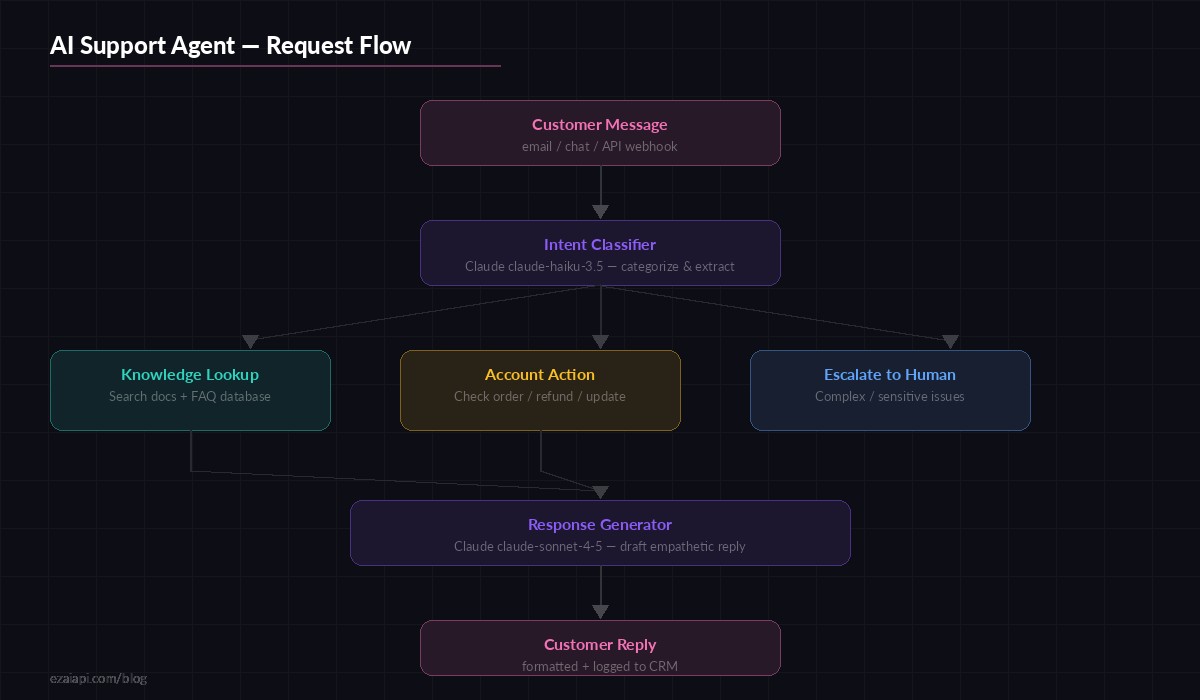
Two-stage pipeline: fast classification with Haiku, then contextual response generation with Sonnet
The flow: customer message arrives → Haiku classifies intent (billing, technical, account, general) and extracts entities (order IDs, email addresses, product names) → your code fetches relevant data from your database or knowledge base → Sonnet generates a reply with that context injected. The third path — escalation — triggers when the classifier detects frustration, legal threats, or topics outside the agent's scope.
Step 1: The Intent Classifier
Start with a classifier that returns structured JSON. This is the gatekeeper — it decides everything downstream.
import anthropic
import json

client = anthropic.Anthropic(
    api_key="sk-your-key",
    base_url="https://ezaiapi.com"
)

CLASSIFY_PROMPT = """Classify this customer support message.
Return JSON only, no markdown:
{
  "intent": "billing|technical|account|general|escalate",
  "entities": {"order_id": null, "email": null, "product": null},
  "sentiment": "positive|neutral|frustrated|angry",
  "summary": "one-line summary"
}

If the customer sounds angry, threatening legal action, or
the issue involves data deletion/security, set intent to "escalate"."""

def classify_ticket(message: str) -> dict:
    response = client.messages.create(
        model="claude-haiku-3.5",
        max_tokens=256,
        system=CLASSIFY_PROMPT,
        messages=[{"role": "user", "content": message}]
    )
    return json.loads(response.content[0].text)

# Test it
result = classify_ticket("Where's my order #4821? It's been 2 weeks!")
# {"intent": "billing", "entities": {"order_id": "4821", ...},
#  "sentiment": "frustrated", "summary": "Customer asking about delayed order #4821"}
A few things to note: we cap max_tokens at 256 because classification responses are tiny — no reason to pay for a larger output buffer. The escalate intent acts as a safety valve. Better to route an ambiguous ticket to a human than to have the AI fumble a sensitive situation.
Step 2: Context Fetching
The classifier output drives what data you pull. This is the part most tutorials skip, but it's where real support agents shine — they answer with your specific data, not generic platitudes.
async def fetch_context(classification: dict) -> str:
    intent = classification["intent"]
    entities = classification["entities"]
    context_parts = []

    if intent == "billing" and entities.get("order_id"):
        order = await db.get_order(entities["order_id"])
        if order:
            context_parts.append(
                f"Order #{order.id}: {order.status}, "
                f"shipped {order.ship_date}, "
                f"tracking: {order.tracking_number}"
            )

    elif intent == "technical":
        # Search your knowledge base with the summary
        docs = await kb.search(
            classification["summary"], limit=3
        )
        for doc in docs:
            context_parts.append(
                f"[{doc.title}]: {doc.content[:500]}"
            )

    elif intent == "account" and entities.get("email"):
        user = await db.get_user_by_email(entities["email"])
        if user:
            context_parts.append(
                f"Account: {user.email}, plan: {user.plan}, "
                f"member since: {user.created_at}"
            )

    return "\n".join(context_parts) or "No specific context found."
The fetch_context function is where you wire up your actual systems — Postgres, Elasticsearch, your CRM's API, whatever holds customer data. The output is plain text that gets injected into the response generation prompt.
Step 3: Response Generation
Now the expensive call. Sonnet gets the original message, the classification, and the fetched context. It drafts a reply that's specific, helpful, and matches your brand voice.
RESPOND_PROMPT = """You are a support agent for {company_name}.
Tone: friendly, concise, no corporate fluff. Use the customer's
first name if available. Keep replies under 150 words.

CONTEXT FROM OUR SYSTEMS:
{context}

TICKET CLASSIFICATION:
- Intent: {intent}
- Sentiment: {sentiment}

Rules:
- If you have order/account data, reference specific details
- If sentiment is frustrated/angry, acknowledge their frustration first
- Never fabricate data — if context says "No specific context", say
  you'll look into it and a team member will follow up
- Include one actionable next step"""

def generate_reply(
    message: str,
    classification: dict,
    context: str
) -> str:
    system = RESPOND_PROMPT.format(
        company_name="Acme Inc",
        context=context,
        intent=classification["intent"],
        sentiment=classification["sentiment"]
    )
    response = client.messages.create(
        model="claude-sonnet-4-5",
        max_tokens=512,
        system=system,
        messages=[{"role": "user", "content": message}]
    )
    return response.content[0].text
The 150-word limit in the prompt is deliberate. Support replies that ramble lose customers. Sonnet respects word limits well — it won't pad a three-sentence answer to fill space.
Putting It All Together
Wire everything into a single handle_ticket function that your webhook, email parser, or chat integration can call:
from dataclasses import dataclass

@dataclass
class TicketResult:
    reply: str
    intent: str
    escalated: bool
    cost_cents: float

async def handle_ticket(message: str) -> TicketResult:
    # Stage 1: Classify (~0.002¢ per ticket with Haiku)
    classification = classify_ticket(message)

    # Escalation check
    if classification["intent"] == "escalate":
        return TicketResult(
            reply="Routing to support team...",
            intent="escalate",
            escalated=True,
            cost_cents=0.002
        )

    # Stage 2: Fetch context from your systems
    context = await fetch_context(classification)

    # Stage 3: Generate reply (~0.05¢ per ticket with Sonnet)
    reply = generate_reply(message, classification, context)

    return TicketResult(
        reply=reply,
        intent=classification["intent"],
        escalated=False,
        cost_cents=0.052
    )
Total cost per ticket: roughly $0.0005 (Haiku classification) + $0.005 (Sonnet reply) = under a cent. Even at 10,000 tickets per month, you're looking at $50-60 total — less than a single hour of a support agent's time.
Production Hardening
The demo code above works, but production needs three more things:
Retry with fallback. If Sonnet times out, fall back to a cheaper model rather than failing silently. EzAI's multi-model fallback makes this trivial — just swap the model string.
Conversation memory. For chat-based support (not email), maintain a message history per customer session. Pass the last 5-10 messages as conversation context so the agent doesn't repeat itself or lose track of the issue.
Human review queue. Log every AI-generated reply with the classification and context. Flag replies where the AI said "I'll look into it" — those are failures that need human follow-up. Track resolution rates by intent category. After a few weeks, you'll know exactly which ticket types the agent handles well and which need prompt tuning.
Check out our guides on error handling in production and rate limit management for the infrastructure side.
Cost Breakdown at Scale
Running the numbers with EzAI API pricing for a support team handling 10,000 tickets per month:
- Classification (Haiku): 10K tickets × ~200 input tokens × $0.25/MTok = $0.50
- Response (Sonnet): 10K tickets × ~800 input tokens × $3/MTok = $24
- Output tokens (Sonnet): 10K × ~150 tokens × $15/MTok = $22.50
- Total: ~$47/month for automated responses to 10,000 tickets
With EzAI's reduced pricing, that drops further. Combine with prompt caching (the system prompt stays identical across all tickets) and you can cut another 40-60% off the Sonnet calls. Realistically: $20-30/month for a support agent that never sleeps, never burns out, and responds in under 2 seconds.
When to Not Use This
Be honest about limits. AI support agents work best for known-answer tickets: "where's my order," "how do I reset my password," "what's your refund policy." They struggle with:
- Multi-step troubleshooting that requires back-and-forth diagnostic questions
- Emotionally charged situations where empathy matters more than speed
- Issues that require accessing systems the agent isn't wired into
- Edge cases with no precedent in your knowledge base
The escalation path isn't a failure mode — it's a feature. The best support setups use AI to handle the 80% and free up humans to do exceptional work on the 20% that actually needs a person.