
Hiring teams drown in resumes. A single job posting for a mid-level Python developer can pull 400+ applications in a week. Reading each one takes 3-5 minutes — that's 30 hours of screening before you've even scheduled a phone call. Claude can do it in seconds per resume, extracting structured data and scoring candidates against your exact requirements.
In this tutorial, you'll build a Python tool that reads PDF resumes, sends them to Claude via EzAI, and outputs a ranked spreadsheet with scores, extracted skills, and red flags. Total API cost: roughly $0.004 per resume using Sonnet.
Architecture Overview
The screener works in three stages. First, it extracts text from PDF resumes using PyPDF2. Then it sends each resume to Claude with a structured prompt that defines the job requirements and scoring rubric. Finally, it collects JSON responses and writes a ranked CSV file.
You'll need three packages beyond the standard library:
pip install anthropic PyPDF2 aiofilesExtracting Text from PDFs
Most resumes arrive as PDFs. Some are clean text, others are scanned images. We'll handle text-based PDFs first — they cover about 90% of resumes submitted through online portals. For scanned documents, you could add OCR with pytesseract, but that's outside our scope here.
import PyPDF2
from pathlib import Path

def extract_resume_text(pdf_path: str) -> str:
    """Extract text from a PDF resume. Returns empty string on failure."""
    try:
        reader = PyPDF2.PdfReader(pdf_path)
        pages = [page.extract_text() for page in reader.pages]
        text = "\n".join(p for p in pages if p)
        return text.strip()
    except Exception as e:
        print(f"Failed to read {pdf_path}: {e}")
        return ""
The function handles encrypted PDFs and corrupted files gracefully — it returns an empty string instead of crashing, so your batch processing continues even when individual files are unreadable.
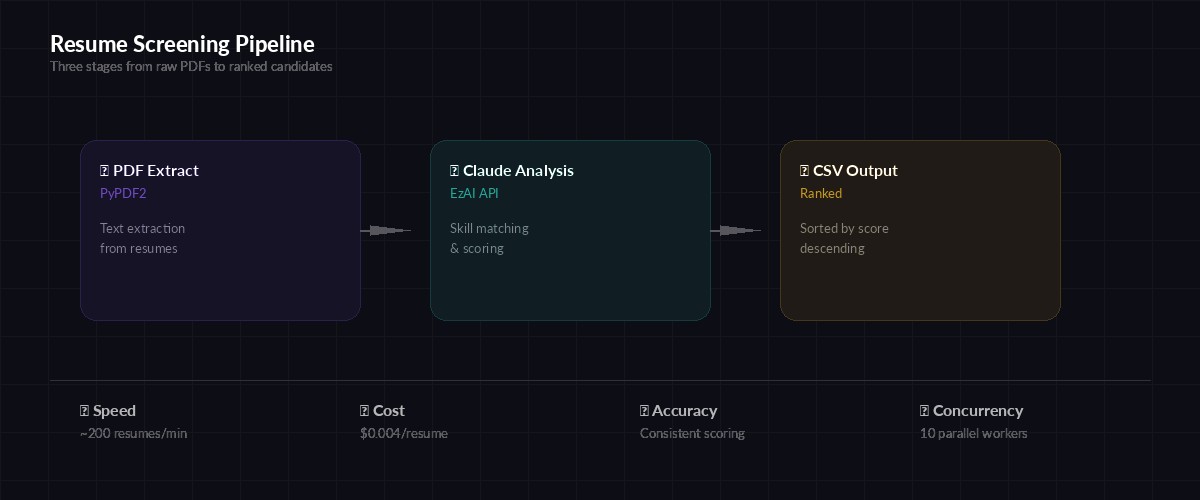
The three-stage pipeline: extract → analyze → rank
The Screening Prompt
The prompt is where the real work happens. You define the job requirements, the scoring rubric, and the output format. Claude returns structured JSON that you can parse directly — no regex hacking required.
SCREENING_PROMPT = """You are a technical recruiter screening resumes.

Job: {job_title}
Required skills: {required_skills}
Nice-to-have: {nice_to_have}
Min years experience: {min_years}

Analyze this resume and return JSON only:
{{
  "name": "candidate full name",
  "email": "email if found",
  "years_experience": number,
  "matched_required": ["skill1", "skill2"],
  "matched_nice_to_have": ["skill1"],
  "missing_required": ["skill1"],
  "score": 0-100,
  "summary": "2-3 sentence assessment",
  "red_flags": ["flag1"] or [],
  "recommendation": "strong_yes | yes | maybe | no"
}}

Scoring rubric:
- Each required skill match: +15 points
- Each nice-to-have match: +5 points
- Years experience >= min: +10 points
- Gaps > 2 years unexplained: -10 points
- Job hopping (< 1 year avg tenure): -5 points

Resume text:
{resume_text}"""
The rubric matters. Without explicit scoring rules, Claude will assign scores based on vibes — and those vibes won't be consistent across 500 resumes. By defining point values for each criterion, you get repeatable, auditable results.
Calling Claude via EzAI
Now wire it up. The screen_resume function sends one resume to Claude and parses the JSON response. We use claude-sonnet-4-5 because it's fast, cheap, and accurate enough for structured extraction tasks.
import anthropic
import json

client = anthropic.Anthropic(
    api_key="sk-your-ezai-key",
    base_url="https://ezaiapi.com"
)

def screen_resume(resume_text: str, job_config: dict) -> dict:
    """Send a resume to Claude for analysis. Returns parsed JSON."""
    prompt = SCREENING_PROMPT.format(
        job_title=job_config["title"],
        required_skills=", ".join(job_config["required"]),
        nice_to_have=", ".join(job_config["nice_to_have"]),
        min_years=job_config["min_years"],
        resume_text=resume_text[:8000]  # truncate long resumes
    )

    response = client.messages.create(
        model="claude-sonnet-4-5",
        max_tokens=1024,
        messages=[{"role": "user", "content": prompt}]
    )

    try:
        return json.loads(response.content[0].text)
    except json.JSONDecodeError:
        # Extract JSON from markdown code blocks if present
        text = response.content[0].text
        if "```json" in text:
            text = text.split("```json")[1].split("```")[0]
        return json.loads(text)
Notice the [:8000] truncation on the resume text. Most resumes are 1-3 pages, which fits well under the limit. But occasionally you'll see a 15-page CV from an academic — truncating prevents unnecessary token burn without losing the relevant information, which almost always appears in the first few pages.
Batch Processing with Concurrency
Processing resumes one at a time is slow. With async concurrency, you can screen 10 resumes simultaneously. Here's the batch processor that handles a folder of PDFs:
import asyncio
import csv
from pathlib import Path

async def process_batch(resume_dir: str, job_config: dict, output: str):
    """Screen all PDFs in a directory, write ranked CSV."""
    pdfs = sorted(Path(resume_dir).glob("*.pdf"))
    print(f"Found {len(pdfs)} resumes")

    semaphore = asyncio.Semaphore(10)  # max 10 concurrent
    results = []

    async def screen_one(pdf_path):
        async with semaphore:
            text = extract_resume_text(str(pdf_path))
            if not text:
                return None
            result = await asyncio.to_thread(
                screen_resume, text, job_config
            )
            result["file"] = pdf_path.name
            return result

    tasks = [screen_one(p) for p in pdfs]
    results = await asyncio.gather(*tasks)
    results = [r for r in results if r]

    # Sort by score descending
    results.sort(key=lambda r: r["score"], reverse=True)

    # Write CSV
    fields = ["score", "recommendation", "name", "email",
              "years_experience", "summary", "file"]
    with open(output, "w", newline="") as f:
        writer = csv.DictWriter(f, fieldnames=fields,
                                  extrasaction="ignore")
        writer.writeheader()
        writer.writerows(results)

    print(f"Ranked {len(results)} candidates → {output}")
Defining Job Requirements
The job config is a plain dictionary. Keep it in a JSON file so non-technical hiring managers can edit it without touching Python code:
job = {
    "title": "Senior Python Developer",
    "required": [
        "Python", "FastAPI or Django", "PostgreSQL",
        "REST APIs", "Docker"
    ],
    "nice_to_have": [
        "Kubernetes", "Redis", "GraphQL",
        "CI/CD pipelines", "AWS"
    ],
    "min_years": 5
}

asyncio.run(process_batch(
    "./resumes", job, "ranked_candidates.csv"
))
Run it and you'll get a CSV sorted by score. The top candidates float to the surface immediately. A batch of 200 resumes finishes in under 2 minutes with 10 concurrent workers.
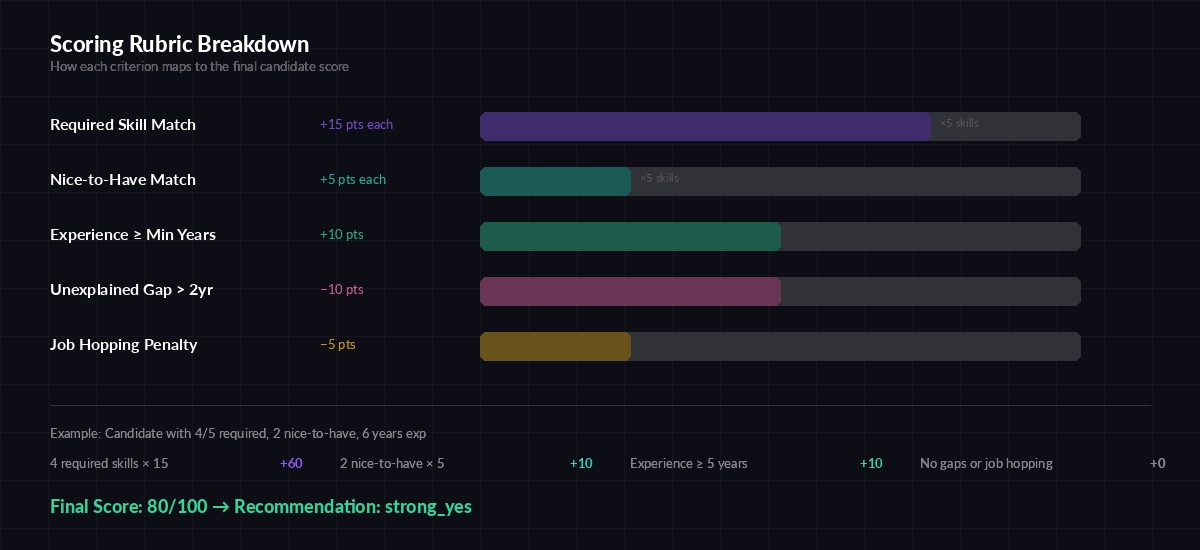
How the scoring rubric maps skills to points for consistent ranking
Handling Edge Cases
Real-world resumes are messy. Here are the common edge cases and how to handle them:
- Empty PDFs — The
extract_resume_textfunction returns an empty string, and the batch processor skips it. Log these so someone can manually review them. - Non-English resumes — Claude handles multilingual input natively. Add a note to the prompt: "Resume may be in any language. Extract and translate key information to English."
- Overstuffed keyword resumes — Some candidates pack invisible text with every skill imaginable. The scoring rubric penalizes this indirectly: if someone claims 50 skills but only has 2 years of experience, the assessment catches the mismatch.
- Rate limits — The semaphore caps concurrency at 10, which stays well within EzAI's rate limits. If you're processing thousands of resumes, lower it to 5.
Cost Breakdown
Each resume averages about 1,500 input tokens (the resume text + prompt) and 400 output tokens (the JSON response). Using claude-sonnet-4-5 through EzAI:
- Per resume: ~$0.004
- 100 resumes: ~$0.40
- 500 resumes: ~$2.00
- 1,000 resumes: ~$4.00
Compare that to a recruiter spending 30+ hours on manual screening. Even with the most generous hourly rate calculation, you're looking at a 1000x cost reduction. And unlike humans, Claude doesn't get fatigued and start skimming at resume #200.
To track your actual spend, check the EzAI dashboard — it shows per-request cost breakdowns so you can see exactly what each screening run costs.
What's Next
This covers the core pipeline: extract, analyze, rank. From here, you could extend it in several directions:
- Add a web UI with FastAPI — we've got a tutorial for that
- Store results in a database instead of CSV for long-term tracking
- Build a second-pass screener that compares top candidates head-to-head using extended thinking
- Add support for DOCX files using
python-docx - Feed the structured output into your ATS via webhook
The prompts shown here are starting points. Tune them for your specific hiring needs — add culture-fit criteria, weight certain skills higher, or adjust the scoring rubric based on what your team actually values.