The average developer gets 300+ notifications per day across Slack, email, GitHub, PagerDuty, and monitoring dashboards. Most of them don't matter. The ones that do get buried under marketing emails and bot noise. In this tutorial, you'll build a Python service that uses Claude's API to classify incoming notifications by urgency, extract actionable context, and route them to the right channel — so the only alerts that reach your phone at 3am are the ones that actually warrant it.
How Notification Triage Works
The system ingests notifications from any source via webhook, sends each one through Claude for semantic analysis, and outputs a structured priority level with a routing decision. No regex. No hand-tuned keyword lists. The LLM understands context — it knows that "disk usage at 81%" is routine, but "disk usage at 81% on the database primary" during a deploy is worth flagging.
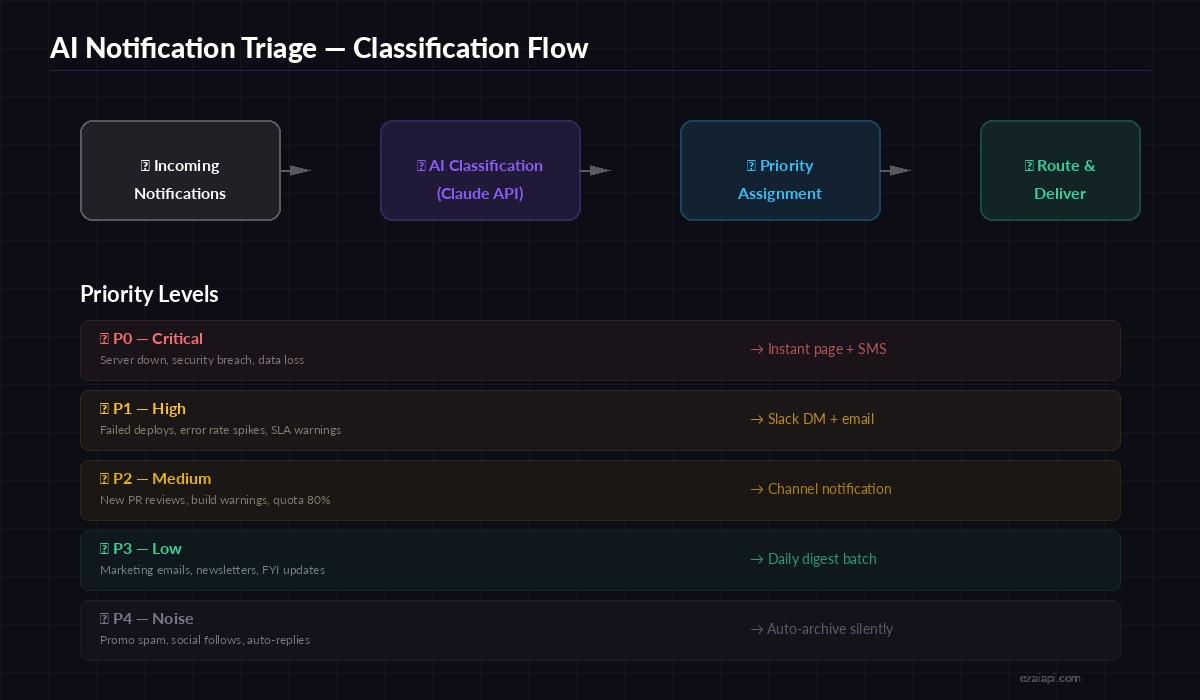
Notification triage pipeline — from raw webhook to prioritized delivery
The priority scale runs P0 through P4. P0 means someone gets paged immediately. P4 means the notification gets silently archived and shows up in a daily digest if you bother to read it. Claude decides which bucket each notification falls into based on the content, source, and any context you provide about your infrastructure.
Setting Up the Classifier
Start by installing the Anthropic SDK and setting your EzAI API credentials. If you haven't signed up yet, grab a key from your dashboard — the free tier covers plenty for testing.
pip install anthropic fastapi uvicornThe core classifier wraps a single Claude API call with a structured system prompt. The trick is providing concrete examples of your infrastructure so the model can make informed priority decisions rather than guessing:
import anthropic
import json

client = anthropic.Anthropic(
    api_key="sk-your-ezai-key",
    base_url="https://ezaiapi.com"
)

SYSTEM_PROMPT = """You are a notification triage system. Classify each
notification into exactly one priority level and suggest a routing action.

Priority levels:
- P0 (critical): Service outages, security breaches, data loss. Page immediately.
- P1 (high): Failed deploys, error rate spikes, SLA warnings. DM + email.
- P2 (medium): PR reviews, build warnings, quota approaching limits. Channel post.
- P3 (low): Marketing, newsletters, FYI updates. Daily digest.
- P4 (noise): Promo spam, social follows, auto-replies. Auto-archive.

Respond with JSON only:
{"priority": "P0-P4", "reason": "one sentence", "route": "page|dm|channel|digest|archive"}
"""

def classify_notification(source: str, subject: str, body: str) -> dict:
    message = client.messages.create(
        model="claude-sonnet-4-5",
        max_tokens=200,
        system=SYSTEM_PROMPT,
        messages=[{
            "role": "user",
            "content": f"Source: {source}\nSubject: {subject}\nBody: {body}"
        }]
    )
    return json.loads(message.content[0].text)
Notice we're using claude-sonnet-4-5 — fast enough for real-time classification (under 500ms per call) and smart enough to distinguish between "database replication lag 2s" (P2) and "database replication lag 45s" (P0). For even lower latency, switch to claude-haiku-3-5 at roughly 3x less cost per token.
Building the Webhook Endpoint
Wrap the classifier in a FastAPI server so any service can POST notifications to it. This is the glue between your existing tools (GitHub webhooks, Grafana alerts, email forwarding rules) and the AI brain:
from fastapi import FastAPI, BackgroundTasks
from pydantic import BaseModel

app = FastAPI()

class Notification(BaseModel):
    source: str          # "github", "grafana", "email", etc.
    subject: str
    body: str
    metadata: dict = {}  # optional extra context

ROUTERS = {
    "page":    send_pagerduty,
    "dm":      send_slack_dm,
    "channel": post_to_channel,
    "digest":  queue_for_digest,
    "archive": archive_silently,
}

@app.post("/webhook/triage")
async def triage(notif: Notification, bg: BackgroundTasks):
    result = classify_notification(
        notif.source, notif.subject, notif.body
    )
    # Route based on AI decision
    router = ROUTERS.get(result["route"], archive_silently)
    bg.add_task(router, notif, result)
    return {
        "priority": result["priority"],
        "route": result["route"],
        "reason": result["reason"]
    }
The endpoint returns the classification immediately while routing happens in the background. Response times stay under 800ms even under load, because the heavy work (Slack API, email SMTP) runs asynchronously.
Adding Batch Processing for Email
Email is the noisiest channel. Instead of classifying messages one at a time, batch them into groups of 10-20 and send a single API call. This cuts costs dramatically and lets Claude see patterns across related emails:
async def batch_classify(notifications: list[Notification]) -> list[dict]:
    # Format all notifications into a numbered list
    items = "\n---\n".join(
        f"[{i+1}] Source: {n.source}\nSubject: {n.subject}\nBody: {n.body[:500]}"
        for i, n in enumerate(notifications)
    )

    message = client.messages.create(
        model="claude-sonnet-4-5",
        max_tokens=1500,
        system=SYSTEM_PROMPT + "\nClassify ALL notifications. Return a JSON array.",
        messages=[{"role": "user", "content": items}]
    )

    return json.loads(message.content[0].text)
Batching 20 emails into one API call costs roughly the same as 3-4 individual calls. For high-volume inboxes, this is the difference between $5/month and $50/month in API spend. Check out our batch processing guide for more optimization patterns.
Routing Decisions in Practice
The routing layer maps each priority to a concrete action. Here's a real-world implementation using Slack and email as delivery channels:
import httpx
from datetime import datetime

SLACK_WEBHOOK = "https://hooks.slack.com/services/T.../B.../xxx"
DIGEST_STORE: list[dict] = []

async def send_slack_dm(notif: Notification, result: dict):
    async with httpx.AsyncClient() as http:
        await http.post(SLACK_WEBHOOK, json={
            "text": f"🔴 *{result['priority']}* — {notif.subject}\n"
                    f"_{result['reason']}_\nSource: {notif.source}"
        })

async def queue_for_digest(notif: Notification, result: dict):
    DIGEST_STORE.append({
        "time": datetime.utcnow().isoformat(),
        "subject": notif.subject,
        "priority": result["priority"],
        "reason": result["reason"]
    })

async def archive_silently(notif: Notification, result: dict):
    # Log it, but don't bother anyone
    print(f"[ARCHIVED] {notif.source}: {notif.subject}")
The digest queue collects P3 notifications throughout the day and fires a summary every morning at 9am. No more scrolling through 80 marketing emails before finding the one GitHub review that actually needs your attention.
Cost and Performance
Running this through EzAI keeps API costs predictable. Here's what typical usage looks like:
- Single classification: ~150 input tokens + ~50 output tokens = ~$0.0004 per notification with Sonnet
- Batch of 20 emails: ~2000 input + ~800 output = ~$0.005 per batch (~$0.00025 each)
- Daily volume of 300 notifications: roughly $0.10/day or $3/month
- Latency: 300-600ms for single calls, under 2s for batches of 20
For teams processing thousands of notifications daily, switching from Sonnet to Haiku drops costs by another 70% with minimal accuracy loss on clear-cut cases. Use Sonnet for ambiguous notifications and Haiku for everything else — our model routing guide covers this pattern in depth.
Deploy and Test
Run the server locally to verify everything works:
# Start the triage server
uvicorn triage:app --port 8000

# Test with a critical notification
curl -X POST http://localhost:8000/webhook/triage \
  -H "content-type: application/json" \
  -d '{
    "source": "pagerduty",
    "subject": "CRITICAL: Primary database unreachable",
    "body": "PostgreSQL primary at db-prod-1 is not responding to health checks. Last successful check: 3 minutes ago. Replication lag on all replicas exceeding 60s."
  }'
Expected response:
{
  "priority": "P0",
  "route": "page",
  "reason": "Primary database is unreachable with cascading replication failure across all replicas."
}
Ship it behind nginx or throw it on a $5/month VPS. Point your GitHub webhooks, Grafana alerts, and email forwarding rules at /webhook/triage and let Claude sort the signal from the noise. Your 3am self will thank you.
What's Next
This covers the core triage pipeline. To take it further:
- Add multi-model fallback so classification continues even if one provider is down
- Implement response caching for duplicate notifications (deploy bots love sending the same message 5 times)
- Build a feedback loop where you can reclassify notifications and fine-tune the system prompt over time
- Connect the EzAI dashboard to monitor classification accuracy and API costs in real time