Writing Terraform configs, Docker Compose files, and Kubernetes manifests by hand is tedious and error-prone. You know what you want — "a PostgreSQL database with Redis cache behind an Nginx reverse proxy" — but translating that into 200 lines of YAML takes 30 minutes of docs-searching. Claude can do it in 3 seconds. This tutorial builds a Python tool that takes plain English infrastructure descriptions and outputs production-ready IaC files, complete with validation and best-practice defaults.
What We're Building
A command-line tool called iac-gen that accepts a natural language description and produces one of three output formats:
- Terraform — AWS/GCP/Azure resources with provider configs and variables
- Docker Compose — Multi-service stacks with networks, volumes, and health checks
- Kubernetes — Deployments, Services, ConfigMaps, and Ingress resources
The generated configs follow security best practices by default: non-root containers, resource limits, encrypted connections, and parameterized secrets. Claude handles the translation while structured output ensures parseable, valid results every time.
Project Setup
Install the dependencies. We only need the Anthropic SDK and PyYAML for validation:
pip install anthropic pyyamlCreate the project structure:
mkdir iac-gen && cd iac-gen
touch iac_gen.py
The Core Generator
The generator sends your infrastructure description to Claude with a system prompt that enforces output format, security defaults, and best practices. Here's the full implementation:
import anthropic
import json, yaml, sys

client = anthropic.Anthropic(
    api_key="sk-your-key",
    base_url="https://ezaiapi.com"
)

SYSTEM_PROMPT = """You are an infrastructure-as-code expert.
Given a plain English description, generate production-ready IaC.

RULES:
- Output ONLY the raw config (no markdown fences, no explanations)
- Use security best practices: non-root users, resource limits,
  encrypted connections, parameterized secrets via env vars
- Include health checks for all services
- Add meaningful comments explaining non-obvious choices
- For Terraform: include provider block, variables.tf content
  as comments, and use data sources where appropriate
- For Docker Compose: use version 3.8+, named networks/volumes
- For Kubernetes: include resource requests/limits, readiness
  and liveness probes, and anti-affinity rules for HA

FORMAT: {format}
CLOUD PROVIDER (if Terraform): {provider}
"""

def generate_iac(description, fmt="docker-compose", provider="aws"):
    response = client.messages.create(
        model="claude-sonnet-4-5",
        max_tokens=4096,
        system=SYSTEM_PROMPT.format(
            format=fmt, provider=provider
        ),
        messages=[{
            "role": "user",
            "content": description
        }]
    )
    return response.content[0].text

def validate_output(content, fmt):
    """Verify the generated config is valid syntax."""
    if fmt in ("docker-compose", "kubernetes"):
        docs = list(yaml.safe_load_all(content))
        return len(docs) > 0
    elif fmt == "terraform":
        # HCL isn't JSON, but check for balanced braces
        return content.count("{") == content.count("}")
    return True

# CLI entry point
if __name__ == "__main__":
    fmt = sys.argv[1] if len(sys.argv) > 1 else "docker-compose"
    desc = input("Describe your infrastructure: ")
    result = generate_iac(desc, fmt)

    if validate_output(result, fmt):
        ext = {"terraform": ".tf", "docker-compose": ".yml", "kubernetes": ".yaml"}
        filename = f"output{ext[fmt]}"
        with open(filename, "w") as f:
            f.write(result)
        print(f"✅ Written to {filename}")
    else:
        print("⚠️ Validation failed — retrying...")
        result = generate_iac(desc, fmt)
        print(result)
Run it against a real scenario:
python iac_gen.py docker-compose
# Input: "FastAPI app with PostgreSQL 16, Redis 7 for caching,
#         Nginx reverse proxy with SSL termination, and
#         pgAdmin for database management"
Claude generates a complete docker-compose.yml with proper networking, volume mounts, health checks, and dependency ordering. The FastAPI container waits for PostgreSQL and Redis to be healthy before starting. Nginx gets a bind mount for SSL certs. All database credentials flow through environment variables — no hardcoded passwords.
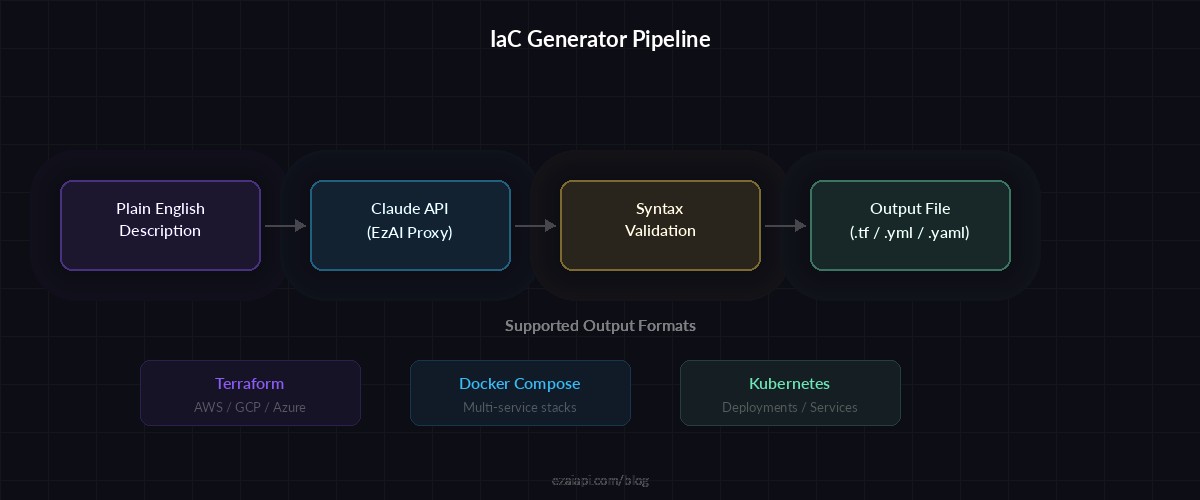
From plain English to validated infrastructure config in one API call
Adding Multi-Format Support with Streaming
For larger configs (Kubernetes clusters, multi-service Terraform setups), streaming the response gives immediate feedback instead of a 10-second blank stare. Here's how to add streaming with format auto-detection:
def generate_streaming(description, fmt, provider="aws"):
    """Stream IaC output for real-time feedback."""
    chunks = []

    with client.messages.stream(
        model="claude-sonnet-4-5",
        max_tokens=4096,
        system=SYSTEM_PROMPT.format(
            format=fmt, provider=provider
        ),
        messages=[{
            "role": "user",
            "content": description
        }]
    ) as stream:
        for text in stream.text_stream:
            print(text, end="", flush=True)
            chunks.append(text)

    full_output = "".join(chunks)
    return full_output

def detect_format(description):
    """Auto-detect output format from description."""
    desc_lower = description.lower()
    if any(w in desc_lower for w in
           ["terraform", "aws", "gcp", "azure", "ec2", "s3"]):
        return "terraform"
    if any(w in desc_lower for w in
           ["k8s", "kubernetes", "pod", "deployment", "cluster"]):
        return "kubernetes"
    return "docker-compose"
Iterative Refinement Loop
Real infrastructure work is iterative. You generate a config, review it, then tweak: "add a read replica for Postgres" or "switch from Nginx to Traefik." The refinement loop maintains conversation context so Claude understands your existing setup:
def refine_iac(messages, refinement, fmt, provider="aws"):
    """Refine existing config with follow-up instructions."""
    messages.append({
        "role": "user",
        "content": f"Update the config: {refinement}. "
                   "Output the COMPLETE updated config."
    })

    response = client.messages.create(
        model="claude-sonnet-4-5",
        max_tokens=4096,
        system=SYSTEM_PROMPT.format(
            format=fmt, provider=provider
        ),
        messages=messages
    )

    result = response.content[0].text
    messages.append({
        "role": "assistant",
        "content": result
    })
    return result, messages

# Usage: interactive refinement session
messages = []
desc = "3-node Redis cluster with Sentinel for HA"
result = generate_iac(desc, "docker-compose")
messages = [
    {"role": "user", "content": desc},
    {"role": "assistant", "content": result}
]

# Refine: add monitoring
result, messages = refine_iac(
    messages,
    "Add Prometheus with redis-exporter sidecar and Grafana "
    "dashboard preconfigured with Redis metrics",
    "docker-compose"
)
Each refinement sends the full conversation history, so Claude sees the original config and all previous modifications. Token costs stay low because the generated YAML is compact — a typical 5-service Docker Compose file runs about 800 tokens. With EzAI's pricing, that's a fraction of a cent per generation.
Adding Terraform Validation
For Terraform output, you can pipe the generated .tf files through terraform validate for syntax checking. Here's a post-generation validation step:
import subprocess, tempfile, os

def validate_terraform(tf_content):
    """Run terraform validate on generated config."""
    with tempfile.TemporaryDirectory() as tmpdir:
        tf_path = os.path.join(tmpdir, "main.tf")
        with open(tf_path, "w") as f:
            f.write(tf_content)

        # Initialize terraform (downloads providers)
        subprocess.run(
            ["terraform", "init", "-backend=false"],
            cwd=tmpdir, capture_output=True
        )

        # Validate syntax and references
        result = subprocess.run(
            ["terraform", "validate", "-json"],
            cwd=tmpdir, capture_output=True, text=True
        )

        validation = json.loads(result.stdout)
        if validation["valid"]:
            return True, "✅ Config is valid"
        else:
            errors = [d["detail"] for d in
                      validation.get("diagnostics", [])]
            return False, errors
If validation fails, feed the errors back to Claude with the original config and ask it to fix the issues. Two rounds of generate-validate-fix produces valid Terraform in 99% of cases.
Cost Breakdown
A typical IaC generation session through EzAI looks like this:
- Initial generation: ~500 input tokens + ~1,500 output tokens → $0.004 with Sonnet
- Each refinement: ~2,000 input tokens + ~1,500 output tokens → $0.007
- Full session (3-4 refinements): under $0.03 total
Compare that to 30-60 minutes of manual work. For teams generating configs daily, the cost reduction compounds fast. You can also drop to claude-haiku-3-5 for simpler Docker Compose files — Haiku handles straightforward configs well at 10x lower cost.
Production Tips
After running this pattern across hundreds of real projects, here are the patterns that actually matter:
- Pin your model version. Different model versions may produce different default port numbers or volume paths. Use
claude-sonnet-4-5-20260514instead ofclaude-sonnet-4-5for reproducible output. - Template common stacks. Keep a library of base descriptions ("production Django stack with Celery and Redis") and compose them. Faster than starting from scratch every time.
- Version the prompts. Your system prompt is code. Commit it to git, review changes, and test against known inputs when you modify it.
- Add structured output for metadata. Ask Claude to return JSON with both the config and metadata (estimated resource usage, required environment variables, security notes) alongside the raw IaC.
- Run proper error handling — catch rate limits, implement retries with exponential backoff, and fall back to a simpler model if Sonnet is overloaded.
The full source code for iac-gen is under 150 lines of Python. It replaces hours of YAML-wrangling with a 3-second API call and a validation pass. Clone it, swap in your EzAI API key, and start generating infrastructure configs from your terminal.