Writing docker-compose.yml files by hand is tedious. You need to figure out which services your project requires, configure health checks, set up volumes, map ports, and wire networks together. Miss one dependency and your stack fails silently at 2 AM.
This tutorial builds a Python CLI tool that scans your project directory — reading package.json, requirements.txt, Dockerfiles, Prisma schemas, and source code — then sends that context to Claude via EzAI to generate a production-ready docker-compose.yml. The output includes health checks, named volumes, restart policies, and environment variable placeholders. Under 120 lines of Python.
How It Works
The generator follows a three-phase pipeline. First, it walks your project tree and collects signals: dependency files reveal which databases and caches you need, Dockerfiles show existing container configs, and source imports hint at service requirements. Second, it packs everything into a structured prompt and sends it to Claude. Third, it extracts the YAML response and writes it to disk.
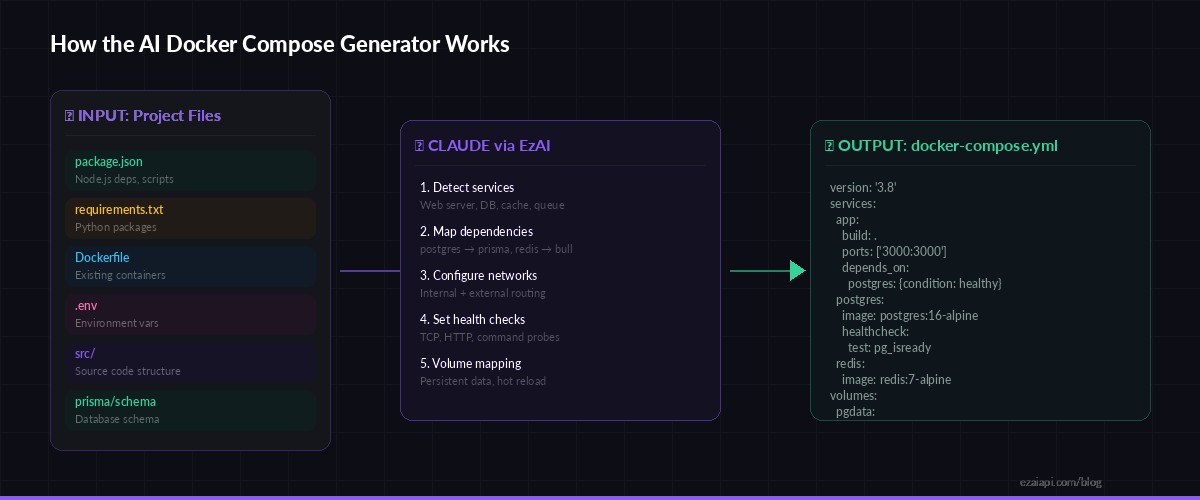
Project files → Claude analysis via EzAI → production-ready docker-compose.yml
Claude is particularly good at this because it can reason about the relationships between your services. It sees prisma in your dependencies and knows you need Postgres. It spots bullmq and adds Redis. It reads your .env.example and maps those variables into the compose file. That kind of cross-file reasoning is where LLMs outperform template-based generators.
Prerequisites
- Python 3.9+ with
httpxinstalled (pip install httpx) - An EzAI API key — sign up takes 30 seconds, and new accounts get 15 free credits
- A project directory you want to containerize
Project Structure
compose-gen/
├── generate.py      # Main script — project scanner + API caller
└── README.md
One file. That's it. The entire tool is a single Python script that you can drop into any project.
Core Generator Code
Here's the full implementation. It scans the project, builds context, calls Claude, and writes the output:
import httpx, json, sys, os
from pathlib import Path

EZAI_KEY = os.environ["ANTHROPIC_API_KEY"]
EZAI_URL = "https://ezaiapi.com/v1/messages"

# Files that reveal project dependencies and structure
SIGNAL_FILES = [
    "package.json", "requirements.txt", "pyproject.toml",
    "Dockerfile", "Dockerfile.dev", ".env.example",
    "prisma/schema.prisma", "docker-compose.yml",
    "Gemfile", "go.mod", "Cargo.toml",
]

def scan_project(root: Path) -> dict:
    """Read signal files and collect directory tree."""
    context = {"files": {}, "tree": []}

    for rel in SIGNAL_FILES:
        path = root / rel
        if path.exists():
            text = path.read_text(errors="ignore")[:4000]
            context["files"][rel] = text

    # Shallow directory listing (depth 2)
    for entry in sorted(root.rglob("*")):
        rel = entry.relative_to(root)
        if len(rel.parts) <= 2 and not any(
            p.startswith(".") or p == "node_modules"
            for p in rel.parts
        ):
            context["tree"].append(str(rel))

    return context
The scanner reads up to 4KB per file — enough context for Claude to understand dependencies without blowing up the token count. The directory tree is capped at depth 2 to give structural context without noise.
Building the Prompt
The prompt is the critical piece. Vague instructions produce vague YAML. Specific instructions produce deployable configs:
SYSTEM = """You are a Docker infrastructure expert.
Given project files, generate a production-ready docker-compose.yml.

Rules:
- Use compose spec version 3.8+
- Pin image tags (postgres:16-alpine, not postgres:latest)
- Add healthchecks for every service
- Use named volumes for persistent data
- Set restart: unless-stopped on all services
- Add depends_on with condition: service_healthy
- Include .env variable references with sensible defaults
- Add comments explaining non-obvious choices
- Output ONLY the YAML inside ```yaml fences, nothing else"""

def build_prompt(context: dict) -> str:
    parts = ["Analyze this project and generate docker-compose.yml:\n"]

    parts.append("## Directory Tree")
    parts.append("\n".join(context["tree"][:50]))

    for name, content in context["files"].items():
        parts.append(f"\n## {name}\n```\n{content}\n```")

    return "\n".join(parts)
The system prompt enforces production standards — pinned versions, health checks, named volumes. Without these constraints, Claude tends to generate minimal configs that work in dev but fall apart in production. The explicit rules fix that.
Calling Claude via EzAI
The API call itself is straightforward. We use claude-sonnet-4-5 for the right balance of speed and quality — Opus would be overkill for YAML generation, and Haiku sometimes misses dependency relationships:
import re

def generate_compose(context: dict) -> str:
    """Send project context to Claude and extract YAML."""
    resp = httpx.post(
        EZAI_URL,
        headers={
            "x-api-key": EZAI_KEY,
            "anthropic-version": "2023-06-01",
            "content-type": "application/json",
        },
        json={
            "model": "claude-sonnet-4-5",
            "max_tokens": 4096,
            "system": SYSTEM,
            "messages": [{"role": "user", "content": build_prompt(context)}],
        },
        timeout=60,
    )
    resp.raise_for_status()
    text = resp.json()["content"][0]["text"]

    # Extract YAML from markdown fences
    match = re.search(r"```ya?ml\n(.*?)```", text, re.DOTALL)
    if not match:
        raise ValueError("No YAML block found in response")
    return match.group(1).strip()
The regex extraction is important. Claude wraps its YAML in markdown fences, and you want the raw content without the fence markers. If the model returns prose instead of YAML (rare with a good system prompt), the ValueError gives you a clear signal to retry.
CLI Entry Point
Wire it all together with a simple main that takes a project path and writes the output:
def main():
    root = Path(sys.argv[1]) if len(sys.argv) > 1 else Path(".")
    out = root / "docker-compose.yml"

    print(f"🔍 Scanning {root.resolve()}...")
    context = scan_project(root)
    print(f"   Found {len(context['files'])} config files")

    print("🤖 Generating docker-compose.yml with Claude...")
    yaml_content = generate_compose(context)

    out.write_text(yaml_content)
    print(f"✅ Written to {out}")
    print(f"   Run: docker compose up -d")

if __name__ == "__main__":
    main()
Run it against any project:
export ANTHROPIC_API_KEY="sk-your-ezai-key"
python3 generate.py /path/to/your/project

# Output:
# 🔍 Scanning /path/to/your/project...
#    Found 4 config files
# 🤖 Generating docker-compose.yml with Claude...
# ✅ Written to /path/to/your/project/docker-compose.yml
#    Run: docker compose up -d
Example Output
Point it at a typical Node.js + Prisma + Redis project and you get something like this:
version: "3.8"

services:
  app:
    build:
      context: .
      dockerfile: Dockerfile
    ports:
      - "${APP_PORT:-3000}:3000"
    environment:
      - DATABASE_URL=postgresql://${POSTGRES_USER:-app}:${POSTGRES_PASSWORD:-secret}@postgres:5432/${POSTGRES_DB:-appdb}
      - REDIS_URL=redis://redis:6379
    depends_on:
      postgres:
        condition: service_healthy
      redis:
        condition: service_healthy
    restart: unless-stopped

  postgres:
    image: postgres:16-alpine
    environment:
      - POSTGRES_USER=${POSTGRES_USER:-app}
      - POSTGRES_PASSWORD=${POSTGRES_PASSWORD:-secret}
      - POSTGRES_DB=${POSTGRES_DB:-appdb}
    volumes:
      - pgdata:/var/lib/postgresql/data
    healthcheck:
      test: ["CMD-SHELL", "pg_isready -U ${POSTGRES_USER:-app}"]
      interval: 5s
      timeout: 3s
      retries: 5
    restart: unless-stopped

  redis:
    image: redis:7-alpine
    command: redis-server --maxmemory 256mb --maxmemory-policy allkeys-lru
    volumes:
      - redisdata:/data
    healthcheck:
      test: ["CMD", "redis-cli", "ping"]
      interval: 5s
      timeout: 3s
      retries: 3
    restart: unless-stopped

volumes:
  pgdata:
  redisdata:
Claude inferred Postgres from the Prisma schema, Redis from the BullMQ dependency, wired the DATABASE_URL from the .env.example pattern, and added health checks with appropriate readiness probes for each service. That's the kind of reasoning a static template can't do.
Cost Breakdown
A typical project scan produces 2,000-3,000 input tokens (file contents + tree) and 800-1,200 output tokens (the YAML). With claude-sonnet-4-5 through EzAI:
- Input: ~3K tokens × $3/M = $0.009
- Output: ~1K tokens × $15/M = $0.015
- Total per generation: ~$0.024
Under three cents per compose file. For comparison, the time you'd spend manually writing and debugging a multi-service compose config is 15-30 minutes. At any engineering hourly rate, the AI approach pays for itself thousands of times over. Check the EzAI pricing page for current model rates.
Extending the Generator
The base version handles common stacks well. Here are three upgrades worth adding for production use:
Multi-environment support. Add a --env flag that generates different configs for dev (with hot reload volumes and debug ports) versus production (with resource limits and logging drivers). Pass the flag value in the user prompt so Claude adapts the output.
Validation pass. After generating the YAML, parse it with PyYAML and run basic checks: do all depends_on targets exist as services? Are all referenced volumes declared? Do port mappings conflict? A 10-line validation function catches the rare hallucination before you hit docker compose up.
Incremental updates. If a docker-compose.yml already exists, read it as additional context and ask Claude to merge new services rather than regenerate from scratch. This preserves manual tweaks while adding new dependencies.
What's Next
You now have a working AI-powered Docker Compose generator in under 120 lines. The pattern — scan files, build context, call Claude, extract structured output — applies to any config generation task: Kubernetes manifests, CI pipelines, nginx configs, Terraform modules.
- Get your API key at ezaiapi.com/dashboard and try it on your own projects
- Read the structured output guide for tighter control over Claude's response format
- Check out 7 ways to reduce AI API costs if you plan to run this at scale
- Explore Docker Compose specification for advanced features like profiles and extensions