
Every production system generates noise — log files pile up, error counts tick over, and customer messages go unread overnight. An AI cron job runner turns that noise into actionable intelligence on a schedule. Instead of manually sifting through data each morning, you configure a Python script to wake up at 6 AM, feed the last 24 hours of logs to Claude, and drop a summary in Slack before your first coffee.
This tutorial walks through building a complete cron-based AI task runner using Python, APScheduler, and the Claude API via EzAI. By the end, you'll have a daemon that runs scheduled AI jobs with retry logic, cost tracking, and dead-letter handling for failed runs.
Why Schedule AI Tasks?
Plenty of AI workloads don't need real-time responses. They need reliable, periodic execution:
- Daily log summaries — condense 50K lines of server logs into a 200-word brief
- Weekly report generation — pull metrics from your database and write a narrative report
- Customer feedback digests — classify and summarize incoming support tickets every 4 hours
- Anomaly detection — compare today's metrics against the past week and flag outliers
- Content generation — draft social posts, changelog entries, or newsletter sections on schedule
Running these as cron jobs instead of ad-hoc scripts means they execute consistently, failures get logged, and you can track costs per job over time.
Project Setup
Start with a clean Python project. You need three dependencies: the Anthropic SDK (works seamlessly with EzAI's endpoint), APScheduler for cron-style scheduling, and structlog for structured logging.
mkdir ai-cron-runner && cd ai-cron-runner
pip install anthropic apscheduler structlog
Set your EzAI API key as an environment variable. If you don't have one yet, grab a free key — new accounts get 15 credits, enough for thousands of scheduled runs with Sonnet.
export EZAI_API_KEY="sk-your-key-here"The AI Job Definition
Each scheduled job is a dataclass with a cron expression, a system prompt, a function that gathers input data, and a callback for the AI's output. This keeps job definitions clean and testable.
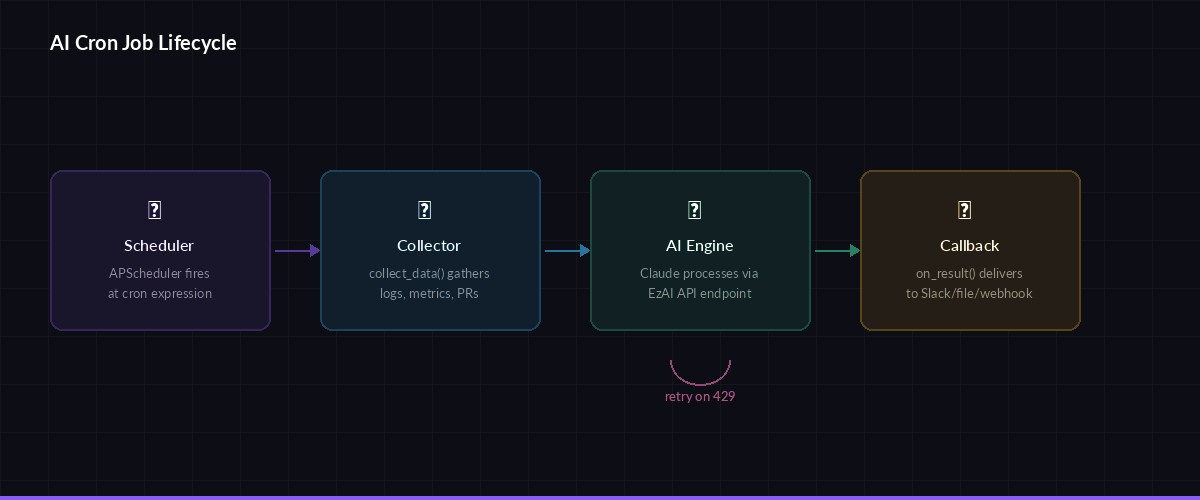
Job lifecycle: schedule triggers → data collector runs → AI processes → callback delivers result
from dataclasses import dataclass
from typing import Callable
import anthropic, os, structlog

log = structlog.get_logger()

client = anthropic.Anthropic(
    api_key=os.environ["EZAI_API_KEY"],
    base_url="https://ezaiapi.com",
)

@dataclass
class AIJob:
    name: str
    cron: str                          # "0 6 * * *" = daily at 6 AM
    model: str                         # "claude-sonnet-4-5" or "claude-haiku-3-5"
    system_prompt: str
    collect_data: Callable[[], str]    # gathers input before each run
    on_result: Callable[[str], None]  # handles AI output
    max_tokens: int = 2048
    retries: int = 2
Building the Runner Engine
The runner wraps APScheduler and adds retry logic, cost tracking, and structured logging. Each job execution gets a unique run ID, so you can trace failures back to specific triggers in your logs.
import uuid, time
from apscheduler.schedulers.blocking import BlockingScheduler
from apscheduler.triggers.cron import CronTrigger

class AICronRunner:
    def __init__(self):
        self.scheduler = BlockingScheduler()
        self.stats = {"runs": 0, "failures": 0, "total_tokens": 0}

    def register(self, job: AIJob):
        parts = job.cron.split()
        trigger = CronTrigger(
            minute=parts[0], hour=parts[1],
            day=parts[2], month=parts[3],
            day_of_week=parts[4],
        )
        self.scheduler.add_job(
            self._execute, trigger,
            args=[job], id=job.name,
            misfire_grace_time=300,
        )
        log.info("job_registered", name=job.name, cron=job.cron)

    def _execute(self, job: AIJob):
        run_id = str(uuid.uuid4())[:8]
        log.info("job_start", job=job.name, run=run_id)

        # Collect input data
        try:
            user_input = job.collect_data()
        except Exception as e:
            log.error("data_collect_failed", job=job.name, err=str(e))
            self.stats["failures"] += 1
            return

        # Call AI with retries
        for attempt in range(job.retries + 1):
            try:
                t0 = time.monotonic()
                resp = client.messages.create(
                    model=job.model,
                    max_tokens=job.max_tokens,
                    system=job.system_prompt,
                    messages=[{"role": "user", "content": user_input}],
                )
                elapsed = time.monotonic() - t0
                tokens = resp.usage.input_tokens + resp.usage.output_tokens

                self.stats["runs"] += 1
                self.stats["total_tokens"] += tokens
                log.info("job_done", job=job.name, run=run_id,
                     tokens=tokens, seconds=round(elapsed, 2))

                job.on_result(resp.content[0].text)
                return

            except anthropic.RateLimitError:
                wait = 2 ** attempt
                log.warn("rate_limited", job=job.name, retry_in=wait)
                time.sleep(wait)
            except Exception as e:
                log.error("job_failed", job=job.name, attempt=attempt, err=str(e))
                if attempt == job.retries:
                    self.stats["failures"] += 1
                time.sleep(1)

    def start(self):
        log.info("runner_starting", jobs=len(self.scheduler.get_jobs()))
        self.scheduler.start()
The retry logic uses exponential backoff specifically for rate limits (which EzAI handles gracefully), and linear retries for other transient errors. After exhausting retries, the job gets logged as a failure but doesn't crash the runner.
Real Example: Daily Log Summarizer
Here's a concrete job that reads the last 24 hours of Nginx access logs, feeds them to Claude Haiku (fast and cheap — roughly $0.001 per summary), and writes the result to a file. Haiku is the right model here: log summaries don't need deep reasoning, just pattern recognition.
import subprocess
from datetime import datetime

def collect_nginx_logs() -> str:
    # Grab last 24h of access logs, capped at 500 lines
    result = subprocess.run(
        ["journalctl", "-u", "nginx", "--since", "24 hours ago",
         "--no-pager", "-q"],
        capture_output=True, text=True
    )
    lines = result.stdout.strip().split("\n")
    if len(lines) > 500:
        lines = lines[-500:]  # keep most recent
    return f"Nginx logs ({len(lines)} entries):\n" + "\n".join(lines)

def save_summary(text: str):
    date = datetime.now().strftime("%Y-%m-%d")
    path = f"/var/log/ai-summaries/nginx-{date}.md"
    with open(path, "w") as f:
        f.write(text)
    log.info("summary_saved", path=path)

log_summarizer = AIJob(
    name="daily-log-summary",
    cron="0 6 * * *",             # 6:00 AM daily
    model="claude-haiku-3-5",
    system_prompt="""You are a DevOps analyst. Summarize server logs into:
1. Traffic overview (total requests, unique IPs, peak hour)
2. Error summary (4xx and 5xx counts, top error paths)
3. Anomalies (unusual patterns, spikes, suspicious IPs)
4. One-line recommendation
Keep it under 200 words. Use markdown.""",
    collect_data=collect_nginx_logs,
    on_result=save_summary,
)
Adding a Webhook Delivery Callback
Most teams want results pushed somewhere — Slack, Discord, or a webhook endpoint. Here's a reusable callback that posts the AI output to any webhook URL, with a fallback to local file storage if the POST fails.
import httpx

def webhook_callback(url: str, fallback_dir: str = "/tmp/ai-cron"):
    def deliver(text: str):
        try:
            resp = httpx.post(url, json={
                "text": text,
                "source": "ai-cron-runner",
            }, timeout=10)
            resp.raise_for_status()
            log.info("webhook_sent", status=resp.status_code)
        except Exception as e:
            log.error("webhook_failed", err=str(e))
            # Fallback: save to disk so nothing is lost
            os.makedirs(fallback_dir, exist_ok=True)
            ts = datetime.now().strftime("%Y%m%d-%H%M%S")
            with open(f"{fallback_dir}/{ts}.md", "w") as f:
                f.write(text)
    return deliver

# Example: push AI summaries to Slack
slack_job = AIJob(
    name="error-digest",
    cron="0 */4 * * *",            # every 4 hours
    model="claude-sonnet-4-5",
    system_prompt="Analyze these error logs. List top 5 issues by severity. Be terse.",
    collect_data=collect_nginx_logs,
    on_result=webhook_callback("https://hooks.slack.com/services/YOUR/WEBHOOK/URL"),
)
Model Selection per Job
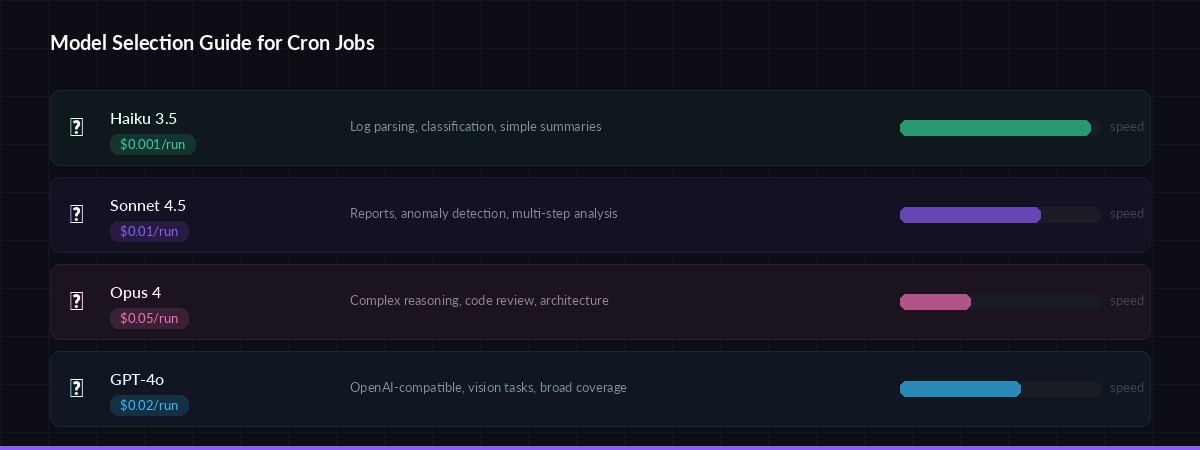
Pick the right model for each job — balance cost vs. reasoning depth
Not every cron job needs Opus-level reasoning. EzAI gives you access to 20+ models through one API key, so match the model to the task:
- claude-haiku-3-5 — Log parsing, classification, simple summaries. ~$0.001 per run.
- claude-sonnet-4-5 — Anomaly detection, report writing, multi-step analysis. ~$0.01 per run.
- claude-opus-4 — Complex reasoning, code review, architecture decisions. ~$0.05 per run.
- gpt-4o — Alternative for teams wanting OpenAI-compatible outputs. Same EzAI key works.
A team running 10 Haiku jobs daily spends about $0.30/month. That's the cost of a single Starbucks drip — for a month of automated AI intelligence.
Putting It All Together
Here's the main entry point that registers jobs and starts the scheduler. Run it as a systemd service or inside a Docker container for production use.
#!/usr/bin/env python3
# main.py — AI Cron Runner entry point

if __name__ == "__main__":
    runner = AICronRunner()

    # Register your jobs
    runner.register(log_summarizer)
    runner.register(slack_job)

    # Add a weekly code review summary
    runner.register(AIJob(
        name="weekly-pr-digest",
        cron="0 9 * * 1",           # Monday 9 AM
        model="claude-sonnet-4-5",
        system_prompt="""Summarize this week's merged PRs.
Group by: features, bugfixes, refactors.
Note any breaking changes. Keep under 300 words.""",
        collect_data=lambda: subprocess.run(
            ["gh", "pr", "list", "--state", "merged",
             "--limit", "30", "--json", "title,body,labels"],
            capture_output=True, text=True
        ).stdout,
        on_result=webhook_callback("https://hooks.slack.com/services/YOUR/WEBHOOK"),
    ))

    print("🕐 AI Cron Runner active. Press Ctrl+C to stop.")
    runner.start()
Cost Tracking and Observability
The stats dict in the runner is a starting point. For production, expose these metrics via a /health endpoint or push them to your monitoring stack. Here's a quick addition using Python's built-in HTTP server:
import json, threading
from http.server import HTTPServer, BaseHTTPRequestHandler

class HealthHandler(BaseHTTPRequestHandler):
    def do_GET(self):
        self.send_response(200)
        self.send_header("Content-Type", "application/json")
        self.end_headers()
        self.wfile.write(json.dumps({
            "status": "healthy",
            "total_runs": runner.stats["runs"],
            "failures": runner.stats["failures"],
            "tokens_used": runner.stats["total_tokens"],
            "jobs": [j.id for j in runner.scheduler.get_jobs()],
        }).encode())

# Start health server in background thread
threading.Thread(
    target=lambda: HTTPServer(("", 8090), HealthHandler).serve_forever(),
    daemon=True
).start()
Now you can hit curl localhost:8090 to see how many runs completed, how many failed, and your total token consumption across all jobs. Pair this with your EzAI dashboard for a complete cost picture.
Production Deployment Tips
- Use systemd — wrap the runner as a
.serviceunit withRestart=alwaysso it survives reboots - Cap input size — always truncate input data before sending to the AI. A 100K-line log file will burn tokens fast. The
collect_datafunction should enforce a ceiling (500-1000 lines is usually enough) - Separate environments — use different EzAI API keys for staging and production so you can track costs independently
- Dead letter queue — persist failed job inputs to disk. After an outage, you can replay them manually instead of losing data
- Model fallback — if Sonnet times out, retry with Haiku. EzAI supports multi-model fallback natively through its routing layer
What to Build Next
This runner handles the fundamentals — scheduling, retries, delivery. From here, you could add:
- A YAML config file for job definitions so non-developers can add jobs
- A SQLite-backed run history for audit trails
- Streaming output for long-running analysis jobs
- Conditional chaining — if the log summary mentions "critical", trigger an immediate follow-up job using multi-step chains
The full source is about 150 lines of Python. No framework lock-in, no complex dependencies. Just a scheduler, an API client, and the AI doing the heavy lifting on autopilot.