
A single AI call can answer a question. But real-world tasks — summarizing a codebase, generating release notes from git history, turning raw data into a polished report — require multiple AI calls working in sequence. Each step takes the output of the previous one, refines it, and passes it forward. This is an AI chain, and it's how production teams build reliable AI workflows without cramming everything into one massive prompt.
In this tutorial, you'll build a multi-step chain in Python that takes raw customer feedback, extracts structured data, categorizes issues, and generates an executive summary. Each step uses a different model through EzAI API, picking the cheapest model that can handle each task.
Why Chains Beat Single Prompts
Stuffing everything into one prompt feels faster, but it breaks down quickly. When you ask a model to extract data, categorize it, analyze trends, and write a report in a single call, you get mediocre results on all four tasks. The model spreads its attention thin, and debugging becomes impossible — you can't tell which part went wrong.
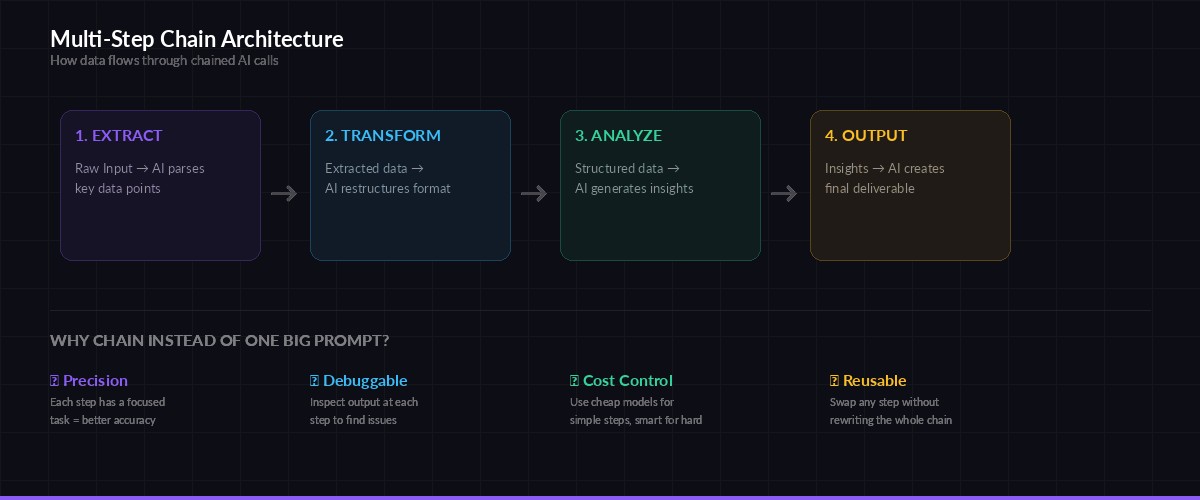
Each step in the chain has a focused task, making outputs more accurate and easier to debug
Chains solve this by giving each step a single job. The extraction step only extracts. The categorization step only categorizes. Each model can focus entirely on its task, and you can inspect intermediate results to pinpoint failures. You also save money — simple steps can use cheaper models like claude-haiku while only the final synthesis step needs claude-sonnet.
Setting Up the Project
You need Python 3.10+ and the Anthropic SDK. If you haven't set up EzAI yet, grab your API key from the dashboard first.
pip install anthropic pydantic
export EZAI_API_KEY="sk-your-key-here"
Here's the base chain class. It handles retries, logging, and passing data between steps:
import json, time, os
from dataclasses import dataclass, field
from typing import Any
import anthropic

client = anthropic.Anthropic(
    api_key=os.environ["EZAI_API_KEY"],
    base_url="https://ezaiapi.com",
)

@dataclass
class ChainStep:
    name: str
    model: str
    system_prompt: str
    max_tokens: int = 2048

    def run(self, user_input: str, retries: int = 3) -> str:
        for attempt in range(retries):
            try:
                resp = client.messages.create(
                    model=self.model,
                    max_tokens=self.max_tokens,
                    system=self.system_prompt,
                    messages=[{"role": "user", "content": user_input}],
                )
                result = resp.content[0].text
                print(f"  ✅ {self.name} ({resp.usage.input_tokens}in + {resp.usage.output_tokens}out tokens)")
                return result
            except anthropic.RateLimitError:
                wait = 2 ** attempt
                print(f"  ⏳ Rate limited on {self.name}, waiting {wait}s...")
                time.sleep(wait)
            except anthropic.APIError as e:
                if attempt == retries - 1:
                    raise
                print(f"  ⚠️ {self.name} failed: {e}, retrying...")
                time.sleep(1)
        raise RuntimeError(f"Step '{self.name}' failed after {retries} retries")
The ChainStep class wraps a single AI call with automatic retry logic and token usage logging. Each step declares which model it uses, so you can mix cheap and expensive models in the same chain.
Building the Feedback Analysis Chain
Our chain has three steps: extract structured data from raw text, categorize and score each issue, then synthesize everything into an executive summary. Here's the full implementation:
# Step 1: Extract — pull structured data from messy feedback
extract = ChainStep(
    name="extract",
    model="claude-haiku-3-5",  # cheap model, simple task
    system_prompt="""Extract structured feedback items from the raw text.
Return a JSON array where each item has:
- "text": the original feedback quote
- "sentiment": "positive" | "negative" | "neutral"
- "feature": which product feature it mentions
Return ONLY valid JSON, no markdown.""",
)

# Step 2: Categorize — group and score the extracted data
categorize = ChainStep(
    name="categorize",
    model="claude-haiku-3-5",  # still cheap enough
    system_prompt="""Given structured feedback JSON, group items by feature
and calculate a severity score (1-10) for each group.
Return JSON with structure:
{"categories": [{"feature": "...", "count": N, "severity": N,
  "top_issues": ["..."], "sentiment_breakdown": {"positive": N, "negative": N}}]}
Return ONLY valid JSON.""",
)

# Step 3: Synthesize — generate the executive summary
synthesize = ChainStep(
    name="synthesize",
    model="claude-sonnet-4-5",  # smart model for writing
    max_tokens=4096,
    system_prompt="""You are a product analyst. Given categorized feedback data,
write a concise executive summary (300 words max) covering:
1. Top 3 issues by severity
2. Quick wins (low effort, high impact fixes)
3. One recommended action item for next sprint
Write in plain English, no jargon. Be specific with numbers.""",
)

def analyze_feedback(raw_feedback: str) -> str:
    print("🔗 Starting feedback analysis chain...")

    # Run the chain: each step feeds into the next
    extracted = extract.run(raw_feedback)
    categorized = categorize.run(extracted)
    summary = synthesize.run(categorized)

    print("✅ Chain complete!")
    return summary
Notice how the first two steps use claude-haiku-3-5 — it's fast, cheap, and perfectly capable of extracting and categorizing structured data. Only the final synthesis step uses claude-sonnet-4-5, where the model's stronger writing ability actually matters. On EzAI, this chain costs roughly $0.003 per run instead of $0.02 if you used Sonnet for everything.
Adding Validation Between Steps
Chains break when one step produces garbage that the next step can't parse. Adding validation gates between steps catches these failures before they cascade:
from pydantic import BaseModel, ValidationError

class FeedbackItem(BaseModel):
    text: str
    sentiment: str
    feature: str

def validate_extraction(raw_json: str) -> list[dict]:
    """Validate extracted feedback matches expected schema."""
    try:
        data = json.loads(raw_json)
        items = [FeedbackItem(**item) for item in data]
        print(f"  ✅ Validated {len(items)} feedback items")
        return [item.model_dump() for item in items]
    except (json.JSONDecodeError, ValidationError) as e:
        raise ValueError(f"Extraction output invalid: {e}")

def analyze_feedback_validated(raw_feedback: str) -> str:
    print("🔗 Starting validated chain...")

    extracted_raw = extract.run(raw_feedback)
    validated = validate_extraction(extracted_raw)  # gate!

    categorized = categorize.run(json.dumps(validated))
    summary = synthesize.run(categorized)

    return summary
The validate_extraction function uses Pydantic to verify the AI's output before sending it to the next step. If the extraction step returns malformed JSON or missing fields, the chain fails fast with a clear error instead of producing a garbled summary three steps later.
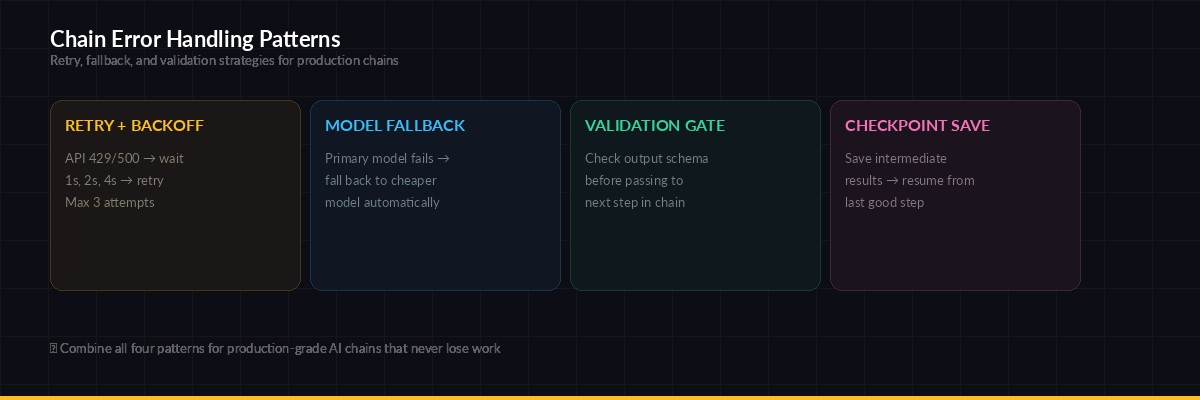
Four patterns that keep production chains running: retry with backoff, model fallback, validation gates, and checkpointing
Model Fallback for Resilience
Production chains need fallback models. If claude-sonnet-4-5 is overloaded, you don't want the entire pipeline to stall. Here's how to add model fallback to any chain step:
@dataclass
class ResilientStep(ChainStep):
    fallback_models: list[str] = field(default_factory=list)

    def run(self, user_input: str, retries: int = 2) -> str:
        models = [self.model] + self.fallback_models
        for model in models:
            try:
                self.model = model
                return super().run(user_input, retries=retries)
            except Exception as e:
                print(f"  🔄 {model} failed, trying next...")
        raise RuntimeError(f"All models failed for {self.name}")

# Use it: tries Sonnet first, falls back to Haiku
smart_step = ResilientStep(
    name="synthesize",
    model="claude-sonnet-4-5",
    fallback_models=["claude-haiku-3-5", "gpt-4o-mini"],
    system_prompt="Write an executive summary...",
)
With EzAI, switching between models is just a string change — same endpoint, same SDK, same response format. You can fall back from Claude to GPT to Gemini without touching your chain logic. Check the pricing page to pick the cheapest fallback for each step.
Running Chains in Parallel
Not every chain is strictly sequential. Sometimes you can run independent steps concurrently to cut total latency. For instance, if you're analyzing feedback from three different sources, extract from all three simultaneously before merging:
import asyncio
import anthropic

async_client = anthropic.AsyncAnthropic(
    api_key=os.environ["EZAI_API_KEY"],
    base_url="https://ezaiapi.com",
)

async def extract_async(text: str, source: str) -> dict:
    resp = await async_client.messages.create(
        model="claude-haiku-3-5",
        max_tokens=2048,
        system=extract.system_prompt,
        messages=[{"role": "user", "content": text}],
    )
    return {"source": source, "items": json.loads(resp.content[0].text)}

async def parallel_extract(sources: dict[str, str]) -> str:
    # Run all extractions concurrently
    tasks = [extract_async(text, name) for name, text in sources.items()]
    results = await asyncio.gather(*tasks)

    # Merge and continue chain sequentially
    all_items = [item for r in results for item in r["items"]]
    categorized = categorize.run(json.dumps(all_items))
    return synthesize.run(categorized)
Three extraction calls that would take 6 seconds sequentially now complete in 2 seconds. The rest of the chain stays sequential because each step depends on the previous one's output. This pattern — fan-out for independent work, fan-in before dependent steps — is how production AI pipelines handle throughput. Check our guide on concurrent AI requests for rate limit management when running parallel chains.
Cost Tracking Across Chains
When you're running chains in production, you need to know what each run costs. Here's a decorator that tracks token usage and calculates cost across all steps:
from functools import wraps

def track_chain_cost(func):
    @wraps(func)
    def wrapper(*args, **kwargs):
        start = time.time()
        result = func(*args, **kwargs)
        elapsed = time.time() - start
        print(f"\n📊 Chain completed in {elapsed:.1f}s")
        print(f"   Track per-request costs at ezaiapi.com/dashboard")
        return result
    return wrapper

@track_chain_cost
def run_analysis(feedback: str) -> str:
    return analyze_feedback_validated(feedback)
EzAI's dashboard already tracks per-request costs, but adding timing to your chain lets you spot slow steps and optimize model selection.
What's Next
You've got a working multi-step chain with validation, retries, model fallback, and parallel execution. From here, you can extend it in several directions:
- Add streaming — use streaming responses on the final step so users see output as it generates
- Cache intermediate results — save extraction outputs so you can re-run analysis without re-extracting
- Add observability — log each step's input/output to debug chains in production
- Scale with queues — run chains in background workers for batch processing
The key insight is simple: break complex AI tasks into focused steps, validate between them, and use the cheapest model that can handle each job. Your chains will be cheaper, more reliable, and easier to debug than any single-prompt approach.
Get started with EzAI at ezaiapi.com/dashboard — every new account comes with 15 free credits, enough to run hundreds of chain executions.