You send the same prompt to Claude twice and get wildly different answers. One is a tight three-line function, the other is a rambling essay with edge cases you didn't ask for. The culprit isn't the model — it's your sampling parameters. Temperature, top_p, and top_k are the knobs that control how "random" or "focused" every token selection is. Get them wrong and you're fighting the model instead of steering it.
What Temperature Actually Does
Every time an AI model generates a token, it produces a probability distribution across its entire vocabulary. The word "function" might have a 40% chance, "method" 25%, "def" 15%, and thousands of other tokens share the remaining 20%. Temperature scales these probabilities before the model picks one.
At temperature 0, the model always picks the highest-probability token. It's greedy decoding — completely deterministic. Run the same prompt ten times, you get ten identical responses. At temperature 1.0, the raw probabilities are used as-is. At temperature 2.0, the distribution flattens out, making unlikely tokens almost as probable as likely ones — the output gets wild and unpredictable.
The math is straightforward: each logit (raw score) is divided by the temperature value before the softmax function converts them to probabilities. Lower temperature sharpens the distribution. Higher temperature flattens it.
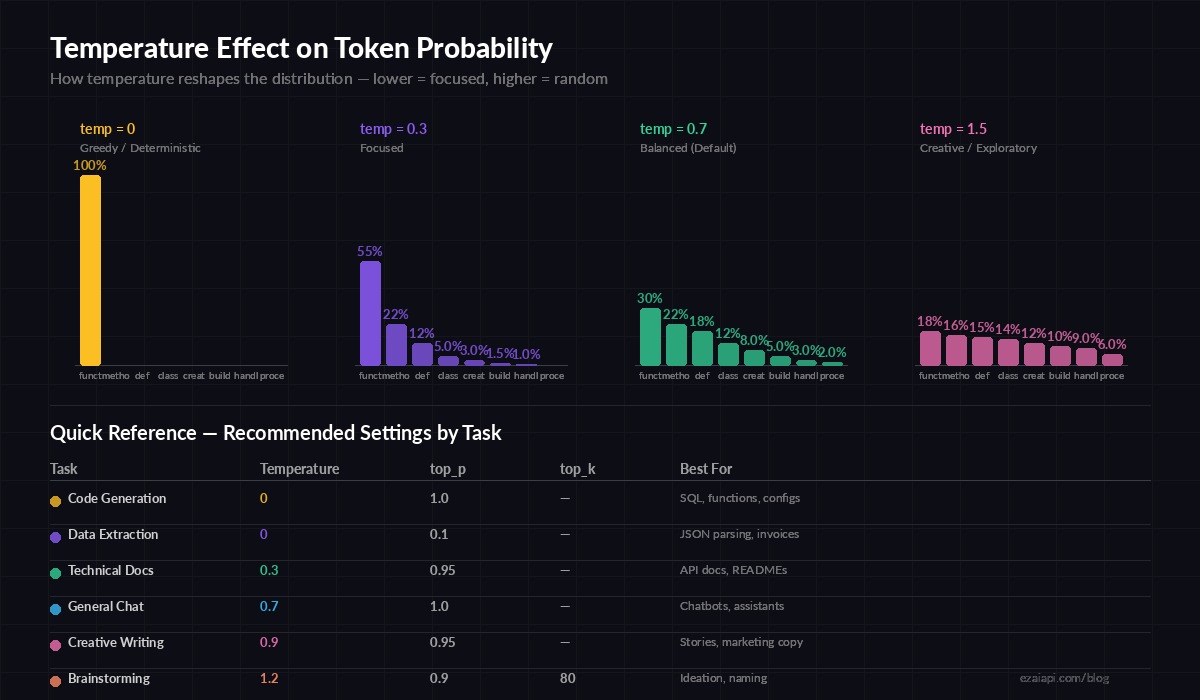
How temperature reshapes the probability curve — low values concentrate mass on top tokens, high values spread it out
Temperature Cheat Sheet by Task
Here are the values that actually work in production, based on what we see across thousands of EzAI API calls daily:
- Code generation (temp 0–0.2): Deterministic output. You want the same function every time. SQL queries, type definitions, config files — keep it locked down.
- Technical writing (temp 0.3–0.5): Slight variation keeps docs from sounding robotic, but the facts stay grounded. API docs, READMEs, commit messages.
- General chat (temp 0.7): The default for most models. Good balance between coherent and natural-sounding.
- Creative writing (temp 0.8–1.0): Stories, brainstorming, marketing copy. You want surprises and varied word choices.
- Exploration (temp 1.0–1.5): When you're stuck and want the model to go off-script. Useful for ideation sessions, never for production code.
Here's how to set temperature with the Anthropic SDK through EzAI:
import anthropic

client = anthropic.Anthropic(
    api_key="sk-your-key",
    base_url="https://ezaiapi.com"
)

# Deterministic code generation — temp 0
code_response = client.messages.create(
    model="claude-sonnet-4-5",
    max_tokens=1024,
    temperature=0,
    messages=[{"role": "user", "content": "Write a Python function to validate email addresses using regex"}]
)

# Creative brainstorming — temp 0.9
creative_response = client.messages.create(
    model="claude-sonnet-4-5",
    max_tokens=2048,
    temperature=0.9,
    messages=[{"role": "user", "content": "Give me 10 creative names for a developer tool that monitors API costs"}]
)
top_p: The Smarter Alternative
Temperature reshapes the entire distribution. top_p (nucleus sampling) takes a different approach: it picks from the smallest set of tokens whose cumulative probability exceeds the threshold p.
With top_p=0.9, the model considers only the tokens that make up the top 90% of probability mass. If three tokens already cover 92%, everything else is discarded before sampling. This naturally adapts — when the model is confident, the nucleus is small and output is focused. When it's uncertain, the nucleus expands to include more options.
This makes top_p more predictable than temperature for most production use cases. A prompt about Python syntax has a narrow nucleus (few valid completions), while an open-ended creative prompt automatically gets a wider one.
# Balanced output with nucleus sampling
response = client.messages.create(
    model="claude-sonnet-4-5",
    max_tokens=1024,
    temperature=1.0,         # Keep temp at 1 when using top_p
    top_p=0.9,              # Only sample from the top 90% of probability mass
    messages=[{"role": "user", "content": "Explain the CAP theorem in distributed systems"}]
)

# Tight nucleus for structured data extraction
extract = client.messages.create(
    model="claude-sonnet-4-5",
    max_tokens=512,
    temperature=1.0,
    top_p=0.1,              # Very focused — almost deterministic
    messages=[{"role": "user", "content": "Extract the company name, date, and amount from this invoice..."}]
)
top_k: Hard Token Cutoff
top_k is the bluntest instrument. It keeps only the top K tokens by probability and throws away everything else, regardless of how much probability mass they represent. top_k=1 is equivalent to greedy decoding. top_k=40 gives the model 40 options per token position.
Google's Gemini models use top_k heavily. Claude and GPT models support it but default to relying on temperature and top_p instead. In practice, top_k is most useful as a safety net — set top_k=50 to prevent the model from ever considering truly bizarre tokens, even at high temperatures.
Combining Parameters: Rules That Work
Don't stack temperature and top_p naively. They interact in ways that can either cancel each other out or compound into garbage output. Follow these rules:
- Pick one primary knob. Either use temperature alone (most common) or set temperature to 1.0 and control randomness with top_p alone.
- Never set both temperature < 0.5 AND top_p < 0.5. You'll over-constrain the model and get repetitive, sometimes degenerate output.
- top_k is optional insurance. Set it between 40–100 if you're using high temperature to prevent rare tokens from corrupting output.
- For code, just use temperature 0. Don't overthink it. Deterministic is what you want.
Here's a helper function that sets the right parameters based on task type — drop this into your codebase and forget about tuning:
import anthropic

client = anthropic.Anthropic(
    api_key="sk-your-key",
    base_url="https://ezaiapi.com"
)

SAMPLING_PRESETS = {
    "code":      {"temperature": 0,   "top_p": 1.0},
    "data":      {"temperature": 0,   "top_p": 1.0},
    "docs":      {"temperature": 0.3, "top_p": 0.95},
    "chat":      {"temperature": 0.7, "top_p": 1.0},
    "creative":  {"temperature": 0.9, "top_p": 0.95},
    "brainstorm":{"temperature": 1.2, "top_p": 0.9, "top_k": 80},
}

def ask(prompt: str, task: str = "chat", model: str = "claude-sonnet-4-5") -> str:
    params = SAMPLING_PRESETS.get(task, SAMPLING_PRESETS["chat"])
    response = client.messages.create(
        model=model,
        max_tokens=2048,
        messages=[{"role": "user", "content": prompt}],
        **params
    )
    return response.content[0].text

# Usage
sql = ask("Write a PostgreSQL query to find duplicate emails", task="code")
ideas = ask("Name 20 SaaS products for freelancers", task="brainstorm")
Real-World Pitfalls
A few things that trip up developers using sampling parameters in production:
Caching breaks at temperature > 0. If you're using prompt caching to cut costs, know that identical prompts with temperature > 0 will produce different outputs each time. Your cache hit rate doesn't change (the cached prefix still applies), but the generated output varies. For cache-heavy workflows, consider temperature=0 on the generation step.
Streaming doesn't change sampling behavior. Whether you use streaming responses or wait for the full response, the sampling parameters work identically. Streaming just delivers tokens as they're generated.
Extended thinking ignores temperature. When using Claude's extended thinking feature, the thinking portion always uses temperature 1. Your temperature setting only applies to the final response after the thinking block.
JSON mode benefits from low temperature. If you're using structured output to extract JSON, keep temperature at 0. Higher values increase the chance of malformed JSON — a field name might get a creative spelling that breaks your parser.
Testing Sampling Settings
Run the same prompt multiple times and measure output variance. Here's a quick test script:
import anthropic
from difflib import SequenceMatcher

client = anthropic.Anthropic(
    api_key="sk-your-key", base_url="https://ezaiapi.com"
)
prompt = "Write a function to reverse a linked list in Python"

for temp in [0, 0.3, 0.7, 1.0]:
    outputs = []
    for _ in range(3):
        r = client.messages.create(
            model="claude-sonnet-4-5", max_tokens=512,
            temperature=temp,
            messages=[{"role": "user", "content": prompt}]
        )
        outputs.append(r.content[0].text)

    # Measure how similar the 3 outputs are to each other
    similarities = []
    for i in range(len(outputs)):
        for j in range(i + 1, len(outputs)):
            similarities.append(
                SequenceMatcher(None, outputs[i], outputs[j]).ratio()
            )
    avg = sum(similarities) / len(similarities)
    print(f"temp={temp:.1f} → avg similarity: {avg:.1%}")
You'll see something like: temp 0 gives 100% similarity, temp 0.3 hovers around 85–95%, temp 0.7 drops to 60–80%, and temp 1.0 can go as low as 40–60% depending on the prompt. This gives you concrete data to pick the right setting for your use case.
TL;DR — What to Set and Forget
For most developers, the answer is simpler than you think:
- Writing code?
temperature=0. Done. - Building a chatbot?
temperature=0.7. Default for a reason. - Generating content?
temperature=0.9, top_p=0.95. Keeps it interesting but coherent. - Extracting data?
temperature=0. You want the same answer every time.
Don't spend hours A/B testing sampling parameters unless output quality is genuinely your bottleneck. In most cases, the prompt matters 10x more than the temperature. Get the prompt right first, then fine-tune sampling if you need to. All these parameters work identically through EzAI's API — same format as Anthropic, OpenAI, or Google, just cheaper.