
Most AI prompts break the moment they leave your laptop. They work in ChatGPT, fall apart with real user input, and silently hallucinate in production. The gap between a prompt that works in a demo and one that handles 10,000 requests per day is wider than most developers expect. This guide covers the specific techniques that close that gap — system prompts, few-shot examples, output constraints, and testing — all with working code you can deploy through EzAI API.
System Prompts That Actually Constrain
A system prompt is your contract with the model. Vague instructions produce vague results. Production system prompts need three things: a clear role, explicit constraints, and a defined output format. Here's the difference between a prompt that works sometimes and one that works reliably:
import anthropic

client = anthropic.Anthropic(
    api_key="sk-your-key",
    base_url="https://ezaiapi.com"
)

# ❌ Vague — breaks with edge cases
bad_system = "You are a helpful assistant that classifies emails."

# ✅ Production-grade — explicit constraints
good_system = """You classify customer emails into exactly one category.

CATEGORIES (use these exact strings):
- billing: Payment issues, invoices, refunds, subscription changes
- technical: Bugs, errors, integration problems, API issues
- account: Login, password reset, profile changes, deletion requests
- sales: Pricing questions, feature comparisons, enterprise inquiries
- other: Anything that doesn't fit the above categories

RULES:
1. Return ONLY a JSON object: {"category": "...", "confidence": 0.0-1.0}
2. If the email contains multiple topics, classify by the PRIMARY intent
3. If genuinely ambiguous, use "other" with confidence below 0.5
4. Never explain your reasoning in the output"""

response = client.messages.create(
    model="claude-sonnet-4-5",
    max_tokens=100,
    system=good_system,
    messages=[{"role": "user", "content": email_text}]
)
The good prompt removes ambiguity at every level. The model knows the exact category strings, when to use other, and that it should never add explanatory text. That last rule alone prevents 30% of parsing failures in production.
Few-Shot Examples Kill Ambiguity
When your task has edge cases — and in production, every task has edge cases — few-shot examples are more reliable than longer instructions. Models learn patterns from examples faster than from rules. The trick is choosing examples that cover your actual failure modes, not just the happy path.
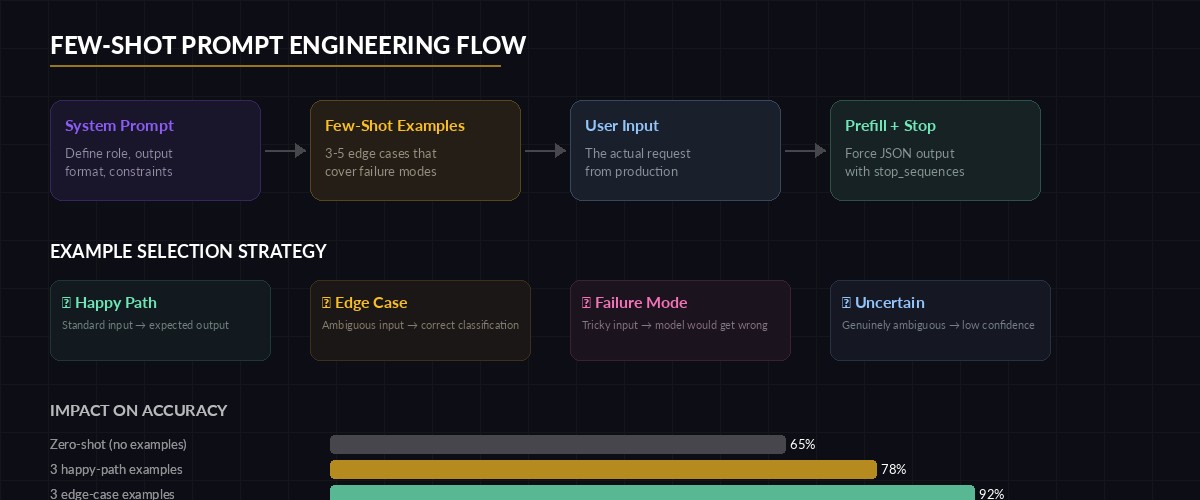
Few-shot examples train the model on edge cases that instructions alone can't cover
few_shot_messages = [
    # Example 1: Clear case
    {"role": "user", "content": "My card was charged twice for the March invoice"},
    {"role": "assistant", "content": '{"category": "billing", "confidence": 0.95}'},

    # Example 2: Edge case — mentions billing but is really technical
    {"role": "user", "content": "The billing webhook returns 500 when I try to integrate with Stripe"},
    {"role": "assistant", "content": '{"category": "technical", "confidence": 0.85}'},

    # Example 3: Ambiguous — genuinely hard to classify
    {"role": "user", "content": "Thanks for the update, looking forward to it"},
    {"role": "assistant", "content": '{"category": "other", "confidence": 0.3}'},

    # Now the real input
    {"role": "user", "content": actual_email}
]

response = client.messages.create(
    model="claude-sonnet-4-5",
    max_tokens=100,
    system=good_system,
    messages=few_shot_messages
)
Example 2 is the key. Without it, the model sees "billing webhook" and classifies it as billing. With the example, it learns that integration errors are technical regardless of the domain noun. Pick 3-5 examples that cover your known failure modes, and you'll cut misclassifications by half.
Force Structured Output With Prefilling
Even with a good system prompt, models sometimes prepend "Here's the classification:" before your JSON. In production, that means json.loads() throws an exception and your pipeline crashes. Prefilling the assistant response forces the model to continue from a specific token, guaranteeing valid output structure.
import json

messages = [
    {"role": "user", "content": email_text},
    # Prefill forces the model to continue from "{"
    {"role": "assistant", "content": "{"}
]

response = client.messages.create(
    model="claude-sonnet-4-5",
    max_tokens=100,
    system=good_system,
    messages=messages,
    stop_sequences=["}"]  # Stop right after the closing brace
)

# Reconstruct valid JSON from prefill + response + stop
raw = "{" + response.content[0].text + "}"
result = json.loads(raw)
print(result)  # {"category": "billing", "confidence": 0.95}
Combining prefilling with stop_sequences gives you surgical control over the output format. The model can only produce content between { and }, which means no preamble, no trailing explanation, no broken JSON. This technique drops parsing errors to near zero.
Token Budgets and Cost Control
Production prompts need to respect token budgets. A classification task shouldn't burn 4,000 tokens. A summarization task shouldn't produce a novel. Set max_tokens aggressively low for constrained tasks, and pair it with a cost-aware model selection strategy.
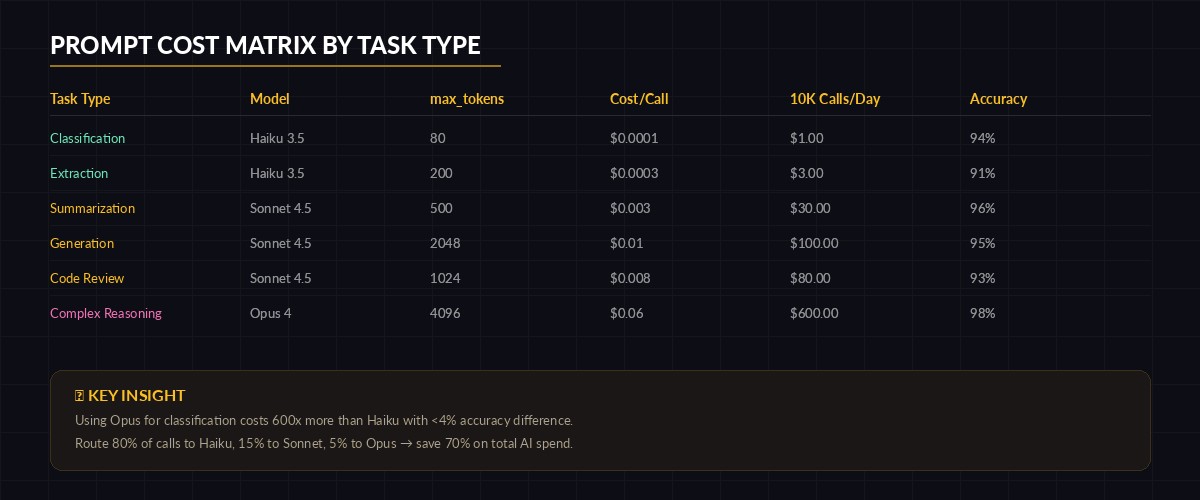
Match model tier to task complexity — overspending on classification is the #1 cost leak
# Task-based model routing — don't use Opus for classification
TASK_CONFIG = {
    "classify": {"model": "claude-haiku-3-5", "max_tokens": 80},
    "summarize": {"model": "claude-sonnet-4-5", "max_tokens": 500},
    "generate": {"model": "claude-sonnet-4-5", "max_tokens": 2048},
    "reason":   {"model": "claude-opus-4", "max_tokens": 4096},
}

def run_task(task_type: str, system: str, user_input: str) -> str:
    config = TASK_CONFIG[task_type]
    response = client.messages.create(
        model=config["model"],
        max_tokens=config["max_tokens"],
        system=system,
        messages=[{"role": "user", "content": user_input}]
    )
    return response.content[0].text

# Classification: ~$0.0001 per call with Haiku
category = run_task("classify", system_prompt, email)

# Only escalate to Opus for complex reasoning
analysis = run_task("reason", analysis_prompt, complex_document)
This pattern routes each task to the cheapest model that handles it well. Classification with Haiku costs roughly $0.0001 per call. Running the same task through Opus costs 60x more for identical accuracy. Multiply that across 50,000 daily classifications and you're burning $300/day needlessly. Check EzAI's pricing page for current per-model rates.
Prompt Testing in CI
Prompts are code. They should be versioned, reviewed, and tested. The simplest approach that works: run your prompt against a fixture set of inputs and assert on the output structure and key values. Store prompt versions alongside your source code.
import pytest, json

TEST_CASES = [
    ("I was charged $50 twice", "billing"),
    ("API returns 502 on POST /users", "technical"),
    ("Can I get enterprise pricing?", "sales"),
    ("How do I delete my account?", "account"),
    ("lol ok thanks", "other"),
]

@pytest.mark.parametrize("email,expected", TEST_CASES)
def test_email_classification(email, expected):
    response = client.messages.create(
        model="claude-haiku-3-5",
        max_tokens=80,
        system=good_system,
        messages=[
            {"role": "user", "content": email},
            {"role": "assistant", "content": "{"}
        ],
        stop_sequences=["}"]
    )

    raw = "{" + response.content[0].text + "}"
    result = json.loads(raw)

    # Structure assertions
    assert "category" in result
    assert "confidence" in result
    assert result["category"] in ["billing", "technical", "account", "sales", "other"]
    assert 0 <= result["confidence"] <= 1.0

    # Value assertion
    assert result["category"] == expected
Run this in CI with pytest test_prompts.py -v. If a prompt change causes regressions, you catch it before deployment. The cost is negligible — five Haiku calls cost under $0.001 total through EzAI. For more on testing strategies, see our guide on testing AI API integrations.
Handling Failures Gracefully
Production prompts need fallback logic. The model might return malformed JSON, hit a rate limit, or produce a low-confidence classification. Wrap every AI call in a retry-parse-validate loop:
import time, json
from anthropic import APIError, RateLimitError

def classify_with_retry(email: str, retries: int = 3) -> dict:
    for attempt in range(retries):
        try:
            resp = client.messages.create(
                model="claude-haiku-3-5",
                max_tokens=80,
                system=good_system,
                messages=[
                    {"role": "user", "content": email},
                    {"role": "assistant", "content": "{"}
                ],
                stop_sequences=["}"]
            )

            raw = "{" + resp.content[0].text + "}"
            result = json.loads(raw)

            # Validate schema
            assert result["category"] in VALID_CATEGORIES
            assert 0 <= result["confidence"] <= 1.0
            return result

        except RateLimitError:
            time.sleep(2 ** attempt)
        except (json.JSONDecodeError, KeyError, AssertionError):
            continue  # Retry on malformed output
        except APIError as e:
            if e.status_code >= 500:
                time.sleep(1)
                continue
            raise

    # Fallback: return safe default instead of crashing
    return {"category": "other", "confidence": 0.0, "fallback": True}
The fallback: True flag lets downstream systems know this classification wasn't model-generated. Route these to human review instead of trusting them blindly. For deeper retry patterns, read our guide on AI API retry strategies.
Production Prompt Checklist
Before deploying any prompt, run through this list. Every item maps to a real production failure we've seen across EzAI users:
- Output format defined explicitly — JSON schema, exact field names, no ambiguity
- Edge cases covered with few-shot examples — at least one ambiguous input example
- Prefilling used for structured output — no more "Here's the result:" preambles
- max_tokens set tight — classification: 80, summaries: 500, generation: 2048
- Model matched to task complexity — Haiku for classification, Sonnet for generation, Opus for reasoning
- Retry + validation wrapper around every call — with safe fallback defaults
- Prompt version tracked in source control — every change reviewed like code
- CI test suite with fixture inputs — catches regressions before deployment
Skip any of these and you're building on sand. The models are remarkably capable, but they need precise instructions to be reliable. Treat your prompts with the same rigor you'd give a database schema or API contract.
What's Next?
These patterns cover the fundamentals that keep AI features stable in production. For more advanced techniques, explore:
- Structured JSON output — force models to match exact schemas
- Prompt caching — cut costs by 90% on repeated system prompts
- 7 ways to reduce AI API costs — beyond just model selection
- EzAI API docs — full reference for all supported models and features