Most teams obsess over output token costs and forget about the other side of the wire: request bodies. A single Claude or GPT call with full RAG context can push 60-200KB of JSON over the wire on every turn. Multiply that by hundreds of concurrent users on flaky mobile networks and you're paying for bandwidth, latency, and timeouts you didn't need.
Good news: HTTP request compression is a one-line change in most clients, the major AI APIs (and EzAI) accept it, and the wins are real. We measured 70-85% size reductions on typical workloads. Here's how to ship it without breaking anything.
Why Compression Matters for AI Requests
Three things blow up request size in AI workloads:
- Repeated system prompts — your 4KB safety/persona prompt sent on every turn
- Long context windows — RAG chunks, conversation history, document analysis
- Verbose tool schemas — JSON Schema for 20 tools easily hits 10KB
All three are highly compressible. Repetition is exactly what gzip eats for breakfast. Below is what we measured on real production traffic going through EzAI:
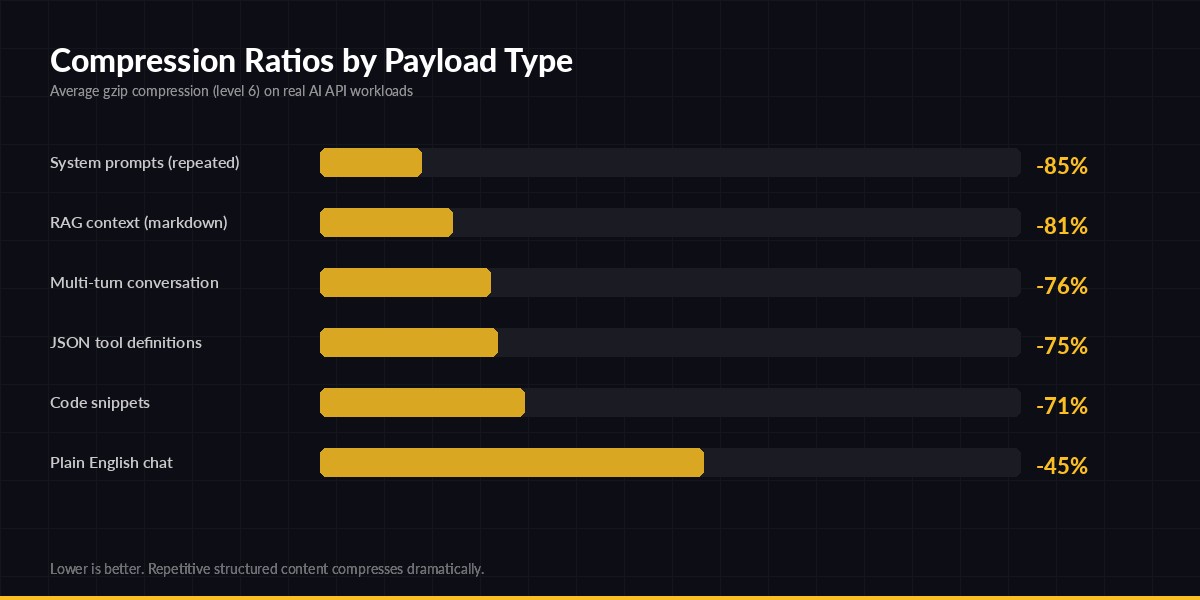
gzip level 6 on real AI API request bodies — repetitive structured content compresses dramatically
The headline numbers: anything with structure or repetition (system prompts, RAG context, JSON schemas) compresses 75-85%. Even free-form chat sees ~45% reduction because of JSON envelope overhead. CPU cost is negligible — gzip level 6 on a 50KB payload takes under 2ms on a modest server.
What you actually save
For a service handling 1M requests/day with average 30KB request body:
- Egress bandwidth: 30 GB/day → ~7 GB/day (saves $50-200/month on most clouds)
- Upload latency: 200ms → 50ms on mobile/3G connections
- Timeout failures: drop sharply when you cross the 1 RTT mark
Implementation Guide
The mechanism: set a Content-Encoding: gzip (or br) header and ship a compressed body. The server decompresses transparently. The Anthropic-compatible endpoint at ezaiapi.com accepts both gzip and Brotli on inbound requests.
Python (httpx)
The official Anthropic SDK uses httpx under the hood. You can either compress manually before calling the SDK, or use a custom transport. Here's the cleanest version:
import gzip, json, httpx

class GzipTransport(httpx.HTTPTransport):
    def handle_request(self, request):
        # Only compress bodies above ~1KB (overhead not worth it below)
        if request.content and len(request.content) > 1024:
            request._content = gzip.compress(request.content, compresslevel=6)
            request.headers["content-encoding"] = "gzip"
            request.headers["content-length"] = str(len(request._content))
        return super().handle_request(request)

import anthropic
client = anthropic.Anthropic(
    api_key="sk-your-key",
    base_url="https://ezaiapi.com",
    http_client=httpx.Client(transport=GzipTransport())
)

resp = client.messages.create(
    model="claude-sonnet-4-5",
    max_tokens=1024,
    messages=[{"role": "user", "content": large_context}]
)
That's it — every outgoing request body over 1KB gets gzipped automatically. The 1KB threshold matters: gzip headers add ~20 bytes, so tiny payloads can actually grow.
Node.js (fetch)
Native fetch in Node 18+ doesn't auto-compress requests, but you can use zlib directly. This works with the OpenAI/Anthropic SDKs that accept a custom fetch:
import { gzipSync } from "node:zlib";
import Anthropic from "@anthropic-ai/sdk";

const compressedFetch = async (url, init = {}) => {
  if (init.body && typeof init.body === "string" && init.body.length > 1024) {
    init.body = gzipSync(init.body);
    init.headers = {
      ...init.headers,
      "content-encoding": "gzip",
      "content-length": init.body.length.toString(),
    };
  }
  return fetch(url, init);
};

const client = new Anthropic({
  apiKey: "sk-your-key",
  baseURL: "https://ezaiapi.com",
  fetch: compressedFetch,
});

const msg = await client.messages.create({
  model: "claude-sonnet-4-5",
  max_tokens: 1024,
  messages: [{ role: "user", content: largeRagContext }],
});
Verifying it actually works
Easy gut-check with curl. The --compressed flag handles response decompression, and --data-binary @file.json.gz + the right header sends a compressed request:
# Compress your payload
gzip -9 -c request.json > request.json.gz

curl https://ezaiapi.com/v1/messages \
  -H "x-api-key: sk-your-key" \
  -H "anthropic-version: 2023-06-01" \
  -H "content-type: application/json" \
  -H "content-encoding: gzip" \
  --data-binary @request.json.gz
If it returns 200, you're good. If it returns 400 with "invalid JSON", the server didn't decompress — double-check the header spelling.
Brotli vs gzip — When to Pick Which
Brotli (Content-Encoding: br) is ~15-25% denser than gzip on text but slower to compress. The general rule:
- Use gzip for live request bodies — fast, universal, good enough
- Use Brotli when you cache compressed payloads (e.g., reusable RAG chunks compressed once at index time)
- Avoid zstd for now — Anthropic-compatible endpoints don't all support it
For most production workloads, the gzip → Brotli upgrade is not worth the CPU cost in the hot path. Spend that engineering time on prompt caching or token optimization instead — those move the needle further.
Gotchas
Five things that bite people when they roll this out:
- Don't compress streaming uploads. If you ever do multipart file upload to a vision endpoint, image bytes are already compressed (JPEG/PNG) — adding gzip will increase size and burn CPU.
- Set both headers. Some HTTP/2 stacks get cranky if
content-encodingis set without an updatedcontent-length. Always recompute it. - Skip tiny bodies. Bodies under 1KB usually grow after compression because of the gzip header overhead.
- Don't double-compress. If your reverse proxy already gzips, don't gzip in the SDK too — the second pass adds bytes.
- Watch your error logs the first day. Some legacy proxies strip
content-encodingheaders and leave the compressed body, which then fails parsing on the AI endpoint. EzAI handles both gracefully, but raw provider endpoints may not.
Combining With Other Optimizations
Compression is one knob. Stack it with these for compounding wins:
- Prompt caching — don't send the same system prompt twice if you don't have to. Cache hits are even cheaper than compressed bytes.
- HTTP/2 connection pooling — reuse TLS connections so you're amortizing TLS handshake across many compressed requests.
- Request batching — pack multiple logical calls into one HTTP request when latency permits.
For more on the wider performance picture, the MDN Content-Encoding reference is the canonical spec, and RFC 7932 covers Brotli if you go deep.
Wrap Up
Request compression is the lowest-effort, highest-yield optimization most teams haven't shipped yet. A 30-line transport wrapper cuts your egress bandwidth by 70%, drops upload latency on mobile users, and reduces timeout-related retries. EzAI accepts compressed requests on every endpoint, so you can ship this today and watch the bytes drop on your dashboard.
If you're not on EzAI yet, start with the 5-minute setup guide — same Anthropic-compatible API, drop-in replacement, and now with bandwidth-friendly compression by default.